Welcome Guest ( Log In | Register )

Outline · [ Standard ] · Linear+

 Skylake/Kaby/Coffee/Comet/Rocket Lake OC V1, Show off your OC here

views
     
xFreedomBoix
post Sep 11 2018, 11:31 AM

Wasuretakunai
****
Senior Member
680 posts

Joined: Oct 2009


Hi.
Got stock i7 8700k with scythe ashura (perform like 212 from cm).

Wonder if: 70-75 gaming 80-82 cinebench is ok for room temp w/o aircond.
And one more thing is that with side panel off: everything drop by 4-5 degree cel. Is this cause by inadaquete airflow? Im running 2 front in 2 top out 1 back out. Might swap out front intake FNv2 120mm to corsair ML140 @@ will this help with the temp?


And if i plan to undevolt (until i can afford better cpu cooler): should i use fixed or offset? read on net that offset means it’ll undervolt as well at idle. Harder to get stability while fixed runs at that voltage all the time, am I correct?

This post has been edited by xFreedomBoix: Sep 11 2018, 11:33 AM
xFreedomBoix
post Sep 12 2018, 11:27 PM

Wasuretakunai
****
Senior Member
680 posts

Joined: Oct 2009


QUOTE(owikh84 @ Sep 12 2018, 09:37 PM)
Those temperatures are quite normal for a stock 8700K running on air cooling.
The chip will throttle at 100C and that's the temp limit (TJmax).
Also, 90C during a stress test (Prime95, IBT, Realbench, OCCT, etc) is fine.
Delid it if you're looking for 10-15C improvement in temps and you don't mind losing the warranty.

On your second question, I also think that the 4-5C might be caused by inadequate airflow. Like your suggestion, you may try swap with a better fan to see if got any improvement. Might as well upgrade your cooling solution to a better air cooler or AIO cooler.

For some reason, offset didn't work for me. I've been using fixed voltage all the time. vCore will fluctuate on load/idle according to Load-line Calibration (LLC) in your BIOS settings.
*
managed to get offset to work, with trial and error using LLC haha.
which aircooler would u recommend?
need ram clearance for vengeance pro and preferably not too hard to install haha..
dark rock pro 3 looks really nice, but heard its hard to install and block 4 ram slots lol
xFreedomBoix
post Sep 13 2018, 10:16 AM

Wasuretakunai
****
Senior Member
680 posts

Joined: Oct 2009


QUOTE(owikh84 @ Sep 13 2018, 06:57 AM)
Noctua NH-D15S of course, world's best air cooler.
But make sure that it can fit inside your case because it's really huge.  biggrin.gif
*
Haha the fan colour really abit... unique.
Ytd i went to checkout my rig.. turn out that i got both my push pull cpu fan in the wrong direction sweat.gif reseating them result in 5 degree drop in both cpu and gpu
xFreedomBoix
post Sep 13 2018, 11:43 AM

Wasuretakunai
****
Senior Member
680 posts

Joined: Oct 2009


QUOTE(owikh84 @ Sep 13 2018, 10:29 AM)
Upgrade to chromax heatsink cover and NF-A15 HS-PWM Chromax fans:

user posted image

https://www.lelong.com.my/noctua-heatsink-c...7-01-Sale-I.htm

https://www.lelong.com.my/noctua-casing-fan...7-01-Sale-I.htm

or might as well consider upgrading to AIO cooler like the EVGA CLC280 or NZXT X62 biggrin.gif
*
Waoh the total pricetag sweat.gif
Any option to purchase d15 w/o included brown fans?
xFreedomBoix
post Sep 13 2018, 12:20 PM

Wasuretakunai
****
Senior Member
680 posts

Joined: Oct 2009


QUOTE(owikh84 @ Sep 13 2018, 11:55 AM)
No ala-carte.
FYI, out of the box the NH-D15S comes with one single NF-A15 PWM fan.
The cheaper option is to buy a used unit.
Resell the original beige/brown fan as it is valuable for someone who needs it.  thumbup.gif
*
Haha good idea. Will try to find one but i think ppl will be reluctant to sell off this beast brows.gif thanks for all your replies btw notworthy.gif

xFreedomBoix
post Sep 22 2018, 03:06 PM

Wasuretakunai
****
Senior Member
680 posts

Joined: Oct 2009


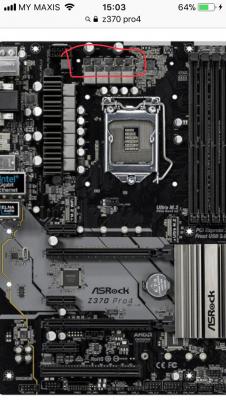
Hi. Wanna ask, the red circle on this thing is mosfet?
I jus notice this mobo dont have heatsink on here lol..
Wonder if installing 3rd party heatsink is ok? Like those small vrm heatsink

And if install, if needed to RMA, can simply remove the heatsink? Assuming applied with included thermal pads

Thanks notworthy.gif

This post has been edited by xFreedomBoix: Sep 22 2018, 03:07 PM


Attached thumbnail(s)
Attached Image
xFreedomBoix
post Sep 22 2018, 04:52 PM

Wasuretakunai
****
Senior Member
680 posts

Joined: Oct 2009


QUOTE(owikh84 @ Sep 22 2018, 04:21 PM)
Yes, those are another set of MOSFETs/VRM. Not being cooled by any heatsink probably because they are a little weak (low-end mobo) and won't generate too much heat.

Moreover, usually board manufacturer would expect users of such entry-level would only use air cooler hence the cool air coming from the cooling fans on top of VRM area.

However, if you feel that this area is toasty then you may consider putting a 3rd party heatsink over there. You can remove the heatsink before sending for RMA.
*
hello, thanks for replying

wanna ask, will the included thermal pads be too adhesive? haha i don't wanna damage the mosfets when removing the heatsinks.

should've went for more expensive mobo, but guess ill make do with what i have

on a side note, is TMPIN3 temps related to these mosfets? tq
xFreedomBoix
post Sep 22 2018, 05:10 PM

Wasuretakunai
****
Senior Member
680 posts

Joined: Oct 2009


QUOTE(owikh84 @ Sep 22 2018, 05:04 PM)
Thermal pads are easily removable, won't stick to the MOSFETs.

I don't think TMPIN3 represents the MOSFETs temp. Usually named as VRM temp in monitoring software such as HWiNFO64. But take note that not all mobo provides VRM temp monitoring, only those higher end boards do. Yours is low end, so...
*
ok noted

so i'll just grab something like this right?
https://www.amazon.com/Gadgeter-Aluminum-Ra...ds=vrm+heatsink


Change to:
| Lo-Fi Version
0.0476sec    0.32    7 queries    GZIP Disabled
Time is now: 4th December 2025 - 04:23 AM