

Hi, I just got a 8600k and wondering what is the safe temp range for it during OC.
Now i'm 83c max on Prime 95.
Skylake/Kaby/Coffee/Comet/Rocket Lake OC V1, Show off your OC here
Skylake/Kaby/Coffee/Comet/Rocket Lake OC V1, Show off your OC here
|
|
 Apr 30 2018, 08:27 AM Apr 30 2018, 08:27 AM
Return to original view | Post
#1
|
 
Senior Member
1,188 posts Joined: Dec 2004   
|
Hi, I just got a 8600k and wondering what is the safe temp range for it during OC.
Now i'm 83c max on Prime 95. |
|
|
|
|
|
Apr 30 2018, 07:14 PM
Return to original view | Post
#2
|
|
Senior Member
1,188 posts Joined: Dec 2004
|
QUOTE(owikh84 @ Apr 30 2018, 07:10 PM) Max is 100c, 83c is safe. Oh ok thx.I would keep it below 80c to avoid experiential incease of vCore (voltage leakage occurs at 80c+)  Can describe more about experiential increase of vCore due to heat ? Thanks  |
|
|
May 1 2018, 08:16 AM
Return to original view | Post
#3
|
|
Senior Member
1,188 posts Joined: Dec 2004
|
QUOTE(owikh84 @ Apr 30 2018, 07:54 PM) Typo, it's exponential*. Hmm, you are right..Thx Above 80c you will notice that your chip requires a lot of voltage increment. The only way for me to keep under 80c is with MasterAir Pro 4 is using 1.18 @ 4.4 GHZ on my 8600k @77c. I guess that cooler is not suitable for high OC. Tried 1.23 v only can stable 4.6 GHZ but 85c  |
|
|
May 1 2018, 09:55 AM
Return to original view | Post
#4
|
|
Senior Member
1,188 posts Joined: Dec 2004
|
QUOTE(owikh84 @ May 1 2018, 09:26 AM) Are these vCore referring to BIOS set or CPU-Z reading at load? Not sure but here's my voltage settings.You can try playing with different Load-line Calibration (LLC) available in the UEFI. 
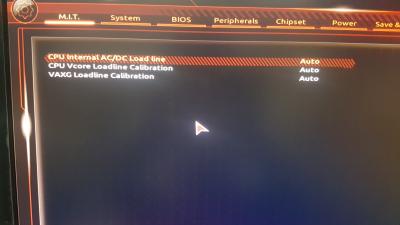
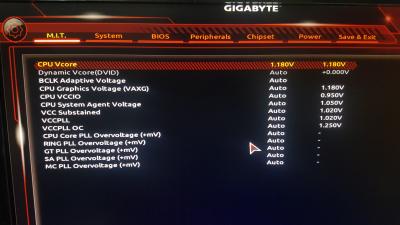
|
|
|
May 1 2018, 10:26 AM
Return to original view | Post
#5
|
|
Senior Member
1,188 posts Joined: Dec 2004
|
QUOTE(owikh84 @ May 1 2018, 10:04 AM) 4.4GHz @ 1.120v load seems to be a nice chip. That one need wait $$$ come in first haha , thx for advice.Get yourself a good AIO cooler (eg. NZXT X62 etc) bro, then 5GHz OC is absolutely doable. |
|
|
May 1 2018, 02:20 PM
Return to original view | Post
#6
|
|
Senior Member
1,188 posts Joined: Dec 2004
|
QUOTE(owikh84 @ May 1 2018, 10:37 AM) Alternatively, EVGA CLC 280 @ RM 529. Ok thx for the recommendation, If need water cooling I guess need change casing too, still using old ATX from the 2009 haha.If you don't mind the noise and appearance  Source: https://www.gamersnexus.net/hwreviews/2788-...ir-h115i/page-3 Just wondering, how long do AIO lasts ? As in before need replacing since I guess u cant change individual parts which is damaged. |
|
|
|
|
|
May 4 2018, 05:29 PM
Return to original view | IPv6 | Post
#7
|
|
Senior Member
1,188 posts Joined: Dec 2004
|
I passed Small FFT for 12 hours but Blend failed in 1 hour.
Most likely suspect is the RAM not stable ? |
|
|
May 4 2018, 10:01 PM
Return to original view | Post
#8
|
|
Senior Member
1,188 posts Joined: Dec 2004
|
QUOTE(owikh84 @ May 4 2018, 07:06 PM) If your RAM is running with XMP profile and not overclocked, most likely it's not a RAM issue. I see, I set XMP and downvolted my CPU abit haha. Want to keep the fan noise down.But you can try priming without enabling XMP profile first. If still getting the same error means your vCore is insufficient enough hence a little bump on the voltage might help. If no error means it's the RAM issue, you will need to play around with RAM voltage, VCCSA or/and VCCIO. Now slowly increment back the voltage. 1.8v failed at 1 hour, 1.9 failed at 8 hours, now trying at 2.0. This post has been edited by king99: May 4 2018, 10:05 PM |
|
|
May 4 2018, 11:32 PM
Return to original view | Post
#9
|
|
Senior Member
1,188 posts Joined: Dec 2004
|
QUOTE(owikh84 @ May 4 2018, 11:04 PM) 2.0v vCore? I hope it was a typo eh typo   1.18 , 1.19 , 1.20 |
|
|
May 11 2018, 09:48 PM
Return to original view | Post
#10
|
|
Senior Member
1,188 posts Joined: Dec 2004
|
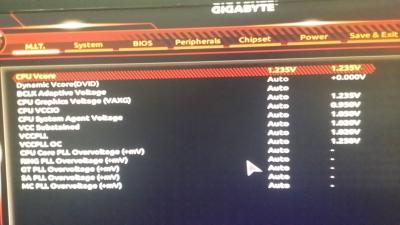
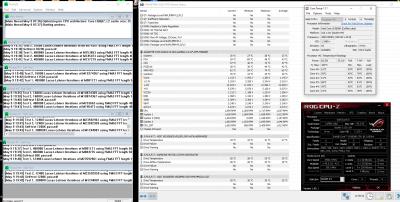
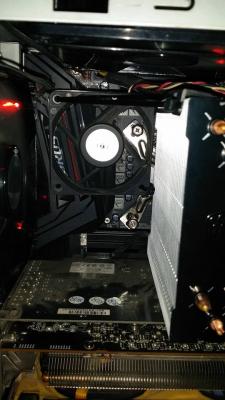
Added a fan to my GIGABYTE Ultra-Gaming 2.0 VRM, temps went from 90c to 75++c. Now only dare to push it up.
Now 4.5 GHZ with max load temp of 84c during prime small FFT. This temp should be ok right ? Resit and repaste the Masterair 4 with multiple diff thermal paste also this temp, now on Kyronaught. I guess this cooler cannot <80 oc haha. This post has been edited by king99: May 11 2018, 09:49 PM Attached thumbnail(s) 
|
|
|
May 12 2018, 11:57 PM
Return to original view | Post
#11
|
|
Senior Member
1,188 posts Joined: Dec 2004
|
QUOTE(owikh84 @ May 12 2018, 06:03 PM) VRM overheat on Z370 Ultra-Gaming 2.0 has also been reported in OC3D's review. Yeah I saw the video. Sadly I got it before the new video is out. Got it last month.[attachmentid=9790028] https://overclock3d.net/reviews/cpu_mainboa...ng_2_0_review/7 Ironically, the version 2.0 is supposed to fix the same flaw found on the original release but it seems that it did not happen LOL. Well at least I am not aiming for 5.0 Ghz for now. 77c for the VRM seems acceptable for my case I think. This post has been edited by king99: May 13 2018, 12:01 AM |
|
|
May 23 2018, 01:53 PM
Return to original view | IPv6 | Post
#12
|
|
Senior Member
1,188 posts Joined: Dec 2004
|
Hmm, just wondering if this is a software bug or really hardware issue.
When I stressing PRIME 95, sometime HWinfo shows the vrm temps will show the max recorded temperature of 115c when I am away. But when I stare at the reading at full load it reads 78c to 80c and never go pass 90c. Sometimes I see unrealistic reading such as 2c Motherboard temps and negative reading. |
|
|
May 26 2018, 02:59 PM
Return to original view | Post
#13
|
|
Senior Member
1,188 posts Joined: Dec 2004
|
QUOTE(owikh84 @ May 23 2018, 10:47 PM) I suspect because of the iTE super I/O chip being used on the GIGABYTE boards. Oh i see.This IC is reportedly not as accurate as the Nuvoton NCT. Btw, I tried putting a fan on the back of my motherboard to cool the rear VRM and CPU...to my surprise.....VRM dropped by 7c and CPU by 1c. Never expected this result. I read most ppl say 1.4 V is the max safe for a Coffee Lake. Just want to clarify is that the one set in BIOS or the one displayed in CPU-Z/Core temp. In BIOS I set 1.320 for 4.7GHZ, but in CPU-Z/Core temp only show 1.25 average when full load. So...the 1.4V limit is in the bios or in Windows ? Thanks. |
|
|
|
|
|
May 28 2018, 07:28 AM
Return to original view | Post
#14
|
|
Senior Member
1,188 posts Joined: Dec 2004
|
Found a buyer for my Ultra Gaming 2.0, he is gonna use it for a non-k processor which ia suitable.
Any motherboard can recommend ? Budget around 1.2k. Eying the Gaming 7 but reports on the vrm temps is like gambling. Some say good vrm never pass 60c. Some 100+c.... |
|
|
Jun 1 2018, 07:01 PM
Return to original view | Post
#15
|
|
Senior Member
1,188 posts Joined: Dec 2004
|
QUOTE(Kidz1995 @ Jun 1 2018, 03:47 PM) Can you tell me how did you 'attach' that fan? I want to do the same thing Will share sometime over the weekend haha, out of town now.Basically I use zip-tie and hang it over my tower cooler using the cooler's 2nd fan bracket. This post has been edited by king99: Jun 1 2018, 07:02 PM |
|
|
Jun 2 2018, 11:14 PM
Return to original view | Post
#16
|
|
Senior Member
1,188 posts Joined: Dec 2004
|
QUOTE(Kidz1995 @ Jun 1 2018, 03:47 PM) Can you tell me how did you 'attach' that fan? I want to do the same thing Better version. Took and old gc and slice it to make mount for fans.Attached thumbnail(s) 
|
|
|
Jun 3 2018, 09:24 AM
Return to original view | Post
#17
|
|
Senior Member
1,188 posts Joined: Dec 2004
|
QUOTE(Kidz1995 @ Jun 3 2018, 08:33 AM) eh why I cant view the picture? From my pc, the picture is blank/full black. only me cant view? Ah sorry, uploaded using phone, maybe got issue there...this should work now.Attached thumbnail(s) 
|
|
|
Jun 3 2018, 08:17 PM
Return to original view | Post
#18
|
|
Senior Member
1,188 posts Joined: Dec 2004
|
I have some weird issue now.
1) Gigabyte Ultra Gaming 2.0 + Corsair PSU, whenever I stress Prime 95 randomly it will cause a coil whine near the top vrm area. Other then Prime 95, didn't heard it. 2) Maybe my Motherboard have not good components, sold it to a friend who building a new PC. Got a Z370 Gaming 7 and guess what, the Coil Whine is still there ! 3) Maybe its' PSU, got an EVGA PSU and still coil whine is there. Both PSU tested are 750W. Tried different power cable as well... 4) Maybe its GPU, so I removed my GPU and use the intel HD and still its there. I can live with it as it only appear during Prime 95 as far as I know. Just annoying when I am stress testing. Wonder what could be causing this ? Do you think it's the motherboard problem ? Bad luck 2 in a row ? Both are new btw. Even at stock speed the whine is there...I tried Real Bench and Prime without AVX and there is no audible whine. I guess the trigger is AVX ? |
|
|
Dec 14 2018, 09:15 PM
Return to original view | Post
#19
|
|
Senior Member
1,188 posts Joined: Dec 2004
|
Hi, if I pass small FFT 24 hours in Prime v29 but fail blend within 30 minutes @ 2.7 Ghz, that leads to an unstable memory ? 8600K + Gaming 7.
It is stable with XMP 3000MHZ @ 2.6 Ghz but not at 2.7GHZ I guess I need to increase VCCIO and System Agent Voltage ? Wondering what is the safe voltages for it.. |
| Change to: |  0.0555sec 0.0555sec
 0.40 0.40
 7 queries 7 queries
 GZIP Disabled GZIP Disabled
Time is now: 3rd December 2025 - 01:02 AM |
 Quote
Quote