Outline ·
[ Standard ] ·
Linear+
Skylake/Kaby/Coffee/Comet/Rocket Lake OC V1, Show off your OC here
|
frozenkid
|
 Jun 1 2017, 10:56 AM Jun 1 2017, 10:56 AM
|
Getting Started


|
Hi Sifu's,
I am planning to over clock my i5 7600k. I got up to 4.6 @ 1.3v stable using the auto overclock feature on my Asus Z270F mobo. Temps was around 60-70 running on my AIO Corsair H100i v2.
Any tips or guide on doing the overclock manually? Im looking to get around 4.8 to 5.0. My biggest concern is what kind of temp I should look at and the max amount of power I should go to get those results. Thank you.
|
|
|
|
|
|
frozenkid
|
Jun 2 2017, 09:52 AM
|
Getting Started
|
QUOTE(owikh84 @ Jun 1 2017, 08:36 PM) Usually auto overclocking will set excessive voltage more than your CPU requires. For 5.0GHz, I'd recommend to try out the 5GHz overclocking preset available in the UEFI BIOS. Save and reboot. Your CPU Core Voltage is now on auto mode, you might want to reduce it to 1.25-1.3v depending on your chip and cooling limit.  Run a stressful CPU-intensive benchmark such as X264 FHD Benchmark. If your cooling is not able to handle the heat (>100c), reduce the CPU speed to 4.9GHz or 4.8GHz while at the same time decrease the CPU Core Voltage until you obtain the lowest possible voltage that's stable at that CPU frequency. For more info, you might want to have a read on the OC tips and guides in the post #1 of this thread: The Kaby Lake Overclocking Guide by Raja@ASUSGIGABYTE Z270 (Kaby Lake) Overclocking GuideHi Bro, Thanks for the insight. I did try the pre-set for 5.0Ghz. The voltage was automatic as you said and it was set at 1.4v. I was able to boot and used Aida64 to do a simple stress test. Temps was hovering around 70+celcius. However after pass 5 min into the test It went to blue screen. I did not have time to trouble shoot so I reverted back to standard config. But my guess it blue screen because of not enough voltage. So concluded that my chip may not be able to push at 5.0 in low voltage. That's why I want to do a manual over clock. My question is, would it be blue screen even if the voltage are too high? |
|
|
|
|
|
frozenkid
|
Jun 6 2017, 09:25 AM
|
Getting Started
|
Hi Guys,
Well here are my latest update over the weekend.
I am pretty pleased with the results. I am stable at 4.8Ghz with 1.35volts after 4 hours of stress test on Aida64 and 3 hours on intel extreme stress test. I am however facing issues with ROG stress test tool. The error I keep getting is "Luxmark is unresponding". I read somewhere that it is bugged.
The leading up to this results there are funny issues I faced. I did try the 5.0Ghz preset settings from asus but the voltage was set at 4.2volts which is too high for my taste. I tried bring the voltage down but anything below 4.2 would crash once I start Aida64. Even if I put 4.9Ghz at below 1.40v would crash.
What I find ironic is that even it is a 0.1 difference but the voltage increment is substantial.
Well as for temps @ 4.8Ghz I am hovering around 70-85 Degress on max load. It is below 80 degrees for most time during gaming.
I have a question. I am now using manual on my cpu volt/cache @ 1.35v. I plan to change it to adaptive. My stock volt is below 1.2v. So from what ive learnt is that 1.35v - 1.2v = +0.15v to be placed in the adaptive field. Can someone advise me on this? thank you.
Btw I will be uploading all my screen shots tonight.
This post has been edited by frozenkid: Jun 6 2017, 09:27 AM
|
|
|
|
|
|
frozenkid
|
Jun 8 2017, 09:00 AM
|
Getting Started
|
QUOTE(owikh84 @ Jun 7 2017, 09:42 PM) Yes, that's how the adaptive method works  You can also enter a value of 1.35 in the Additional Turbo Mode CPU Core Voltage box. 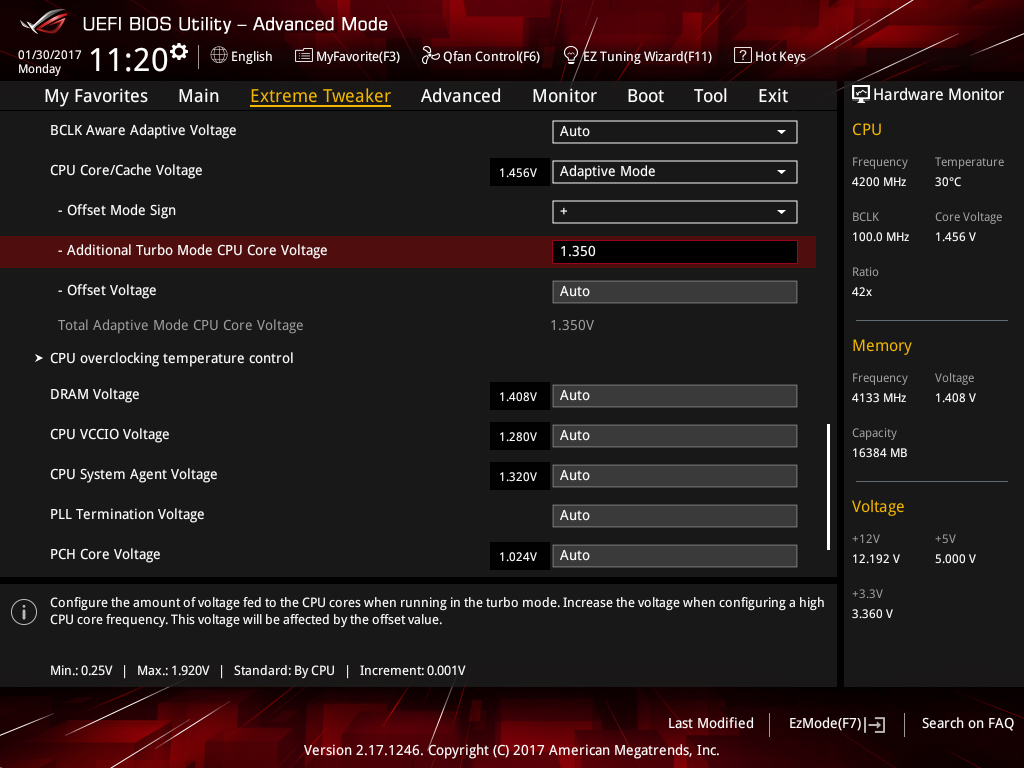 Source: https://rog.asus.com/articles/guides/the-ka...clocking-guide/Thanks a lot bro. Ill go check it out tonight. Cheers. |
|
|
|
|



 Quote
Quote

 0.0476sec
 0.16
0.16
 7 queries
 GZIP Disabled