Welcome Guest ( Log In | Register )

56 Pages « < 32 33 34 35 36 > » Bottom

Outline · [ Standard ] · Linear+

 Skylake/Kaby/Coffee/Comet/Rocket Lake OC V1, Show off your OC here

views
     
cstkl1
post Sep 17 2018, 11:07 AM

Look at all my stars!!
Group Icon
Elite
6,799 posts

Joined: Jan 2003

QUOTE(owikh84 @ Sep 17 2018, 08:08 AM)
Could be the same bin as yours or better.
I'm now testing 4400 at 1.45v, seems stable so far at HCl 100% but I aim for 1000%.
*
nice... hmm dont know whether can achieve that...

TSowikh84
post Sep 18 2018, 07:58 AM

i7 Clan
Group Icon
Elite
8,711 posts

Joined: Nov 2007
From: Butterworth, PG / Machang, Kelantan


QUOTE(cstkl1 @ Sep 17 2018, 11:07 AM)
nice... hmm dont know whether can achieve that...
*
1.45v gave me an error between 100-200%.
Need to tweak a bit.
wongtheboy92
post Sep 19 2018, 10:52 PM

Enthusiast
*****
Senior Member
809 posts

Joined: Dec 2008


QUOTE(owikh84 @ Sep 16 2018, 05:04 PM)
Malaysia Day benching with ROG Maximus X Formula. biggrin.gif
Finally I'm able to get my 4x8GB TridentZ RGB (B-die) passed HCl Memtest 300% (~ 4 hours) at DDR4-4400 CL19-19-19-39-2T at 1.50v after relaxing all the tRDWR subtimings to 19 from ASUS's default of 16.

user posted image

DDR4-4400 CL19-19-19-39-2T 4x8GB @ 1.50v:
user posted image
*
Can I know this wc test bench links to what size of radiator? It looks pretty basic and neat.
TSowikh84
post Sep 19 2018, 11:06 PM

i7 Clan
Group Icon
Elite
8,711 posts

Joined: Nov 2007
From: Butterworth, PG / Machang, Kelantan


QUOTE(wongtheboy92 @ Sep 19 2018, 10:52 PM)
Can I know this wc test bench links to what size of radiator? It looks pretty basic and neat.
*
Case: Dimastech EasyDual V2.5: https://forum.lowyat.net/index.php?showtopic=2301151
Radiator: 2x XSPC RX360 V2 (EOL)
Custom WC: EK-Supremacy EVO RGB + EK D5 Vario + EK-RES X2 250 + 2x RX360 + 12x GT AP15
TSowikh84
post Sep 20 2018, 08:01 PM

i7 Clan
Group Icon
Elite
8,711 posts

Joined: Nov 2007
From: Butterworth, PG / Machang, Kelantan


No need 1.50v, actually 1.475v is enough. biggrin.gif

user posted image

4x8GB DDR4-4400 CL19-19-19-39-2T @ 1.475v:
user posted image

QVL of MXF:
user posted image
xFreedomBoix
post Sep 22 2018, 03:06 PM

Wasuretakunai
****
Senior Member
680 posts

Joined: Oct 2009


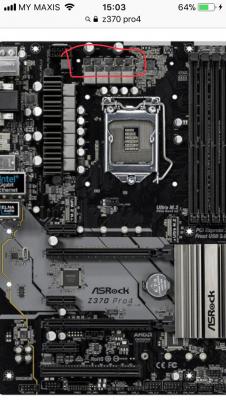
Hi. Wanna ask, the red circle on this thing is mosfet?
I jus notice this mobo dont have heatsink on here lol..
Wonder if installing 3rd party heatsink is ok? Like those small vrm heatsink

And if install, if needed to RMA, can simply remove the heatsink? Assuming applied with included thermal pads

Thanks notworthy.gif

This post has been edited by xFreedomBoix: Sep 22 2018, 03:07 PM


Attached thumbnail(s)
Attached Image
TSowikh84
post Sep 22 2018, 04:21 PM

i7 Clan
Group Icon
Elite
8,711 posts

Joined: Nov 2007
From: Butterworth, PG / Machang, Kelantan


QUOTE(xFreedomBoix @ Sep 22 2018, 03:06 PM)
Hi. Wanna ask, the red circle on this thing is mosfet?
I jus notice this mobo dont have heatsink on here lol..
Wonder if installing 3rd party heatsink is ok? Like those small vrm heatsink

And if install, if needed to RMA, can simply remove the heatsink? Assuming applied with included thermal pads

Thanks notworthy.gif
*
Yes, those are another set of MOSFETs/VRM. Not being cooled by any heatsink probably because they are a little weak (low-end mobo) and won't generate too much heat.

Moreover, usually board manufacturer would expect users of such entry-level would only use air cooler hence the cool air coming from the cooling fans on top of VRM area.

However, if you feel that this area is toasty then you may consider putting a 3rd party heatsink over there. You can remove the heatsink before sending for RMA.
xFreedomBoix
post Sep 22 2018, 04:52 PM

Wasuretakunai
****
Senior Member
680 posts

Joined: Oct 2009


QUOTE(owikh84 @ Sep 22 2018, 04:21 PM)
Yes, those are another set of MOSFETs/VRM. Not being cooled by any heatsink probably because they are a little weak (low-end mobo) and won't generate too much heat.

Moreover, usually board manufacturer would expect users of such entry-level would only use air cooler hence the cool air coming from the cooling fans on top of VRM area.

However, if you feel that this area is toasty then you may consider putting a 3rd party heatsink over there. You can remove the heatsink before sending for RMA.
*
hello, thanks for replying

wanna ask, will the included thermal pads be too adhesive? haha i don't wanna damage the mosfets when removing the heatsinks.

should've went for more expensive mobo, but guess ill make do with what i have

on a side note, is TMPIN3 temps related to these mosfets? tq
TSowikh84
post Sep 22 2018, 05:04 PM

i7 Clan
Group Icon
Elite
8,711 posts

Joined: Nov 2007
From: Butterworth, PG / Machang, Kelantan


QUOTE(xFreedomBoix @ Sep 22 2018, 04:52 PM)
hello, thanks for replying

wanna ask, will the included thermal pads be too adhesive? haha i don't wanna damage the mosfets when removing the heatsinks.

should've went for more expensive mobo, but guess ill make do with what i have

on a side note, is TMPIN3 temps related to these mosfets? tq
*
Thermal pads are easily removable, won't stick to the MOSFETs.

I don't think TMPIN3 represents the MOSFETs temp. Usually named as VRM temp in monitoring software such as HWiNFO64. But take note that not all mobo provides VRM temp monitoring, only those higher end boards do. Yours is low end, so...
xFreedomBoix
post Sep 22 2018, 05:10 PM

Wasuretakunai
****
Senior Member
680 posts

Joined: Oct 2009


QUOTE(owikh84 @ Sep 22 2018, 05:04 PM)
Thermal pads are easily removable, won't stick to the MOSFETs.

I don't think TMPIN3 represents the MOSFETs temp. Usually named as VRM temp in monitoring software such as HWiNFO64. But take note that not all mobo provides VRM temp monitoring, only those higher end boards do. Yours is low end, so...
*
ok noted

so i'll just grab something like this right?
https://www.amazon.com/Gadgeter-Aluminum-Ra...ds=vrm+heatsink


TSowikh84
post Sep 22 2018, 05:18 PM

i7 Clan
Group Icon
Elite
8,711 posts

Joined: Nov 2007
From: Butterworth, PG / Machang, Kelantan


QUOTE(xFreedomBoix @ Sep 22 2018, 05:10 PM)
ok noted

so i'll just grab something like this right?
https://www.amazon.com/Gadgeter-Aluminum-Ra...ds=vrm+heatsink
*
Yes, that's right.
naqib0307
post Sep 23 2018, 12:00 PM

Enthusiast
*****
Junior Member
732 posts

Joined: Nov 2013
QUOTE(owikh84 @ Aug 26 2018, 11:02 PM)
1.104v, good chip you got there.
I'm guessing it needs about 1.296v for 5GHz OC.
Also use CPU Load-line Calibration (LLC) level 6 to minimize the load voltage fluctuation.
*
Thanks man. Finally got some time to try this setting. thumbup.gif

Set in bios 1.28V
LLC level 6

Still running Prime95. Lets see what will happen biggrin.gif


[attachmentid=10035233]
TSowikh84
post Sep 23 2018, 01:25 PM

i7 Clan
Group Icon
Elite
8,711 posts

Joined: Nov 2007
From: Butterworth, PG / Machang, Kelantan


QUOTE(naqib0307 @ Sep 23 2018, 12:00 PM)
Thanks man. Finally got some time to try this setting.  thumbup.gif

Set in bios 1.28V
LLC level 6

Still running Prime95. Lets see what will happen  biggrin.gif

*
Well done, good chip you got there!

naqib0307
post Sep 23 2018, 03:33 PM

Enthusiast
*****
Junior Member
732 posts

Joined: Nov 2013


So i stopped my stress test after 4 hours without any error. I guess that's enough? or need more.

[attachmentid=10035357]

For AVX offset, do I really need to set it? I read your post previously it is being used in games such as bf but I dont play that game hehehe. I tried running prime95 with avx offset 3, so it runs @ 4.7GHz the whole time? confused.gif
TSowikh84
post Sep 23 2018, 09:32 PM

i7 Clan
Group Icon
Elite
8,711 posts

Joined: Nov 2007
From: Butterworth, PG / Machang, Kelantan


QUOTE(naqib0307 @ Sep 23 2018, 03:33 PM)
So i stopped my stress test after 4 hours without any error. I guess that's enough? or need more.
For AVX offset, do I really need to set it? I read your post previously it is being used in games such as bf but I dont play that game hehehe.  I tried running prime95 with avx offset 3, so it runs @ 4.7GHz the whole time?  confused.gif
*
For me, 4 hours priming without any error already can confirm that your OC is stable for 24/7.

Since your 5.0GHz already stable with AVX offset 0 and still within your cooling limit, I don't see why you need to play with AVX offset at 5.0GHz.

Or maybe you can try playing with 5.1GHz AVX offset -1 at the current vCore @ 1.296v.

This post has been edited by owikh84: Sep 24 2018, 10:39 AM
keyo
post Oct 8 2018, 07:52 PM

Casual
***
Junior Member
345 posts

Joined: Jun 2009


Z390 dah keluar any specialty?
TSowikh84
post Oct 9 2018, 11:49 AM

i7 Clan
Group Icon
Elite
8,711 posts

Joined: Nov 2007
From: Butterworth, PG / Machang, Kelantan


QUOTE(keyo @ Oct 8 2018, 07:52 PM)
Z390 dah keluar any specialty?
*
» Click to show Spoiler - click again to hide... «


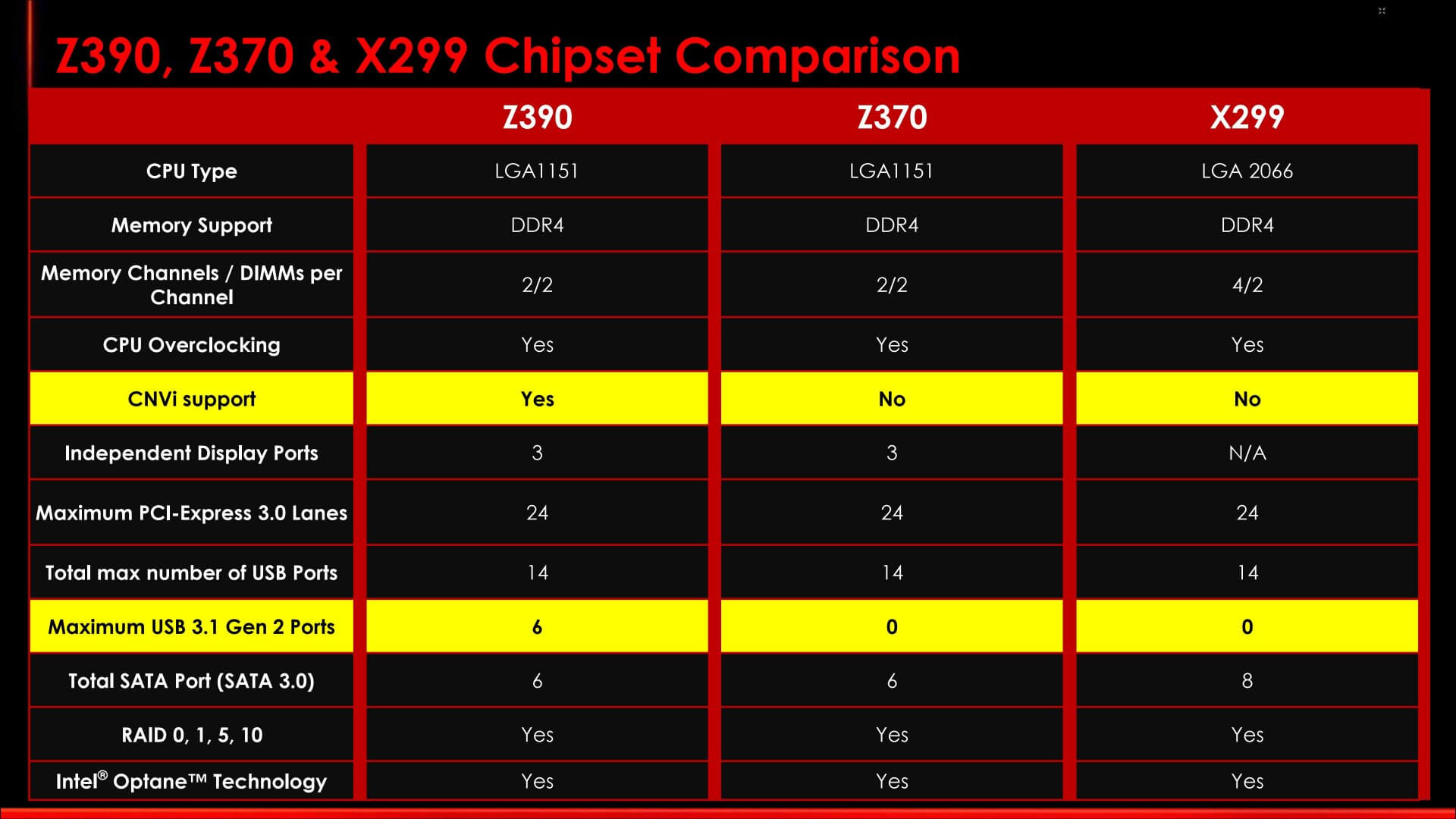
Z390 is just like the Z370 but now comes with native support for up 6x USB 3.1 Gen2 (10Gbps) ports and CNVi (Integrated Wifi-AC) support.

Source: https://www.techspot.com/news/76816-intel-l...h-gen-core.html

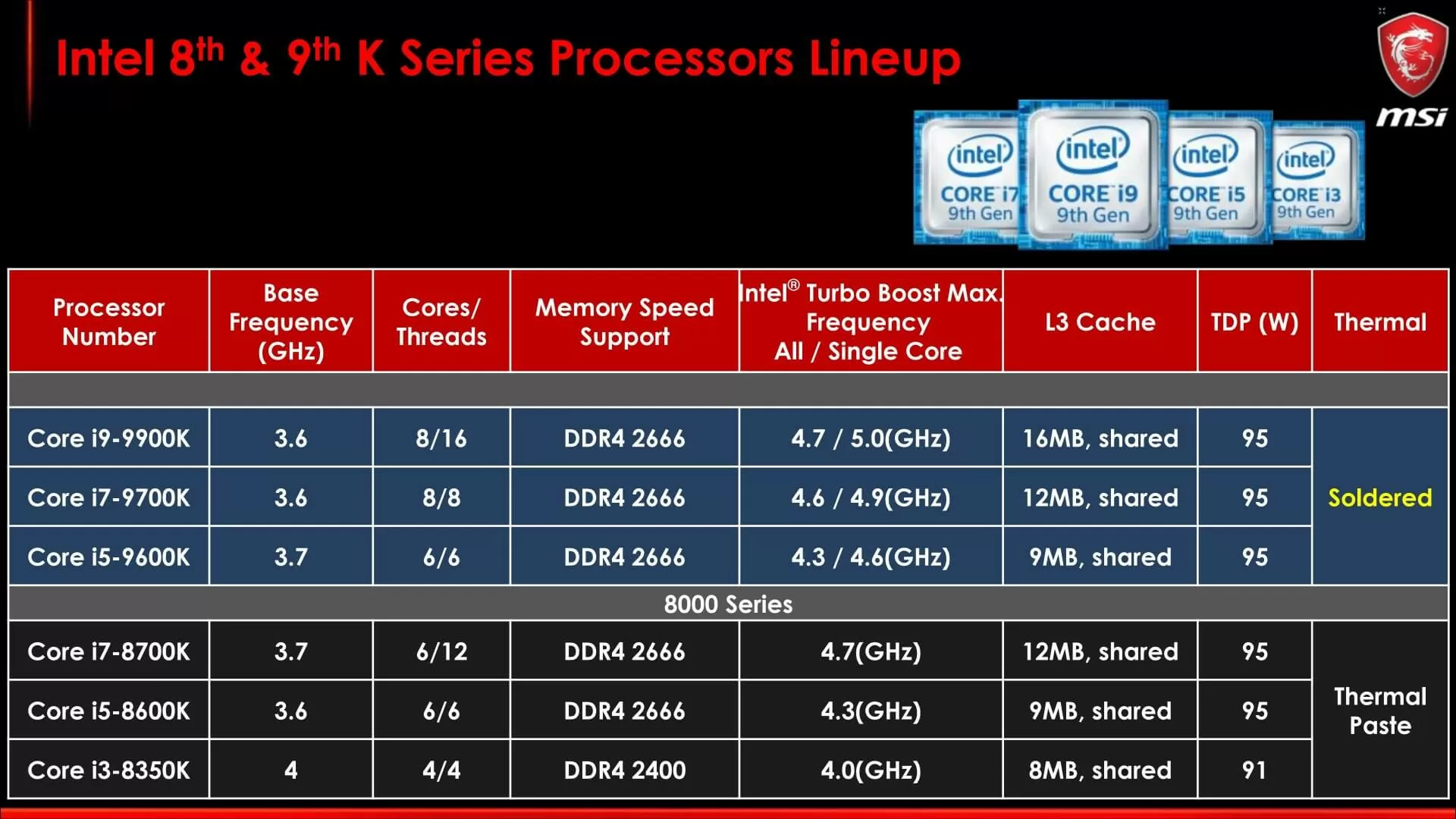
Key features of 9th Core CPUs:

- First performance Intel Core i9 desktop S-series processor Up to 8 cores
- Intel Z390 chipset compatible
- Solder Thermal Interface Material (STIM)
- Integrated USB 3.1 gen 2 and Integrated Intel Wireless-AC
- Up to 16 threads, 5.0 GHz, 16 MB cache, and 40 platform PCIe lanes (16 CPU + 24 PCH)
- Compatible with all Intel 300 series chipsets
- Intel Optane memory and Intel Optane SSD support
- Thunderbolt 3 support

» Click to show Spoiler - click again to hide... «


wongtheboy92
post Oct 10 2018, 04:30 PM

Enthusiast
*****
Senior Member
809 posts

Joined: Dec 2008


QUOTE(keyo @ Oct 8 2018, 07:52 PM)
Z390 dah keluar any specialty?
*
Their ITX board designs are so much nicer, particularly the GIGABYTE Z390 I Aorus Pro WIFI or MSI MPG Z390I Gaming Edge AC.

QUOTE(owikh84 @ Oct 9 2018, 11:49 AM)
» Click to show Spoiler - click again to hide... «


Z390 is just like the Z370 but now comes with native support for up 6x USB 3.1 Gen2 (10Gbps) ports and CNVi (Integrated Wifi-AC) support.

Source: https://www.techspot.com/news/76816-intel-l...h-gen-core.html

Key features of 9th Core CPUs:

- First performance Intel Core i9 desktop S-series processor Up to 8 cores
- Intel Z390 chipset compatible
- Solder Thermal Interface Material (STIM)
- Integrated USB 3.1 gen 2 and Integrated Intel Wireless-AC
- Up to 16 threads, 5.0 GHz, 16 MB cache, and 40 platform PCIe lanes (16 CPU + 24 PCH)
- Compatible with all Intel 300 series chipsets
- Intel Optane memory and Intel Optane SSD support
- Thunderbolt 3 support

» Click to show Spoiler - click again to hide... «

*
Thermal cooling will be better than the traditional thermal paste application?

This post has been edited by wongtheboy92: Oct 10 2018, 04:37 PM
TSowikh84
post Oct 10 2018, 07:37 PM

i7 Clan
Group Icon
Elite
8,711 posts

Joined: Nov 2007
From: Butterworth, PG / Machang, Kelantan


QUOTE(wongtheboy92 @ Oct 10 2018, 04:30 PM)
Thermal cooling will be better than the traditional thermal paste application?
*
Of course, solder is basically metal (indium?), which conducts heat better than any thermal paste.
CPU temps will definitely be excellent after this, without needing to delid the CPU. rclxms.gif

djandrew
post Oct 11 2018, 09:56 PM

Getting Started
**
Junior Member
236 posts

Joined: Jan 2010


this time Gigabyte Z390 aorus master vrm heatsink is so much better than z370 series..seriously so much better, direct heat pipe contact with good quality 1.5mm thermal pad between vrm and heatsink...
damn... 3 months back just bought gigabyte Z370 aorus gaming 7...haiz doh.gif bangwall.gif

This post has been edited by djandrew: Oct 11 2018, 09:59 PM

56 Pages « < 32 33 34 35 36 > » Top
 

Change to:
| Lo-Fi Version
0.0298sec    0.45    6 queries    GZIP Disabled
Time is now: 9th December 2025 - 07:15 PM