Welcome Guest ( Log In | Register )

Outline · [ Standard ] · Linear+

 Setting up home karaoke

views
     
TSdecypher
post Aug 30 2015, 12:03 PM, updated 11y ago

低头族
*****
Senior Member
864 posts

Joined: Apr 2006
From: Earth


I have a modest 42" Samsung TV and have recently bought a Sony Home Theatre (BDV-E2100). Both devices are connected to a desktop. On the HT, I noticed there are two microphone ports so I dream of setting up my own karaoke system.

I have loads of KTV version MTVs that can be played using VLC player and switching audio channels to mute vocals, but I just can't seem to make it work for the HT. When I plug in a mic, it says NOT.USE that probably means karaoke is not supported when audio input is from a computer. Something that the salesman did not tell me when I made the purchase.

With this setup, how can I proceed to realize my dream of having a home karaoke set? I am OK to spend more to finish the setup, and something like an Android KTV box thing comes to mind.

Any pros have any suggestions or recommendations?

Thanks in advance.
sonerin
post Aug 30 2015, 01:44 PM

Look at all my stars!!
*******
Senior Member
8,739 posts

Joined: Aug 2009
QUOTE(decypher @ Aug 30 2015, 12:03 PM)
I have a modest 42" Samsung TV and have recently bought a Sony Home Theatre (BDV-E2100). Both devices are connected to a desktop. On the HT, I noticed there are two microphone ports so I dream of setting up my own karaoke system.

I have loads of KTV version MTVs that can be played using VLC player and switching audio channels to mute vocals, but I just can't seem to make it work for the HT. When I plug in a mic, it says NOT.USE that probably means karaoke is not supported when audio input is from a computer. Something that the salesman did not tell me when I made the purchase.

With this setup, how can I proceed to realize my dream of having a home karaoke set? I am OK to spend more to finish the setup, and something like an Android KTV box thing comes to mind.

Any pros have any suggestions or recommendations?

Thanks in advance.
*
If not mistaken this function never work. Why not you call Sony to verify
TSdecypher
post Aug 30 2015, 02:28 PM

低头族
*****
Senior Member
864 posts

Joined: Apr 2006
From: Earth


QUOTE(sonerin @ Aug 30 2015, 01:44 PM)
If not mistaken this function never work. Why not you call Sony to verify
*
Hmm OK.

I probably need an amplifier to go along with this.

I have also been searching around for an Android box that can also has KTV functions. Can you tell me if I'm too ambitious? sad.gif
sonerin
post Aug 30 2015, 02:40 PM

Look at all my stars!!
*******
Senior Member
8,739 posts

Joined: Aug 2009
QUOTE(decypher @ Aug 30 2015, 02:28 PM)
Hmm OK.

I probably need an amplifier to go along with this.

I have also been searching around for an Android box that can also has KTV functions. Can you tell me if I'm too ambitious? sad.gif
*
Don't think android has this function as well
SUSchokia
post Aug 30 2015, 03:28 PM

Chartered Member
*******
Senior Member
3,617 posts

Joined: Oct 2010
Where is the mic port?

user posted image

user posted image

TSdecypher
post Sep 1 2015, 07:18 PM

低头族
*****
Senior Member
864 posts

Joined: Apr 2006
From: Earth


QUOTE(chokia @ Aug 30 2015, 03:28 PM)
Where is the mic port?

user posted image

user posted image
*
Right here bro

user posted image
TSdecypher
post Sep 1 2015, 07:21 PM

低头族
*****
Senior Member
864 posts

Joined: Apr 2006
From: Earth


QUOTE(sonerin @ Aug 30 2015, 02:40 PM)
Don't think android has this function as well
*
Hmm OK.

I meant something like this: http://www.vnnmall.com/ktv6000hd-professio...ed-p-17165.html

But I am unsure where to find it. Maybe Lowyat got kot...
sonerin
post Sep 1 2015, 07:28 PM

Look at all my stars!!
*******
Senior Member
8,739 posts

Joined: Aug 2009
QUOTE(decypher @ Sep 1 2015, 07:21 PM)
Hmm OK.

I meant something like this: http://www.vnnmall.com/ktv6000hd-professio...ed-p-17165.html

But I am unsure where to find it. Maybe Lowyat got kot...
*
Oh.....you can search Lelong website should have few sellers
shinchan^^
post Sep 2 2015, 07:16 AM

K66
*********
All Stars
21,256 posts

Joined: Jan 2003
From: Pekopon


QUOTE(decypher @ Aug 30 2015, 12:03 PM)
I have a modest 42" Samsung TV and have recently bought a Sony Home Theatre (BDV-E2100). Both devices are connected to a desktop. On the HT, I noticed there are two microphone ports so I dream of setting up my own karaoke system.

I have loads of KTV version MTVs that can be played using VLC player and switching audio channels to mute vocals, but I just can't seem to make it work for the HT. When I plug in a mic, it says NOT.USE that probably means karaoke is not supported when audio input is from a computer. Something that the salesman did not tell me when I made the purchase.

With this setup, how can I proceed to realize my dream of having a home karaoke set? I am OK to spend more to finish the setup, and something like an Android KTV box thing comes to mind.

Any pros have any suggestions or recommendations?

Thanks in advance.
*
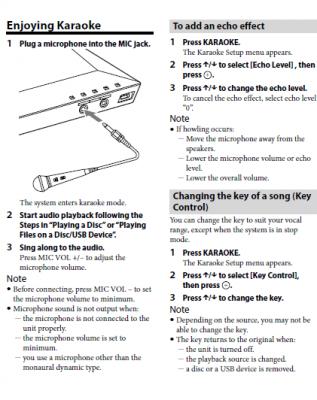
have u try mic with audio from TV via digital out?

Attached Image

This post has been edited by shinchan^^: Sep 2 2015, 08:40 AM
shinchan^^
post Sep 2 2015, 08:29 AM

K66
*********
All Stars
21,256 posts

Joined: Jan 2003
From: Pekopon


QUOTE(decypher @ Aug 30 2015, 02:28 PM)
Hmm OK.

I probably need an amplifier to go along with this.

I have also been searching around for an Android box that can also has KTV functions. Can you tell me if I'm too ambitious? sad.gif
*
QUOTE(sonerin @ Aug 30 2015, 02:40 PM)
Don't think android has this function as well
*
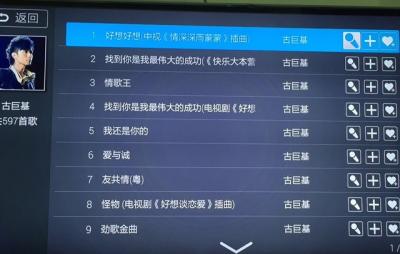
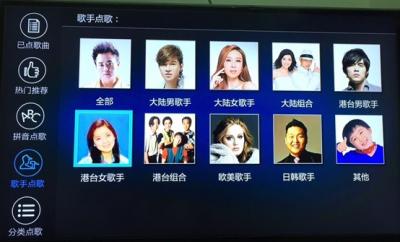
I am using mi box icon_rolleyes.gif

Attached Image

Attached Image

Attached Image

TSdecypher
post Sep 2 2015, 11:27 AM

低头族
*****
Senior Member
864 posts

Joined: Apr 2006
From: Earth


QUOTE(shinchan^^ @ Sep 2 2015, 08:29 AM)
I am using mi box  icon_rolleyes.gif

Attached Image

Attached Image

Attached Image
*
You are my hero. Is it this one? http://www.lelong.com.my/xiaomi-tv-mibox-b...7-01-Sale-I.htm
shinchan^^
post Sep 2 2015, 11:28 AM

K66
*********
All Stars
21,256 posts

Joined: Jan 2003
From: Pekopon


QUOTE(decypher @ Sep 2 2015, 11:27 AM)
that price is for minibox or xiaomi box?

lazada shot up to 249 today


This post has been edited by shinchan^^: Sep 2 2015, 11:29 AM
TSdecypher
post Sep 2 2015, 11:32 AM

低头族
*****
Senior Member
864 posts

Joined: Apr 2006
From: Earth


QUOTE(shinchan^^ @ Sep 2 2015, 07:16 AM)
have u try mic with audio from TV via digital out?

Attached Image
*
Yes, Sir I have tried this. I read the manual as well. However it assumes I am playing Karaoke BD/DVD. I actually have a lot of AVI...
TSdecypher
post Sep 2 2015, 01:22 PM

低头族
*****
Senior Member
864 posts

Joined: Apr 2006
From: Earth


QUOTE(shinchan^^ @ Sep 2 2015, 11:28 AM)
that price is for minibox or xiaomi box?

lazada shot up to 249 today
*
XiaoMi TV MiBox Box Enhanced 3rd Gen 5G Android TV 4k Full HD UNLOCK

I feel like I am helping the seller to advertise... smile.gif
muncheno
post Sep 3 2015, 04:32 PM

Enthusiast
*****
Senior Member
736 posts

Joined: Jun 2006
From: Ipoh
Shinchan,

What app are you using for the Karaoke?

Thanks,
Muncheno

QUOTE(shinchan^^ @ Sep 2 2015, 08:29 AM)
I am using mi box  icon_rolleyes.gif

Attached Image
*
shinchan^^
post Sep 3 2015, 04:36 PM

K66
*********
All Stars
21,256 posts

Joined: Jan 2003
From: Pekopon


QUOTE(muncheno @ Sep 3 2015, 04:32 PM)
Shinchan,

What app are you using for the Karaoke?

Thanks,
Muncheno
*


http://app.shafa.com/apk/Kgezhiwang.html
Zot
post Sep 3 2015, 04:51 PM

Look at all my stars!!
*******
Senior Member
7,938 posts

Joined: Mar 2014
QUOTE(decypher @ Sep 2 2015, 11:32 AM)
Yes, Sir I have tried this. I read the manual as well. However it assumes I am playing Karaoke BD/DVD. I actually have a lot of AVI...
*
I downloaded the manual but it has no mic input. Getting confused hmm.gif I want to find the spec
shinchan^^
post Sep 3 2015, 04:54 PM

K66
*********
All Stars
21,256 posts

Joined: Jan 2003
From: Pekopon


QUOTE(Zot @ Sep 3 2015, 04:51 PM)
I downloaded the manual but it has no mic input. Getting confused  hmm.gif  I want to find the spec
*
ya I checked the manual too.
weird shocking.gif
TS's BDV-E2100 has MIC 1 & 2 in the pic
Zot
post Sep 3 2015, 05:00 PM

Look at all my stars!!
*******
Senior Member
7,938 posts

Joined: Mar 2014
QUOTE(decypher @ Aug 30 2015, 12:03 PM)
I have a modest 42" Samsung TV and have recently bought a Sony Home Theatre (BDV-E2100). Both devices are connected to a desktop. On the HT, I noticed there are two microphone ports so I dream of setting up my own karaoke system.

I have loads of KTV version MTVs that can be played using VLC player and switching audio channels to mute vocals, but I just can't seem to make it work for the HT. When I plug in a mic, it says NOT.USE that probably means karaoke is not supported when audio input is from a computer. Something that the salesman did not tell me when I made the purchase.

With this setup, how can I proceed to realize my dream of having a home karaoke set? I am OK to spend more to finish the setup, and something like an Android KTV box thing comes to mind.

Any pros have any suggestions or recommendations?

Thanks in advance.
*
Have you ever disconnect the Line Input from the PC and use only the mic just to confirm this?
muncheno
post Sep 3 2015, 05:34 PM

Enthusiast
*****
Senior Member
736 posts

Joined: Jun 2006
From: Ipoh

Thank you shinchan. smile.gif

QUOTE(shinchan^^ @ Sep 3 2015, 04:36 PM)
TSdecypher
post Sep 3 2015, 10:26 PM

低头族
*****
Senior Member
864 posts

Joined: Apr 2006
From: Earth


QUOTE(Zot @ Sep 3 2015, 05:00 PM)
Have you ever disconnect the Line Input from the PC and use only the mic just to confirm this?
*
Sorry what is Line Input from PC? ... Do you mean Audio Input?

If I remove the Yellow/White-to-USB cable and use BD-DVD/USB/Bluetooth mode, the mic can work.

But the mic cannot work when the audio is coming from PC.
shinchan^^
post Sep 4 2015, 09:34 AM

K66
*********
All Stars
21,256 posts

Joined: Jan 2003
From: Pekopon


QUOTE(decypher @ Sep 3 2015, 10:26 PM)
Sorry what is Line Input from PC? ... Do you mean Audio Input?

If I remove the Yellow/White-to-USB cable and use BD-DVD/USB/Bluetooth mode, the mic can work.

But the mic cannot work when the audio is coming from PC.
*
looks like sony restriction liao
Zot
post Sep 4 2015, 09:49 AM

Look at all my stars!!
*******
Senior Member
7,938 posts

Joined: Mar 2014
QUOTE(decypher @ Sep 3 2015, 10:26 PM)
Sorry what is Line Input from PC? ... Do you mean Audio Input?

If I remove the Yellow/White-to-USB cable and use BD-DVD/USB/Bluetooth mode, the mic can work.

But the mic cannot work when the audio is coming from PC.
*
Yes, audio. The Line Input is normally refers to the RCA type connector. The signal level (Line Level) is normally spec at 2V peak-peak for consumer product. This input is colored WHITE and RED for Left and Right audio signal respectively. The YELLOW color is normally for composite video. You can see this at the back of your TV.

Since you can use the mic when you removed the RCA connection to your HT, why not just buy an RCA connector switch. You can buy the one with remote control if lazy to move. So you can connect and disconnect the audio cable from the PC when you want to karaoke or want to use source from PC? smile.gif
TSdecypher
post Sep 4 2015, 10:55 PM

低头族
*****
Senior Member
864 posts

Joined: Apr 2006
From: Earth


QUOTE(Zot @ Sep 4 2015, 09:49 AM)
Yes, audio. The Line Input is normally refers to the RCA type connector. The signal level (Line Level) is normally spec at 2V peak-peak for consumer product. This input is colored WHITE and RED for Left and Right audio signal respectively. The YELLOW color is normally for composite video. You can see this at the back of your TV.

Since you can use the mic when you removed the RCA connection to your HT, why not just buy an RCA connector switch. You can buy the one with remote control if lazy to move. So you can connect and disconnect the audio cable from the PC when you want to karaoke or want to use source from PC?  smile.gif
*
Bro, my source of Karaoke MTV Files are on the PC... If i disconnect the PC from the HT it's just a PA system LOL

I guess shinchan is right. It's a sony restriction.

Damn.

When the store demo to me, they use phone to play mp3 via bluetooth. The mic can be used so I thought OK. Aih.
Zot
post Sep 5 2015, 09:14 PM

Look at all my stars!!
*******
Senior Member
7,938 posts

Joined: Mar 2014
QUOTE(decypher @ Sep 4 2015, 10:55 PM)
Bro, my source of Karaoke MTV Files are on the PC... If i disconnect the PC from the HT it's just a PA system LOL

I guess shinchan is right. It's a sony restriction.

Damn.

When the store demo to me, they use phone to play mp3 via bluetooth. The mic can be used so I thought OK. Aih.
*
I meant disconnect the audio only and keep the video. Try if this can work. I believe you have Red, White and Yellow going into your HT
TSdecypher
post Sep 6 2015, 12:45 PM

低头族
*****
Senior Member
864 posts

Joined: Apr 2006
From: Earth


QUOTE(Zot @ Sep 5 2015, 09:14 PM)
I meant disconnect the audio only and keep the video. Try if this can work. I believe you have Red, White and Yellow going into your HT
*
Sorry bro. My mistake. I checked the Audio In ports and there is only White and Red. No Yellow sad.gif
Zot
post Sep 7 2015, 08:27 AM

Look at all my stars!!
*******
Senior Member
7,938 posts

Joined: Mar 2014
QUOTE(decypher @ Sep 6 2015, 12:45 PM)
Sorry bro. My mistake. I checked the Audio In ports and there is only White and Red. No Yellow sad.gif
*
Like I mentioned before, the White and Red wire is for audio Left and Right respectively. The Yellow one is for Video. Actually, I'm a bit blurred on the connection between your PC to HT.

You play your karaoke video using VLC on PC. You also mentioned about USB cable. What I presumed was the audio and video from PC was using USB to HT unit. A bit strange for me for video using USB even though I believe that there is such cable.

How do you connect the video to your TV? Direct from PC or though HT (if your HT has video in)? Using HDMI?
How your audio from PC is connected to your HT?

My suggestion was that to leave the video cable untouched but get you audio L & R (White and Red) goes through switch box before connect it to HT. By doing this, you can cut off the audio in when you want to use the karaoke function. You can switch it back on to connect the audio if you want to have the audio coming from the PC.

This was my idea since you mentioned that if you disconnect the audio (White and Red cable), you can get the karaoke function.
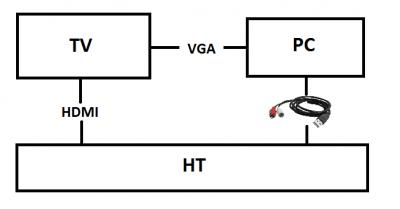
TSdecypher
post Sep 7 2015, 10:35 AM

低头族
*****
Senior Member
864 posts

Joined: Apr 2006
From: Earth


QUOTE(Zot @ Sep 7 2015, 08:27 AM)
Like I mentioned before, the White and Red wire is for audio Left and Right respectively. The Yellow one is for Video. Actually, I'm a bit blurred on the connection between your PC to HT.

You play your karaoke video using VLC on PC. You also mentioned about USB cable. What I presumed was the audio and video from PC was using USB to HT unit. A bit strange for me for video using USB even though I believe that there is such cable.

How do you connect the video to your TV? Direct from PC or though HT (if your HT has video in)? Using HDMI?
How your audio from PC is connected to your HT?

My suggestion was that to leave the video cable untouched but get you audio L & R (White and Red) goes through switch box before connect it to HT. By doing this, you can cut off the audio in when you want to use the karaoke function. You can switch it back on to connect the audio if you want to have the audio coming from the PC.

This was my idea since you mentioned that if you disconnect the audio (White and Red cable), you can get the karaoke function.
*
Attached Image

Please refer to the attachment for an illustration. It is just a simple diagram of how my devices are connected.

The connection between my PC and HT is via a USB to Audio cable. One end is a USB jack, and the other end has White and Red wire. No Yellow, thus no Audio.

My PC does not have a HDMI port, so I could only use a VGA cable. It connects to the TV.

The HT is connected to the TV via a HDMI port.

So basically the Karaoke function on the HT only works for BD-DVD, USB and Bluetooth. It does not work with the USB to Audio Cable. When I plug it in, the console on HT says "NOT.USE". I can watch movies on the TV using the PC for selection and HT for audio.

I also tried plugging the mic directly to the PC, no good.

shinchan^^
post Sep 7 2015, 10:45 AM

K66
*********
All Stars
21,256 posts

Joined: Jan 2003
From: Pekopon


QUOTE(decypher @ Sep 7 2015, 10:35 AM)
Attached Image

Please refer to the attachment for an illustration. It is just a simple diagram of how my devices are connected.

The connection between my PC and HT is via a USB to Audio cable. One end is a USB jack, and the other end has White and Red wire. No Yellow, thus no Audio.

My PC does not have a HDMI port, so I could only use a VGA cable. It connects to the TV.

The HT is connected to the TV via a HDMI port.

So basically the Karaoke function on the HT only works for BD-DVD, USB and Bluetooth. It does not work with the USB to Audio Cable. When I plug it in, the console on HT says "NOT.USE". I can watch movies on the TV using the PC for selection and HT for audio.

I also tried plugging the mic directly to the PC, no good.
*
what if audio cable plug to TV instead?
TSdecypher
post Sep 7 2015, 11:06 AM

低头族
*****
Senior Member
864 posts

Joined: Apr 2006
From: Earth


QUOTE(shinchan^^ @ Sep 7 2015, 10:45 AM)
what if audio cable plug to TV instead?
*
Then the audio comes out from TV I guess? In this case totally no Karaoke already because Mic+PC doesn't work.

Plus the sound from HT is better than sound from TV...
Zot
post Sep 7 2015, 11:09 AM

Look at all my stars!!
*******
Senior Member
7,938 posts

Joined: Mar 2014
QUOTE(decypher @ Sep 7 2015, 10:35 AM)
Attached Image

Please refer to the attachment for an illustration. It is just a simple diagram of how my devices are connected.

The connection between my PC and HT is via a USB to Audio cable. One end is a USB jack, and the other end has White and Red wire. No Yellow, thus no Audio.

My PC does not have a HDMI port, so I could only use a VGA cable. It connects to the TV.

The HT is connected to the TV via a HDMI port.

So basically the Karaoke function on the HT only works for BD-DVD, USB and Bluetooth. It does not work with the USB to Audio Cable. When I plug it in, the console on HT says "NOT.USE". I can watch movies on the TV using the PC for selection and HT for audio.

I also tried plugging the mic directly to the PC, no good.
*
Just as I thought. The USB from PC is providing just stereo audio (L & R). So, as you mentioned before (if I understood it right), the mic will function if the USB (on PC end) or the Red/White RCA connector (on HT end) is unplugged. So, the karaoke video will still work through PC to TV via VGA cable.

So, instead of plug/unplug the Red/While cable at the back of the HT unit, consider buying a switch that can connect/disconnect the audio cable from PC to HT. I know that there is switch that can be remotely controlled out there. Maybe it has ability to switch more than just one stereo port. If too much for investment, you can just buy a manually switched one. Probably around rm10 smile.gif

Basically, the switch will disconnect the audio (the USB->Red/White) and you will have the karaoke function with mic on HT with karaoke video played from PC. If you want to watch movie from PC, switch to reconnect the audio back to HT and you have normal HT function. wink.gif
TSdecypher
post Sep 7 2015, 11:24 AM

低头族
*****
Senior Member
864 posts

Joined: Apr 2006
From: Earth


QUOTE(Zot @ Sep 7 2015, 11:09 AM)
Just as I thought. The USB from PC is providing just stereo audio (L & R). So, as you mentioned before (if I understood it right), the mic will function if the USB (on PC end) or the Red/White RCA connector (on HT end) is unplugged. So, the karaoke video will still work through PC to TV via VGA cable.
*
Yes!

QUOTE(Zot @ Sep 7 2015, 11:09 AM)
So, instead of plug/unplug the Red/While cable at the back of the HT unit, consider buying a switch that can connect/disconnect the audio cable from PC to HT. I know that there is switch that can be remotely controlled out there. Maybe it has ability to switch more than just one stereo port. If too much for investment, you can just buy a manually switched one. Probably around rm10  smile.gif

Basically, the switch will disconnect the audio (the USB->Red/White) and you will have the karaoke function with mic on HT with karaoke video played from PC. If you want to watch movie from PC, switch to reconnect the audio back to HT and you have normal HT function.  wink.gif
*
When the switch disconnects the audio cable, I will have the karaoke function with mic on HT with karaoke video played from PC... but I won't have audio from the PC, right? smile.gif
Zot
post Sep 7 2015, 11:32 AM

Look at all my stars!!
*******
Senior Member
7,938 posts

Joined: Mar 2014
QUOTE(decypher @ Sep 7 2015, 11:24 AM)
Yes!
When the switch disconnects the audio cable, I will have the karaoke function with mic on HT with karaoke video played from PC... but I won't have audio from the PC, right? smile.gif
*
Ohh! I'm forgetting something here doh.gif . You still need music sound from PC, not just your beautiful voice blush.gif Shame on me. Let me see what other option I can suggest hmm.gif
shinchan^^
post Sep 7 2015, 11:37 AM

K66
*********
All Stars
21,256 posts

Joined: Jan 2003
From: Pekopon


QUOTE(Zot @ Sep 7 2015, 11:32 AM)
Ohh! I'm forgetting something here  doh.gif . You still need music sound from PC, not just your beautiful voice  blush.gif  Shame on me. Let me see what other option I can suggest  hmm.gif
*
audio to TV

mic to HT


but not mix together biggrin.gif
Zot
post Sep 7 2015, 11:54 AM

Look at all my stars!!
*******
Senior Member
7,938 posts

Joined: Mar 2014
QUOTE(decypher @ Sep 7 2015, 11:24 AM)
Yes!
When the switch disconnects the audio cable, I will have the karaoke function with mic on HT with karaoke video played from PC... but I won't have audio from the PC, right? smile.gif
*
Hey! Since your BDV-E2100 is DLNA capable devices, why not fully utilize that. You can let your HT discover the files from you hard drive and controlled it directly from the HT instead of separately from PC. Then no need to use stereo Line input wink.gif
shinchan^^
post Sep 10 2015, 09:01 AM

K66
*********
All Stars
21,256 posts

Joined: Jan 2003
From: Pekopon


QUOTE(Zot @ Sep 7 2015, 11:54 AM)
Hey! Since your BDV-E2100 is DLNA capable devices, why not fully utilize that. You can let your HT discover the files from you hard drive and controlled it directly from the HT instead of separately from PC. Then no need to use stereo Line input  wink.gif
*
I just tried out the karaoke function,
it only works when input is from the HT ( TV showing HT screen)

if switch other input from TV the karaoke function is off
Zot
post Sep 10 2015, 09:42 AM

Look at all my stars!!
*******
Senior Member
7,938 posts

Joined: Mar 2014
QUOTE(shinchan^^ @ Sep 10 2015, 09:01 AM)
I just tried out the karaoke function,
it only works when input is from the HT ( TV showing HT screen)

if switch other  input from TV the karaoke function is off
*
I meant use Ethernet port to connect to your PC. Use DLNA networking function of your HT to browse files in your PC and play it from there instead of your PC. Do not use VLC in your PC. Use HDMI output to connect to your TV.

I've never set-up DLNA but I think you need to enable share on your hardisk in PC. Your HT will discover it and you can browse the video files from there and play it. This way I think you will have your karaoke function. The problem might be limited format of video files in can play, but you can always convert the original to compatible format.
shinchan^^
post Sep 14 2015, 10:18 AM

K66
*********
All Stars
21,256 posts

Joined: Jan 2003
From: Pekopon


QUOTE(decypher @ Sep 7 2015, 10:35 AM)
Attached Image

Please refer to the attachment for an illustration. It is just a simple diagram of how my devices are connected.

The connection between my PC and HT is via a USB to Audio cable. One end is a USB jack, and the other end has White and Red wire. No Yellow, thus no Audio.

My PC does not have a HDMI port, so I could only use a VGA cable. It connects to the TV.

The HT is connected to the TV via a HDMI port.

So basically the Karaoke function on the HT only works for BD-DVD, USB and Bluetooth. It does not work with the USB to Audio Cable. When I plug it in, the console on HT says "NOT.USE". I can watch movies on the TV using the PC for selection and HT for audio.

I also tried plugging the mic directly to the PC, no good.
*
I think you RCA to TV,
TV set output to TV Speaker
HT set USB -> unmute Mic

haha but two difference channel thumbup.gif
HMMaster
post Sep 16 2015, 02:51 PM

10K Club
Group Icon
Moderator
10,308 posts

Joined: Jan 2003
From: Kuala Lumpur


Isn't it mentioned in the manual (provided by shinchan^^) that the karaoke function is for playing from usb device or disc? (and never mention other devices such as PC)

Not sure what files you use, but wont it be easier for you to copy the karaoke files to a USB drive/HDD and play it from the HT system? (Or use the DLNA option as suggested by Zot)
TSdecypher
post Sep 17 2015, 02:01 PM

低头族
*****
Senior Member
864 posts

Joined: Apr 2006
From: Earth


QUOTE(HMMaster @ Sep 16 2015, 02:51 PM)
Isn't it mentioned in the manual (provided by shinchan^^) that the karaoke function is for playing from usb device or disc? (and never mention other devices such as PC)

Not sure what files you use, but wont it be easier for you to copy the karaoke files to a USB drive/HDD and play it from the HT system? (Or use the DLNA option as suggested by Zot)
*
The manual doesn't say specifically the karaoke only works with USB/Disk Drives. Besides, when I purchased the HT, the salesperson says can! Sigh. I may have been cheated.

I am now thinking to use a Mi Box like shinchan^^ and use a karaoke app in it.

I am unsure how to use DLNA. Is it like Bluetooth?
HMMaster
post Sep 17 2015, 11:06 PM

10K Club
Group Icon
Moderator
10,308 posts

Joined: Jan 2003
From: Kuala Lumpur


QUOTE(decypher @ Sep 17 2015, 02:01 PM)
The manual doesn't say specifically the karaoke only works with USB/Disk Drives. Besides, when I purchased the HT, the salesperson says can! Sigh. I may have been cheated.

I am now thinking to use a Mi Box like shinchan^^ and use a karaoke app in it.

I am unsure how to use DLNA. Is it like Bluetooth?
*
Based on the info provided in the manual, I think the karaoke function will only work when the video files are played from the player itself. Most likely external sources are not supported.

DLNA is just like network file sharing (not Bluetooth). If you have a DLNA server running (windows 7 and above have built-in), your player should be able to access the files.

But if you need karaoke functionality (ie queue songs, search singer, etc), then the USB drive and DLNA might not be able to fulfill your requirement. You'll need a dedicated karaoke machine for that.
shinchan^^
post Sep 18 2015, 08:32 AM

K66
*********
All Stars
21,256 posts

Joined: Jan 2003
From: Pekopon


QUOTE(HMMaster @ Sep 17 2015, 11:06 PM)
Based on the info provided in the manual, I think the karaoke function will only work when the video files are played from the player itself. Most likely external sources are not supported.

DLNA is just like network file sharing (not Bluetooth). If you have a DLNA server running (windows 7 and above have built-in), your player should be able to access the files.

But if you need karaoke functionality (ie queue songs, search singer, etc), then the USB drive and DLNA might not be able to fulfill your requirement. You'll need a dedicated karaoke machine for that.
*
buy the RCA mixer with mic will solve it nod.gif


Change to:
| Lo-Fi Version
0.0419sec    0.62    6 queries    GZIP Disabled
Time is now: 16th December 2025 - 03:45 AM