Welcome Guest ( Log In | Register )

Bump Topic Topic Closed RSS Feed
125 Pages « < 84 85 86 87 88 > » Bottom

Outline · [ Standard ] · Linear+

 [V28] Lowyat.Net Mechanical Keyboard Club

views
     
TSquovadis123
post Feb 10 2016, 05:32 PM

Keys
*******
Senior Member
2,882 posts

Joined: Oct 2009
From: Land of Denial
QUOTE(stupid1 @ Feb 10 2016, 05:30 PM)
Hi there thanks for reply. May I know what do you meant by bling 2? Means pretty shiny with backlit? I am just finding one mechanical keyboard which can last long, sounds good (click sound) when playing or typing
*
Ya, bling2 mean shiny with fancy backlit.
stupid1
post Feb 10 2016, 05:40 PM

Getting Started
**
Junior Member
112 posts

Joined: Jun 2012
QUOTE(quovadis123 @ Feb 10 2016, 05:32 PM)
Ya, bling2 mean shiny with fancy backlit.
*
Thanks again!Cooler Master QFR-i is LTK right? I'm finding a full size one actually..which one would you recommend me? Thanks Bro
irsyadfy
post Feb 10 2016, 06:14 PM

Getting Started
**
Junior Member
219 posts

Joined: Oct 2013
From: Shah Alam


QUOTE(stupid1 @ Feb 10 2016, 05:40 PM)
Thanks again!Cooler Master QFR-i is LTK right? I'm finding a full size one actually..which one would you recommend me? Thanks Bro
*
im sure u meant TKL, TenKeyLess.

btw im new to mech kb too and just bought myself Ducky Zero DK2108. *click click click*

stupid1
post Feb 10 2016, 06:21 PM

Getting Started
**
Junior Member
112 posts

Joined: Jun 2012
QUOTE(irsyadfy @ Feb 10 2016, 06:14 PM)
im sure u meant TKL, TenKeyLess.

btw im new to mech kb too and just bought myself Ducky Zero DK2108. *click click click*
*
Hi there thanks for reply.. Yeah typo
.hahaha.how is ducky zero? How much did you bought? It's full sized right?
irsyadfy
post Feb 10 2016, 06:33 PM

Getting Started
**
Junior Member
219 posts

Joined: Oct 2013
From: Shah Alam


QUOTE(stupid1 @ Feb 10 2016, 06:21 PM)
Hi there thanks for reply.. Yeah typo
.hahaha.how is ducky zero? How much did you bought? It's full sized right?
*
it's my first board, so i cant really compare to others.
but i like this board as it has dedicated volume button as i listen to music a lot so easy for me to vol up/down. most of kb need to use FN+volume keys.
other than that i cant really comment. but satisfied with my purchase.

bought it for 260 promotion from topmaid computer at lowyat plaza.
stupid1
post Feb 10 2016, 06:41 PM

Getting Started
**
Junior Member
112 posts

Joined: Jun 2012
QUOTE(irsyadfy @ Feb 10 2016, 06:33 PM)
it's my first board, so i cant really compare to others.
but i like this board as it has dedicated volume button as i listen to music a lot so easy for me to vol up/down. most of kb need to use FN+volume keys.
other than that i cant really comment. but satisfied with my purchase.

bought it for 260 promotion from topmaid computer at lowyat plaza.
*
Wow.. Do they have promotion Now at lowyat? I'm looking for backlight one.. Is there one?
irsyadfy
post Feb 10 2016, 07:17 PM

Getting Started
**
Junior Member
219 posts

Joined: Oct 2013
From: Shah Alam


QUOTE(stupid1 @ Feb 10 2016, 06:41 PM)
Wow.. Do they have promotion Now at lowyat? I'm looking for backlight one.. Is there one?
*
is their shop whos making the promo. others dont know. n that shop close till tomolo. friday open i think so.
btw mine was not backlit, not into backlit much.

btw w ur budget 300-400 sure can get backlit one.
just see the mice,keyboards, controller garage sales. then u can get the idea what type of kb ppl selling out there.
owh one more i opt for ducky as it has OEM key layout(not sure if the right word, masters pls correct me), filco too but no dedicated media keys at all.
razer has small win key, while corsair got shorter/longer(dont remember) spacebar. but everyone will have their own preferences.
waone567
post Feb 10 2016, 07:45 PM

New Member
*
Junior Member
29 posts

Joined: Jun 2012
QUOTE(quovadis123 @ Feb 9 2016, 09:00 PM)
Black looks luxury, the keycaps are in dark gray whereas, the font in black.
White Beige looks cleaner, keycaps in white beige color, font in black.
White better contrast.

If you are a typist, I recommend you get a blank keycaps 1.
*
blank keycaps look sweet but i'm new to this layout. i'll get the black as it looks more 'blank' than the white. maybe change the keycaps to blank after familiar enough with it.
[davey.havok]
post Feb 10 2016, 08:06 PM

Getting Started
**
Junior Member
128 posts

Joined: Jan 2003


QUOTE(irsyadfy @ Feb 10 2016, 07:17 PM)
owh one more i opt for ducky as it has OEM key layout standard bottom row
*
irsyadfy
post Feb 10 2016, 08:21 PM

Getting Started
**
Junior Member
219 posts

Joined: Oct 2013
From: Shah Alam


QUOTE(davey.havok @ Feb 10 2016, 08:06 PM)

*
thanks for correcting me smile.gif

KuzumiTaiga
post Feb 11 2016, 01:01 AM

Spends too much time with mechanical keyboards
*******
Senior Member
3,317 posts

Joined: Jun 2008
From: Cheras ~ London WC1E 7HU~ Shenzhen


QUOTE(stupid1 @ Feb 10 2016, 05:16 PM)
Hi thanks for the reply.. But where is the kazumitaiga signature? Can't find it using the search topic thread here.. But based on the thread here for gamers they don't usually use ducky or filco or storm mechanical keyboard?
*
Hi, he's talking about me. laugh.gif
stupid1
post Feb 11 2016, 02:20 PM

Getting Started
**
Junior Member
112 posts

Joined: Jun 2012
QUOTE(KuzumiTaiga @ Feb 11 2016, 01:01 AM)
Hi, he's talking about me.  laugh.gif
*
Hi I'm Jason
Powet
post Feb 12 2016, 11:38 AM

Enthusiast
*****
Senior Member
709 posts

Joined: Oct 2013


QUOTE(stupid1 @ Feb 10 2016, 05:40 PM)
Thanks again!Cooler Master QFR-i is LTK right? I'm finding a full size one actually..which one would you recommend me? Thanks Bro
*
Get ducky or deck, you wont go wrong. Models-wise survey at ur own thumbup.gif
zzzxtreme
post Feb 12 2016, 03:49 PM

Synth Freak
*******
Senior Member
4,299 posts

Joined: Sep 2006
From: Your girlfriend's bed


gigabyte k83 ok not ? rm299
[davey.havok]
post Feb 13 2016, 12:25 AM

Getting Started
**
Junior Member
128 posts

Joined: Jan 2003


user posted image

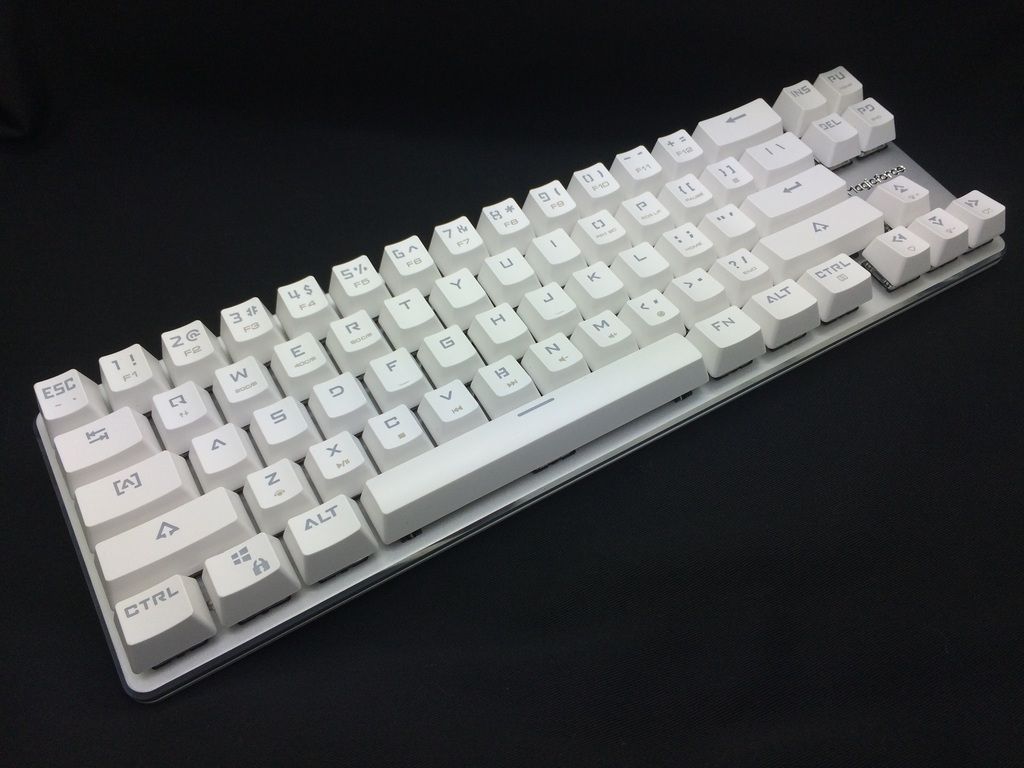
Short Review: Magicforce Smart 68-key Mechanical Keyboard

Specs:
• Unique 68-key ANSI layout
• Gateron blue switches
• Aluminum top plate (silver) with white plastic body
• White backlighting
• White doubleshot ABS keycaps (OEM profile)
• 3 DIP switches

Pros:
• The form factor. 60% boards (e.g. Pok3r & KBP V60) are a joy to carry around, but having to access the arrow keys through a function layer sometimes make them a pain to use. The Magicforce 68 gives you all the portability of a Pok3r with the added advantage of dedicated arrow keys & PGUP/PGDN for convenience. It really shines when paired with a laptop to consume written content online, especially if you are seated on your couch.
• The price. In my opinion this is an absolute steal for USD75 all-in on Massdrop. At the time of writing, the only other *readily available* 66/68 key options in the market are the Varmilo VA68M, which costs 2x the Magicforce, and the Leopold FC660M, which is 3x the price (!!) If USD75 is still too steep for you, there are Kailh switch versions out there that go for slightly less.
• The build quality. I tried twisting the keyboard with both hands but could only make it flex very slightly. Some people have complained that the base of the keyboard is uneven and rocks back & forth during use, but mine feels pretty sturdy.
• The clean & minimalistic design. This needs no explanation. Even the Magicforce logo etched into the top plate looks sharp.
• The aluminum top plate has a nice matte finish and diffuses the backlight evenly, resulting in a soft glowing effect.
• Has 9 stages of LED brightness, perfect for fine-tuning.
• USB cord is detachable.
• Idiot-proof. Just plug and play, no need to mess around with software. You can even ignore the DIP switches.

Cons:
• The chamfered edges of the aluminium top plate are poorly finished. Some areas have hairline scratches, while other sections seem mis-cut. This appears to be a common (but minor) problem from what I've read online.
• The chamfered edges trap fingerprints in the blink of an eye, although they are only noticeable from up close.
• The ABS keycaps feel thin and cheap, and the legends are ugly.
• Only has 3 lighting modes: On, Off and Breathing.
• Method of adjusting breathing mode speed is counter-intuitive.
• Does not remember your last-used lighting mode & brightness setting; defaults to 'On' mode upon restart.

Gateron Blue Switches:
• The Gateron blue switches here are made in China and have a translucent top shell, which is slightly less see-through compared to the transparent Outemu switches I reviewed here.
• The one thing you have probably heard about Gaterons is that they are buttery smooth. Well, I can tell you the hype is real! Being a first-time Gateron user, this was something I noticed immediately upon using the Magicforce. I am seriously impressed.
• The smoothness even results in a snappier upstroke where the keys just bounce back readily to their original position. This is a definite improvement over the friction-y MX Blues that I use daily. Ironically, I never realized MX Blues were friction-y until now.
• In terms of the clicking noise, these Gaterons are on par with Cherries (i.e. not as loud as Outemus).
• The pitch of the click (in the musical sense) is similar to Cherry as well. I can't tell them apart blindfolded.
• There were no inconsistencies in terms of switch feel across the keyboard. These switches are a dream to type on, and they haven't even been lubed yet.

Conclusions:
• The Magicforce Smart 68 is unquestionably a fun little keyboard with a great price tag, but it is not without its flaws.
• There are issues with the finishing as described above, and the limited lighting modes plus inability to store/recall presets makes you wonder why this product has "Smart" in its name.
• But for me, having a compact keyboard that features dedicated arrow keys definitely outweighs all the negatives I've outlined above. If you are a fan of 60% keyboards yet can't live without arrow keys, you should definitely grab one.
• However, if your existing 60% already fulfills all your needs, or if you don't mind your arrow keys being hidden under a function layer, then give this a miss.
• If you do decide to pull the trigger, try getting a unit with Gaterons inside. You'll be glad you did.


Original post: 13th Feb / 00:15 / Initial impressions after using for ½ a day
Edit 1:
Edit 2:


This post has been edited by [davey.havok]: Feb 13 2016, 12:25 AM

Assassin's
post Feb 13 2016, 07:01 AM

Casual
***
Junior Member
467 posts

Joined: Mar 2012


Hi guys, I'm thinking of getting a Vortex Pok3r for myself and was hoping to get some advice for you guys.

I'm technically not new to the mech keyboard world as I have owned one before (CM QFR-i) but decided to change it because I don't like MX Brown on this keyboard and would prefer one that is easier to carry around.

Also, is there any news of a backlit version of the Vortex Pok3r coming here to Malaysia? It's not a must since I don't look at my keyboard all the time but will be surely missed when I moved away from the QFR-i.
Fuuko Master
post Feb 13 2016, 01:17 PM

New Member
*
Junior Member
39 posts

Joined: Mar 2009


Finally got my Realforce 87u 55g. I have no idea why some people complain about 55g being too heavy, because it feels amazing to me. I guess it's time to stop spending on keyboards.
Can you imagine that there are people who paid RM1000+ for it?

» Click to show Spoiler - click again to hide... «

TSquovadis123
post Feb 13 2016, 01:23 PM

Keys
*******
Senior Member
2,882 posts

Joined: Oct 2009
From: Land of Denial
QUOTE(Fuuko Master @ Feb 13 2016, 01:17 PM)
Finally got my Realforce 87u 55g. I have no idea why some people complain about 55g being too heavy, because it feels amazing to me. I guess it's time to stop spending on keyboards.
Can you imagine that there are people who paid RM1000+ for it?

» Click to show Spoiler - click again to hide... «

*
55 Topre is always amazing, and it's the best feeling.
If you compared with 45g, I like 55g feel, but I prefer 45g. brows.gif
55g will make you very tired if you are a typing kuli. icon_idea.gif

quovadis123
TSquovadis123
post Feb 13 2016, 01:23 PM

Keys
*******
Senior Member
2,882 posts

Joined: Oct 2009
From: Land of Denial
[- double post -]

This post has been edited by quovadis123: Feb 13 2016, 01:24 PM
megadisc
post Feb 13 2016, 01:29 PM

Look at all my stars!!
*******
Senior Member
4,349 posts

Joined: Mar 2005
From: Johor Bahru, Malaysia

QUOTE(davey.havok @ Feb 13 2016, 12:25 AM)
user posted image

Short Review: Magicforce Smart 68-key Mechanical Keyboard

Specs:
• Unique 68-key ANSI layout
• Gateron blue switches
• Aluminum top plate (silver) with white plastic body
• White backlighting
• White doubleshot ABS keycaps (OEM profile)
• 3 DIP switches

Pros:
• The form factor. 60% boards (e.g. Pok3r & KBP V60) are a joy to carry around, but having to access the arrow keys through a function layer sometimes make them a pain to use. The Magicforce 68 gives you all the portability of a Pok3r with the added advantage of dedicated arrow keys & PGUP/PGDN for convenience. It really shines when paired with a laptop to consume written content online, especially if you are seated on your couch.
• The price. In my opinion this is an absolute steal for USD75 all-in on Massdrop. At the time of writing, the only other *readily available* 66/68 key options in the market are the Varmilo VA68M, which costs 2x the Magicforce, and the Leopold FC660M, which is 3x the price (!!) If USD75 is still too steep for you, there are Kailh switch versions out there that go for slightly less.
• The build quality. I tried twisting the keyboard with both hands but could only make it flex very slightly. Some people have complained that the base of the keyboard is uneven and rocks back & forth during use, but mine feels pretty sturdy.
• The clean & minimalistic design. This needs no explanation. Even the Magicforce logo etched into the top plate looks sharp.
• The aluminum top plate has a nice matte finish and diffuses the backlight evenly, resulting in a soft glowing effect.
• Has 9 stages of LED brightness, perfect for fine-tuning.
• USB cord is detachable.
• Idiot-proof. Just plug and play, no need to mess around with software. You can even ignore the DIP switches.

Cons:
• The chamfered edges of the aluminium top plate are poorly finished. Some areas have hairline scratches, while other sections seem mis-cut. This appears to be a common (but minor) problem from what I've read online.
• The chamfered edges trap fingerprints in the blink of an eye, although they are only noticeable from up close.
• The ABS keycaps feel thin and cheap, and the legends are ugly.
• Only has 3 lighting modes: On, Off and Breathing.
• Method of adjusting breathing mode speed is counter-intuitive.
• Does not remember your last-used lighting mode & brightness setting; defaults to 'On' mode upon restart.

Gateron Blue Switches:
• The Gateron blue switches here are made in China and have a translucent top shell, which is slightly less see-through compared to the transparent Outemu switches I reviewed here.
• The one thing you have probably heard about Gaterons is that they are buttery smooth. Well, I can tell you the hype is real! Being a first-time Gateron user, this was something I noticed immediately upon using the Magicforce. I am seriously impressed.
• The smoothness even results in a snappier upstroke where the keys just bounce back readily to their original position. This is a definite improvement over the friction-y MX Blues that I use daily. Ironically, I never realized MX Blues were friction-y until now.
• In terms of the clicking noise, these Gaterons are on par with Cherries (i.e. not as loud as Outemus).
• The pitch of the click (in the musical sense) is similar to Cherry as well. I can't tell them apart blindfolded.
• There were no inconsistencies in terms of switch feel across the keyboard. These switches are a dream to type on, and they haven't even been lubed yet.

Conclusions:
• The Magicforce Smart 68 is unquestionably a fun little keyboard with a great price tag, but it is not without its flaws.
• There are issues with the finishing as described above, and the limited lighting modes plus inability to store/recall presets makes you wonder why this product has "Smart" in its name.
• But for me, having a compact keyboard that features dedicated arrow keys definitely outweighs all the negatives I've outlined above. If you are a fan of 60% keyboards yet can't live without arrow keys, you should definitely grab one.
• However, if your existing 60% already fulfills all your needs, or if you don't mind your arrow keys being hidden under a function layer, then give this a miss.
• If you do decide to pull the trigger, try getting a unit with Gaterons inside. You'll be glad you did.
Original post: 13th Feb / 00:15 / Initial impressions after using for ½ a day
Edit 1:
Edit 2:

*
great review

i read as GALVATRON lol .....


125 Pages « < 84 85 86 87 88 > » Top
Topic ClosedOptions
 

Change to:
| Lo-Fi Version
0.0556sec    0.59    6 queries    GZIP Disabled
Time is now: 9th December 2025 - 01:39 PM