

 Nov 16 2006, 01:21 PM, updated 20y ago


After installing/updating Internet Explorer 7, my internet shortcut icon (*.url) is not displayed properly under Start menu and other IE based browser like Maxthon. This example from start menu :
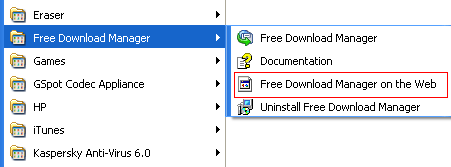
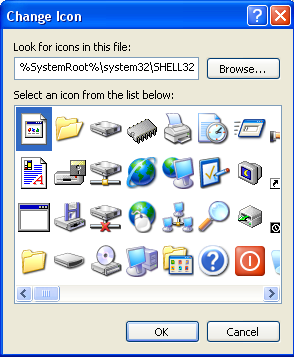
The problem is when the shortcut is not pointed to the right library. You can check this by right click > properties > change icon. This is shortcut which has the icon problem :
This is the shortcut which display the IE icon :
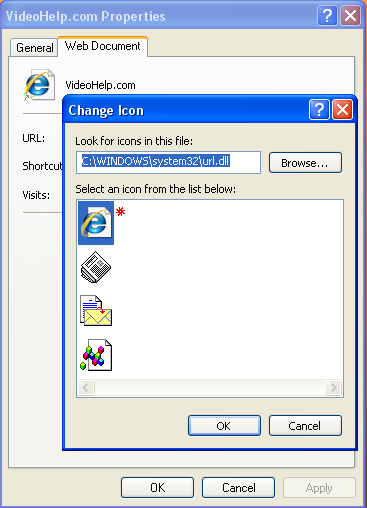
Did you notice it. There is 2 different shortcut :
- %SystemRoot%\system32\SHELL32.dll <- problem with the icon
- C:\WINDOWS\system32\url.dll <- icon properly displayed
Walla ! Icon fixed ...

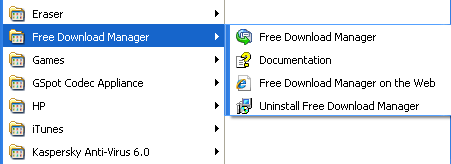
NOTES/UPDATES:
- Using Tweak UI to rebuild the icon won't work since very obvious the problem lies with wrong path to the icon library.
- It seems work with Start menu only (read next info).
- It seems this trick won't work for Maxthon . Ironically, Maxthon use "Favourites" from IE too but IE 7 has no problem to display the icon properly.
This post has been edited by keyz: Nov 17 2006, 09:06 PM
 Quote
Quote
 0.0139sec
 0.76
0.76
 5 queries
 GZIP Disabled