
QUOTE(electronictomato @ May 18 2016, 07:19 PM)
Pm best price. Interested to get one

Thank you for inquiry, just pmed to you. Lowyat.NET -> Garage Sales -> Special Interest Garage Sales -> Home Electronics & Wares Garage Sales
Media Player [WTS] HIMEDIA H8 Plus 4K UHD, Dual Band WIFI and Gigabit Ethernet
|
|
 May 18 2016, 08:14 PM May 18 2016, 08:14 PM
|
 
Junior Member
108 posts Joined: Aug 2011 From: Penang  
|
QUOTE(electronictomato @ May 18 2016, 07:19 PM) Pm best price. Interested to get one Thank you for inquiry, just pmed to you. |
|
|
|
|
|
May 19 2016, 02:22 PM
|

Junior Member
269 posts Joined: Mar 2006 From: Sarawak
|
Hi. Can i get a link to your latest firmware for the tv box? Thanks
|
|
|
May 19 2016, 09:36 PM
|
|
Junior Member
108 posts Joined: Aug 2011 From: Penang
|
QUOTE(samowong @ May 19 2016, 02:22 PM) Hi. Can i get a link to your latest firmware for the tv box? Thanks Our customer repo is open for customers, just sent me your email for verification. |
|
|
May 22 2016, 09:03 PM
|
|
Junior Member
108 posts Joined: Aug 2011 From: Penang
|
QUOTE(samowong @ May 19 2016, 02:22 PM) Hi. Can i get a link to your latest firmware for the tv box? Thanks Dear Customer,New firmware 1.1.1 available in the skydrive and Himedia Website, below are the change log : 1). Support IOS 9.3 Air Play 2). Improve local play back 3). Fix WIFI stability 4). Enhance HDMI compatibility 5). Improve user interface including hide the "bottom system bar" by default. |
|
|
May 25 2016, 08:54 AM
|

Newbie
0 posts Joined: May 2016
|
Kodi 16.1 is already stable version, it is time to upgrade to 16.1. Just follow the 5 steps Quick Restore Kodi 16 as per in the Skydrive guide under the sub folder "XBM_KODI/KODI 16 Jarvis".
**************** how am get this file? because my kodi no have menu TV thank you |
|
|
May 25 2016, 01:16 PM
|
|
Junior Member
108 posts Joined: Aug 2011 From: Penang
|
QUOTE(djody @ May 25 2016, 08:54 AM) Kodi 16.1 is already stable version, it is time to upgrade to 16.1. Just follow the 5 steps Quick Restore Kodi 16 as per in the Skydrive guide under the sub folder "XBM_KODI/KODI 16 Jarvis". TV menu take to long to load and cause some irritating, the preinstalled addons has taken out the tv menu as per feedback from customers. You can access to live tv direct from the new menu.**************** how am get this file? because my kodi no have menu TV thank you 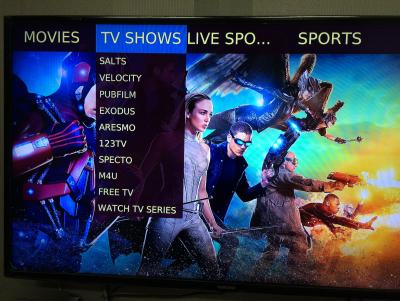
The Kodi configuration files are in our customer skydrive, just sent me your email for verification, will sent you the link. |
|
|
|
|
|
May 30 2016, 10:44 AM
|
|
Senior Member
878 posts Joined: Dec 2008 
|
hi, am interested in this player. appreciate if you could help me on below questions.
1) what are the available memory for installing app, when it is out from factory? read from one of the post here, he seems failed in installing second app. 2) what is the difference in Q and H series? Is it different alphabet for different market? for eg. the Q16, Q10Pro and H8? 3) in case there is a need to claim warranty, how should we proceed on that? 4) What is the model you can recommend to me, if I dont need any preinstalled streaming app? Normally, i download and save RMVB files into my network storage. And I access these files from ES Explorer, and open using MX player. 5) Can i access and run movies files from network storage (network path like //pcname/volume1/series) via kodi ? Thanks in advance. This post has been edited by pvateme: May 30 2016, 11:43 AM |
|
|
May 30 2016, 01:32 PM
|
|
Junior Member
108 posts Joined: Aug 2011 From: Penang
|
QUOTE(pvateme @ May 30 2016, 10:44 AM) hi, am interested in this player. appreciate if you could help me on below questions. Thank you for your inquiry.1) what are the available memory for installing app, when it is out from factory? read from one of the post here, he seems failed in installing second app. 2) what is the difference in Q and H series? Is it different alphabet for different market? for eg. the Q16, Q10Pro and H8? 3) in case there is a need to claim warranty, how should we proceed on that? 4) What is the model you can recommend to me, if I dont need any preinstalled streaming app? Normally, i download and save RMVB files into my network storage. And I access these files from ES Explorer, and open using MX player. 5) Can i access and run movies files from network storage (network path like //pcname/volume1/series) via kodi ? Thanks in advance. 1). Apps partition is 2GB, 2GB for OS and 12GB for the data/sdcard partition. After factory install apps left 1.5GB free space. 2). Q series is using HiSilicon chipset and H series use none HiSilicon chipset such as Rockchip. 3). Just sent the box to me for warranty claim. 4). If you just stream RMVB via MxPlayer then entry level H8 Octa core with 1GB ram will do. If you have budget, could consider H8 Octa core with 2GB ram. H8 1+8 model - RM320 https://forum.lowyat.net/index.php?showtopic=3727931&hl= H8 2+ 16 model - RM460 https://forum.lowyat.net/index.php?showtopic=3677149&hl= 5). This is question of Kodi not the box itself. Technically is possible. However, Himedia come with media center where you can direct access to network share folder, no need Kodi. |
|
|
Jun 8 2016, 05:18 PM
|
|
Junior Member
32 posts Joined: May 2006
|
highly recommended! 1 of the most helpful seller that really take good care of the customer. Just COD with the seller yesterday.
i am enjoying my box to the fullest. Thanks Nicety! |
|
|
Jun 8 2016, 09:02 PM
|
|
Junior Member
108 posts Joined: Aug 2011 From: Penang
|
QUOTE(fionachin @ Jun 8 2016, 05:18 PM) highly recommended! 1 of the most helpful seller that really take good care of the customer. Just COD with the seller yesterday. Thank you, pls feel free to ask in the future if you need help in firmware upgrade or searching for new apps.i am enjoying my box to the fullest. Thanks Nicety! |
|
|
Jun 13 2016, 01:07 PM
|

Junior Member
7 posts Joined: Apr 2012
|
hello, pm best price, thanks
 |
|
|
Jun 13 2016, 01:40 PM
|
|
Junior Member
108 posts Joined: Aug 2011 From: Penang
|
QUOTE(mudaimak @ Jun 13 2016, 01:07 PM) hello, pm best price, thanks Just pmed to you, we are selling firm price in order to save time for post sales support. |
|
|
Jun 15 2016, 02:34 AM
|
|
Junior Member
6 posts Joined: Sep 2014
|
Bought H8 from nicety on friday , received on monday. Great seller, really recommended.
|
|
|
|
|
|
Jun 16 2016, 10:43 AM
|
|
Junior Member
7 posts Joined: Apr 2012
|
already got the H8
, thank you nicety |
|
|
Jun 16 2016, 08:47 PM
|
|
Junior Member
108 posts Joined: Aug 2011 From: Penang
|
QUOTE(cweiz @ Jun 15 2016, 02:34 AM) Bought H8 from nicety on friday , received on monday. Great seller, really recommended. Thank you bro, you order at right timing when I'm just about to dispatch :-)Thank you for your support, hope the getting started guide help. |
|
|
Jun 16 2016, 08:54 PM
|
|
Junior Member
108 posts Joined: Aug 2011 From: Penang
|
QUOTE(mudaimak @ Jun 16 2016, 10:43 AM) already got the H8 Thank you for acknowledge receipt bro. In the poslaju slip, there is my whatsapp number. Pls feel free to whatsapp me If you have any questions. Just be patient with me if I'm busy and unable to response to you immediately., thank you nicety |
|
|
Jun 21 2016, 01:59 AM
Show posts by this member only | IPv6 | Post
#457
|
|
Junior Member
115 posts Joined: Nov 2011
|
Hi all,
I am here to provide testimony to nicety for his patience guiding me step by step of installing apps. customer service is top notch. highly recommended. Thanks again. on side note, if upgrade firmware needs to install all again? |
|
|
Jun 22 2016, 11:44 PM
|
|
Junior Member
108 posts Joined: Aug 2011 From: Penang
|
QUOTE(NussFit @ Jun 21 2016, 01:59 AM) Hi all, There is two upgrade your firmware:I am here to provide testimony to nicety for his patience guiding me step by step of installing apps. customer service is top notch. highly recommended. Thanks again. on side note, if upgrade firmware needs to install all again? A). Via Android setting, apps are remain but please upgrade version by version and do not skip the version. B). Upgrade via Recover button hole, this is equivalent to reformat in Windows. This is clean method where you wide off the spyware, malware, unnecessary apps that slow down your box. |
|
|
Jul 3 2016, 06:42 PM
|

Senior Member
973 posts Joined: Jun 2008
|
This H8 has composite video output?
Pls PM me, thanks. This post has been edited by wongpeter: Jul 3 2016, 06:43 PM |
|
|
Jul 3 2016, 07:00 PM
|
|
Junior Member
108 posts Joined: Aug 2011 From: Penang
|
QUOTE(wongpeter @ Jul 3 2016, 06:42 PM) This H8 has composite video output? Thank you for inquiry.Pls PM me, thanks.  The video output is either HDMI or composite video out as above photo (yellow connector), but not support S-video and not Coaxial digital output. |
|
Topic ClosedOptions
|
| Change to: |  0.0225sec 0.0225sec
 0.47 0.47
 6 queries 6 queries
 GZIP Disabled GZIP Disabled
Time is now: 8th December 2025 - 08:02 PM |
 Quote
Quote