Outline ·
[ Standard ] ·
Linear+
ASUS A555L, colour / screen problem ?
|
TSMx-ZAi
|
 Aug 5 2015, 07:46 AM, updated 11y ago Aug 5 2015, 07:46 AM, updated 11y ago
|
Getting Started


|
hey guys, just bought a new laptop Asus A555L. Previously using Dell Inspiron N5110 and cant help but notice the difference between the colors btwn the laptops. Is is a defect of the laptop or is there any settings i can adjust??
I tried to adjust the graphic properties but just cant manage to get a "natural" colour or one that resembles my old laptop, and my old laptop is stock, never adjust any settings regarding the screen or colours. Please help!! thanks!!
|
|
|
|
|
|
pandera999
|
Aug 8 2015, 10:46 PM
|
|
|
your image.. cant see  |
|
|
|
|
|
TSMx-ZAi
|
Aug 9 2015, 04:46 AM
|
Getting Started
|
QUOTE(pandera999 @ Aug 8 2015, 10:46 PM) your image.. cant see I dont actually have any picture as I dont have another laptop to compare.. but the laptop seems to have a whitish tint on its screen im not sure why.. or perhaps all of the edition of this laptop are like that.. hmmm thanks anyway! |
|
|
|
|
|
pandera999
|
Aug 9 2015, 08:43 AM
|
|
|
QUOTE(Mx-ZAi @ Aug 9 2015, 04:46 AM) I dont actually have any picture as I dont have another laptop to compare.. but the laptop seems to have a whitish tint on its screen im not sure why.. or perhaps all of the edition of this laptop are like that.. hmmm thanks anyway! sorry, i tot you upload the pic... but its ur signature...  whitish on your screen? usually if the screen defects, there is diffrent color produce.. but not whitish... did you see other user screen color?  because its asus... so.. and its common notebook out there... so, can compare... |
|
|
|
|
|
TSMx-ZAi
|
Aug 9 2015, 03:50 PM
|
Getting Started
|
QUOTE(pandera999 @ Aug 9 2015, 08:43 AM) sorry, i tot you upload the pic... but its ur signature... whitish on your screen? usually if the screen defects, there is diffrent color produce.. but not whitish... did you see other user screen color? because its asus... so.. and its common notebook out there... so, can compare... i went back to the shop and seems like all of it is kinda whitish.. damn maybe i picked the wrong laptop. the salesperson told me its because my screen wasn't FULL HD but other laptops with the same resolution seems to have "darker" colours as well when compared to this. not sure why.. the screen just seem like a bit bright and white.. and the brightness settings wouldn't help.. T_T |
|
|
|
|
|
pandera999
|
Aug 9 2015, 05:10 PM
|
|
|
QUOTE(Mx-ZAi @ Aug 9 2015, 03:50 PM) i went back to the shop and seems like all of it is kinda whitish.. damn maybe i picked the wrong laptop. the salesperson told me its because my screen wasn't FULL HD but other laptops with the same resolution seems to have "darker" colours as well when compared to this. not sure why.. the screen just seem like a bit bright and white.. and the brightness settings wouldn't help.. T_T seems like its the screen problem.. i just think about, sooner or later.. everything will turns white... like this.. maybe la 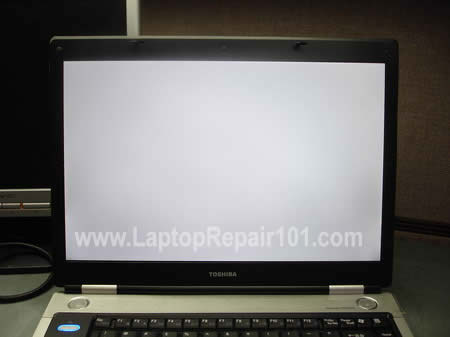 |
|
|
|
|
|
TSMx-ZAi
|
Aug 9 2015, 08:30 PM
|
Getting Started
|
QUOTE(pandera999 @ Aug 9 2015, 05:10 PM) seems like its the screen problem.. i just think about, sooner or later.. everything will turns white... like this.. maybe la I hope not.. worst thing is its so hard to find the A555 laptop.. even Asus website doesnt have it.. hmm |
|
|
|
|
|
pandera999
|
Aug 10 2015, 10:31 AM
|
|
|
QUOTE(Mx-ZAi @ Aug 9 2015, 08:30 PM) I hope not.. worst thing is its so hard to find the A555 laptop.. even Asus website doesnt have it.. hmm worse comes to worse.. thats happen hopefully its not |
|
|
|
|
|
viqq
|
Aug 10 2015, 02:33 PM
|
|
|
The screen on my friend's laptop had a crack after a week of use, worse than your case. Now have to get it replaced. OMG. Asus quality down the drain?
|
|
|
|
|
|
sachiko_118
|
Aug 14 2015, 12:13 AM
|
Getting Started
|
QUOTE(Mx-ZAi @ Aug 5 2015, 07:46 AM) hey guys, just bought a new laptop Asus A555L. Previously using Dell Inspiron N5110 and cant help but notice the difference between the colors btwn the laptops. Is is a defect of the laptop or is there any settings i can adjust?? I tried to adjust the graphic properties but just cant manage to get a "natural" colour or one that resembles my old laptop, and my old laptop is stock, never adjust any settings regarding the screen or colours. Please help!! thanks!! it might be a panel issue. if the panel not reach to qualification level, surely you won't get the right color.. you can send to service centre for checking, but as feedback their service is not good... |
|
|
|
|
|
delsoo
|
Aug 16 2015, 12:44 PM
|
|
|
QUOTE(sachiko_118 @ Aug 14 2015, 12:13 AM) it might be a panel issue. if the panel not reach to qualification level, surely you won't get the right color.. you can send to service centre for checking, but as feedback their service is not good... I own a Asus A555l also , the screen quality is like that 1 . I compare the screen quality with my FULL HD LCD monitor , the colour of the Asus is sucks . lol I get used to it already |
|
|
|
|
|
TSMx-ZAi
|
Aug 16 2015, 10:35 PM
|
Getting Started
|
QUOTE(delsoo @ Aug 16 2015, 12:44 PM) I own a Asus A555l also , the screen quality is like that 1 . I compare the screen quality with my FULL HD LCD monitor , the colour of the Asus is sucks . lol I get used to it already means will changing a monitor helps? |
|
|
|
|
|
delsoo
|
Aug 16 2015, 10:53 PM
|
|
|
QUOTE(Mx-ZAi @ Aug 16 2015, 10:35 PM) means will changing a monitor helps? changing monitor ? you mean bought an external monitor for your Asus ? |
|
|
|
|
|
TSMx-ZAi
|
Aug 17 2015, 10:32 PM
|
Getting Started
|
QUOTE(delsoo @ Aug 16 2015, 10:53 PM) changing monitor ? you mean bought an external monitor for your Asus ? yes.. connect to external monitor.. will that help? |
|
|
|
|
|
delsoo
|
Aug 18 2015, 07:30 AM
|
|
|
QUOTE(Mx-ZAi @ Aug 17 2015, 10:32 PM) yes.. connect to external monitor.. will that help? Yes, the notebook screen is crap. |
|
|
|
|
|
TSMx-ZAi
|
Aug 18 2015, 11:32 PM
|
Getting Started
|
QUOTE(delsoo @ Aug 18 2015, 07:30 AM) Yes, the notebook screen is crap. ok thanks!! |
|
|
|
|
|
delsoo
|
Aug 19 2015, 07:31 AM
|
|
|
QUOTE(Mx-ZAi @ Aug 18 2015, 11:32 PM) Try to update your Asus Splendid Utility software to the latest version and see if the question solved. i remembered I can't use the Vivid mode before updating . After updating , Vivid mode works well ady . But , the colour saturation of vivid mode is not high as the previous version in win8.1 |
|
|
|
|
|
TSMx-ZAi
|
Aug 19 2015, 08:00 PM
|
Getting Started
|
QUOTE(delsoo @ Aug 19 2015, 07:31 AM) Try to update your Asus Splendid Utility software to the latest version and see if the question solved. i remembered I can't use the Vivid mode before updating . After updating , Vivid mode works well ady . But , the colour saturation of vivid mode is not high as the previous version in win8.1 i think my Splendid Utility is up to date cuz i deleted the old one (after reading things from Google) and then reinstalled. I used the normal mode though as the vivid mode seems too... bright |
|
|
|
|
|
delsoo
|
Aug 22 2015, 03:31 PM
|
|
|
tumpang ur thread , hope u do mind ...haha
how to know when the Caps lock is turned on ? there's no LED indicator...
|
|
|
|
|
|
TSMx-ZAi
|
Aug 23 2015, 03:21 PM
|
Getting Started
|
QUOTE(delsoo @ Aug 22 2015, 03:31 PM) tumpang ur thread , hope u do mind ...haha how to know when the Caps lock is turned on ? there's no LED indicator... i use external keyboard so... yeah. lol |
|
|
|
|



 Quote
Quote


 0.0229sec
 0.47
0.47
 5 queries
 GZIP Disabled