

Of course, Windows 7 I can use my WIFI driver with no problem.
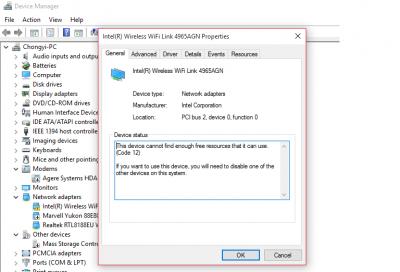
I have try disabled some of the hardware but still cannot.
Maybe someone can enlighten me which hardware to be disabled?
I'm using Benq S41.
Hardware Problem
|
|
 Jul 31 2015, 02:02 PM, updated 11y ago Jul 31 2015, 02:02 PM, updated 11y ago
Show posts by this member only | Post
#1
|
 
Senior Member
881 posts Joined: Aug 2007 From: Petaling Jaya   
|
I have update from Window 7 Ultimate to Windows 10 Pro.
Of course, Windows 7 I can use my WIFI driver with no problem.
I have try disabled some of the hardware but still cannot. Maybe someone can enlighten me which hardware to be disabled? I'm using Benq S41. |
|
|
|
|
|
Jul 31 2015, 02:05 PM
Show posts by this member only | Post
#2
|

Junior Member
45 posts Joined: Nov 2005 From: MALAYSIA (moving a lot)
|
maybe not compatible?need to check website for update?
|
|
|
Jul 31 2015, 02:09 PM
Show posts by this member only | Post
#3
|
|
Senior Member
881 posts Joined: Aug 2007 From: Petaling Jaya
|
QUOTE(DeJaV00 @ Jul 31 2015, 02:05 PM) maybe not compatible?need to check website for update? I have download and update the required drivers which written Windows 10. But still same issue. Most probably not driver issue. (Maybe) |
|
|
Jul 31 2015, 02:13 PM
Show posts by this member only | IPv6 | Post
#4
|

Senior Member
1,591 posts Joined: Mar 2014 From: 75°26'11.6"S, 136°16'16.0"E
|
QUOTE(loselegend @ Jul 31 2015, 02:09 PM) I have download and update the required drivers which written Windows 10. You have 2 wireless network drivers?But still same issue. Most probably not driver issue. (Maybe) EDIT: that might not be the issue though. And code 12 description can be found here: https://technet.microsoft.com/en-us/library...ror=-2147217396 http://answers.microsoft.com/en-us/windows...f4-ee639607fea7 This post has been edited by lolzcalvin: Jul 31 2015, 02:32 PM |
|
|
Jul 31 2015, 02:42 PM
Show posts by this member only | Post
#5
|
|
Senior Member
881 posts Joined: Aug 2007 From: Petaling Jaya
|
QUOTE(lolzcalvin @ Jul 31 2015, 02:13 PM) You have 2 wireless network drivers? I have only 1 wireless driver.EDIT: that might not be the issue though. And code 12 description can be found here: https://technet.microsoft.com/en-us/library...ror=-2147217396 http://answers.microsoft.com/en-us/windows...f4-ee639607fea7 The reason for the screenshot to have 2 is due to the I have a USB WIFI adapter plug into it. Anyway, Benq S41 have 1 WiFI and 1 Bluetooth which need to use one stroke key to either enabled one of them or enabled both of them. Of course, Windows 7 can do this thing and after the update to 10 it become like this. QUOTE Two devices have been assigned the same input/output (I/O) ports, the same interrupt, or the same Direct Memory Access channel. The assignment was made by either the basic input/output system (BIOS), the operating system, or a combination of the two. I have no idea which of another hardware been assigned the same I/O port. I have try disabled both Bluetooth and LAN port but still cannot use. |
|
|
Jul 31 2015, 11:25 PM
Show posts by this member only | Post
#6
|

Senior Member
2,186 posts Joined: Aug 2005
|
Try remove the device and its drivers, reboot Windows, it may help.
|
|
|
|
|
|
Jul 31 2015, 11:32 PM
Show posts by this member only | Post
#7
|

Senior Member
1,643 posts Joined: Apr 2013
|
uninstall the current driver,
try windows update see whather windows will install it for you or not. if still not working, do the same thing and now try intel driver utility. http://www.intel.com/p/en_US/support/detect if still cannot...  This post has been edited by CyrusWong: Jul 31 2015, 11:33 PM |
|
|
Aug 1 2015, 12:01 AM
Show posts by this member only | Post
#8
|
|
Senior Member
1,201 posts Joined: Jul 2013
|
Probably driver problem, maybe have to wait for intel to make it compatible with win 10.
|
|
|
Aug 1 2015, 12:09 AM
Show posts by this member only | Post
#9
|

Junior Member
529 posts Joined: Aug 2006 From: Oil Town (Miri)
|
I also have this problem. What I do is just disable it and restart my PC then enable it again. The problem solved by it own.
|
|
|
Aug 1 2015, 03:07 PM
|
|
Senior Member
881 posts Joined: Aug 2007 From: Petaling Jaya
|
QUOTE(Silfrijin @ Jul 31 2015, 11:25 PM) Try remove the device and its drivers, reboot Windows, it may help. The device was inside the motherboard.QUOTE(CyrusWong @ Jul 31 2015, 11:32 PM) uninstall the current driver, Try this before.try windows update see whather windows will install it for you or not. if still not working, do the same thing and now try intel driver utility. http://www.intel.com/p/en_US/support/detect if still cannot... I even have the utility installed but unable solve the problem. QUOTE(xperiaVuser @ Aug 1 2015, 12:01 AM) Probably driver problem, maybe have to wait for intel to make it compatible with win 10. Hopefully  QUOTE(poh880 @ Aug 1 2015, 12:09 AM) I also have this problem. What I do is just disable it and restart my PC then enable it again. The problem solved by it own. Try this and not working. |
|
|
Aug 1 2015, 11:52 PM
|
|
Senior Member
2,186 posts Joined: Aug 2005
|
QUOTE(loselegend @ Aug 1 2015, 03:07 PM) The device was inside the motherboard. Typo earlier, what I meant was to remove the device at Device Manager, uninstall driver too. |
|
|
Aug 2 2015, 02:15 PM
|
|
Senior Member
881 posts Joined: Aug 2007 From: Petaling Jaya
|
QUOTE(Silfrijin @ Aug 1 2015, 11:52 PM) Typo earlier, what I meant was to remove the device at Device Manager, uninstall driver too. I have try this method.But still the same.  |
|
|
Aug 2 2015, 11:31 PM
|
|
Senior Member
2,186 posts Joined: Aug 2005
|
Enable all devices and uninstall again this device.
Check whether Intel provide latest driver for this. |
|
|
Aug 3 2015, 10:50 AM
|
|
Senior Member
881 posts Joined: Aug 2007 From: Petaling Jaya
|
QUOTE(Silfrijin @ Aug 2 2015, 11:31 PM) Enable all devices and uninstall again this device. Check whether Intel provide latest driver for this. QUOTE(cbm711 @ Aug 3 2015, 10:32 AM) Hardware cause by win10 ? Thanks all for your suggestion but I think Windows 10 is not supported in this driver. |
|
Topic ClosedOptions
|
| Change to: |  0.0189sec 0.0189sec
 0.26 0.26
 6 queries 6 queries
 GZIP Disabled GZIP Disabled
Time is now: 10th December 2025 - 08:57 PM |
 Quote
Quote