

QUOTE(Monolog @ Aug 17 2015, 12:49 AM)
I am using VIP5 now but download speed never reached 2mbps. Why?


Are you connected using Ethernet cable OR using WiFi?Unifi Official TM UniFi High Speed Broadband Thread V21, ( -_・) ︻デ═一▸ Maxis & Time
|
|
 Aug 17 2015, 06:12 AM Aug 17 2015, 06:12 AM
Return to original view | IPv6 | Post
#1
|
 
Senior Member
1,182 posts Joined: Jan 2003  
|
QUOTE(Monolog @ Aug 17 2015, 12:49 AM) I am using VIP5 now but download speed never reached 2mbps. Why? Are you connected using Ethernet cable OR using WiFi? |
|
|
|
|
|
Sep 8 2015, 10:57 PM
Return to original view | IPv6 | Post
#2
|
|
Senior Member
1,182 posts Joined: Jan 2003
|
For TM UniFi users on UniFi 30Mbps / 50Mbps, please do your speed test preferably on a wired, OR HomePlug connection instead of wireless.
Subject to various conditions such as interference, you may never get the optimum speed on wireless connections, but all is ok when on wired/HomePlug. In my case, I get only less than 20Mbps on a wireless connection mainly due to wireless congestion at my area (too many wireless access points from neighbors) |
|
|
Sep 8 2015, 11:19 PM
Return to original view | IPv6 | Post
#3
|
|
Senior Member
1,182 posts Joined: Jan 2003
|
QUOTE(fruitie @ Sep 8 2015, 10:59 PM) Mine is fully wireless and it is extremely fine, >32Mbps at all time. QUOTE(zuhaili87 @ Sep 8 2015, 11:08 PM) Speedtest is fine actually whether wifi or wired. My speedtest result is 32Mbps DL / 5.2Mbps UL. QUOTE(buyoq @ Sep 8 2015, 11:10 PM) I believe you wont face this kind of issue if ure on 5Ghz band. AC wifi is a plus.i am on wifi and constantly 33Mbps previously.now on 50Mbps, 50++-ish Mbps Well, what I mean is, very subjective, as it is subjected to various conditions. For users in high-rise condos, chances are they may not get the optimum speed due to interference from neighbors. Even using an Asus RT-N12HP, my wireless connection is still affected by interference, but worse off if using TM stock router or other routers with low powered antennas.This post has been edited by jolmy: Sep 8 2015, 11:20 PM |
|
|
Sep 11 2015, 07:58 AM
Return to original view | Post
#4
|
|
Senior Member
1,182 posts Joined: Jan 2003
|
QUOTE(hidayat14 @ Sep 11 2015, 01:28 AM) Those who are on 30mbps package, i have questions for you guys This is especially true for users staying at high-rise apartments due to many interfering wireless access points from neighbors.When you said the connection is not stable, have you try to connect direct to router thru wired connection instead of wireless? Im on 30mbps but i havent experience any instability in connection so far. Except that wireless connection is kinda on the low side, which i suspect caused by stock router. When i connect using lan cable directly, i can get full speed of 30mbps of download and 5 mbps of upload. Even I am using an Asus RT-N12HP (With 9dBi high gain antennas), The best I could get is around 17Mbps if I am nearer to the router, but it can go as low as just 5Mbps if I am in my room, away from the router. There are just too many neighboring access points on all channels. Switching channels won't do much of a help anyway. It was worst in the past when I was using TP-Link WR841ND and TM's D-Link DIR-615, where I could get ping time of > 1000ms between device and router. I strongly recommend using direct cable (Ethernet) OR alternatively, the HomePlug technology (Ethernet over power lines). In both cases, when performing speed test, the speed peaks at close to 50Mbps before settling down around 30Mbps. |
|
|
Sep 11 2015, 08:12 AM
Return to original view | Post
#5
|
|
Senior Member
1,182 posts Joined: Jan 2003
|
QUOTE(jusbella @ Sep 11 2015, 08:08 AM) U can use AC router. This may be a solution for those who still depend a lot on wireless.In my case, no need for it as I am using HomePlug now. WIreless is only used to connect smartphone. |
|
|
Sep 11 2015, 05:47 PM
Return to original view | Post
#6
|
|
Senior Member
1,182 posts Joined: Jan 2003
|
QUOTE(Momo2014 @ Sep 11 2015, 05:22 PM) Been getting a only 5mbps on unifi30 even when off peak hour. QUOTE(jusbella @ Sep 11 2015, 05:25 PM) call them to reset port. Before that, already reboot router??And, are you on wired or wireless?? |
|
|
|
|
|
Sep 13 2015, 04:46 PM
Return to original view | IPv6 | Post
#7
|
|
Senior Member
1,182 posts Joined: Jan 2003
|
TM UniFi 30 Mbps speed test
Router: Asus RT-N12HP Connection type: VDSL2 Crowded environment in condo, many neighboring wireless APs. For this who keep complaining about poor speeds, if you are using wireless, please try to do speed test using cable connection. This post has been edited by jolmy: Sep 13 2015, 04:55 PM Attached thumbnail(s) 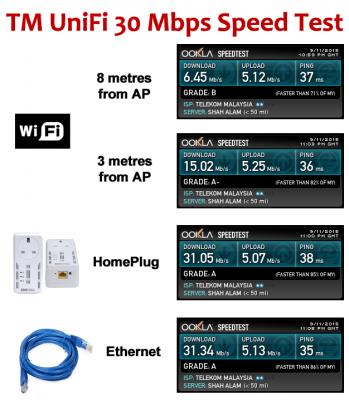
|
|
|
Sep 13 2015, 04:56 PM
Return to original view | IPv6 | Post
#8
|
|
Senior Member
1,182 posts Joined: Jan 2003
|
QUOTE(toytoy @ Sep 13 2015, 04:49 PM) Ping seems a bit on the high side. Ethernet should be less than 10ms. For users using VDSL2 (Fiber to building, then copper to BTU), the ping of 30ms to 50ms is normal. |
|
|
Sep 13 2015, 05:41 PM
Return to original view | IPv6 | Post
#9
|
|
Senior Member
1,182 posts Joined: Jan 2003
|
QUOTE(eksk @ Sep 13 2015, 05:30 PM) anyone on RM169 for unifi 30? my friend says he is paying that amount but when i go to TM point they say they have no such package... The UniFi 30 Mbps is RM169, but ONLY available with a HyppTV pack subscription of RM30 (Aneka or Varnam) or RM40 (Ruby). So at the very minimum, it will cot you RM199.It is itemised like that when you see your bill. This post has been edited by jolmy: Sep 13 2015, 05:53 PM |
|
|
Sep 13 2015, 11:04 PM
Return to original view | IPv6 | Post
#10
|
|
Senior Member
1,182 posts Joined: Jan 2003
|
QUOTE(Moogle Stiltzkin @ Sep 13 2015, 10:37 PM) i get 4ms....... locally.... 200ms to international specifically the US. did that before. Usually within 200ms to 300ms.you should run latency test overseas, since thats the real ball buster  |
|
|
Sep 14 2015, 09:18 AM
Return to original view | IPv6 | Post
#11
|
|
Senior Member
1,182 posts Joined: Jan 2003
|
QUOTE(FaezFarhan @ Sep 14 2015, 01:55 AM) I see. Alright then. Will try changing routers. Well, I posted this attachment yesterday, but I am reposting it here in case you missed it.Btw, how good is homeplug? Is it as fast as direct modem connection? Just look at the speedtest result and you can see yourself the comparison between wireless, HomePlug & Ethernet cable. Attached thumbnail(s) 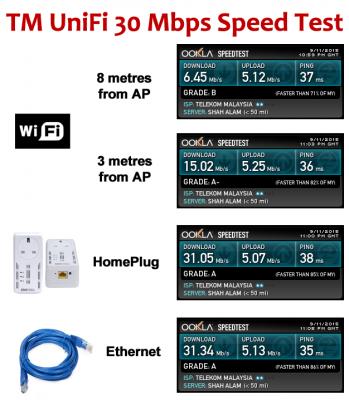
|
|
|
Sep 14 2015, 07:38 PM
Return to original view | IPv6 | Post
#12
|
|
Senior Member
1,182 posts Joined: Jan 2003
|
QUOTE(MGM @ Sep 14 2015, 03:42 PM) What homeplugs do u use? I'm using Aztech HomePlug AV HL-113EP (200 Mbps). This is good enough.However, I believe the AV standard is phasing out and you most likely will see the HomePlug AV2 (500 Mbps) ones being sold now. |
|
Topic ClosedOptions
|
| Change to: |  0.0438sec 0.0438sec
 0.71 0.71
 7 queries 7 queries
 GZIP Disabled GZIP Disabled
Time is now: 4th December 2025 - 11:48 AM |
 Quote
Quote