

QUOTE(fruitie @ Sep 10 2015, 10:25 PM)
Sigh. iOS 9 will be out soon and I think TM will screw it up. I will have a difficult time downloading it... 

Hopefully TM get it fix before iOS 9 is release 
Unifi Official TM UniFi High Speed Broadband Thread V21, ( -_・) ︻デ═一▸ Maxis & Time
|
|
 Sep 10 2015, 10:30 PM Sep 10 2015, 10:30 PM
|
 
Senior Member
2,954 posts Joined: Apr 2008  
|
QUOTE(fruitie @ Sep 10 2015, 10:25 PM) Sigh. iOS 9 will be out soon and I think TM will screw it up. I will have a difficult time downloading it... Hopefully TM get it fix before iOS 9 is release |
|
|
|
|
|
Sep 10 2015, 10:31 PM
|
 
Staff
72,819 posts Joined: Sep 2005 From: KUL 
|
QUOTE(KKW @ Sep 10 2015, 10:30 PM) Hopefully TM get it fix before iOS 9 is release It has been there for some time already... |
|
|
Sep 10 2015, 10:38 PM
|
|
Senior Member
2,954 posts Joined: Apr 2008
|
QUOTE(fruitie @ Sep 10 2015, 10:31 PM) It has been there for some time already... Update via iTunes right? It seem I don't have any issue also  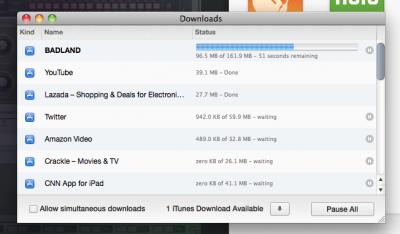
|
|
|
Sep 10 2015, 10:39 PM
|

Junior Member
17 posts Joined: Apr 2015
|
QUOTE(xperiaVuser @ Sep 10 2015, 10:15 PM) Okay my youtube was playing ok on 720/1080p before 9pm. Now it's buffering... I can only play 480p max for smooth video. Same. Has been like this for the past 2 days for me x_x |
|
|
Sep 10 2015, 10:42 PM
|

Senior Member
2,150 posts Joined: Feb 2006
|
Weird. Having random dc now. Reported.
|
|
|
Sep 10 2015, 10:42 PM
|
|
Staff
72,819 posts Joined: Sep 2005 From: KUL
|
QUOTE(KKW @ Sep 10 2015, 10:38 PM) Update via iTunes right? It seem I don't have any issue also I don't know about iTunes, I was saying Apps Store.
Usually I download straight from iPad, not using iTunes... I guess it will be affected. |
|
|
|
|
|
Sep 10 2015, 10:48 PM
|
|
Senior Member
2,954 posts Joined: Apr 2008
|
QUOTE(fruitie @ Sep 10 2015, 10:42 PM) I don't know about iTunes, I was saying Apps Store. Later I try update apps on iPad via Apps Store Usually I download straight from iPad, not using iTunes... I guess it will be affected. I see. Usually I leave my iPad on auto update. I don't bother to check  This post has been edited by KKW: Sep 10 2015, 10:50 PM |
|
|
Sep 10 2015, 10:57 PM
|
|
Staff
72,819 posts Joined: Sep 2005 From: KUL
|
Updating apps now on my iPad, amazingly fast.
 Hope it continues... Maybe not. Only one app is updated very quickly. The other two not slow but not too fast. Acceptable. Way better than few days ago.. This post has been edited by fruitie: Sep 10 2015, 10:59 PM |
|
|
Sep 10 2015, 11:18 PM
|

Junior Member
458 posts Joined: Oct 2011 From: A Lost Planet
|
QUOTE(pakji @ Sep 10 2015, 10:27 PM) vip10 always stable i wont take 30mbps yea.. i know what you mean.. i will take VIP20 because download 20mbps upload 20mbps both same = stable my area not available unifi so now i using streamyx 4mbps just heard that fruitie is getting amazing speed so got tempted..  |
|
|
Sep 10 2015, 11:34 PM
|

Senior Member
4,390 posts Joined: Oct 2004 From: Cheras, Malaysia 
|
I'm paying 169 @ 10mbps excluding gst. possible to get some sort of hypp tv package? My parents do watch it
|
|
|
Sep 11 2015, 12:05 AM
|
|
Senior Member
2,954 posts Joined: Apr 2008
|
QUOTE(fruitie @ Sep 10 2015, 10:57 PM) Updating apps now on my iPad, amazingly fast. Same like yours. First apps really fast get updated but the following apps wont move at all Hope it continues... Maybe not. Only one app is updated very quickly. The other two not slow but not too fast. Acceptable. Way better than few days ago.. |
|
|
Sep 11 2015, 01:28 AM
Show posts by this member only | IPv6 | Post
#2332
|

Junior Member
231 posts Joined: Jun 2014
|
Those who are on 30mbps package, i have questions for you guys
When you said the connection is not stable, have you try to connect direct to router thru wired connection instead of wireless? Im on 30mbps but i havent experience any instability in connection so far. Except that wireless connection is kinda on the low side, which i suspect caused by stock router. When i connect using lan cable directly, i can get full speed of 30mbps of download and 5 mbps of upload. |
|
|
Sep 11 2015, 07:07 AM
|
|
Senior Member
2,150 posts Joined: Feb 2006
|
QUOTE(hidayat14 @ Sep 11 2015, 01:28 AM) Those who are on 30mbps package, i have questions for you guys I only use cable in my apartment.When you said the connection is not stable, have you try to connect direct to router thru wired connection instead of wireless? Im on 30mbps but i havent experience any instability in connection so far. Except that wireless connection is kinda on the low side, which i suspect caused by stock router. When i connect using lan cable directly, i can get full speed of 30mbps of download and 5 mbps of upload. |
|
|
|
|
|
Sep 11 2015, 07:58 AM
|

Senior Member
1,182 posts Joined: Jan 2003
|
QUOTE(hidayat14 @ Sep 11 2015, 01:28 AM) Those who are on 30mbps package, i have questions for you guys This is especially true for users staying at high-rise apartments due to many interfering wireless access points from neighbors.When you said the connection is not stable, have you try to connect direct to router thru wired connection instead of wireless? Im on 30mbps but i havent experience any instability in connection so far. Except that wireless connection is kinda on the low side, which i suspect caused by stock router. When i connect using lan cable directly, i can get full speed of 30mbps of download and 5 mbps of upload. Even I am using an Asus RT-N12HP (With 9dBi high gain antennas), The best I could get is around 17Mbps if I am nearer to the router, but it can go as low as just 5Mbps if I am in my room, away from the router. There are just too many neighboring access points on all channels. Switching channels won't do much of a help anyway. It was worst in the past when I was using TP-Link WR841ND and TM's D-Link DIR-615, where I could get ping time of > 1000ms between device and router. I strongly recommend using direct cable (Ethernet) OR alternatively, the HomePlug technology (Ethernet over power lines). In both cases, when performing speed test, the speed peaks at close to 50Mbps before settling down around 30Mbps. |
|
|
Sep 11 2015, 08:05 AM
|

Junior Member
43 posts Joined: Nov 2006
|
30mb user here
After 8pm youtube , itunes and play store Donwload is super slow ... |
|
|
Sep 11 2015, 08:08 AM
|
|
Senior Member
3,034 posts Joined: Dec 2011
|
U can use AC router.
QUOTE(jolmy @ Sep 11 2015, 07:58 AM) This is especially true for users staying at high-rise apartments due to many interfering wireless access points from neighbors. Even I am using an Asus RT-N12HP (With 9dBi high gain antennas), The best I could get is around 17Mbps if I am nearer to the router, but it can go as low as just 5Mbps if I am in my room, away from the router. There are just too many neighboring access points on all channels. Switching channels won't do much of a help anyway. It was worst in the past when I was using TP-Link WR841ND and TM's D-Link DIR-615, where I could get ping time of > 1000ms between device and router. I strongly recommend using direct cable (Ethernet) OR alternatively, the HomePlug technology (Ethernet over power lines). In both cases, when performing speed test, the speed peaks at close to 50Mbps before settling down around 30Mbps. |
|
|
Sep 11 2015, 08:12 AM
|
|
Senior Member
1,182 posts Joined: Jan 2003
|
QUOTE(jusbella @ Sep 11 2015, 08:08 AM) U can use AC router. This may be a solution for those who still depend a lot on wireless.In my case, no need for it as I am using HomePlug now. WIreless is only used to connect smartphone. |
|
|
Sep 11 2015, 08:44 AM
|

Senior Member
1,305 posts Joined: Jan 2010 From: Jitra >> Putrajaya
|
QUOTE(jolmy @ Sep 11 2015, 07:58 AM) This is especially true for users staying at high-rise apartments due to many interfering wireless access points from neighbors. even on 5Ghz band ?Even I am using an Asus RT-N12HP (With 9dBi high gain antennas), The best I could get is around 17Mbps if I am nearer to the router, but it can go as low as just 5Mbps if I am in my room, away from the router. There are just too many neighboring access points on all channels. Switching channels won't do much of a help anyway. It was worst in the past when I was using TP-Link WR841ND and TM's D-Link DIR-615, where I could get ping time of > 1000ms between device and router. I strongly recommend using direct cable (Ethernet) OR alternatively, the HomePlug technology (Ethernet over power lines). In both cases, when performing speed test, the speed peaks at close to 50Mbps before settling down around 30Mbps. |
|
|
Sep 11 2015, 09:02 AM
|

Senior Member
3,892 posts Joined: Jan 2003 From: Back on earth!
|
QUOTE(jusbella @ Sep 11 2015, 08:08 AM) U can use AC router. No need to go and by AC router, just get a dual band router, that will do and connect at the 5GHz band. Most recent devices should support 5GHz band. |
|
|
Sep 11 2015, 09:54 AM
|

Junior Member
268 posts Joined: Apr 2014 From: dont harash me
|
QUOTE(fruitie @ Sep 10 2015, 12:33 AM) I was so happy on VIP10 after upgraded from VIP5, now even happier on 30Mbps. hi,Anyway, I suggest you to take up VIP10, the 10Mbps upload speed is useful to some. is the vip 10 having any promotion lately? coz when I ask the hotline they said its rm210 ++ |
|
Topic ClosedOptions
|
| Change to: |  0.0300sec 0.0300sec
 0.62 0.62
 6 queries 6 queries
 GZIP Disabled GZIP Disabled
Time is now: 10th December 2025 - 12:20 AM |
 Quote
Quote