Welcome Guest ( Log In | Register )

Bump Topic Topic Closed RSS Feed
4 Pages  1 2 3 > » Bottom

Outline · [ Standard ] · Linear+

 Huawei Honor 7 Official Thread v1, your unfair advantage!

views
     
Nuzzary
post Sep 29 2015, 11:30 AM

Getting Started
**
Junior Member
191 posts

Joined: Sep 2015
QUOTE(NightFelix @ Sep 29 2015, 10:42 AM)
Well, I was holding off for review/feedback before grab this Honor 7. lol laugh.gif
*
got my Honor 7 a while back as test unit, quite a wonderful phone to be exact.
still not done doing my review
next point is the finger print ID, that sensor can do wonders!!

Nuzzary
post Sep 29 2015, 05:33 PM

Getting Started
**
Junior Member
191 posts

Joined: Sep 2015
QUOTE(leeandy @ Sep 29 2015, 12:05 PM)
Just wondering honor 7 have this write on features after screenshot. Something like note 5 or lg g3 ...anyone who had the phone(honor 7) , kindly enlighten... Many thanks
*
Got.. can crop, grafiti (free hand edit) and mosaic to edit screenshot.
screenshop can be taken using knuckle method

refer video below
https://www.youtube.com/watch?v=MQ3K9e9KHEM

Nuzzary
post Sep 30 2015, 07:44 PM

Getting Started
**
Junior Member
191 posts

Joined: Sep 2015
QUOTE(azeemzuhair @ Sep 30 2015, 06:26 PM)
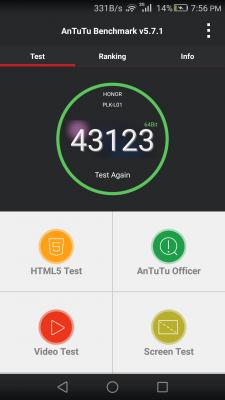
Please post Antutu result for Stock ROM. I wanna root to see the difference later.
*
Antutu 32bit
Attached Image

Antutu 64bit
Attached Image

This post has been edited by Nuzzary: Sep 30 2015, 07:59 PM
Nuzzary
post Nov 5 2015, 11:11 PM

Getting Started
**
Junior Member
191 posts

Joined: Sep 2015
QUOTE(VeeJay @ Nov 5 2015, 03:47 PM)
Apparently there is a data usage screen...but i'm not sure where it is located?

Maybe some guru here could point it out...

[attachmentid=5244229]
*
Here you go..
http://www.mytechgarbage.net/2015/11/honor...data-limit.html

There are more available hidden option there for you to explore
Nuzzary
post Nov 5 2015, 11:12 PM

Getting Started
**
Junior Member
191 posts

Joined: Sep 2015
QUOTE(yusukezz @ Nov 5 2015, 11:08 PM)
How do you boot into fastboot? I can't seem to enter the fastboot mode even I press volume down+ power key
*
Press volume down + powerkey while plug in to USB

Nuzzary
post Nov 16 2015, 12:02 PM

Getting Started
**
Junior Member
191 posts

Joined: Sep 2015
QUOTE(ed0gawa @ Nov 16 2015, 08:40 AM)
I have a quick question regarding the B120 manual upgrade.

It will erase all my data? (Apps,photo etc?)
*
Nope.. Inline update without data wipe
I'm on b120 now

Nuzzary
post Nov 16 2015, 12:08 PM

Getting Started
**
Junior Member
191 posts

Joined: Sep 2015
QUOTE(espreeko @ Nov 15 2015, 02:13 PM)
Hi bros with Honor 7,

any concerns with how the EMUI is handling the google apps' notifications? I read on a review, emails from gmail or hangouts (basically google apps) may not get their notifications displayed on the lockscreen.

Next will be when receiving multiple emails, whatsapp messages, missed calls etc. does it group them together and you cant expand to see them without going into the app itself?

Another point they cited was, lollipop allows quick "expansion" of supported apps like gmail, whatsapp etc to "quickly read the first lines of the email/message even on the notification on the lockscreen AND also the notification tray." but expanding and before going into the app itself.

Are you able to share a little more info with me? i'm trying real hard to find a place that I can hands-on with a LIVE device before confirming my purchase.
*
By default notification are only on status bar but you could change it to be available on lock screen (personally I don't like it so I never turn it on).. Will try enabling it and revert back later

Nuzzary
post Nov 16 2015, 12:33 PM

Getting Started
**
Junior Member
191 posts

Joined: Sep 2015
QUOTE(jackjack1988 @ Nov 16 2015, 12:17 PM)
I went to Hua Wei in Leisure Mall and Tropicana City Mall .
Both outlets do not have any display unit for testing.
Any stores that have the display unit for me to test ? In Klang Valley preferably.
*
Normally they won't have except phone shop that bought from vmall and resell the phone (extra markup cost)..


Nuzzary
post Nov 16 2015, 12:36 PM

Getting Started
**
Junior Member
191 posts

Joined: Sep 2015
QUOTE(Nuzzary @ Nov 16 2015, 12:08 PM)
By default notification are only on status bar but you could change it to be available on lock screen (personally I don't like it so I never turn it on).. Will try enabling it and revert back later
*
Test it on my phone, no notification on lock screen for gmail on mine.. Most app have notification but not gmail and maybe other gapps also..


Nuzzary
post Nov 18 2015, 08:01 PM

Getting Started
**
Junior Member
191 posts

Joined: Sep 2015
QUOTE(alvanyap @ Nov 17 2015, 09:42 PM)
just now i try to:

1. Unlock bootloader = SUCCESS
2. Flash china official rom 5.1.1 for UL-00 = FAILED
3. Flash EU B121 Rom = IN PROGRESS

seems like can't flash across different model code
*
Different model use different hardware configuration (radio type and frequency) so in short can only same model
Nuzzary
post Nov 18 2015, 08:03 PM

Getting Started
**
Junior Member
191 posts

Joined: Sep 2015
QUOTE(alvanyap @ Nov 18 2015, 09:21 AM)
after 1 night test, i manage to flash EU B121 rom, however i cant apply any OTA update after B121...which consider pretty useless  rclxub.gif  rclxub.gif
*
Can.. I did mine.. The trick is to reinstall the B121 using manual update (update.app) to overwrite any other checks.. Did mine already and I'm currently on B140 😜
Nuzzary
post Nov 19 2015, 08:23 AM

Getting Started
**
Junior Member
191 posts

Joined: Sep 2015
QUOTE(alvanyap @ Nov 18 2015, 10:57 PM)
Did you flash b121 using bootloader too?I can't manage to flash using key combination  so I flash by using fastboot(extract out the system.img, recovery.img, boot.img & userdata.img)

Would you mind to share your step?
*
This is how I did it (no data lost / wipe)
Using fastboot flash these
1. CUST (change the build CUST ID)
2. BOOT
3. System

Reboot and copy update.app to storage (the same b121)
Install update.app using internal EMUI update tool
Install B140 OTA update

I still kept my old data as this is my primary phone now since my wife took my trusted nexus 4.

Have fun!!
Nuzzary
post Nov 19 2015, 08:26 AM

Getting Started
**
Junior Member
191 posts

Joined: Sep 2015
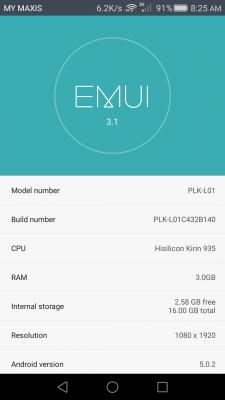
Purposely put telco name up there to show it is my own screenshot

This post has been edited by Nuzzary: Nov 19 2015, 08:28 AM


Attached thumbnail(s)
Attached Image
Nuzzary
post Nov 19 2015, 11:12 AM

Getting Started
**
Junior Member
191 posts

Joined: Sep 2015
QUOTE(KidsCode @ Nov 19 2015, 10:38 AM)
Would like to check, if anyone encounter this issue.

ROM - Latest EMUI
Bootloader - Unlock
ROM - Rootted

The problem on Titanium Backup unable to backup / write to SD Card. The SD card is not write protective, but in TB it mentioned "folder is not writable"

Search around the issue mentioned before but it was at old KitKat versions and also mentioned problem on SD Card (that is not the case)
*
Found this on XDA don't know if could fix your issue or not

change a setting in Preferences - Backup folder location. Near the top is Storage Provider. Click and change to Documentprovider.


Nuzzary
post Nov 19 2015, 12:10 PM

Getting Started
**
Junior Member
191 posts

Joined: Sep 2015
QUOTE(alvanyap @ Nov 19 2015, 11:15 AM)
i didnt c any CUST.img in my downloaded B121 firmware  rclxub.gif  (but i did c it on malaysia B120 firmware shakehead.gif )
where you download the B121 firmware?from modacco?
*
Yup.. Downloaded it from there as i can't find other place
It's inside the update.app


Attached thumbnail(s)
Attached Image
Nuzzary
post Nov 20 2015, 07:22 PM

Getting Started
**
Junior Member
191 posts

Joined: Sep 2015
QUOTE(Leon be here now @ Nov 20 2015, 01:59 PM)
Oh thanks I think i will keep using B100 for now, will update when more people say its fine.
Didnt realise update to B120 is that easy, just check update on phone and click.
I though i need dl rom then use pc to flash it or something.
*
B120 update start already for OTA.

Nuzzary
post Nov 21 2015, 09:43 AM

Getting Started
**
Junior Member
191 posts

Joined: Sep 2015
QUOTE(minami_ke @ Nov 21 2015, 09:19 AM)
Hey Honor 7 users,
I have zenfone 2 and honor 7 as my 1st smarthphone choices.
I have a thread asking opinions here: https://forum.lowyat.net/topic/3781542. Zenfone 2 got bashed. haha
As a heavy user, storage is important to me, can l put most apps, games and data into the SD card? Any good bad ugly experience (hardware and software issue) with honor 7, other than less powerful GPU power and storage? 64gb version and honor 7 plus can cost up to rm2000 from overseas. sweat.gif Mostly scared product kena damage or scammed if buy online.
Any other better alternatives? As I will be in KL in early December.
*
You could move the "supported" app to sd card manually from settings > app.

Good : nice build, beautiful design, fast finger print sensor, 20mp camera (PDAF), 8mp front camera + flash, multiple gesture control

Bad : video is only HD (no 4k), small storage, second sim / sdcard (expand storage no second sim vice versa), phone accessories are still minimal, internal battery

Ugly : battery is only 1 day or 1.5 day max, no 3rd party ROM yet


Nuzzary
post Nov 21 2015, 04:08 PM

Getting Started
**
Junior Member
191 posts

Joined: Sep 2015
QUOTE(VeeJay @ Nov 21 2015, 02:31 PM)
Majority of the smartphone has similar lifeline for battery...dont you think so?
*
Could be better IMHO..
Don't like the idea of fast charging trump over battery life. I know H7 could support fast charging but some people (like me) don't have power bank


Nuzzary
post Nov 22 2015, 04:31 AM

Getting Started
**
Junior Member
191 posts

Joined: Sep 2015
If really want to look at G8, honor would have around the similar spec somewhere next year when Honor 5x arrive at our shore.. No official news yet on the availability (understandable because it would kill G8 market) but if you want that spec, honor is making a lower priced version with Honor 5x..
Nuzzary
post Nov 22 2015, 08:06 PM

Getting Started
**
Junior Member
191 posts

Joined: Sep 2015
QUOTE(a-ei-a @ Nov 22 2015, 07:55 PM)
Just wondering, can we use H7 fingerprint for mobile banking login?
*
Only Marshmallow (android 6.0) have finger print security API for app but again even if you are using Nexus (android 6.0) the app must be able to use the API first..

The short answer cannot, but you'll never know once Honor 7 have Marshmallow and internet banking app use the new features..


4 Pages  1 2 3 > » Top
Topic ClosedOptions
 

Change to:
| Lo-Fi Version
0.0509sec    0.26    7 queries    GZIP Disabled
Time is now: 7th December 2025 - 09:56 PM