

uTorrent = 0.5KB/s (total)
eMule = 2.0KB/s (total)
HTTP = 4.0KB/s
FTP = 3.5KB/s
Throttled badly. I speculate last 2 days of down time could be due to upgrading their packet shaper.

Please update your BT download speed here, Update your latest BT download speed
|
|
  Jan 11 2007, 09:58 PM Jan 11 2007, 09:58 PM
Return to original view | Post
#1
|
 
VIP
18,182 posts Joined: Jan 2005 From: Dagobah 
|
1Mbps package (soon will downgarde)
uTorrent = 0.5KB/s (total) eMule = 2.0KB/s (total) HTTP = 4.0KB/s FTP = 3.5KB/s Throttled badly. I speculate last 2 days of down time could be due to upgrading their packet shaper. |
|
|
|
|
|
 Jan 14 2007, 08:30 PM Jan 14 2007, 08:30 PM
Return to original view | Post
#2
|
|
VIP
18,182 posts Joined: Jan 2005 From: Dagobah
|
still 0KB/s total from international IPs.
 local IPs OK  |
|
|
Jan 15 2007, 12:49 AM
Return to original view | Post
#3
|
|
VIP
18,182 posts Joined: Jan 2005 From: Dagobah
|
QUOTE(yetieater @ Jan 14 2007, 08:31 PM) It's a real problem if you're trying to download relatively obscure stuff. That's my problem (also why mine had no local seeds). Screamyx is killing my downloads.  QUOTE(yetieater @ Jan 14 2007, 08:31 PM) Wonder when they'll open up the restraints a bit. I don't think so. They never even bothered to use traffic load balancing, just simply "throttle to death". My seeds also always gets disconnected.  |
|
|
 Jan 15 2007, 06:18 PM Jan 15 2007, 06:18 PM
Return to original view | Post
#4
|
|
VIP
18,182 posts Joined: Jan 2005 From: Dagobah
|
Actually those speeds can be misleading. If you are downloading mostly from local IPs, then you can reach those kind of speeds. But from outside (international IPs), it may not look so rosy (unless on VPN of course). Try to differentiate between local and foreign sources...
|
|
|
 Jan 16 2007, 02:33 PM Jan 16 2007, 02:33 PM
Return to original view | Post
#5
|
|
VIP
18,182 posts Joined: Jan 2005 From: Dagobah
|
I've checked that out few days ago, those who are getting "super duper speeds" here is because you are mostly downloading from local seeders (unless you are on VPN or other bypass methods).
 |
|
|
Jan 16 2007, 11:16 PM
Return to original view | Post
#6
|
|
VIP
18,182 posts Joined: Jan 2005 From: Dagobah
|
Reporting in to the 0KB/s club! All peers are international ones (mostly in Europe!) and its hasn't budged much since November!!
 Attached thumbnail(s) 
|
|
|
|
|
|
Jan 17 2007, 12:42 PM
Return to original view | Post
#7
|
|
VIP
18,182 posts Joined: Jan 2005 From: Dagobah
|
Tried it just now.. Still the same, 0KB/s from international peers while local peers OK.
 |
|
|
 Jan 17 2007, 10:59 PM Jan 17 2007, 10:59 PM
Return to original view | Post
#8
|
|
VIP
18,182 posts Joined: Jan 2005 From: Dagobah
|
By the way.. TMNutz switched off their packet shaper for a while just now... See pix attachment.. Even though I limit my download speed, see how much UNUSED bandwidth!!
 Best ping times when Packet shaper OFF Local ~ 9ms! Singapore ~ 120ms USA & rest of the world ~ 260ms Now ping times when Packet Shaper ON Local ~ 46ms! Sinagpore ~ 510ms! USA & rest of the world ~ 2150ms  *Sigh* This post has been edited by lex: Jan 17 2007, 11:00 PM Attached thumbnail(s) 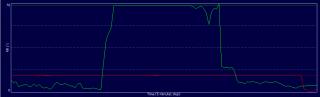
|
|
|
 Jan 18 2007, 01:25 AM Jan 18 2007, 01:25 AM
Return to original view | Post
#9
|
|
VIP
18,182 posts Joined: Jan 2005 From: Dagobah
|
It seems the packet shaper is somewhat off again (maybe on some routes). My downloads just flew again. Ping times to Singapore gets even better now! Sometimes 86ms!!!
 Edit: USA & rest of the world still 2+ seconds... I did get about 260~500 back then... This post has been edited by lex: Jan 18 2007, 01:46 AM |
|
|
 Jan 18 2007, 12:58 PM Jan 18 2007, 12:58 PM
Return to original view | Post
#10
|
|
VIP
18,182 posts Joined: Jan 2005 From: Dagobah
|
Now can't connect to any peers. Back to 0KB/s again. WEB BROWSING HAS ALSO SLOWED DOWN!!
Ping times now Local ~ 1100ms!  Sinagpore ~ 1200ms! USA & rest of the world ~ 1500ms ?! Conclusion is they now back to their original BT throttling packet/traffic shaper again! Explanation on yesterday night and this morning sudden speed up and slow downs from my monitoring.... The first speed up is they bypassed the packet shaper. That accounts for the incredible speedup I got yeaterday plus the back to normal ping times I had (local ~ 9ms!). They were probably testing something out then... Then they started switching routes to another packet shaper which does not throttle encrypted torrent connections BUT capable of blocking tracker connections - probably using simple pass thru protocol inspection, and not deep packet inspection. This caused all those "connection reset by peer" errors. Ping times also jumped suddenly (local ~ 62ms!) Then today morning, they are back the original packet shaper (which does deep packet inspection) that throttles and keeps disconnecting encrypted torrent connections. Ping times went crazily high (local ~ 900ms!!) What say you? This post has been edited by lex: Jan 18 2007, 01:01 PM |
|
|
Jan 18 2007, 01:38 PM
Return to original view | Post
#11
|
|
VIP
18,182 posts Joined: Jan 2005 From: Dagobah
|
There seems to be two different shapers I've noticed
1. Allows connection to tracker BUT throttles encrypted BT, ridiculously high ping times! (deep packet inspection type) 2. Kills connection to tracker BUT does not throttle encrypted BT, higher than usual ping times! (simple pass thru protocol inspection type) Either way, its not looking good... |
|
|
Jan 20 2007, 01:18 PM
Return to original view | Post
#12
|
|
VIP
18,182 posts Joined: Jan 2005 From: Dagobah
|
10KB/s here, mostly locals... internationals are sunk..
QUOTE(sasaug @ Jan 20 2007, 12:57 PM) at least now i am blasting with 16-31 kbps download speed...... That's because most probably they stopped screwing HTTPS connections for the moment being. No errors today either (on my monitoring). Seems to have stopped for now... (Speculated) They could be using protocol inspection shaper to "jam" torrent connections (from outside).. |
|
|
Jan 20 2007, 08:19 PM
Return to original view | Post
#13
|
|
VIP
18,182 posts Joined: Jan 2005 From: Dagobah
|
One of my stuck ones from November last year until now....
19 hours of electricity wasted today... Attached thumbnail(s) 

|
|
|
|
|
|
Jan 21 2007, 11:20 AM
Return to original view | Post
#14
|
|
VIP
18,182 posts Joined: Jan 2005 From: Dagobah
|
TMNutz shaper is cutting off all international connections. You can see the peer (in the peer list from tracker or from DHT) but you cannot connect to it, or the peer cannot connect to you...
» Click to show Spoiler - click again to hide... « I think most communications are using DHT. That would explain the slow speeds (often less then 1KB/s) in both mule and BT |
|
|
Jan 21 2007, 12:21 PM
Return to original view | Post
#15
|
|
VIP
18,182 posts Joined: Jan 2005 From: Dagobah
|
jubz, for your solution of torrents sucking up your bandwidth = limit your torrent client upload (and download) speed. If you noticed my graphs, I only limit to 35%~75% download and 33% upload.. That way I can surf and play while downloading/uploading.
This post has been edited by lex: Jan 21 2007, 12:23 PM |
|
|
Jan 21 2007, 12:57 PM
Return to original view | Post
#16
|
|
VIP
18,182 posts Joined: Jan 2005 From: Dagobah
|
My almost 3 month old torrent still at standstill 0KB/s.. Downloaded 0 Bytes.
And I have one mamoth 38GB coming in at a miserly 1KB/s, even they are from local seeds..  Al international seeds are "jammed". |
|
|
Jan 22 2007, 07:09 PM
Return to original view | Post
#17
|
|
VIP
18,182 posts Joined: Jan 2005 From: Dagobah
|
International: Speed 0KB/s, Downloaded 0 bytes
Don't be mislead by the total download speed from overseas peers. Observe the peer list... always connect, gets 0.1Kb/s~0.5KB/s per peer, then disconnect! Downloaded nil bytes... Coming to 3 months running and I haven't completed one of my downloads. This post has been edited by lex: Jan 22 2007, 07:10 PM |
|
|
Jan 22 2007, 11:00 PM
Return to original view | Post
#18
|
|
VIP
18,182 posts Joined: Jan 2005 From: Dagobah
|
QUOTE(DragLung @ Jan 22 2007, 08:30 PM) really so bad? what are you downloading? use local tracker if possible, who cares about international peers as long as can complete download That's the problem... The stuff I'm downloading currently do not have any local peers... which means it ain't one of the "popular" downloads. And you can't buy it here either. 2 days since I restarted it, still zip.  Attached thumbnail(s) 
|
|
|
Jan 24 2007, 02:53 PM
Return to original view | Post
#19
|
|
VIP
18,182 posts Joined: Jan 2005 From: Dagobah
|
You can also convert between uTorrent, BitSpirit and BitComet. Before starting, in uTorrent go to "Preferences -> Downloads" and enable "Append !ut to incomplete files" (see the attached image...).
Download XP PowerToys CmdHere and install. After that, right click on the download Folder (which contains incomplete files) and select "Command Prompt Here". Type in the following commands... For uTorrent -> BitSpirit: REN *.!UT *.BT! For BitSpirit -> uTorrent: REN *.BT! *.!UT For uTorrent -> BitComet: REN *.!UT *.BC! For BitComet -> uTorrent: REN *.BC! *.!UT For BitComet -> BitSpirit: REN *.BC! *.BT! For BitSpirit -> BitComet: REN *.BT! *.BC! Alternatively if you are lazy to type it again and again, you can create a BAT file for each of these commands (e.g. "BT2UT.BAT") and place them under WINDOWS folder, and run it in this command prompt window (e.g. type "BT2UT"). This post has been edited by lex: Jan 24 2007, 02:57 PM Attached thumbnail(s) 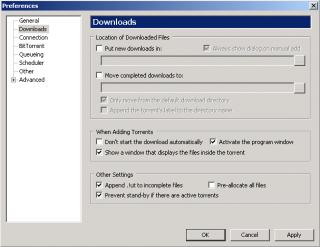
Attached image(s)  |
|
|
Jan 24 2007, 06:33 PM
Return to original view | Post
#20
|
|
VIP
18,182 posts Joined: Jan 2005 From: Dagobah
|
HeHeHunter, you may want to look into this one I've posted: Batch rename for uTorrent, BitSpirit & BitComet, Convert incomplete files per folder....
 |
| Change to: |  0.0374sec 0.0374sec
 0.33 0.33
 7 queries 7 queries
 GZIP Disabled GZIP Disabled
Time is now: 7th December 2025 - 11:05 AM |
 Quote
Quote