Welcome Guest ( Log In | Register )

Outline · [ Standard ] · Linear+

Unifi Choosing the correct Unifi router (own experience), TP-Link vs Asus for Unifi

views
     
westlife
post Dec 9 2016, 09:42 PM

10k Club
********
All Stars
14,277 posts

Joined: Jan 2011
QUOTE(rosizzat1000 @ Dec 8 2016, 12:31 AM)
My suggestion is to get a very good router that can cover that specific area u wanted because the wifi extender is the worst thing to use on a dead spot zone. Yes it can drag the coverage to that area but bear in mind it is unstable at all and drop the speed so much.

Note: I'm still reading all the posting to understand and learn what is the best router to get for longer range. Currently using Tplink AC750. But my problem is the coverage still can't reach very well into my room. Cant even stream movie using android box because of the dead spot.
*
No point to spend extra money for a super good wifi wireless router. The current TP-link AC wireless router that is given by TM is more than enough. It is the good decent wireless router considered that it is free.

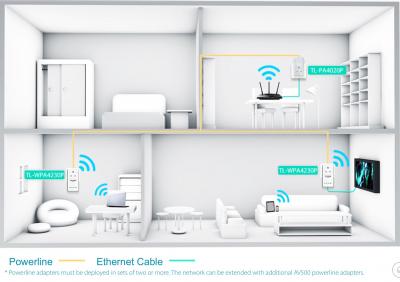
The best device that one can buy to extend the wireless network at home is homepage. TP-link home plugs are excellent. Cheap and good. Wired/wireless one u have all the choices to pick from.

Never buy those wifi extenders, they are the most useless devices. As they function like repeaters, u need to place the extenders very close to the coverage of the original wireless routers which it defeats the purpose, and it gets frequent disconnections easily.
westlife
post Dec 10 2016, 03:27 AM

10k Club
********
All Stars
14,277 posts

Joined: Jan 2011
QUOTE(rosizzat1000 @ Dec 10 2016, 02:25 AM)
Indeed. I just tried a diff router and the result still the same. Been reading about the powerline adapters too. But a friend of mine said that device drops the speed as well. Doesn't it works about the same like wifi extenders? From what u are saying, it works like I put another router at another area. Does it true?
*
homeplug like the tp-link powerline is using electricity to carry data, so u can place the home plug anywhere in ur house to extend ur existing network. so technically it does not have limitation in terms of coverage depending u are using wired/wifi homeplug.

yes, if u buy the wireless enabled home plug, it works like access point that extend the ur existing wireless network but the main difference comparing to wifi extender is that it does not need to be placed in the original wifi router coverage area but anywhere u like as long u have the power socket at the location u want.

Home plug is the best solution for home users to extend their network for coverage and it is definitely stable enough as long as u have the home plug attached (directly) to the power socket and NOT via power extension. with that, u should get the best result and it should not have dropped connections at all unless ur home existing electricity sockets are having quality issues. If this is also not stable enough solution, u can forget about anything else in the market currently.

i personally had tried all the products and i only statisfy with homeplug and not anything else as I meed to cover my upper level of my home for wireless. home plug is a cheapest and most reliable solution currently.

u can even use it to allow u to place ur hypptv box anywhere of ur house near to any other power sockets instead of next to ur wireless router now as hypptv box must be connected to the vlan 600 of the particular ethernet port of ur wireless router that is configured to allow hypptv to work.


This post has been edited by westlife: Dec 10 2016, 03:38 AM
westlife
post Dec 10 2016, 04:52 AM

10k Club
********
All Stars
14,277 posts

Joined: Jan 2011
QUOTE(calvinlaw510 @ Sep 28 2016, 06:43 PM)
I got this 2 routers from TM. Archer C5 have better wifi coverage. Dir850L have extra features like free dlinkddns, can assign vlan on wifi and guess wifi(can connect new Hypptv STB through wifi and watch hypptv).

Stability wise Archer C5 i tested almost a month now, no hang, no disconnection, i connected with 6 to 12 devices. Dir850L i only tested for few days, as the wifi cant cover my 2 story house and i have faced wifi speed degradation after few days using and have to reset the router to restore the speed.
*
Dir850l can do vlan tagging on wifi? that's cool. Because the archer c5 I have did not have the function. I have two unifi installation done on two different locations within this 1 month time. Both I am given the TP-link Acher C5 wireless routers. Both I registered online via TM website.

The coverage is actually really good comparing to any wireless routers I have owned to date.

the cons is that the hypptv cannot work over wifi and must be wired as it needs to be on vlan 600. For my own home, no issue as my wireless router is placed in living room and my hypptv box and tv are both next to the wireless router.

However, for my parent house, I need to place the hypptv box for a tv at a location that is slightly further from the wireless router which I will need either a long utp cable to connect (ugly) and need to find a king cable or I need a home plug to make it work.

Dlink the design is actually very unique which I quite like. Just that I do not like this brand.

This post has been edited by westlife: Dec 10 2016, 05:44 AM
westlife
post Dec 10 2016, 09:38 AM

10k Club
********
All Stars
14,277 posts

Joined: Jan 2011
QUOTE(rosizzat1000 @ Dec 10 2016, 02:25 AM)
Indeed. I just tried a diff router and the result still the same. Been reading about the powerline adapters too. But a friend of mine said that device drops the speed as well. Doesn't it works about the same like wifi extenders? From what u are saying, it works like I put another router at another area. Does it true?
*
This will be a very good illustration of it.
Attached Image

Attached Image

Attached Image

Attached Image

This post has been edited by westlife: Dec 10 2016, 10:54 AM


Change to:
| Lo-Fi Version
0.0241sec    0.80    7 queries    GZIP Disabled
Time is now: 10th December 2025 - 03:57 AM