Outline ·
[ Standard ] ·
Linear+
GPS (general: wat is it? how does it work?), Get your answers here!
|
denver
|
 Oct 5 2008, 12:00 AM Oct 5 2008, 12:00 AM
|

|
I can't seem to get my GPS to work anymore. When I key in a destination, it will calculate the route and distance based on the last "start point", and it just stops there. The GPS didn't locate my current position and recalculate the route (despite having set the "Start: By GPS" option).
I'm using Mapking 2007 on Asus P750. It used to work fine. Does anyone know how to solve this problem?
|
|
|
|
|
|
denver
|
Oct 6 2008, 09:00 PM
|
|
|
QUOTE(vhs1 @ Oct 6 2008, 01:56 AM) your GPS is not on and not log into the sat yet, i think I thought so too, but the GPS stream shows lots of data "coming in" or streaming into my PDA. Anyway, how to manually log on to the satellite? |
|
|
|
|
|
denver
|
Oct 7 2008, 07:00 PM
|
|
|
QUOTE(vhs1 @ Oct 7 2008, 01:07 AM) click GPS (satellite pic)
wait till you get at least 3 blue bars (more is better) The problem is, my signal bars only has a quesiton mark (?) on it. No blue bars at all. Last time, I had to wait a while and the blue bars would appear and everything would work. Now, only the the question mark appear. But when I click on GPS Status -> Stream, I see lots of data coming in. But no signal. Weird. |
|
|
|
|
|
denver
|
Oct 8 2008, 03:00 PM
|
|
|
QUOTE(vhs1 @ Oct 8 2008, 01:01 AM) i think reinstall the software first & see how; or the gps module has gone kaput ( i could be wrong as i m not that an expert) visit your pda shop and ask for opinions will be the better move if after reinstall still cant get a lock on check COM ports whether its the correct figure (some one mentioned you can get it auto detect), try it too Ok, I'll go back to PDA expert and ask them to re-install MapKing. Thanks. |
|
|
|
|
|
denver
|
Oct 8 2008, 11:32 PM
|
|
|
QUOTE(borneo @ Oct 8 2008, 06:44 PM) Perhaps thats the best to do...... seems more like software problem. But b4 reinstalling, have u tried varying the baudrate? Different hardware works better on certain baudrate. What is baudrate? And how do I change it? |
|
|
|
|
|
denver
|
Oct 12 2008, 10:42 PM
|
|
|
QUOTE(borneo @ Oct 9 2008, 05:50 PM) Tools>gps settings>baudrate Since u are able to pick up data stream, your com port is correct. Just try varying different baudrates. While testing, make sure u are out in the open!  I can't seem to find the baudrate. I went to the Tools in Mapking 2007, click on GPS Settings but there were no baudrate listed there. |
|
|
|
|
|
denver
|
Oct 13 2008, 10:30 PM
|
|
|
Thanks guys. I've finally found the baudrate settings. I was looking at the wrong place (under Settings). Anyway, I've attached some screenshots to show my current GPS settings when I switch it on. When I change the GPS Setting to Auto-Detect, just like in Baronic's screenshots, still nothing. In Tools, when I click on Search GPS, it says that GPS Found! But when I switch to map mode, it doesn't detect where I am now. And the GPS signal bar shows a question mark (?) instead of the signal bars. QUOTE(Deani_77 @ Oct 13 2008, 09:36 PM) Slow GPS connection or slow getting GPS Fix. One thing you need to remember if you didn't turn on your GPS for a long time for sure it will take longer time to get GPS Fix, I remember there is term called Cold Start ,Warm Start and Hot Start I haven't turned on my GPS for a few weeks already. The longest I waited was almost 20 minutes. Even for Cold Start, I dont think it should be that long, right? Attached thumbnail(s)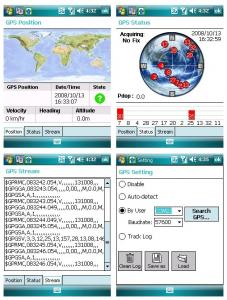
|
|
|
|
|



 Quote
Quote

 0.0259sec
 0.30
0.30
 7 queries
 GZIP Disabled