Welcome Guest ( Log In | Register )

7 Pages « < 3 4 5 6 7 >Bottom

Outline · [ Standard ] · Linear+

 New Unifi IPTV Box - Huawei EC6108V8, Need some help on configuration and tips

views
     
OCMAX
post Jun 7 2017, 12:29 AM

Enthusiast
*****
Senior Member
858 posts

Joined: Jan 2003


QUOTE(voncrane @ Jun 7 2017, 12:08 AM)
He no use latest Kodi V17.3, Loses.. And yes, you and I know better addons than Exodus.. In fact, I haven't had to resort to Exodus for quite awhile.. You offer me good price and honest, I'll ship this box to you..  brows.gif
*
I thought you said is useless. Give lar. rclxm9.gif

To be frank! I have not been using Kodi v17.3 to watch any movies for sometime. I'm using few good android apps that can replaced Kodi. Load Much faster and easy to access. Not to mention KODI in the white box in my bedroom has not been using for months. LOL laugh.gif

For Europe Live stream channels. Playersklub new apk that works with TV box has no problem. The only thing are their server still in beta mode. LOL laugh.gif

as for my favorite Chinese Live stream has been replaced with android apps. TVB dramas can play with RSS media player. no issue at all.

The only ISSUE are official KODI dev. They're SUCKS. LOL laugh.gif laugh.gif laugh.gif

This post has been edited by OCMAX: Jun 7 2017, 08:04 AM
OCMAX
post Jun 14 2017, 10:39 AM

Enthusiast
*****
Senior Member
858 posts

Joined: Jan 2003


QUOTE(keewah @ Jun 14 2017, 09:58 AM)
By the way, want to ask Sifu here,

I just 'downgrade' my white huawei box from the mandatory update last few months .

Still with the old firmware, I install a few Apps such as Kodi and Astro_On_The_Go.

I would like to ask , if I now enable the update , can my apps still works after the firmware upgrade ..

The reason i wanted to upgrade is that, i would like to use build-in app [iflix] within the Hypptv app.

thanks.
*
After the updates. the apps you installed previously should be working. Mine did but the playstore and google setting will not work anymore.
OCMAX
post Jun 14 2017, 03:20 PM

Enthusiast
*****
Senior Member
858 posts

Joined: Jan 2003


QUOTE(math @ Jun 14 2017, 02:22 PM)
Hi,
Just need to know whether we can use the remote to input alphabet? (I tried to setup the wifi and iflix but only number can input using remote.) Or it is impossible? still need to connect keyboard?
*
The screen keyboard should appear. If not you might have removed it accidentally?

Or you can get a RF mini-keyboard that comes with a USB plug-in. Is pretty cheap and useful.
OCMAX
post Jun 14 2017, 04:22 PM

Enthusiast
*****
Senior Member
858 posts

Joined: Jan 2003


QUOTE(chrischiang @ Jun 14 2017, 03:56 PM)
hello! im just upgrade to unifi yesterday.. and the hypptv box i got i suppose it to be the latest firmware(without play store).. do you mind share me the old firmware that having the play store?? thanks!
*
Pleased give credit to Faizal. https://blog.faizalnordin.com/english-huawe...08v8-playstore/
OCMAX
post Jun 18 2017, 11:49 AM

Enthusiast
*****
Senior Member
858 posts

Joined: Jan 2003


QUOTE(TOMEI-R @ Jun 18 2017, 11:15 AM)
My box refused to boot pass the "Starting" page yesterday night. Had to hard reset and install everything again. Anybody experienced the same issue before and do we have to properly turn off the box (ie shutting it down properly) before turning off the plug?
*
Did you disable some default apps to clear up space for Kodi?

lately some kodi addons are the culprit of conflicts. It doesn't close properly.

But I have not experience couldn't boot. More like kodi doesn't close properly that I have to used force stop (might be due to auto updates issue). After I removed some repo that might be the cause. it works find now.
OCMAX
post Jun 18 2017, 02:30 PM

Enthusiast
*****
Senior Member
858 posts

Joined: Jan 2003


QUOTE(lyt25_1234 @ Jun 16 2017, 03:42 PM)
Can we change the STB ethernet port to become Internet port?

Cuz right now it's only for IPTV port.
*
Yes! you can do that by going to the router setting. http://192.168.0.1 the password should be at your STB. the installer normally put a sticker on the router. the name & password are written on the sticker.

But once you changed the vlan bridge. you can no longer watch hypptv channels if you don't configure another dedicated wifi port for these purposed.

QUOTE(TOMEI-R @ Jun 18 2017, 02:02 PM)
I think I did.. But it was running fine prior to this. So I wouldnt suspect it to be the reason. Should I disable playstore auto update? I suspect that would be the cause.
*
A lot of people didn't aware after you have installed more apps and kodi into the hypptv STB. it left only 2-3++mb memory space available.

You have to free up the memory during the initial stage. Low memory can be one of the factor if playstore start to auto updates the apps in the system.

To free up the space you can do that with Kodi. Disable all useless apps & google related stuff. Since we normally installed/side load apk. ES explorer can do the job.

The only downside after removing google account manager are you can no longer able to synchronize youtube account. But the standalone youtube TV app works (search function and playback).

Anyway! the main objective to free up the memory is to let the other apps to run smoothly which is the most important. Right! smile.gif

This post has been edited by OCMAX: Jun 18 2017, 08:38 PM
OCMAX
post Jun 19 2017, 03:32 PM

Enthusiast
*****
Senior Member
858 posts

Joined: Jan 2003


Just sharing!

When I called TM to report my TM Silver box faulty. The service center told me if the box damaged by lightning. It's not under warranty and it will cost me RM150.00 only.

SO my guess if you called service center and report your box are now faulty by any means. It will cost you RM150.00 if you are not covered by the warranty.

I got lucky to replaced for free after I told them my unit LCD was not working and not damaged by lightning because I can see the display on my TV. Only the LCD are faulty. After a few days the technician came and changed both the STB & Router for me without even check the old system. I got a free replacement upgrade to the white STB. smile.gif

This post has been edited by OCMAX: Jun 19 2017, 03:32 PM
OCMAX
post Jul 2 2017, 04:11 PM

Enthusiast
*****
Senior Member
858 posts

Joined: Jan 2003


QUOTE(dennis008 @ Jul 2 2017, 02:20 PM)
anyone know how to hard reset the tvbox?? mine stuck at starting page
*
https://blog.faizalnordin.com/english-huawe...08v8-playstore/
OCMAX
post Jul 4 2017, 02:06 PM

Enthusiast
*****
Senior Member
858 posts

Joined: Jan 2003


Search for ES File Explorer pro. 'ad-free"
OCMAX
post Jul 4 2017, 03:01 PM

Enthusiast
*****
Senior Member
858 posts

Joined: Jan 2003


QUOTE(burdiespooler @ Jul 4 2017, 02:59 PM)
Guys, recently cannot stream video from those bundled apps from shafa guanjia. Any workaround?
*
A lot of the Chinese apps now are geo-blocked. You need VPN to work with the apps now.
OCMAX
post Jul 4 2017, 04:26 PM

Enthusiast
*****
Senior Member
858 posts

Joined: Jan 2003


QUOTE(burdiespooler @ Jul 4 2017, 04:20 PM)
can show how to get VPN on the Hypptv box? thanks
*
I tested hypptv STB are not compatible with VPN apps because you can't unable "trust VPN" feature.


About the Chinese apps geo-blocked is real because I have another Himedia TV box that is running VPN with these Chinese apps. no problem.
OCMAX
post Jul 5 2017, 09:14 AM

Enthusiast
*****
Senior Member
858 posts

Joined: Jan 2003


QUOTE(ahmadcivices01 @ Jul 5 2017, 08:56 AM)
successful to down grade my tm hypptv box ec6108v8 for get playstore but my problem is always fail to install any apk file?is that i need to unlock 1st that STB?please advice sifu here?newbie here thanks in advance.
*
you need to "allowed unknown source apps installation" first you need to sign in to google store and download an app. Es explorer or any explorer. When you first click to install an apk. a pop up message to ask your permission.
OCMAX
post Jul 5 2017, 10:22 PM

Enthusiast
*****
Senior Member
858 posts

Joined: Jan 2003


QUOTE(ahmadcivices01 @ Jul 5 2017, 10:00 PM)
apk file install haven't settle yet?now coming new issue is "pending download" app. Es explorer error from play store?how to resolve that yea?
*
if the download are congested you can try other explorer. Most of them can install APK. than later sideload ES explorer pro smile.gif
OCMAX
post Jul 7 2017, 12:30 PM

Enthusiast
*****
Senior Member
858 posts

Joined: Jan 2003


QUOTE(Eric1910 @ Jul 7 2017, 12:08 PM)
Hi, i recently get a box with no playstore installed. May i know how to install playstore ?

Btw, i got the latest maintenance code  laugh.gif
*
What maintenance code you got there 304830 or 3008?
OCMAX
post Jul 9 2017, 09:28 AM

Enthusiast
*****
Senior Member
858 posts

Joined: Jan 2003


QUOTE(cinciaolike @ Jul 8 2017, 11:24 PM)
Hi, can u please pm the latest maintenance code? just got myself a box and the code is needed urgently. Millions thanks in advance.
*
That's another way. Just follow these instruction. http://blog.faizalnordin.com/english-hyptv...-playstore-adb/


If you read more pages in these thread. there's one more method to flash the older firmware. It has posted before.

Pleased credit the founder.

This post has been edited by OCMAX: Jul 9 2017, 09:32 AM
OCMAX
post Jul 9 2017, 10:43 AM

Enthusiast
*****
Senior Member
858 posts

Joined: Jan 2003


QUOTE(ahmadcivices01 @ Jul 9 2017, 09:32 AM)
Always HELP two thumb UP  thumbup.gif
*
You are welcome! that's nothing to hide to shared what has been posted. Not like some that ask for help but not willing to share when ask. LOL laugh.gif

That's other method not using the maintenance code to "FLASH" the firmware. smile.gif

This post has been edited by OCMAX: Jul 9 2017, 12:55 PM
OCMAX
post Jul 13 2017, 04:52 PM

Enthusiast
*****
Senior Member
858 posts

Joined: Jan 2003


QUOTE(cheyumm @ Jul 13 2017, 04:40 PM)
Hi, anyone else having problem using youtube?

I had tried installing the latest version from apk-pure, but for some reason the video would not play.

I would appreciate it if you guys could share which youtube version you guys are using and still work with hypptv huawei stb.
*
You need to used these version but you won't able to login and utilize account synchronization feature.

Another way is to used Kodi youtube addon.
OCMAX
post Jul 14 2017, 09:17 AM

Enthusiast
*****
Senior Member
858 posts

Joined: Jan 2003


QUOTE(cheyumm @ Jul 14 2017, 08:59 AM)
Ok I can confirm youtube is working now. thumbup.gif

On another note, I notice the picture quality for huawei hypptv stb compared to my android tv is a lot lower i.e. you could actually notice jagged lines etc even though the resolution for both are the same(1080p).  confused.gif

I would assume this is due to the huawei stb is optimised for hypptv only and not other apps hmm.gif
*
there's a vid quality option. you need a mouse to navigate to choose, click on the screen a option bar will pop up. smile.gif

You might want to try Kodi youtube addon can work with youtube login and you can also used custom setting to choose the best quality available for the vid. It even works with 4K video. smile.gif

This post has been edited by OCMAX: Jul 14 2017, 09:29 AM
OCMAX
post Jul 14 2017, 06:13 PM

Enthusiast
*****
Senior Member
858 posts

Joined: Jan 2003


QUOTE(navilink @ Jul 14 2017, 05:51 PM)
I use  ES File Explorer PRO also.. but somehow when I select the APK, I cannot see which selection button is highlighted (i.e. Cancel / Market / Install)

How to setup mouse to navigate? Can plugin keyboard to the box to navigate also?

Just 'hack' the white box yesterday haha. It's been idle for almost a year there, time to utilize it.
*
Get a USB RF mouse or you can get a USB mini keyboard with mouse pad function. Is pretty cheap.

as for the Es explorer pro. yup! the selection bar highlight is very dim. It will be easier to used with a mouse.
OCMAX
post Jul 17 2017, 05:56 PM

Enthusiast
*****
Senior Member
858 posts

Joined: Jan 2003


QUOTE(fruitie @ Jul 17 2017, 04:15 PM)
Same, half way then OK.

I haven't tried USB audio splitter or this box as I have given it to my sister who is using it with TV.

My own box is using USB audio splitter and it works.
*
QUOTE(monoikhwan @ Jul 17 2017, 05:13 PM)
ohhh no wonder, nevermind, ill see what i can do.
Thanks for the verification smile.gif
*
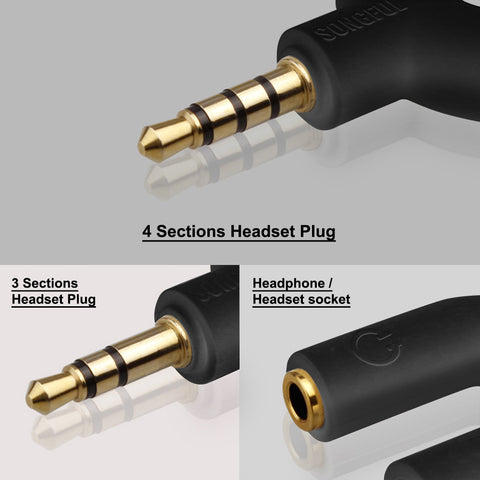
I think they used different pin configuration. you might want to try to solder your own 3.5mm jack that comes with 4 section.

those common ones they used is 3 section.

https://qph.ec.quoracdn.net/main-qimg-62fa3...53488a48388e99f

user posted image

This post has been edited by OCMAX: Jul 17 2017, 05:58 PM

7 Pages « < 3 4 5 6 7 >Top
 

Change to:
| Lo-Fi Version
0.1091sec    0.16    7 queries    GZIP Disabled
Time is now: 3rd December 2025 - 04:29 AM