Welcome Guest ( Log In | Register )

177 Pages « < 169 170 171 172 173 > » Bottom

Outline · [ Standard ] · Linear+

 New Unifi IPTV Box - Huawei EC6108V8, Need some help on configuration and tips

views
     
keptz
post Sep 20 2019, 11:32 PM

Getting Started
**
Junior Member
140 posts

Joined: Jun 2007
From: AssJay


Guys..i cant install astro on go the latest version..coz the old version keep asking to update. anyone able to install and use?

This post has been edited by keptz: Sep 20 2019, 11:33 PM
arang67
post Oct 5 2019, 11:21 AM

New Member
*
Newbie
2 posts

Joined: Mar 2010
hey guys..

i use stb unifi the small one..

can install viu app inside it? want to watch korea drama

thread many pages edy..just view this thread today..can someone guide me ?

thank you!
ckpv5
post Oct 9 2019, 07:36 PM

Getting Started
**
Junior Member
221 posts

Joined: Feb 2010


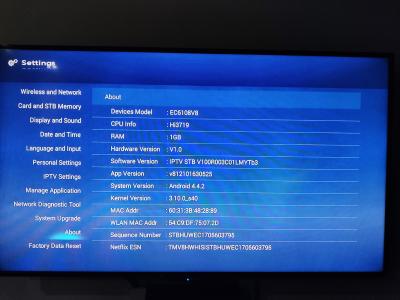
Today receiving an update to hypptv box. Hopefully all my installed apps still there and the workaround on how to install apps still there too

Attached Image

Update :

New firmware version
Attached Image

New desktop.. no app section .. damn .. need to install other launcher if possible.
Attached Image


This post has been edited by ckpv5: Oct 9 2019, 07:55 PM
chongch
post Oct 9 2019, 09:30 PM

New Member
*
Junior Member
26 posts

Joined: Nov 2004
From: Kuala Lumpur


QUOTE(ckpv5 @ Oct 9 2019, 07:36 PM)
Today receiving an update to hypptv box. Hopefully all my installed apps still there and the workaround on how to install apps still there too

Attached Image

Update :

New firmware version
Attached Image

New desktop.. no app section .. damn .. need to install other launcher if possible.
Attached Image
*
I hit the exact same problem just now. Anyone has a solution or recommendation? Email me @ cch@live.com.my
Thanks
Chong

This post has been edited by chongch: Oct 9 2019, 09:32 PM
ckpv5
post Oct 9 2019, 10:28 PM

Getting Started
**
Junior Member
221 posts

Joined: Feb 2010


QUOTE(chongch @ Oct 9 2019, 09:30 PM)
I hit the exact same problem just now. Anyone has a solution or recommendation? Email me @ cch@live.com.my
Thanks
Chong
*
Lucky I have chrome installed so click winkey + b on keyboard to brings up chrome, download and install other launcher .. almost solved all except 3rd party launcher cannot launch hyyptv app & settings due to permission denied. The workaround for now is don't set default launcher .. when press home on remote choose default launcher to launch hypptv & settings (and maybe all other default apps like browser (can't test as most system apps I disabled long before the update)) then home again to launch 3rd party launcher and run your installed apps.
cempiang-x
post Oct 10 2019, 09:20 AM

New Member
*
Newbie
16 posts

Joined: Dec 2007
QUOTE(ckpv5 @ Oct 9 2019, 10:28 PM)
Lucky I have chrome installed so click winkey + b on keyboard to brings up chrome, download and install other launcher .. almost solved all except 3rd party launcher cannot launch hyyptv app & settings due to permission denied. The workaround for now is don't set default launcher .. when press home on remote choose default launcher to launch hypptv & settings (and maybe all other default apps like browser (can't test as most system apps I disabled long before the update)) then home again to launch 3rd party launcher and run your installed apps.
*
3rd party launcher name, please..
ckpv5
post Oct 10 2019, 09:33 AM

Getting Started
**
Junior Member
221 posts

Joined: Feb 2010


QUOTE(cempiang-x @ Oct 10 2019, 09:20 AM)
3rd party launcher name,  please..
*
Anything .. such as nova launcher, microsoft launcher, tv launcher & etc.
Fot me, I'm using ATV launcher.

Some of them .. https://uphilltechno.com/top-10-launchers-f...android-tv-box/
gaikon
post Oct 10 2019, 09:56 AM

New Member
*
Newbie
0 posts

Joined: Mar 2017
QUOTE(cempiang-x @ Oct 10 2019, 09:20 AM)
3rd party launcher name,  please..
*
i'm using simple tv launcher, mine if iwanna use the hypptv i have to click back button twice and it will go to the hypptv launcher. when i wanna use my the launcher just hit home button on the remote.
the native setting also removed. I found it in root/system/priv-app but cannot execute the setting.
cempiang-x
post Oct 10 2019, 10:25 AM

New Member
*
Newbie
16 posts

Joined: Dec 2007
QUOTE(ckpv5 @ Oct 10 2019, 09:33 AM)
Anything .. such as nova launcher, microsoft launcher, tv launcher & etc.
Fot me, I'm using ATV launcher.

Some of them .. https://uphilltechno.com/top-10-launchers-f...android-tv-box/
*
QUOTE(gaikon @ Oct 10 2019, 09:56 AM)
i'm using simple tv launcher, mine if iwanna use the hypptv i have to click back button twice and it will go to the hypptv launcher. when i wanna use my the launcher just hit home button on the remote.
the native setting also removed. I found it in root/system/priv-app but cannot execute the setting.
*
thanks all biggrin.gif biggrin.gif
zlaugh
post Oct 10 2019, 03:31 PM

New Member
*
Newbie
7 posts

Joined: Feb 2011
I didn't download chrome so I'm using the browser but it says does not support download anymore....
Any other way to install other launcher?
PointOfSale
post Oct 10 2019, 09:48 PM

Getting Started
**
Junior Member
164 posts

Joined: Jan 2017
From: KL


for those that still using unifi box with old firmware with custom app, if it ask you to update, press cancel and do the below. For those that still waiting for automatic update, quickly do as below if not you will forever stuck with the new firmware without any app or custom installation app.

you need to quickly install any tv launcher app example ATV launcher, chrome and go to android setting and enable and tick the install unknown sources permanently and dont disable it so that you can use custom tv launcher and use back your custom app and install any custom app in the future.

Latest unifi firmware update, they not only disable the android setting menu, they delete the whole huawei app setting as well.

I have this problem, who can help?

Before this i already have all the custom app i need and sideload into the unifi box. I have custom tv launcher as well. But i disable the install unknown sources in the android setting menu.

So now after automatic update, the android setting menu is delete and not accessible anymore. I try to install new custom app and it prompt up the blocked installation of app and i unable to go to setting and there isnt any setting at all.

So any solution?
ckpv5
post Oct 11 2019, 02:45 PM

Getting Started
**
Junior Member
221 posts

Joined: Feb 2010


QUOTE(zlaugh @ Oct 10 2019, 03:31 PM)
I didn't download chrome so I'm using the browser but it says does not support download anymore....
Any other way to install other launcher?
*
Is this your first time to install app ? If yes, out of luck as you can't enable allow installation of apps from unknown sources.

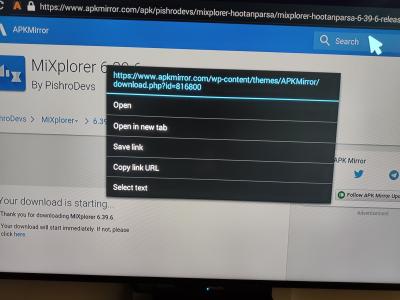
If it is enabled before, just use the brower to download, need to long click on download link then select save link. It will download the file in the background. Wait for awhile for it to finish download, press ctrl+j on keyboard, you should see the file you downloaded. Click it to install.

Attached Image
Attached Image


This post has been edited by ckpv5: Oct 11 2019, 02:46 PM
chongch
post Oct 11 2019, 05:43 PM

New Member
*
Junior Member
26 posts

Joined: Nov 2004
From: Kuala Lumpur


QUOTE(ckpv5 @ Oct 9 2019, 10:28 PM)
Lucky I have chrome installed so click winkey + b on keyboard to brings up chrome, download and install other launcher .. almost solved all except 3rd party launcher cannot launch hyyptv app & settings due to permission denied. The workaround for now is don't set default launcher .. when press home on remote choose default launcher to launch hypptv & settings (and maybe all other default apps like browser (can't test as most system apps I disabled long before the update)) then home again to launch 3rd party launcher and run your installed apps.
*
The new desktop, where got other apps other than those 4 icons, hypptv being the largest.
Instead, since paying rm159/mth with Ruby pack, my condo max for copper over fibre is 30Mbps, opted for pay nothing till end 2019, January 2020 onwards pay rm139/mth with ultimate pack renewed 2yrs contract. If wanted other option, may buy a new tvbox. Still using astro to watch badminton live games. 😢
ckpv5
post Oct 11 2019, 05:56 PM

Getting Started
**
Junior Member
221 posts

Joined: Feb 2010


QUOTE(chongch @ Oct 11 2019, 05:43 PM)
The new desktop, where got other apps other than those 4 icons, hypptv being the largest.
*
Does this means you never install any other app on your hypptv box before the update ? Only default apps ?
When you asked any solution or recommendation I thought you asked how to access all previous installed apps. Sorry for the misunderstanding.
cybersim2
post Oct 11 2019, 07:37 PM

On my way
****
Junior Member
503 posts

Joined: Aug 2006
From: CatCity


I tried to download other launcher using the build in browser. Unfortunately it failed to download, when I press Ctrl+J it show Queue then Failed. I suspect the update block download also. I tried Ctrl+Enter on the APK link, then surprisingly it allow me to choose ES File explorer to handle the download. But it also failed to download. Got to find other alternative
ckpv5
post Oct 11 2019, 08:16 PM

Getting Started
**
Junior Member
221 posts

Joined: Feb 2010


QUOTE(cybersim2 @ Oct 11 2019, 07:37 PM)
I tried to download other launcher using the build in browser. Unfortunately it failed to download, when I press Ctrl+J it show Queue then Failed. I suspect the update block download also. I tried Ctrl+Enter on the APK link, then surprisingly it allow me to choose ES File explorer to handle the download. But it also failed to download. Got to find other alternative
*
I tried the stock browser to download an apk then ctrl+j .. can install, no problem.

Also can try to download from your phone. Use a file manager with http server capability. I'm using Mixplorer. Once you set http server on your phone, open the browser to browse your phone storage. Download the apk from your phone with long click on it and select save link then ctrl+j to install
neato4u
post Oct 12 2019, 07:25 AM

Cha La, Head Cha La!
******
Senior Member
1,664 posts

Joined: Jan 2003
From: Ipoh

QUOTE(ckpv5 @ Oct 9 2019, 07:36 PM)
Update :
New desktop.. no app section .. damn .. need to install other launcher if possible.
Attached Image
Hey ckpv5,

How about hypptv / unifitv itself after upgrade?
Eg. Any difference in interface / quality?
Thanks!
ckpv5
post Oct 12 2019, 03:13 PM

Getting Started
**
Junior Member
221 posts

Joined: Feb 2010


QUOTE(neato4u @ Oct 12 2019, 07:25 AM)
Hey ckpv5,

How about hypptv / unifitv itself after upgrade?
Eg. Any difference in interface / quality?
Thanks!
*
It is a different app if compare to previous firmware but still the same interface. It is lighter I guess as it is faster to run and picture & sound quality more or less the same .. maybe slightly better.
neato4u
post Oct 18 2019, 07:55 PM

Cha La, Head Cha La!
******
Senior Member
1,664 posts

Joined: Jan 2003
From: Ipoh

QUOTE(ckpv5 @ Oct 12 2019, 03:13 PM)
It is a different app if compare to previous firmware but still the same interface. It is lighter I guess as it is faster to run and picture & sound quality more or less the same .. maybe slightly better.
*
Thanks bro. I'll skip the update then, my box still running stock app and i sideloaded many things laugh.gif

Btw guys, any of you experience when you do heavy surfing, your hypptv / unifi tv lags? like sekat2.

I noticed when i download stuffs on pc. If I stop download unifi tv ok again.

Not using full bandwidth also (ex. only download @ 100mbps max (limit throttle), actual speed is 800mbps.)
Is it because of router? I'm using DLINK DIR-850L.
Or I need to set something in router?
As far as I know unifi tv running on VLAN?

[update]
Found out it only happens when i download on a specific desktop.
Doesn't matter if I changed the port, it will still cause unifi tv to lag.
It doest happen on other desktop connected to same or different port.
As my cables are cable-tied, hard for me to change cables to test.
Haiz.

This post has been edited by neato4u: Oct 18 2019, 08:48 PM

ahhl
post Oct 19 2019, 10:37 AM

Getting Started
**
Junior Member
73 posts

Joined: Jul 2006
i am one whom also got the update automatically. now all the hypptv, android setting, Google play, huawei setting missing.
luckily i have other launcher that i set as default. othermarket apk. i also noticed i still able to update other apks.
who still keep the old hypptv. apks. just wondering whether it still can works if installed.
very annoyed with unifi.

177 Pages « < 169 170 171 172 173 > » Top
 

Change to:
| Lo-Fi Version
0.0172sec    0.43    6 queries    GZIP Disabled
Time is now: 2nd December 2025 - 09:51 AM