

these are a few perspectives ive generated usin aketchup + atlantis + edit usin photoshop...
hope to get comments to improve my work...
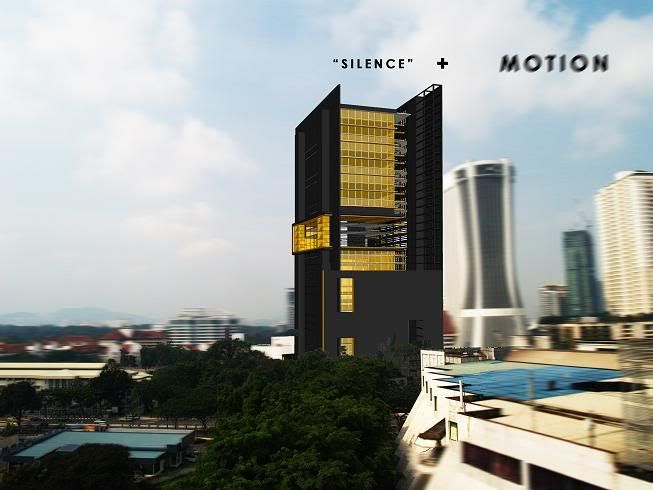
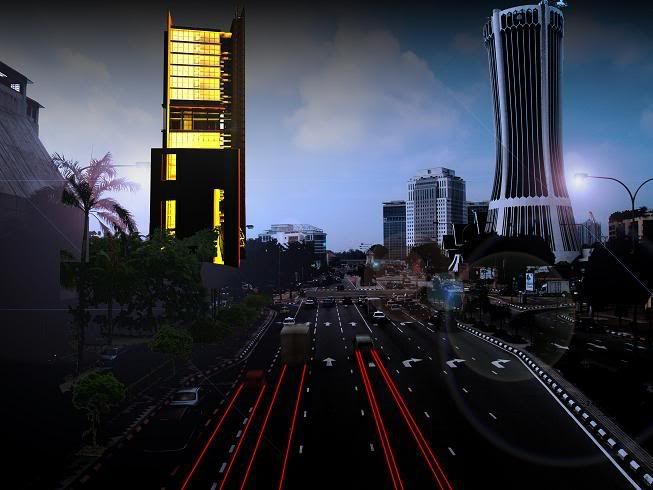
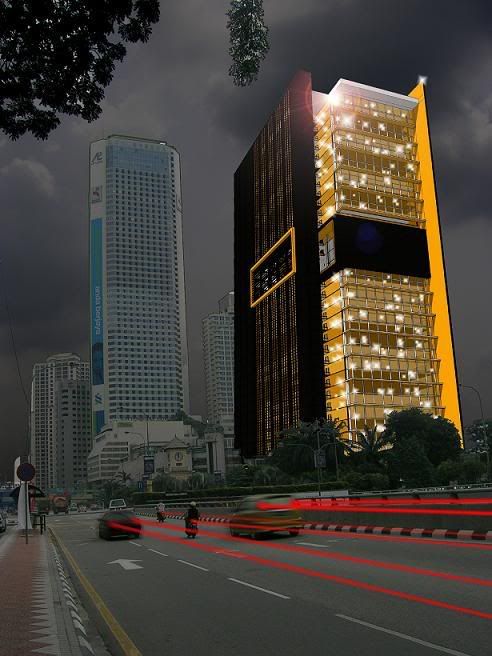
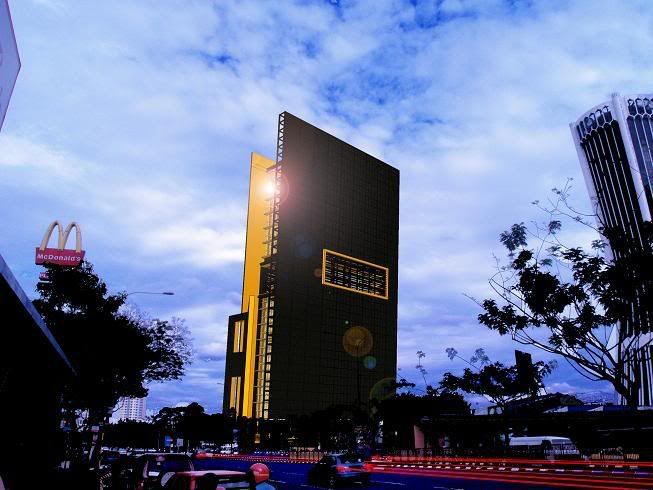
my architectural perspectives..., comments are most welcome..
|
|
  Oct 26 2006, 02:31 PM, updated 20y ago Oct 26 2006, 02:31 PM, updated 20y ago
Show posts by this member only | Post
#1
|
 
Senior Member
615 posts Joined: Mar 2005 From: serdang/gombak/seri kembangan 
|
elleop guys..
these are a few perspectives ive generated usin aketchup + atlantis + edit usin photoshop... hope to get comments to improve my work... |
|
|
|
|
|
Oct 27 2006, 11:12 PM
Show posts by this member only | Post
#2
|

Senior Member
1,259 posts Joined: Feb 2005 From: North Blue  
|
wahhh, abg kepep sgt terer dlm atlantis laaa.. ur bldg mcm katun sket..
|
|
|
Oct 27 2006, 11:20 PM
Show posts by this member only | Post
#3
|
|
Senior Member
615 posts Joined: Mar 2005 From: serdang/gombak/seri kembangan
|
haha... tulah, drastik sgt perbezaan nye
|
|
|
Oct 27 2006, 11:24 PM
Show posts by this member only | Post
#4
|
|
Senior Member
1,259 posts Joined: Feb 2005 From: North Blue
|
QUOTE(aka_kepep @ Oct 27 2006, 11:20 PM) haha... tulah, drastik sgt perbezaan nye render skecth up ka 3ds max tuh? |
|
|
Oct 27 2006, 11:25 PM
Show posts by this member only | Post
#5
|
|
Senior Member
615 posts Joined: Mar 2005 From: serdang/gombak/seri kembangan
|
second pic je atlantis... yg lain sketchup saje... touch up pshop
|
|
|
Oct 28 2006, 12:21 AM
Show posts by this member only | Post
#6
|

Junior Member
48 posts Joined: Feb 2006
|
i think if those drawing brighter will be better.. clients see also happier... but good work.
 |
|
|
|
|
|
Oct 28 2006, 01:10 AM
Show posts by this member only | Post
#7
|
|
Senior Member
615 posts Joined: Mar 2005 From: serdang/gombak/seri kembangan
|
u mean like the 1st one?
|
|
|
Oct 28 2006, 02:09 AM
Show posts by this member only | Post
#8
|

Junior Member
451 posts Joined: Oct 2006 From: Mars
|
its a good artwork.
but at a glance we can tell dat its not real.. the blending is not so smooth.. plus the light trail behind the cars are obviously fake.. juz my 2cents  |
|
|
Oct 28 2006, 02:36 AM
Show posts by this member only | Post
#9
|

Senior Member
675 posts Joined: Jan 2003 From: PJ, Selangor
|
Remove the light flares..
First one is very nice, love the focus blur  |
|
|
Oct 28 2006, 06:55 AM
|
|
Senior Member
615 posts Joined: Mar 2005 From: serdang/gombak/seri kembangan
|
QUOTE(GulaV @ Oct 28 2006, 02:09 AM) its a good artwork. wow... but at a glance we can tell dat its not real.. the blending is not so smooth.. plus the light trail behind the cars are obviously fake.. juz my 2cents  thanx man... any ideas of making it look more 'real', i mean the light trails... thanx man... any ideas of making it look more 'real', i mean the light trails...neway, its not an artwork... to me, art is just a selfish expression of ones crazy head... other people might not accept it... QUOTE(onscreen @ Oct 28 2006, 02:36 AM) Remove the light flares.. yerp, thats part of the design concept itself... something to do with poetic n silence bla2 in the middle of the cramped city...First one is very nice, love the focus blur the light flares are redudndant u mean?? thanks... will try n touch up...  |
|
|
Oct 28 2006, 08:53 AM
|

Senior Member
1,513 posts Joined: Nov 2004 From: Kuching - Klang 
|
the blending not smooth coz the colors.. maybe play around with color, contrast, color balance will help alot...
plus the 'Real' image u used is blurr as compared to your 3d work.. dats y can tell that its cut & paste thing.. though the 3d work is quite solid..  |
|
|
Oct 28 2006, 10:11 AM
|

Senior Member
2,234 posts Joined: Jan 2003
|
i think its crap...
well heres my reason.. first of all... you gotta decide on whether or not you want it to be realistic or abstract in this case where u wanna show things like silence within the city.. i guess it would be better to make it more abstract... yea the moving blurry lights and things sort of show movement but i dont think its enough... u want to be able to speak through your drawings/renderings... where when one sees the picture he can tell immediately what is your main concept, whats ure focus. at the moment... it doesnt really show anything... what makes ure building different from the buildings around it? whats the relation? what you should do is try to make the drawings then go around and ask ppl what they think the picture is trying to convey or you can even just do a blind crit with your family members for practice im not saying that your works are bad... dont just focus on making beautiful renderings... write down ure concept in one sentence.. put it in front of your computer...then think. How can i show my building as the constant? how can i show movement? how can i show "cramped"? what do i want teh users to feel when they see my building? i hope u dont take this in bad... just trying to help btw the model is good and i really like the building.. especially from the 1copy.jpg picture..and the facade looks really nice from that angle |
|
|
Oct 28 2006, 11:48 AM
|
|
Senior Member
615 posts Joined: Mar 2005 From: serdang/gombak/seri kembangan
|
QUOTE(evo.com @ Oct 28 2006, 10:11 AM) i think its crap... wow thanx man... was looking for this kinda comment... well heres my reason.. first of all... you gotta decide on whether or not you want it to be realistic or abstract in this case where u wanna show things like silence within the city.. i guess it would be better to make it more abstract... yea the moving blurry lights and things sort of show movement but i dont think its enough... u want to be able to speak through your drawings/renderings... where when one sees the picture he can tell immediately what is your main concept, whats ure focus. at the moment... it doesnt really show anything... what makes ure building different from the buildings around it? whats the relation? what you should do is try to make the drawings then go around and ask ppl what they think the picture is trying to convey or you can even just do a blind crit with your family members for practice im not saying that your works are bad... dont just focus on making beautiful renderings... write down ure concept in one sentence.. put it in front of your computer...then think. How can i show my building as the constant? how can i show movement? how can i show "cramped"? what do i want teh users to feel when they see my building? i hope u dont take this in bad... just trying to help btw the model is good and i really like the building.. especially from the 1copy.jpg picture..and the facade looks really nice from that angle will look into it... hehe... maybe it helps if i post the whole picture of the presentation boards if i wanna go deep into the concept and stuff... these are jus shots of the perspectives... but hey, i welcome any kinda opinions... thanx man, by the way, r u in the field or somethin related? |
|
|
|
|
|
Oct 28 2006, 12:58 PM
|
|
Junior Member
451 posts Joined: Oct 2006 From: Mars
|
QUOTE(aka_kepep @ Oct 28 2006, 06:55 AM) wow... yeah. u can see many pictures with light trails and observe the behavior. thanx man... any ideas of making it look more 'real', i mean the light trails...1st, they are taken with camera. means there will be flares and mirror image around the main light trail. u can copy the layer n make it low opacity. 2nd, mostly it's not a flat image. thus, u ve to consider the perspective of the light. 3rd, u use photoshop rite? u cant use gausian blur on it because it is a filter that does very linear gradient blur. but if u observed closely, the real light trail does not behave like that. they r more intense in the middle and have a quick gradient blur around it. nwy, i agree wit everybody. ur 3d r way too good.. |
|
|
Oct 28 2006, 01:14 PM
|
|
Senior Member
615 posts Joined: Mar 2005 From: serdang/gombak/seri kembangan
|
QUOTE(GulaV @ Oct 28 2006, 12:58 PM) yeah. u can see many pictures with light trails and observe the behavior. maybe with the light trails i can make it slightly thinner and apply outer glows to it... think that might help...1st, they are taken with camera. means there will be flares and mirror image around the main light trail. u can copy the layer n make it low opacity. 2nd, mostly it's not a flat image. thus, u ve to consider the perspective of the light. 3rd, u use photoshop rite? u cant use gausian blur on it because it is a filter that does very linear gradient blur. but if u observed closely, the real light trail does not behave like that. they r more intense in the middle and have a quick gradient blur around it. nwy, i agree wit everybody. ur 3d r way too good.. plus turning down a bit more of its opacity... |
|
|
Oct 28 2006, 02:24 PM
|
|
Junior Member
451 posts Joined: Oct 2006 From: Mars
|
QUOTE(aka_kepep @ Oct 28 2006, 01:14 PM) maybe with the light trails i can make it slightly thinner and apply outer glows to it... think that might help... u r the man!! plus turning down a bit more of its opacity... guess u can understand wat im tryin to teach here.. hehe  |
|
|
Oct 28 2006, 04:16 PM
|
|
Senior Member
615 posts Joined: Mar 2005 From: serdang/gombak/seri kembangan
|
teeheee... no seriously, ur the man
|
|
|
Oct 28 2006, 04:18 PM
|

Senior Member
1,667 posts Joined: Jan 2003 
|
Wuah .... cantik la design abang kepep
|
|
|
Oct 28 2006, 04:43 PM
|
|
Junior Member
451 posts Joined: Oct 2006 From: Mars
|
QUOTE(aka_kepep @ Oct 28 2006, 04:16 PM) teeheee... no seriously, ur the man so can u post back the modified version? im sure u ll be doing it rite?cant wait to see it n kondem u again.. |
|
|
Oct 28 2006, 06:42 PM
|
|
Senior Member
615 posts Joined: Mar 2005 From: serdang/gombak/seri kembangan
|
haha, actually i left the psd file at another hdisk... which isnt connected... dang...
|
| Change to: |  0.0171sec 0.0171sec
 0.51 0.51
 5 queries 5 queries
 GZIP Disabled GZIP Disabled
Time is now: 2nd December 2025 - 07:59 PM |
 Quote
Quote