

QUOTE(cooldreamer @ Mar 17 2017, 10:16 AM)
No idea why they removed it..someone did ask but they never reply and according to them it is not advisable to plugged in for long hours.. 

Shud hav removable battery. Duhh.Alienware Mothership V12, Intruder alert!
|
|
 Mar 17 2017, 10:18 AM Mar 17 2017, 10:18 AM
|
Senior Member
5,907 posts Joined: Dec 2012 From: Taiping,Perak  
|
QUOTE(cooldreamer @ Mar 17 2017, 10:16 AM) No idea why they removed it..someone did ask but they never reply and according to them it is not advisable to plugged in for long hours.. Shud hav removable battery. Duhh. |
|
|
|
|
|
Mar 17 2017, 03:14 PM
|

Senior Member
711 posts Joined: Jan 2003 From: Jay Bee 
|
QUOTE(Jay Chua CC @ Mar 17 2017, 10:18 AM) Shud hav removable battery. Duhh. haha...i still do not understand why they remove it as most people I heard using it previously says the desktop mode is good  |
|
|
Mar 18 2017, 08:20 PM
|

Junior Member
25 posts Joined: Feb 2010
|
anyone own alienware amplifier? hows the performance?
|
|
|
Apr 11 2017, 01:00 AM
|

Senior Member
3,038 posts Joined: Nov 2009
|
notes: for alienware m17x r4 owners; the driver list that i posted previously (here) still works fine for w10 creator update (1703)
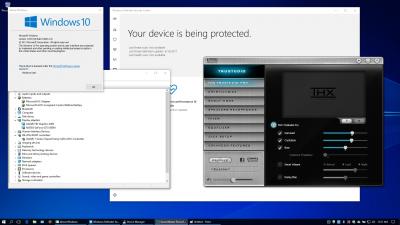
have fun  |
|
|
Apr 11 2017, 02:37 AM
|
|
Junior Member
25 posts Joined: Feb 2010
|
nice @horns! . early access w10 CU huh?
|
|
|
Apr 11 2017, 03:45 PM
|
|
Senior Member
3,038 posts Joined: Nov 2009
|
QUOTE(veddex @ Apr 11 2017, 02:37 AM) nice @horns! . early access w10 CU huh? yes running the same thing for weeks on my aw18 already; it's running fine after patch heheto make w10 run even snappier, at least turn off all services that you don't need and stuff running in background. (e.g. uninstall whatever apps that you know you will never click on them; check out blackviper.com service list; also check out all options in all settings) |
|
|
|
|
|
Apr 11 2017, 04:21 PM
|
|
Senior Member
5,907 posts Joined: Dec 2012 From: Taiping,Perak
|
Anyone encountered disk read error after windows update? Pc ocassionally hangs and restarted into black page(disk read error) , press ctrl;+alt+del
|
|
|
Apr 11 2017, 04:46 PM
Show posts by this member only | IPv6 | Post
#828
|
|
Senior Member
3,038 posts Joined: Nov 2009
|
QUOTE(Jay Chua CC @ Apr 11 2017, 04:21 PM) Anyone encountered disk read error after windows update? Pc ocassionally hangs and restarted into black page(disk read error) , press ctrl;+alt+del sounded like failing disk to me; don't think it's caused by windows update. i installed all updates for all machines; all running w10. nothing happened. |
|
|
Apr 11 2017, 04:50 PM
|
|
Senior Member
5,907 posts Joined: Dec 2012 From: Taiping,Perak
|
QUOTE(horns @ Apr 11 2017, 04:46 PM) sounded like failing disk to me; don't think it's caused by windows update. Yesterday working all good tho. Then today suddenly become like that after i updated. Only when running dota, else is okay. And yeah i updated the nvidia driver too.i installed all updates for all machines; all running w10. nothing happened. |
|
|
Apr 11 2017, 08:35 PM
|
|
Senior Member
3,038 posts Joined: Nov 2009
|
QUOTE(Jay Chua CC @ Apr 11 2017, 04:50 PM) Yesterday working all good tho. Then today suddenly become like that after i updated. Only when running dota, else is okay. And yeah i updated the nvidia driver too. Maybe try run sfc /scannow at admin cmd prompt and see if it helps. Also if you haven't already, scan the disk and see if it reports disk errors. You can also run crystaldisk info to check disk smart status. |
|
|
Apr 11 2017, 10:37 PM
|
|
Senior Member
5,907 posts Joined: Dec 2012 From: Taiping,Perak
|
QUOTE(horns @ Apr 11 2017, 08:35 PM) Maybe try run sfc /scannow at admin cmd prompt and see if it helps. Also if you haven't already, scan the disk and see if it reports disk errors. You can also run crystaldisk info to check disk smart status. 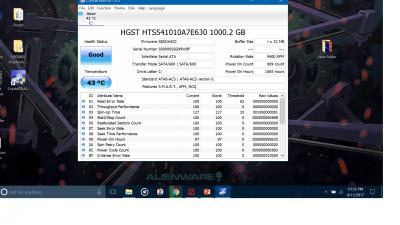
Anything unusual? Could it be the new nvidia update that is meant for the creator's? This post has been edited by Jay Chua CC: Apr 11 2017, 10:38 PM |
|
|
Apr 11 2017, 11:39 PM
|
|
Senior Member
3,038 posts Joined: Nov 2009
|
QUOTE(Jay Chua CC @ Apr 11 2017, 10:37 PM)
Anything unusual? Could it be the new nvidia update that is meant for the creator's? |
|
|
Apr 12 2017, 01:09 AM
Show posts by this member only | IPv6 | Post
#833
|
|
Senior Member
5,907 posts Joined: Dec 2012 From: Taiping,Perak
|
QUOTE(horns @ Apr 11 2017, 08:35 PM) Maybe try run sfc /scannow at admin cmd prompt and see if it helps. Also if you haven't already, scan the disk and see if it reports disk errors. You can also run crystaldisk info to check disk smart status. Not yet. Btw the nvidia only have option reinstall and not uninstall. At the Geforce experince rite? 
When i restart, it came to this evrytime. Have to force shut down and on to get to the desktop. |
|
|
|
|
|
Apr 12 2017, 04:08 AM
|
|
Senior Member
3,038 posts Joined: Nov 2009
|
QUOTE(Jay Chua CC @ Apr 12 2017, 01:09 AM) Not yet. Btw the nvidia only have option reinstall and not uninstall. At the Geforce experince rite? from the picture your bios setup was messed up somehow. you should turn pxe boot off, unless you really run your machine with it. check the bios and see if you can see your hdd listed.
When i restart, it came to this evrytime. Have to force shut down and on to get to the desktop. i never used gfe before. you can use ddu, http://www.wagnardsoft.com/ to remove the gpu drivers in safe mode. |
|
|
Apr 15 2017, 09:45 PM
Show posts by this member only | IPv6 | Post
#835
|
|
Senior Member
5,907 posts Joined: Dec 2012 From: Taiping,Perak
|
QUOTE(horns @ Apr 12 2017, 04:08 AM) from the picture your bios setup was messed up somehow. you should turn pxe boot off, unless you really run your machine with it. check the bios and see if you can see your hdd listed. Why there is third drive? Before this dont have alsoi never used gfe before. you can use ddu, http://www.wagnardsoft.com/ to remove the gpu drivers in safe mode. 
|
|
|
Apr 16 2017, 02:21 AM
|
|
Senior Member
3,038 posts Joined: Nov 2009
|
QUOTE(Jay Chua CC @ Apr 15 2017, 09:45 PM) Why there is third drive? Before this dont have also i suspect it's your recovery partition; not a third drive.
|
|
|
Apr 16 2017, 12:02 PM
Show posts by this member only | IPv6 | Post
#837
|
|
Senior Member
5,907 posts Joined: Dec 2012 From: Taiping,Perak
|
QUOTE(horns @ Apr 16 2017, 02:21 AM) i suspect it's your recovery partition; not a third drive. why is it named so weirdly? with all those symbols.  |
|
|
Apr 16 2017, 12:55 PM
|
|
Senior Member
3,038 posts Joined: Nov 2009
|
QUOTE(Jay Chua CC @ Apr 16 2017, 12:02 PM) why is it named so weirdly? with all those symbols. that weird names are based on the microsoft way to name volumes. try use search engines to find out more.what's the outcome of your original problem (hdd read error)? have you fixed it? also, try to tell me in details what you did before you had 'the third drive'. without details the trouble shooting process to find out actual problems and right solution will take a long time. you can use the same details to look up with search engines. probably others had the similar problems as yours and solutions have been found. |
|
|
Apr 16 2017, 04:02 PM
|
|
Junior Member
25 posts Joined: Feb 2010
|
i oredi in win 10 creator update.. so far quite good.. can notice the improvement compared to my old win 10.. just need to reinstall a few driver to make it perfect.. (wacom driver, font generator , etc)
|
|
|
Apr 16 2017, 07:20 PM
Show posts by this member only | IPv6 | Post
#840
|
|
Senior Member
5,907 posts Joined: Dec 2012 From: Taiping,Perak
|
QUOTE(horns @ Apr 16 2017, 12:55 PM) that weird names are based on the microsoft way to name volumes. try use search engines to find out more. Before i did a clean reinstall of windows there is no third recovery drive there. It appears after i wiped out everything and reinstall windows.what's the outcome of your original problem (hdd read error)? have you fixed it? also, try to tell me in details what you did before you had 'the third drive'. without details the trouble shooting process to find out actual problems and right solution will take a long time. you can use the same details to look up with search engines. probably others had the similar problems as yours and solutions have been found. The main problem, freezing, slowing, crashing into blue screen, read disk error, and pxe boot came right after i update into windpws crwator and the nvidia latest update. Tried nearly evrything, troubleshooting, checking drives, clean reinstall all also to no avail. Then i try revert back to the previous nvidia driver. Seems to be okay for now. Try restart , able to boot into desktop, before this sure came out read disk error and pxe thingy a few times. Seems like many ppl having issues after updates too. https://forums.geforce.com/default/topic/10...vers-issues-/2/ Anyway, contacted dell for follow up my problem. Dem, there are super slow in replying unlike Apple counterparts. Guess warranty already ended so they no layan. haha This post has been edited by Jay Chua CC: Apr 16 2017, 11:34 PM |
| Change to: |  0.0290sec 0.0290sec
 0.25 0.25
 6 queries 6 queries
 GZIP Disabled GZIP Disabled
Time is now: 7th December 2025 - 11:12 AM |
 Quote
Quote