Welcome Guest ( Log In | Register )

Outline · [ Standard ] · Linear+

 Alienware Mothership V12, Intruder alert!

views
     
aaronpang
post Feb 18 2019, 01:51 PM

Cat Exterminator
******
Senior Member
1,979 posts

Joined: Jan 2003
From: Kuala Lumpur
QUOTE(Gentleman_League @ Dec 28 2018, 10:57 AM)
Hello guys, i had a M14x R2 which i bought few years back (approx 4-5y), just out of curiosity can i upgrade those hardware like graphic cards etc? cos alot of games my pc cant really support..
*
Time to buy a new one if you ask me biggrin.gif

QUOTE(refnulf @ Jan 4 2019, 12:00 PM)
All the sifu, need some assistance. Got an old M17x from 2014. There's a motherboard issue and Dell doesn't have the motherboard anymore.

Any idea where I can find one? The processor is i7 and still kicking strong when the computer decides to boot up. Just the motherboard problem, laptop doesn't post and only posts and gets into OS after many restarts.

Appreciate any help!
*
Try searching ebay for replacement boards there's tons.
Make sure the seller offers DOA warranty/returns.

QUOTE(Timemuffin @ Jan 28 2019, 11:34 AM)
sup y'all

my R3 have a wonky SSD.. sometimes can detect.. sometimes cant..

but my warranty expire jor..

whats the best go around to fix it?

replace the HDD myself?
*
Perform these basic troubleshooting steps.

1) Run ePSA and document any error and validation codes.
Shutdown the computer
Press and hold the Fn key while turning on the system
When the diagnostic screen comes up you can release the Fn Key. The diagnostics will begin automatically.

2) Re seat the SSD into the motherboard. Sometimes it could be a loose connection.

3) Test with a known good SSD.


aaronpang
post Feb 19 2019, 10:34 AM

Cat Exterminator
******
Senior Member
1,979 posts

Joined: Jan 2003
From: Kuala Lumpur
Why Alienware/Dell Malaysia slow to introduce the RTX GPU notebooks? US store already have them on sale shakehead.gif

Giving away my current Alienware 15 GTX1060, to my cousin as going away to Uni present.

Question for fellow Alienware owners would you
a) wait for Alienware with RTX2060 or
b) go for similarly priced and spec GTX1080 laptop tongue.gif hmm.gif

Ray tracing is not high on my must have and got Graphics Amp so future RTX GPU upgrades is possible.

This post has been edited by aaronpang: Feb 19 2019, 05:03 PM
aaronpang
post Feb 20 2019, 04:14 PM

Cat Exterminator
******
Senior Member
1,979 posts

Joined: Jan 2003
From: Kuala Lumpur
QUOTE(refnulf @ Feb 20 2019, 12:52 PM)
Likely to go with illegear's rtx offerings! Btw thanks for the suggestion, I'll check ebay!
*
Yup the Illegear Selenite is very temping, wonder if I should give them a try.

https://store.illegear.com/slim-and-powerfu...r-selenite.html

aaronpang
post Feb 26 2019, 03:07 PM

Cat Exterminator
******
Senior Member
1,979 posts

Joined: Jan 2003
From: Kuala Lumpur
Pssst Alienware M17 with RTX2060 just landed.

https://www.dell.com/en-my/shop/cty/alienwa...=configurations

Attached Image

edit the most expensive config is RM16999.00 brows.gif

This post has been edited by aaronpang: Feb 26 2019, 03:10 PM
aaronpang
post Mar 8 2019, 04:48 PM

Cat Exterminator
******
Senior Member
1,979 posts

Joined: Jan 2003
From: Kuala Lumpur
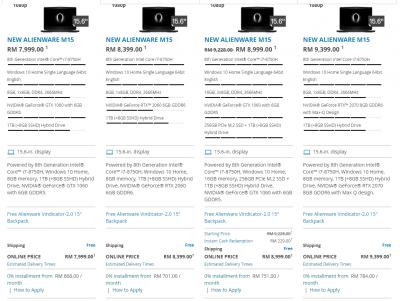
Alienware M15 with RTX has landed.

Pricing diff is RM400 between GTX1060 & RTX2060 models.

Link to page https://www.dell.com/en-my/shop/laptops-and...5-laptop?~ck=bt

Attached Image

This post has been edited by aaronpang: Mar 8 2019, 04:51 PM
aaronpang
post Mar 18 2019, 11:20 AM

Cat Exterminator
******
Senior Member
1,979 posts

Joined: Jan 2003
From: Kuala Lumpur
QUOTE(akib_mullen @ Mar 14 2019, 05:03 PM)
Still got my m11x r3 but recently I can't even let it to boot. Got beep sound non stop. I suspect the hdd corrupt already. Can i change it to ssd? Any ssd at computer shop will do?
*
I used to have something similar M14xR2.

Yeah simple enough to swap out for SATA SSD.

Link to service manual on how to go about replacing the HDD:-
https://downloads.dell.com/manuals/all-prod...guide_en-us.pdf
aaronpang
post Mar 18 2019, 01:50 PM

Cat Exterminator
******
Senior Member
1,979 posts

Joined: Jan 2003
From: Kuala Lumpur
QUOTE(akib_mullen @ Mar 18 2019, 11:45 AM)
Surprisingly when I tried to boot it few days ago, it went throught. But still got beep sound. Need to power off and on, then press F12, boot through hard disk.
Wifi worked. Then I tried boot again, laptop can't detect wifi. Anyway, will change the hdd, got few errors before this is a sign of problematic hdd.
*
Try running the self test diagnostics and share what it says.

1. Turn on (or restart) your computer.
2. Shut down and restart the laptop. When the Alienware logo appears, press <F12> immediately.
NOTE: If you wait too long and the operating system logo appears, continue to wait until
you see the Microsoft® Windows® desktop; then, shut down your computer and try again.
3. Select Diagnostics from the menu and press <Enter>.
4. Follow the instructions on the screen.

Also how many times did it beep, can google the beep codes.
aaronpang
post Mar 21 2019, 01:17 PM

Cat Exterminator
******
Senior Member
1,979 posts

Joined: Jan 2003
From: Kuala Lumpur
Alienware M15 I ordered arrived recently.
Sharing some quick unbox pictures.

Attached Image

Attached Image

Nebula RED colour really pops whistling.gif
wub.gif love this colour, reminiscent of Alienware M15X 2 generations ago.

Attached Image

First impressions holding is WOW! Alienware M15 is lighter, more compact compared with Alienware 15 R4.

Laptop lid and keyboard area covered in soft touch materials, the bottom cover is all metal with metallic ping when flicked.

Attached Image

Attached Image

Power brick it's the same 180 watt unit as earlier model.
The wall lead that came with M15 unit is unexpectedly short.

Side by side comparison 15 R4 lead, double length of M15.
Attached Image
Attached Image

This post has been edited by aaronpang: Mar 21 2019, 01:24 PM
aaronpang
post Mar 22 2019, 06:55 PM

Cat Exterminator
******
Senior Member
1,979 posts

Joined: Jan 2003
From: Kuala Lumpur
QUOTE(edmund_yung @ Mar 21 2019, 03:16 PM)
do you like the new keyboard?
*
Alienware M15 keyboard is fair tho nothing spectacular.
Comparing Alienware M15 against HP Elitebook both feels very similar to type with.

For gaming M15's okay in a pinch tho I'd opt for regular keyboard.
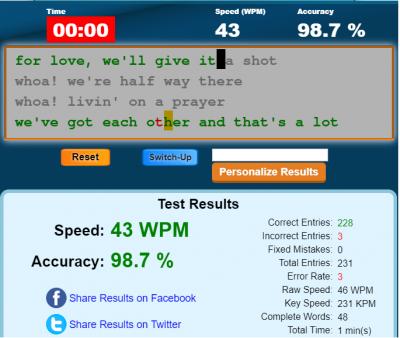
Ran some quick typing test, results below. Mostly conclude my typing sucks biggrin.gif

Alienware M15
Attached Image

HP Elitebook 840 G5 (chicklet keyboard no numpad)
Attached Image

Razer Cynosa
Attached Image
aaronpang
post Mar 25 2019, 11:13 AM

Cat Exterminator
******
Senior Member
1,979 posts

Joined: Jan 2003
From: Kuala Lumpur
QUOTE(akib_mullen @ Mar 25 2019, 08:14 AM)
Googled the beep codes. I think the beep is only up to 8. But mine beep endlessly lol. What I do just press power button and boot it again. Sometime it went through, sometimes it happened again. So it is kind of hit or miss
*
Give this a try, unusual problem I've had with M14x.
The laptop battery died and the notebook refused to boot.
After I disconnected/removed internal battery, worked normally so maybe give that a try.

Beeps non-stop, motherboard possibly gonna die.
Last resort maybe try flashing the BIOS to newer version. Hopefully it's just BIOS software fault.

Usually beeps followed by a pause and repeats the sequence until the computer shuts down.
Count how many times it beeps and check against table below:-

Attached Image

This post has been edited by aaronpang: Mar 25 2019, 11:38 AM
aaronpang
post Mar 25 2019, 02:22 PM

Cat Exterminator
******
Senior Member
1,979 posts

Joined: Jan 2003
From: Kuala Lumpur
QUOTE(akib_mullen @ Mar 25 2019, 12:19 PM)
Tried to differentiate the pause but not really noticeable. Hopefully not mobo kaput. BIOS latest version, just check the service tag and take the latest by date right?
*
Yup that's right.

Managed to unplug the battery from mobo?
While you're at it check the ram is properly seated.
aaronpang
post Mar 26 2019, 09:59 AM

Cat Exterminator
******
Senior Member
1,979 posts

Joined: Jan 2003
From: Kuala Lumpur
QUOTE(akib_mullen @ Mar 26 2019, 07:55 AM)
Got problem whether it keyboard problem or anything else.
I don't even know what. But it popup like this.
Came across this before, but I don't rmb what I done. Or it popup like that because keyboard problem so the keyboard itself pressed those buttons

» Click to show Spoiler - click again to hide... «

*
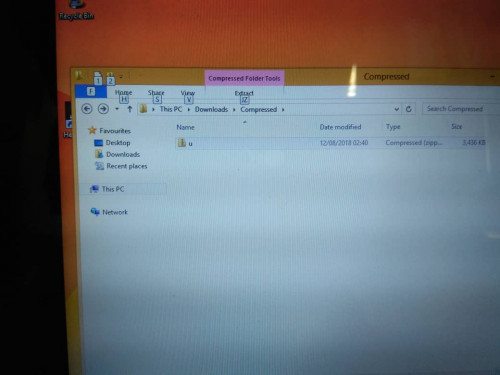
Windows Explorer shortcut, the "Alt" key is pressed.

Hit "Esc" button to dismiss it. Maybe accidentally press or "Esc" key stuck.


aaronpang
post Mar 27 2019, 11:47 AM

Cat Exterminator
******
Senior Member
1,979 posts

Joined: Jan 2003
From: Kuala Lumpur
QUOTE(Zelz92 @ Mar 27 2019, 10:15 AM)
Hi all,

Has anyone tried LM on their Alienware 15 R4? How's the temp? I'm planning to do it soon. Any tips and recommendations?

Thanks all!
*
Highly tempted but undecided hmm.gif
Got everything like conformal coating, conductonaut in my Lazada shopping cart.
Small mistake and magic smoke comes out biggrin.gif

My observation AW15 R4 requires a lot of disassembly before reaching heat sink.

Take a look at service manual, for idea how much components have to come off here.

Removing bottom cover, you can see the heat-sink assembly buried deep.
Attached Image

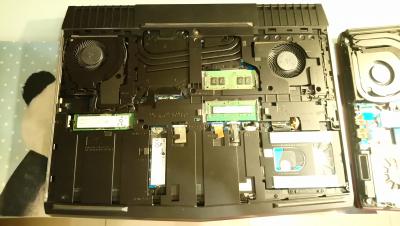
AW M15 much more serviceable, heat-sink easier to get at IMHO.
Attached Image

This post has been edited by aaronpang: Mar 27 2019, 11:48 AM
aaronpang
post Mar 27 2019, 01:04 PM

Cat Exterminator
******
Senior Member
1,979 posts

Joined: Jan 2003
From: Kuala Lumpur
QUOTE(Zelz92 @ Mar 27 2019, 12:55 PM)
Just bought all the items in lazada & shopee. Alcohol, conductonaut, conformal coating, super33+ tape, etc.

What conformal coating brand is good? I can only find Kontakt Chemie brand in Lazada.

Took apart my 15R4 last night to clean the heatsink. I got confident and want to try LM next.
*
Think you got most of the basic stuff needed.

Yup found the same conformal coating RM46 on lazada.
Tho some recommended using nail varnish as substitute.

Might want to add foam barriers to catch any LM balls escaping from under the heatsink.
http://forum.notebookreview.com/threads/fo...e-guide.817207/

Good luck with LM your laptop.

This post has been edited by aaronpang: Mar 27 2019, 01:12 PM
aaronpang
post Mar 28 2019, 11:13 AM

Cat Exterminator
******
Senior Member
1,979 posts

Joined: Jan 2003
From: Kuala Lumpur
QUOTE(Zelz92 @ Mar 27 2019, 01:46 PM)
Thanks for the tip!

I just found out that conformal coating doesn't protect against LM. Dang it. just bought that damn thing.
Reddit Post
*
Sometimes coating is applied too thin and not uniform, so there's gaps.
Coating usually done in several layers and allowed to cure.


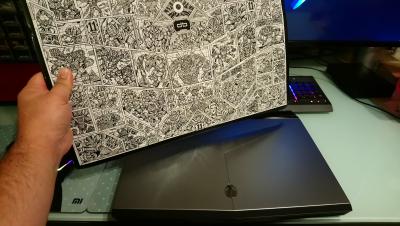
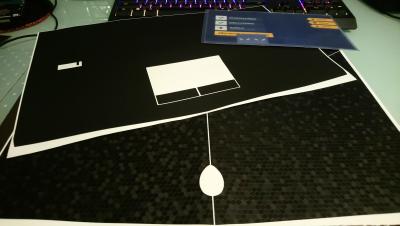
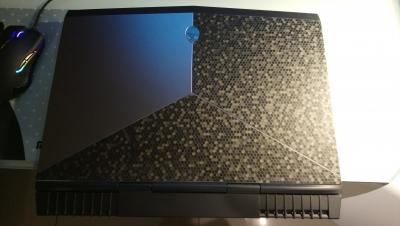
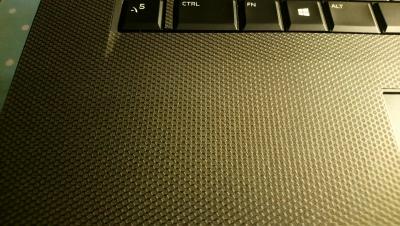
On separate note #DBrand skins finally arrived.
Nice packaging and the textured skins are awesome thumbsup.gif

» Click to show Spoiler - click again to hide... «


Attached Image

This post has been edited by aaronpang: Mar 28 2019, 11:15 AM


Change to:
| Lo-Fi Version
0.0550sec    0.35    7 queries    GZIP Disabled
Time is now: 2nd December 2025 - 06:24 AM