

Hi there
I have a BB Z10 here, which keep restarts at the 'blackberry' start up.
Anyone here encounter this problem before ?
Please advise on the problem.
Thank you
Z10 keep restarting at 'Blackberry' startup, Help
Z10 keep restarting at 'Blackberry' startup, Help
|
|
 May 9 2015, 02:55 PM, updated 11y ago May 9 2015, 02:55 PM, updated 11y ago
Return to original view | Post
#1
|
 
Junior Member
51 posts Joined: May 2013 
|
Hi there
I have a BB Z10 here, which keep restarts at the 'blackberry' start up. Anyone here encounter this problem before ? Please advise on the problem. Thank you |
|
|
|
|
|
May 10 2015, 11:10 PM
Return to original view | IPv6 | Post
#2
|
|
Junior Member
51 posts Joined: May 2013
|
QUOTE(hyperyouth_firepower @ May 9 2015, 11:39 PM) does it say at which phase? if you're using the latest firmware it will show what's loading at the bottom part of the screen. Is your BB icon a thick one, or a thin one?  
It keeps restarting after the 'Blackberry' words as in the picture. |
|
|
May 16 2015, 08:13 AM
Return to original view | Post
#3
|
|
Junior Member
51 posts Joined: May 2013
|
QUOTE(hyperyouth_firepower @ May 10 2015, 11:19 PM) hmm. that means it has failed to load. Yes,tried to do the auto reload yesterday and it works! Have you tried downloading the phone's firmware and autoload it? Its like a phone reset, but this process reloads your phone's firmware, and you lose EVERYTHING inside the phone. Thank you very much  |
|
|
May 16 2015, 09:00 AM
Return to original view | Post
#4
|
|
Junior Member
51 posts Joined: May 2013
|
QUOTE(hyperyouth_firepower @ May 16 2015, 08:27 AM) most welcome. I've loaded 3.1 ,and the updates in the phone has proposed me to update to 3.2. Then is it alright to update it via phone? just remember, DO NOT load beta firmware. Just load official firmware. Current official firmwares are for 10.3.1 Now there are a lot of 10.3.2 betas.. once you load that you can never go back (your phone will brick) Another thing is,my z10 tends to heat up and hangs quite often during the usage. But I still manage to do the restarting by pressing the on off button. Is it a problem with the phone? Or its just the phone slowdown due to the new updates? |
|
|
May 16 2015, 09:14 AM
Return to original view | Post
#5
|
|
Junior Member
51 posts Joined: May 2013
|
QUOTE(hyperyouth_firepower @ May 16 2015, 09:02 AM) hold out, don't upgrade to 10.3.2 yet. its not even officially out. Oh no, how to stop this?your PIN may have been whitelisted for 10.3.2 beta, but trust me, you don't want to upgrade to that YET. When your phone is brand new (as in auto reloaded), it will force all cores (dual core) to run to optimise settings. Usually there's a cooling down period. You should make sure to: a) activate BBM b) activate your email accounts c) connect to a wifi Normally when your phone is newly reloaded it tends to ask for things such as your login details. If you fail to provide it, it will continue talking to servers as if its still trying to send data (although its lack of data), and thus processes are run, and your phone heats up. 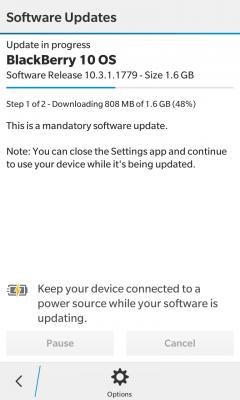
|
|
|
May 16 2015, 10:03 AM
Return to original view | IPv6 | Post
#6
|
|
Junior Member
51 posts Joined: May 2013
|
QUOTE(hyperyouth_firepower @ May 16 2015, 09:18 AM) that's 10.3.1.1779, the latest for 10.3.1 I see. Thank you for all the guides and advises.that's good. no need to stop it. if its 10.3.2 it won't be from there, at least not yet. That's where you click to get official updates. It says its updating to 10.3.1.1779. You should get it. if it says 10.3.2 BETA, don't. |
| Change to: |  0.0155sec 0.0155sec
 0.52 0.52
 7 queries 7 queries
 GZIP Disabled GZIP Disabled
Time is now: 14th December 2025 - 04:19 AM |
 Quote
Quote