Outline ·
[ Standard ] ·
Linear+
Xiaomi Mi Box User Club, let's talk mi box!
|
ck2chan
|
 Jun 9 2016, 11:50 PM Jun 9 2016, 11:50 PM
|

|
Just got my black Mibox 5th Gen and new Panasonic full HD tv.
When I run Kodi to watch live football, the picture not clear and can see patches on the players face when they move.
Y like that? My tv no good?
|
|
|
|
|
|
ck2chan
|
Jun 14 2016, 11:58 PM
|
|
|
QUOTE(hellfire_my @ Jun 13 2016, 11:31 PM) If you still haven't buy one i would advise you to stay away from it. Any brand with 2GB ram should be good. My uncle use China brand with proper settings and tune, the quality look good. |
|
|
|
|
|
ck2chan
|
Nov 19 2016, 08:09 PM
|
|
|
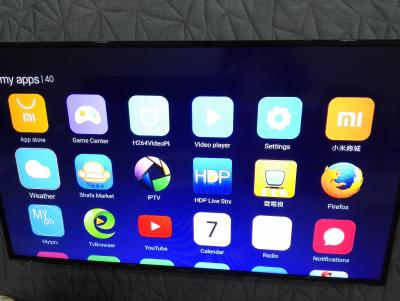
Mibox layout changed n I never update anything myself. Last time kodi n others apps at right. Now is hidden in the folder Kodi cannot open now. The seller don't want layan me. Anyone encounter before? This post has been edited by ck2chan: Nov 19 2016, 08:11 PM Attached thumbnail(s)
|
|
|
|
|
|
ck2chan
|
Nov 20 2016, 01:35 PM
|
|
|
QUOTE(beck_ken @ Nov 20 2016, 12:21 AM) It's a new update with new interface My kodi still working Yeah, kodi is working now. May be a few days never open, mibox kinda slow n updating. After an hour, test again can use ready. |
|
|
|
|
|
ck2chan
|
Nov 22 2016, 04:40 PM
|
|
|
QUOTE(chilskater @ Nov 22 2016, 02:00 PM) do u have problem with Kodi?mine always exit to previous add on menu after awhile Mine is totally cannot go in Kodi. But after i on Mibox for one hour and left it idle while working, off it and on again then Kodi is running again. Spoiled my plan that day to watch Man Utd vs Arsenal.  Nowadays, Mibox lag after the firmware update on MiBox. Seller no give me solution to this. This post has been edited by ck2chan: Nov 22 2016, 04:41 PM |
|
|
|
|
|
ck2chan
|
Nov 25 2016, 10:16 PM
|
|
|
QUOTE(Mubarak90 @ Nov 25 2016, 06:15 PM) Ooo, mine became like that too. I wonder why. Now it is harder to launch Kodi and interface is full of never will be used stuff.  Yeah, mine now everytime on sure pop out apps manager ask clean coz not enough space. Need to find out to release internal space. I have pen drive plug in all the time. |
|
|
|
|
|
ck2chan
|
Nov 30 2016, 05:17 PM
|
|
|
QUOTE(chilskater @ Nov 30 2016, 08:32 AM) try to look for Easy Advanced Setting in Kodi tutorial..need to install add on for it. Very useful Thank you.  |
|
|
|
|
|
ck2chan
|
Apr 14 2020, 12:55 AM
|
|
|
Update my Mibox with latest Kodi. Every time install new addons it will gone missing after I exit and go in later. Today, I watch finish one episode, back to continue next episode, the addon totally missing. Can any sifu know why??  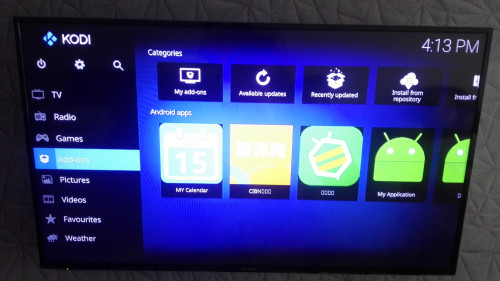 |
|
|
|
|



 Quote
Quote

 0.1101sec
 0.70
0.70
 7 queries
 GZIP Disabled