

QUOTE(arrowhead7372 @ May 13 2015, 10:25 PM)
My sot is abt 4hrs tops only.
I has fail

Mine 3 onlyyyyI has fail
Samsung Galaxy Note 4 Official Thread V8, Lollipop rolling out in Malaysia ....
|
|
 May 13 2015, 10:29 PM May 13 2015, 10:29 PM
|
 
Senior Member
1,863 posts Joined: Aug 2014 From: Soviet Sarawak - Dum Spiro Spero   
|
QUOTE(arrowhead7372 @ May 13 2015, 10:25 PM) My sot is abt 4hrs tops only. Mine 3 onlyyyyI has fail |
|
|
|
|
|
May 13 2015, 10:29 PM
|
|
Senior Member
1,863 posts Joined: Aug 2014 From: Soviet Sarawak - Dum Spiro Spero
|
QUOTE(vcan @ May 13 2015, 09:59 PM) This is my sot today. Mind show what app is ur no1? |
|
|
May 13 2015, 11:23 PM
|

Senior Member
1,102 posts Joined: May 2013
|
QUOTE(Miracles @ May 13 2015, 10:05 PM) Share your source pls. I'm into scenery/vintage theme too. Using one that I got it from an app; Zedge. But there aren't many good ones Not easy to find nice qhd wallpaper indeed. My source were mostly from internet. Just search quad hd wallpapers then check out the top sites of the result  Walao bro. What did you do and use today?  I got my recent one from a qhd wallpaper site that is meant for LG G3. Same resolution as Note 4 so i checked it out and fell in love with this one in my search. It has that out of the world feel to it 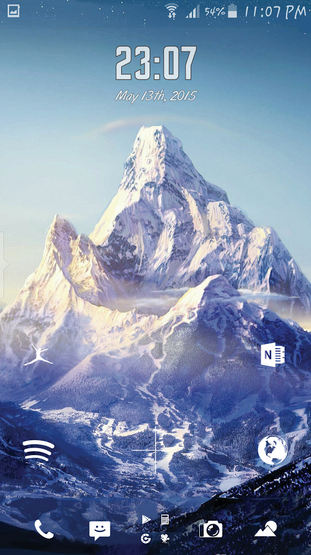 |
|
|
May 14 2015, 01:06 AM
|

All Stars
31,607 posts Joined: Aug 2010
|
QUOTE(OwlsHeart @ May 13 2015, 11:23 PM) Not easy to find nice qhd wallpaper indeed. My source were mostly from internet. Just search quad hd wallpapers then check out the top sites of the result wow what lockscreen you using I got my recent one from a qhd wallpaper site that is meant for LG G3. Same resolution as Note 4 so i checked it out and fell in love with this one in my search. It has that out of the world feel to it  |
|
|
May 14 2015, 01:24 AM
|
|
Senior Member
1,102 posts Joined: May 2013
|
QUOTE(XeactorZ @ May 14 2015, 01:06 AM) wow what lockscreen you using it's my homescreen ler Using Nova Launcher + Flight Icon pack for the icons on homescreen  |
|
|
May 14 2015, 06:46 AM
|

Junior Member
42 posts Joined: Mar 2012
|
[quote=zhou.xingxing,May 13 2015, 10:29 PM]
Mind show what app is ur no1? [/quote I'm not a heavy user, mostly surfing Internet using cm browser, shopping app, twitter, checking email & play very little game. As you know that after upgraded to Lollipop, WiFi always on even I didn't use it. I turned the Wifi always on during sleep to 'never' & untick the 'always allow scanning' Wifi setting. That's it. I've no idea whether is this two setting I did can save more battery. I will try a few more days & see how. |
|
|
|
|
|
May 14 2015, 07:00 AM
|
|
Senior Member
1,863 posts Joined: Aug 2014 From: Soviet Sarawak - Dum Spiro Spero
|
[quote=vcan,May 14 2015, 06:46 AM]
[quote=zhou.xingxing,May 13 2015, 10:29 PM] Mind show what app is ur no1? [/quote I'm not a heavy user, mostly surfing Internet using cm browser, shopping app, twitter, checking email & play very little game. As you know that after upgraded to Lollipop, WiFi always on even I didn't use it. I turned the Wifi always on during sleep to 'never' & untick the 'always allow scanning' Wifi setting. That's it. I've no idea whether is this two setting I did can save more battery. I will try a few more days & see how. [/quote] Actually quite similar to mine... but mine 3 hsot only  |
|
|
May 14 2015, 07:10 AM
|
|
Senior Member
732 posts Joined: Sep 2008
|
yesterday downgraded from lollipop go kitkat.. stuck in bootloop.. managed to make it alive back with clearing cache.. done rooting & install xposed.. heard there might be no support anymore on xposed form samsung lollipop..
|
|
|
May 14 2015, 07:11 AM
Show posts by this member only | IPv6 | Post
#1129
|

Junior Member
279 posts Joined: Sep 2006 
|
wow, almost 9 hours looking at the screen and not a heavy user
 is that for 1 day or 2? |
|
|
May 14 2015, 07:38 AM
|

Senior Member
1,917 posts Joined: Mar 2008
|
QUOTE(S6 edge fans @ May 14 2015, 04:43 AM) Hi, can pls show me how you root, i am thinking to root also. Thanks. QUOTE(Super Amoled Fans @ May 14 2015, 04:43 AM) Bro, can teach me how you root, is it yours on lollipop also? I wanna root also. Tq.  |
|
|
May 14 2015, 08:01 AM
|
 
Elite
27,801 posts Joined: Jun 2007 From: Johor
|
QUOTE(Super Amoled Fans @ May 14 2015, 04:43 AM) Bro, can teach me how you root, is it yours on lollipop also? I wanna root also. Tq. Go to XDA Note 4 Original Android development thread n look for Chain fire root fileDownload Odin ( go Google for it) in your windows PC Off phone n go into download mode ( home+vol down+power button simultaneously ) n connect to PC. Launch Odin n select the extracted chain fire root file in tar format n just select as PDA. Leave everything else intact. Just press start n viola within 30 sec your phone rooted. Easiest n fastest method Another way is use Odin to flash Cwm recovery ( in tar format) . Than boot into CWM recovery ( volup+power +home button simultaneously ) n select supersu zip All these files easily found in XDA You can use these files on both kit kat n lollipop. This post has been edited by benny888: May 14 2015, 08:02 AM |
|
|
May 14 2015, 09:08 AM
|

Senior Member
5,284 posts Joined: Nov 2011
|
wat is this phone SOT?
|
|
|
May 14 2015, 09:21 AM
|
|
Elite
27,801 posts Joined: Jun 2007 From: Johor
|
QUOTE(Super Amoled Fans @ May 14 2015, 08:55 AM) Wow, i thought got simpler way lol. Tqvm for reply unker. How much more simpler are you are looking for ?? Just run an app such as TR root ?? Such apps if can work are known to be have a disastrous effect on your phone as your details are fed over to some unknown server in China ??Seriously, If you find this not simple enough, just forget about rooting !! |
|
|
|
|
|
May 14 2015, 10:44 AM
|
|
Senior Member
1,102 posts Joined: May 2013
|
QUOTE(S6 edge fans @ May 14 2015, 04:43 AM) Hi, can pls show me how you root, i am thinking to root also. Thanks. QUOTE(benny888 @ May 14 2015, 08:01 AM) Go to XDA Note 4 Original Android development thread n look for Chain fire root file Exactly as simple as what the senior taught. It may seem complex to you probably because you are not familiar with the rooting tools. You need to download two things before go on the rooting process. Ok perhaps i put it this way for you to understand easily. Download Odin ( go Google for it) in your windows PC Off phone n go into download mode ( home+vol down+power button simultaneously ) n connect to PC. Launch Odin n select the extracted chain fire root file in tar format n just select as PDA. Leave everything else intact. Just press start n viola within 30 sec your phone rooted. Easiest n fastest method Another way is use Odin to flash Cwm recovery ( in tar format) . Than boot into CWM recovery ( volup+power +home button simultaneously ) n select supersu zip All these files easily found in XDA You can use these files on both kit kat n lollipop. [b]Example : Our phones power source comes from its battery.If the battery ran out of juice,what do we need? The charger. In this rooting situation, Odin is the charger so you need to download it first. You can download the latest version here http://odindownload.com/ I recommend going for the stable version and not the beta ones. I'm using the 3.10 version. After downloading the Zip file, unzip it and open the exe. Next step, now we have the charger, we need the charging cable. Not just any cable but the right cable especially if want to use the fast charging option. In this rooting case, the n910c file is the cable. That's the 2nd thing you need to download. Direct link here https://download.chainfire.eu/559/CF-Root/C...exx-smn910c.zip After you done downloading that,go back to odin.exe,click the button that says 'PDA/AP' and look for the file that you just downloaded. Click the one titled : CF-Auto-Root-trelte-treltexx-smn910c.tar.md5 (in the 2nd Zip file that you downloaded) Actually they already included the Odin for you in that zip file.It's version 3.07. That will work well also so you can choose to skip the step of downloading the Odin since the n910c zip file includes the charger(Odin) already. After you have the file appeared under the PDA/AP, switch off your note 4,press vol down+home button+power button at the same time and it will boot into download mode, proceed to continue then connect your note 4 to your pc, on the Odin, press start and it will begin the process. Wait for the success status. If nothing happens, try reconnect the phone. If success d,it will auto reboot and your phone is rooted! Well i hope my guide won't be too confusing for you you can also refer back to Mr.Benny instruction once you have the odin and the tar md5 file ready ( the charger and the cable ) |
|
|
May 14 2015, 11:06 AM
|

Junior Member
25 posts Joined: Nov 2007
|
Hi guys, this is the 1st time im using android phone.
just bought note 4 bout a few weeks. im using verus iron case series. after a few week found that my chrome bazel fade at the charging area. anyone having the same issue? |
|
|
May 14 2015, 11:16 AM
|

Elite
6,659 posts Joined: Jan 2003 From: KL/PJ/USJ/Puchong/KKB, Sel. 
|
QUOTE(OwlsHeart @ May 14 2015, 10:44 AM) Exactly as simple as what the senior taught. It may seem complex to you probably because you are not familiar with the rooting tools. You need to download two things before go on the rooting process. Ok perhaps i put it this way for you to understand easily. that cf-root still works on rooting lollipop?[b]Example : Our phones power source comes from its battery.If the battery ran out of juice,what do we need? The charger. In this rooting situation, Odin is the charger so you need to download it first. You can download the latest version here http://odindownload.com/ I recommend going for the stable version and not the beta ones. I'm using the 3.10 version. After downloading the Zip file, unzip it and open the exe. Next step, now we have the charger, we need the charging cable. Not just any cable but the right cable especially if want to use the fast charging option. In this rooting case, the n910c file is the cable. That's the 2nd thing you need to download. Direct link here https://download.chainfire.eu/559/CF-Root/C...exx-smn910c.zip After you done downloading that,go back to odin.exe,click the button that says 'PDA/AP' and look for the file that you just downloaded. Click the one titled : CF-Auto-Root-trelte-treltexx-smn910c.tar.md5 (in the 2nd Zip file that you downloaded) Actually they already included the Odin for you in that zip file.It's version 3.07. That will work well also so you can choose to skip the step of downloading the Odin since the n910c zip file includes the charger(Odin) already. After you have the file appeared under the PDA/AP, switch off your note 4,press vol down+home button+power button at the same time and it will boot into download mode, proceed to continue then connect your note 4 to your pc, on the Odin, press start and it will begin the process. Wait for the success status. If nothing happens, try reconnect the phone. If success d,it will auto reboot and your phone is rooted! Well i hope my guide won't be too confusing for you you can also refer back to Mr.Benny instruction once you have the odin and the tar md5 file ready ( the charger and the cable ) |
|
|
May 14 2015, 11:17 AM
|
|
Elite
27,801 posts Joined: Jun 2007 From: Johor
|
QUOTE(Gouki @ May 14 2015, 11:16 AM) that cf-root still works on rooting lollipop? Yes. Just make sure you download correct version n Msian unit is N910c. |
|
|
May 14 2015, 11:22 AM
|
|
Elite
6,659 posts Joined: Jan 2003 From: KL/PJ/USJ/Puchong/KKB, Sel.
|
QUOTE(benny888 @ May 14 2015, 11:17 AM) Yes. Just make sure you download correct version n Msian unit is N910c. but i still reluctant to go to lollipop due to exposed framework. |
|
|
May 14 2015, 11:28 AM
|
|
Elite
27,801 posts Joined: Jun 2007 From: Johor
|
QUOTE(Gouki @ May 14 2015, 11:22 AM) but i still reluctant to go to lollipop due to exposed framework. It will be a long long wait as developer said Samsung make too much changes on Google firmware.Anyway just follow my tips given yesterday n you can get substantial increase in battery life . My friend a complete nerd is very happy with his lollipop. Though a nerd he always want latest stuffs on his phone n I helped him always to do it. I was amazed he hit 7-8 hours SOT on his rooted Note4. He basically used the phone for browsing, email, YouTube, tweeter n facebook but mainly on wifi as his home quite poor 3g n no LTE yet. |
|
|
May 14 2015, 01:29 PM
|
|
Elite
6,659 posts Joined: Jan 2003 From: KL/PJ/USJ/Puchong/KKB, Sel.
|
QUOTE(benny888 @ May 14 2015, 11:28 AM) It will be a long long wait as developer said Samsung make too much changes on Google firmware. what kinda app did you greenify for him? i kinda need the exposed framework for the customisation. still contemplating if i wanna sacrifice those for the latest lollipop. lol. Anyway just follow my tips given yesterday n you can get substantial increase in battery life . My friend a complete nerd is very happy with his lollipop. Though a nerd he always want latest stuffs on his phone n I helped him always to do it. I was amazed he hit 7-8 hours SOT on his rooted Note4. He basically used the phone for browsing, email, YouTube, tweeter n facebook but mainly on wifi as his home quite poor 3g n no LTE yet. |
|
Topic ClosedOptions
|
| Change to: |  0.0849sec 0.0849sec
 0.59 0.59
 6 queries 6 queries
 GZIP Disabled GZIP Disabled
Time is now: 3rd December 2025 - 12:23 AM |
 Quote
Quote