

QUOTE(arrowhead7372 @ May 17 2015, 02:16 PM)
Its the otg thumb drive right? Hmmm must consider that as well.

Yes mini version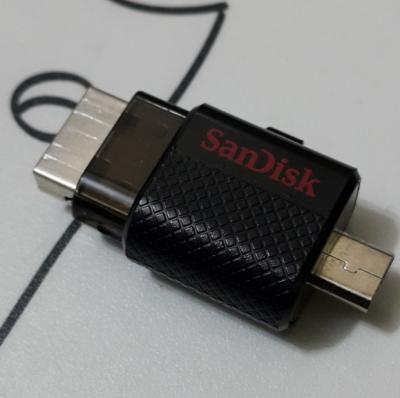
Samsung Galaxy Note 4 Official Thread V8, Lollipop rolling out in Malaysia ....
|
|
 May 17 2015, 02:57 PM May 17 2015, 02:57 PM
Return to original view | Post
#101
|
 
Elite
27,801 posts Joined: Jun 2007 From: Johor  
|
QUOTE(arrowhead7372 @ May 17 2015, 02:16 PM) Its the otg thumb drive right? Hmmm must consider that as well. Yes mini version
|
|
|
|
|
|
May 17 2015, 03:43 PM
Return to original view | Post
#102
|
|
Elite
27,801 posts Joined: Jun 2007 From: Johor
|
QUOTE(sharp56 @ May 17 2015, 03:27 PM) Followed all the steps for rooting Note 4 (N910C - lollipop 5.0.1) correctly but message at Odin 3.0.7 stucked at "Getting PIT for mapping". The phone stuck at downloading mode (green android figure) and I had to pull out the battery to reboot the phone. Tried re-downloading the program at XDA developers website and re-do all the steps several times but result all the same - stuck at "Getting PIT for mapping". Don't select PIT. Leave everything as it is. Just select the root tar file as PDA. Than simply press StartWhat could be the problem and solution? |
|
|
May 17 2015, 08:03 PM
Return to original view | Post
#103
|
|
Elite
27,801 posts Joined: Jun 2007 From: Johor
|
QUOTE(sharp56 @ May 17 2015, 07:48 PM) benny888, That is a RARE error message ...never heard any other users ever experienced such. Try again with lower version of Odin, say 1.85 or 1.87. I never like to use v3 and above as is at times problematic. I always use ver 1.87I didn't select PIT. I just opened up the odin3.07 exe and tap on the PDA button and select the "CF-Auto-Root-trelte-treltexx-smn910c.tar.md5" file and then start button. I don't know what is the problem. |
|
|
May 18 2015, 08:51 AM
Return to original view | Post
#104
|
|
Elite
27,801 posts Joined: Jun 2007 From: Johor
|
QUOTE(arrowhead7372 @ May 18 2015, 08:49 AM) Yup. Takes abt 2 days. I switched over from Maxis n it was activated within an hour. That was about 3 years ago. That is bad if it takes 2 days now. I don't even need to clear my Maxis bill as auto charge to my card. |
|
|
May 18 2015, 03:12 PM
Return to original view | Post
#105
|
|
Elite
27,801 posts Joined: Jun 2007 From: Johor
|
QUOTE(Baconateer @ May 18 2015, 02:53 PM) finally able to use Celcom now...by the way..how to check data balance using sms?? VOL STATUS to 22188Top Up data : BROADBAND VOL to 22188 - you will recieve reply and offer various plans - just follow the guided instructions |
|
|
May 20 2015, 07:46 AM
Return to original view | Post
#106
|
|
Elite
27,801 posts Joined: Jun 2007 From: Johor
|
Rooting is freaking simple n no data will be deleted
I had described how to root it n another forumer had added comments to it Do a search back or just google in forum XDA Note4 original android development. Look for Chainfire root |
|
|
|
|
|
May 20 2015, 04:33 PM
Return to original view | Post
#107
|
|
Elite
27,801 posts Joined: Jun 2007 From: Johor
|
sharp56 - another proven case service center doesn't bother about Knox triggered
I had successfully claim Note3 USB port n motherboard replacement with S6 Edge with knox triggered. But in both cases I fully unrooted phone before sending in This post has been edited by benny888: May 20 2015, 04:34 PM |
|
|
May 20 2015, 04:43 PM
Return to original view | Post
#108
|
|
Elite
27,801 posts Joined: Jun 2007 From: Johor
|
QUOTE(zhou.xingxing @ May 20 2015, 04:31 PM) rooting is a myth to me Rooting itself less than a minute including reboot. Installing twrp most another minute. 3 mins so fast? 3 mins so fast? |
|
|
May 20 2015, 04:48 PM
Return to original view | Post
#109
|
|
Elite
27,801 posts Joined: Jun 2007 From: Johor
|
sharp 56 - messing with system apps ( deleting n moving) do it only if you are more knowledgeable
You can always use Odin in PC to flash back any stock rom incase your phone is soft broken I used Greenify Pro to greenify everything that is listed except whatsapp. Don't worry core system apps will never allow it to be greenify I used Titanium to freeze all Knox stuffs n several other useless ( so deemed by me) Samsung app n utilities too This post has been edited by benny888: May 20 2015, 04:51 PM |
|
|
May 20 2015, 06:06 PM
Return to original view | Post
#110
|
|
Elite
27,801 posts Joined: Jun 2007 From: Johor
|
I had tested Leandroid but didn't like it. When phone resume from standby mode the 3g/lte lockup is slightly delayed up to 1-2 secs. Anyway I tested it only for half a day n not sure how it will help in saving battery usage
The best app is still intelli3g ( need xposed mod) but sadly xposed mod not available for lollipop yet Meanwhile I use the next best app DS battery saver |
|
|
May 20 2015, 08:03 PM
Return to original view | Post
#111
|
|
Elite
27,801 posts Joined: Jun 2007 From: Johor
|
QUOTE(OwlsHeart @ May 20 2015, 07:30 PM) From what i understand, battery saving apps are generally meant in two ways. 1. Managing the network data and 2. Managing the apps running in background. Well I am glad you like it. As for me I always want my data instant on and I just hate to wait for data be online. The battery saving apps available are either include one way only or the heavier ones that can do both the jobs effectively. Leandroid is only meant for network data management that's why its rather light and simple. It does help in battery saving when your phone is not in use and what i like about it is that, you can set it to activate back wifi/data every 30 mins or any time desired to check any new messages/emails. That way you don't need to wake your phone just to recover the data. And the 1-2 secs delay i don't see why its a big deal, blink once and there goes 1 sec.  It may not be better than any of the major battery saving apps available but it's definitely useful in battery saving. It may not be better than any of the major battery saving apps available but it's definitely useful in battery saving.As said many times, different users had different needs of their app. It is simply I just hate to wait for data to be online - I'll always prefer it to be instant |
|
|
May 24 2015, 05:06 PM
Return to original view | Post
#112
|
|
Elite
27,801 posts Joined: Jun 2007 From: Johor
|
QUOTE(metfan @ May 24 2015, 04:45 PM) Hi all, SD chipset you need to check specs of AP set first. Not necessary all AP sets are SD chipWanna ask about n4 models had me a bit confused after reading the threads. So n910c is model for msia and using exynos chip. Which is better? The exynos chip or the snapdragon 805 chip? If i want the snapdragon chip then need to buy ap set? Kindly advice. Thanks ya.. Most web reviews point to Exynos a better performer n better battery savings vs SD. |
|
|
May 25 2015, 11:47 AM
Return to original view | Post
#113
|
|
Elite
27,801 posts Joined: Jun 2007 From: Johor
|
QUOTE(happyday119 @ May 25 2015, 10:33 AM) Sorry, I am not familiar with root 1) If I download cracked game, is it rooted device only can play? 2) If I root my note 4, is S Note still available? 3) Can I use back Samsung TouchWiz after root? QUOTE(zhou.xingxing @ May 25 2015, 11:42 AM) guys, if i root my n4, i wil stil be on stock rom? wil i lose those stylus features? Rooting only allow you admin access to phone systemNo data or files will be deleted Everything remains intact n everything will work as before It is what you wish to do after root that will affects your phone Most 9/10 custom rom are still TW based n all SPen features remained |
|
|
|
|
|
May 25 2015, 12:42 PM
Return to original view | Post
#114
|
|
Elite
27,801 posts Joined: Jun 2007 From: Johor
|
QUOTE(zhou.xingxing @ May 25 2015, 12:34 PM) Meaning my existing launchers n settign remains right? Wil they factory reset it? As said everything remains intact!! Google meaning of intact if u don't understand |
|
|
May 25 2015, 11:48 PM
Return to original view | Post
#115
|
|
Elite
27,801 posts Joined: Jun 2007 From: Johor
|
For those rooted phones, you will not be able to update firmware OTA
There are several ways to overcome this If ONLY rooted without any custom recovery ( CWM or TWRP) installed - USE app supersu PRO to unroot. Launch app and at its settings, untick enable supersuser . Scroll down and tap Fully unroot. Restart phone If rooted and with Custom recovery installed Extract fully down the stock firmware tar file till you see recovery.img. There will be other several img files too. Use app FLASHIFY to flash this stock recovery.img file. Restart phone and you will get stock recovery installed. Unroot phone as described earlier on Or you can use Odin in PC to just flash this recovery.img file ( compress it back to tar format) . You need to compress the img file back to tar format first. I always prefer use app flashify without need to use PC If you had any CUSTOM rom installed, best is to use Odin in PC to flash the stock firmware in tar format. This will auto unroot and restore stock recovery and stock rom to your phone. However this will possibly erase all your phone's data. I cannot really remember whether this will happen but it won't erase any data if your rom is official rom. Downgrading your firmware will erase data. Upgrading or flashing similar version will not This post has been edited by benny888: May 25 2015, 11:54 PM |
|
|
May 26 2015, 12:21 AM
Return to original view | Post
#116
|
|
Elite
27,801 posts Joined: Jun 2007 From: Johor
|
If you don't want ota just download latest firmware at sammobile n flash using odin in PC.
However many users "lazy" to download the big file Seriously I had never any issues downloading from sammobile even though my home wifi is hopelessly slow averaging only 2-4 Mbps only vs my phone Celcom LTE 15-25 Mbps !!! This post has been edited by benny888: May 26 2015, 12:27 AM |
|
|
May 26 2015, 12:42 AM
Return to original view | Post
#117
|
|
Elite
27,801 posts Joined: Jun 2007 From: Johor
|
QUOTE(bitcomet79 @ May 26 2015, 12:37 AM) Do I need to unroot first before flash using odin? Already said odin flashing will unroot n restore to stock recoveryThanks a lot.... U guys never read properly ??? |
|
|
May 26 2015, 12:45 AM
Return to original view | Post
#118
|
|
Elite
27,801 posts Joined: Jun 2007 From: Johor
|
QUOTE(arrowhead7372 @ May 26 2015, 12:35 AM) Uncle benny, u very patient with your hopeless wifi.. hahaha. If me i will have terminate that shit already. P1 is best I can get in BP. Before that streamyx is worse only max 1Mbps . Hopefully Unify will be in by August as informed. Those Telco home broadband is faster but stupid offer as only allow more data usage from 2am onwards only till 7am. |
|
|
May 26 2015, 07:03 AM
Return to original view | Post
#119
|
|
Elite
27,801 posts Joined: Jun 2007 From: Johor
|
QUOTE(arrowhead7372 @ May 26 2015, 01:09 AM) I hope this new update will fix my s planner problem. If not i will change to s6e What problem is that?? Never like to use Samsung app but will look at it on my S6 E n friend's Note4. He had not yet updated yet n considering custom roms based on latest build. This post has been edited by benny888: May 26 2015, 07:04 AM |
|
|
May 26 2015, 10:54 AM
Return to original view | Post
#120
|
|
Elite
27,801 posts Joined: Jun 2007 From: Johor
|
QUOTE(arrowhead7372 @ May 26 2015, 10:32 AM) Got an offer to swap with a s6e and top up 900... That I would say is a good dealGood deal?  tempting... but.. smaller screen smaller battery tempting... but.. smaller screen smaller battery Based on my experience using S6 Edge : Screen size - I can never get used to its smaller size. It would be great if it has at least a 5.5 inch display. You need to assess yourself on this Battery : Don't worry too much as the S6 chip is way better and more energy efficient. On day 2 alone I had even hit 5-6 hours SOT and easily match Note 4. However my S6E was rooted n installed with apps/tweaks to reduce battery drain on phone standby. And yes you had to accept battery is non removable and heavy users might need a powerbank in his bag Another major disadvantage of S6E is it doesn't has ext SDcard support. But is minor issue if you can accept to use those mini micro USB thumb drives. I used a 64 GB unit it to store most of my audio, videos and backups ( Titanium, EAS, nandroid backups). There s no obvious significant delays reading stuffs from the ext drive If you need to use SPen frequently, you will miss this in S6E However personally I feel S6 is a better choice than S6E. The Edge feature in SGE is gimmicky and severely lacking in functions vs the Edge in Note Edge. All users of S6E agreed that they bought it solely for its unique design and seriously if one is hoping more from the Edge features, he will be sorely disappointed. I viewed the Edge in S6E is a big failure from Samsung vs Note Edge In overall performance the S6E is way much better vs Note 4. I'd say the S6E is the smoothest and best performance Android I had ever used to date. Sadly it is only a 5 incher. |
|
Topic ClosedOptions
|
| Change to: |  0.0445sec 0.0445sec
 0.40 0.40
 7 queries 7 queries
 GZIP Disabled GZIP Disabled
Time is now: 3rd December 2025 - 02:56 AM |
 Quote
Quote