
Welcome Guest ( Log In | Register )

Outline · [ Standard ] · Linear+

 Smart Home, Let's discuss

views
     
kokwei
post Aug 3 2018, 07:07 PM

New Member
*
Junior Member
48 posts

Joined: Jan 2007


Hello people! It is great to find such a community of Smart Home Automation enthusiasts in Malaysia.

Let me introduce the setup I have at home:

1) 3 storey link house
2) 5x Alexa Echo Dots
3) 5x Broadlink RM Mini 3 in all rooms for IR-based appliance controls
4) 1x Broadlink RM Pro+ in dining area at the ground floor
5) 1x Broadlink TC2 3-gang wall switch, integrated to (4)
6) Raspberry Pi with HA installed + Haaska Alexa Skill for the discovery of broadlink remote devices exposed by all the RM Mini 3s and RM Pro+

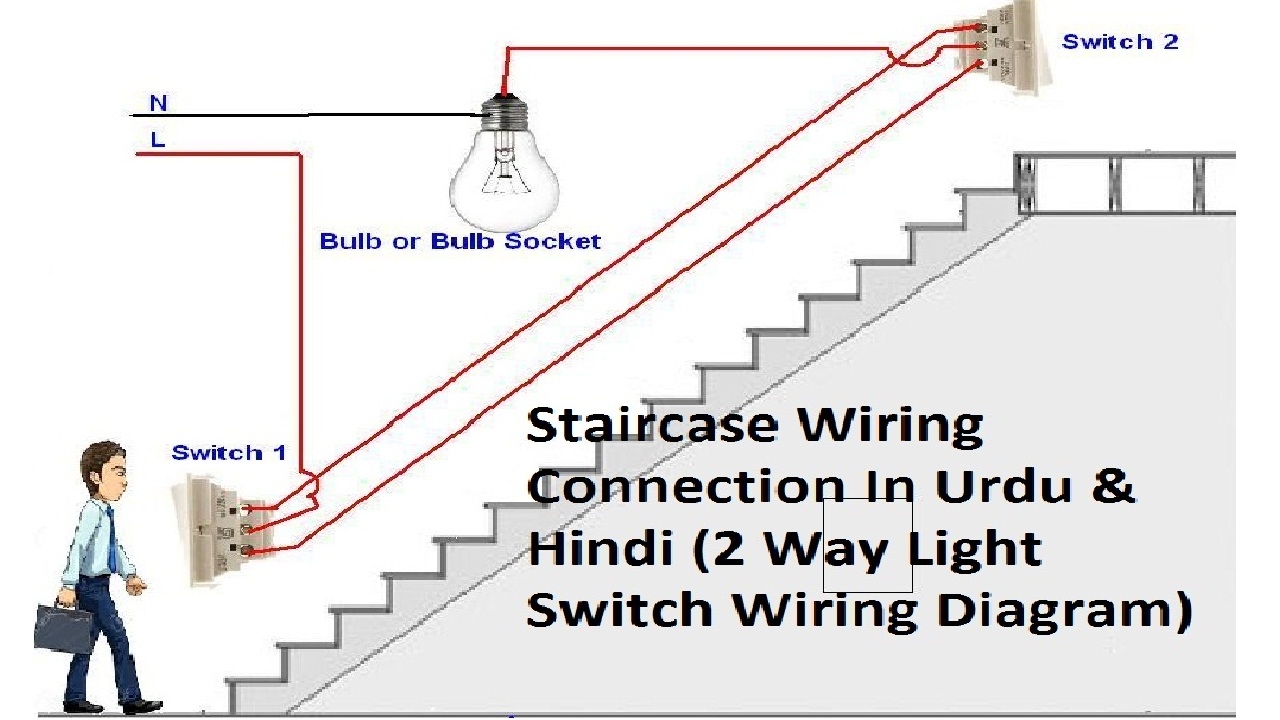
I have managed to get Alexa to trigger the TC2 switches nicely through HA without depending on the Broadlink servers which is cool. However, in my next iteration of the smart home automation project I need to replace several spots of light switches which are 2-way in nature. FYI, my definition of 2-way means the same light being controlled by 2 different switches. The diagram below illustrates this:
user posted image

I've been Google'ing for a while and I could not find 2-way TC2 switches. I then dropped the Broadlink Malaysia a message to check if they have a solution for 2-way switches. I received the following:

user posted image

Apparently, this wireless eTouch switch is able to pair with another wired eTouch switch (imagine the wired eTouch switch is one of my existing TC2 switch that does not support 2-way). I however, had confirmed that these do not work with the TC2.

I would like to seek for the advice and opinions of all the sifus here. What is a typical solution for 2-way switches?
kokwei
post Aug 12 2018, 09:32 AM

New Member
*
Junior Member
48 posts

Joined: Jan 2007


QUOTE(Kiding @ Aug 3 2018, 09:07 PM)
Actually my house doesn't use 2 way switch anymore, I just replace it with PIR sensor, automatically turn on when someone in the staircase.
*
Which PIR sensor are you using?
kokwei
post Aug 12 2018, 09:35 AM

New Member
*
Junior Member
48 posts

Joined: Jan 2007


QUOTE(luvox @ Aug 3 2018, 11:57 PM)
Other brand RF switch, like chuguan, can pair with another battery powered switch pad to stick on wall.
I already replace all my TC2 with aqara wall switch n i can stick addition battery powered aqara switch pad on any place. Alternative to my aqara battery switch pad is magic cube
*
I am exploring the same solution.

Question to you:

1) Can you share with me the links to the AQARA Wall Switch (without neutral)? I am able to locate the battery powered wireless switch, but am cautious of the wall switch as I read there are neutral vs non-neutral ones.

2) I read product pages like this - https://shopee.com.my/Xiaomi-Aqara-Light-Co...3668.1391757674

It says "fire wire". Does this mean with or without neutral?

3) I noticed that AQARA wall switch is up to 2-gang maximum only. Any proposed solution for 3-gang, 2-way?


kokwei
post Aug 12 2018, 10:22 AM

New Member
*
Junior Member
48 posts

Joined: Jan 2007


QUOTE(luvox @ Aug 12 2018, 11:00 AM)
Ya. Aqara only hv two gang. What u can do is cut another wall switch box or do like me by pass one of the electric point to keep that curcuit turn on 24/7 & i put sonoff basic at the ceiling point to control that bypassed circuit. Because that bypassed point is not important, i only need automation with xiaomi motion censor to turn on my condo doorway light. Another bypassed circuit is L-box cove light LED strip that im ok only to use voice control to turn it on.

If i wana put aqara battery powered remote switch pad to turn them on also can. I can setup my home assistant automation, if aqara switch pad on/off, then sonoff basic on/off (flashed with tasmota and communicate with ha via mqtt). If u hv plaster ceiling, easier to put sonoff basic above the ceiling at first downlight that connected to parallel downlights circuit, before the wire looping start.

https://shopee.com.my/visiongadgetry/206651184

Single firewire mean only need live wire. If only need live wire the range is 3w-800w
If need neutral wire there is no minimal 3w range
*
Bro, thank you for your comprehensive explanation!

Your use case for the sonoff basic is actually practical, i.e. by-passing on the wall switch and install sonoff basic on the plaster ceiling itself, before the actual LED downlight(s).

And thanks for clarifying the definition of fire wire smile.gif
kokwei
post Aug 23 2018, 08:49 AM

New Member
*
Junior Member
48 posts

Joined: Jan 2007


I've been having issues with one of my Broadlink TC2 switches.
It is a 3 gang switch and occasionally it turns off 2 of the 3 gangs at random times, when the gangs were in the state of "on".

Is it an issue of installation, or is it a defect?

Very tempted to trash it and go for Aqara switches instead. My biggest issue with Aqara is that they don't have 3 gangs!
kokwei
post Aug 24 2018, 11:43 AM

New Member
*
Junior Member
48 posts

Joined: Jan 2007


Has anyone tried to DIY flashing of Tasmota firmware onto Sonoff basic switches? If so, may I ask that you share which guide you followed, and where did you source for the tools (Arduino FTDI - USB board), etc for the task?

Thanks.
kokwei
post Aug 24 2018, 04:54 PM

New Member
*
Junior Member
48 posts

Joined: Jan 2007


QUOTE(Fubar20 @ Aug 24 2018, 02:55 PM)
Use the Search function, bro. There are YT videos I posted few pages back.
You can follow DrZzs channel if you are interested to know more.

DO NOT USE FTDI USB!! Most of them are fakes and will brick.
I use a CH340G USB to TTL programmer bought under RM 10 at lelong.
*
Apologies for asking again. Will search for the post. Thank you for your prompt response.

Cheers!
kokwei
post Aug 26 2018, 07:09 PM

New Member
*
Junior Member
48 posts

Joined: Jan 2007


QUOTE(yeop @ Aug 26 2018, 07:00 PM)
Thanks, my fan does come with remote,i just want to control on/off biggrin.gif
because i want to integrate with mi gateway hub
*
Most economical solution is get a Broadlink RM mini 3. Get it to learn the IR commands to turn on/off your fan, and control via the broadlink app, or alexa/home assistant.

Hope this helps.
kokwei
post Sep 13 2018, 10:54 PM

New Member
*
Junior Member
48 posts

Joined: Jan 2007


Has anyone tried controlling their Autogate (DC Motor) with RM Pro? I tried to get RM Pro to learn the signals, but I noticed once learnt, the command can only be used once and subsequently it doesn't trigger the auto-gate anymore. I'm suspecting that there's an algorithm built into subsequent signals, which carries some random number that's only known between the sender (remote), and the receiver (gate control box).

Am I the only one?
kokwei
post Sep 13 2018, 11:04 PM

New Member
*
Junior Member
48 posts

Joined: Jan 2007


QUOTE(Drian @ Sep 12 2018, 12:27 PM)
I would like to use aqara wall switches that does not use neutral line .

My other option is to use broadlink TC2 or Chuguan.
*
This can be done.

My setup is Home Assistant running on Raspberry Pi, with the following:

1) Xiaomi Gateway
2) Aqara wall switches (no neutral)
3) Aqara wireless wall switch (battery powered), to replace the 2-way switches along my staircases, hallways, etc.
4) Xiaomi motion sensors - which detects movements, captured by Home Assistant, and triggers (2) - wall switches. I am also able to trigger RM Pro -> Broadlink TC2 switches ... with home assistant you can cross manufacturers

Depends on what you want to achieve.
kokwei
post Sep 13 2018, 11:05 PM

New Member
*
Junior Member
48 posts

Joined: Jan 2007


QUOTE(Fubar20 @ Sep 14 2018, 12:03 AM)
Auto gate normally use rolling code.
Not suitable for RM Pro.
Rolling Code
*
Thanks for your speedy response. Looks like I've hit a road block then smile.gif
kokwei
post Sep 14 2018, 04:19 PM

New Member
*
Junior Member
48 posts

Joined: Jan 2007


QUOTE(ozak @ Sep 14 2018, 09:45 AM)
Mostly I think for fun only.

I don't see any automation there.

More step to execute on the phone than by the remote.
*
In my case, it isn't really because it is for fun. Like a clear use case yesterday night, I left my gate open, and my auto gate remotes are in both of my cars. I live in a 3-storey house, and I do not have a remote to the gate where I sleep on the 3rd floor hence it triggered me if I could leverage on the RM Pro to control the gate since I have Alexa integration and Home Assistant web access already for it - instead of getting another remote and place it on the 3rd floor.

Looks like I need to go for the additional remote then, after reading all these comments here. Cheers.
kokwei
post Sep 14 2018, 04:43 PM

New Member
*
Junior Member
48 posts

Joined: Jan 2007


QUOTE(Zot @ Sep 14 2018, 05:25 PM)
I think what you need it auto closing if detected no activity around the gate. That is automation in case you forget  biggrin.gif
*
I am quite cautious of this, as accidental closing can badly dent the car. Maybe really smart rules around this one, i.e. after 12am, etc.

But then I read the postings on having a sonoff attached to the autogate board, etc ... I chicken out already. I'm an IT guy, dare not go so deep on electronics smile.gif
kokwei
post Sep 14 2018, 05:23 PM

New Member
*
Junior Member
48 posts

Joined: Jan 2007


QUOTE(Zot @ Sep 14 2018, 05:53 PM)
A good autogate should not dent the car. However, scared too because it stopped when the gate is actually touch car body. You can put sensor across the gate to sense any obstruction.  smile.gif
*
I suppose adding all up points me to getting the third remote for my auto gate and forget about automation for now.


Change to:
| Lo-Fi Version
0.3443sec    0.70    7 queries    GZIP Disabled
Time is now: 14th December 2025 - 05:28 PM