Welcome Guest ( Log In | Register )

9 Pages « < 2 3 4 5 6 > » Bottom

Outline · [ Standard ] · Linear+

 Smart Home, Let's discuss

views
     
Oltromen Ripot
post Oct 28 2022, 03:43 PM

πŸ‘ 999999 person Likes this member
*******
Senior Member
4,034 posts

Joined: Dec 2019
QUOTE(epicure @ Oct 28 2022, 10:38 AM)
user posted image

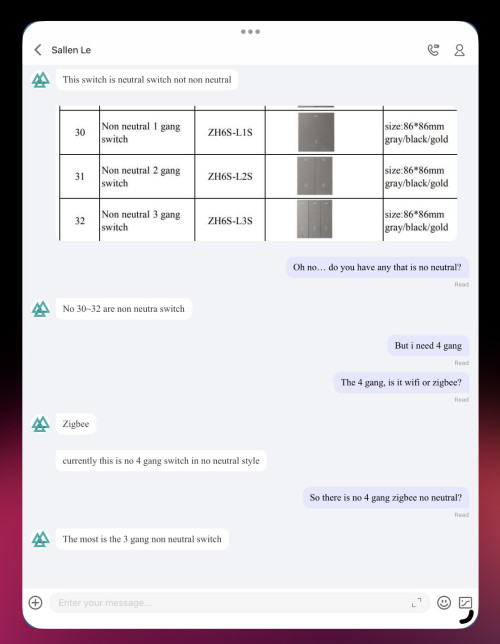
I’ve contacted the supplier.. unfortunately.. 4-gang zigbee switch requires neutral… i would need to loop the neutral from the nearest light fitting in that circuit.. but unfortunately no time to access ceiling to loop and draw the cable to the switch … seems like gotta put this on hold for a while..
*
i'm actually having dilemma between using the switches and sockets on zigbee or on wifi.

if on wifi, the smart switches and sockets can easily reconnect if i replace AP, as long SSID and credential remains the same. BUT, i will have tons of DHCP clutter. failure of individual switch or socket is restricted to the affected.

if on zigbee, it is soothing on the eye as far as DHCP listing is concerned, BUT, if the zigbee gateway fails, .... all sockets and switches will become offline.

right now i am leaning towards the fault tolerance of using wifi over zigbee for switches and sockets.

(there is supposedly feature to migrate devices connected through a faulty zigbee gateway to another replacement zigbee gateway, but it's an all or nothing proposition; cannot pick and choose which device transfer to replacement gateway "1st floor" and which transfer to replacement gateway "2nd floor", as example.)

This post has been edited by Oltromen Ripot: Oct 28 2022, 03:45 PM
Oltromen Ripot
post Oct 28 2022, 10:23 PM

πŸ‘ 999999 person Likes this member
*******
Senior Member
4,034 posts

Joined: Dec 2019
QUOTE(adamw @ Oct 28 2022, 07:51 PM)
Wrong, if you have 2 gateway, it will only migrate to the one you select so 1st floor devices will only goto the new 1st floor.
*
i haven't test, but what i mean is, based on my understanding reading the documentation:-

if i have 10 devices on malfunctioning gateway A, i can only transfer all 10 to replacement gateway B and not selectively 5 to replacement gateway C.
Oltromen Ripot
post Oct 29 2022, 12:23 AM

πŸ‘ 999999 person Likes this member
*******
Senior Member
4,034 posts

Joined: Dec 2019
QUOTE(adamw @ Oct 28 2022, 11:24 PM)
Yes, you cannot select, it has to be all on original gateway but your earlier question was different from above scenario.
*
what was being delivered just lost in transcription.

the earlier conundrum wasn't a question. it's a statement of choosing between either zigbee or wifi.

and part of choosing wifi over zigbee for switches and sockets is on considering the failure point, which is the zigbee gateway becoming faulty. all along, what i mean is, documentation said cannot split registered device on 1 gateway to many replacement gateway.


Oltromen Ripot
post Nov 11 2022, 08:34 PM

πŸ‘ 999999 person Likes this member
*******
Senior Member
4,034 posts

Joined: Dec 2019
I bought loads of Smartrul Tuya Wifi+433, chiefly because the Wifi+433 can support Neutral line AND have 4 gang.

https://shopee.com.my/product/49648373/6968872410

Also bought a few 433 remote out of curiosity.
if this can use to control the switches direct without lifting my butt of the mattr-...sofa, it's heaven-sent.

But.... how do I pair each of the 8 buttons on the remote to a button on the switch?

Or do I need additional device (pulak?) for the 433 signal to be captured and acted upon?
Oltromen Ripot
post Nov 20 2022, 12:23 PM

πŸ‘ 999999 person Likes this member
*******
Senior Member
4,034 posts

Joined: Dec 2019
QUOTE(lucaswjk @ Nov 20 2022, 04:31 AM)
agreed 433MHz remote is heaven sent, no need hp at all.

this is how I program on my sonoff switch
1. long press one of your desired button on your wall switch until u hear a beep... some device will blink led
2. then on ur remote, press the button u want for the trigger. thats it.
ps: not recommended but can trigger multiple button using the same key at remote. eg all lights or fan+light
*
thank you.
i'm looking forward for these switches to arrive. then need to spend some time installing.

but i have to insert 20mm spacers sweat.gif . because when i installed a 3-pin socket, 15mm spacer is just nice for the amount of wires and thickness under the soocket. i imagine 4-gangs will have at least 5 wires.

i opened a 4-gang ceiling switch for sampling and jackpot 8 wires behind!!! now i'm fretting and hopefully the 4 lives wires are from same source, so i can just use 1 of them.
Oltromen Ripot
post Nov 26 2022, 08:06 PM

πŸ‘ 999999 person Likes this member
*******
Senior Member
4,034 posts

Joined: Dec 2019
QUOTE(alucard89 @ Oct 26 2022, 07:37 PM)
Oh wait, different breakers, not sure about this time
*
QUOTE(shykull @ Oct 26 2022, 07:58 PM)
» Click to show Spoiler - click again to hide... «

*
QUOTE(shykull @ Oct 26 2022, 09:50 PM)
will not trip. unless got short to earth then will trip.

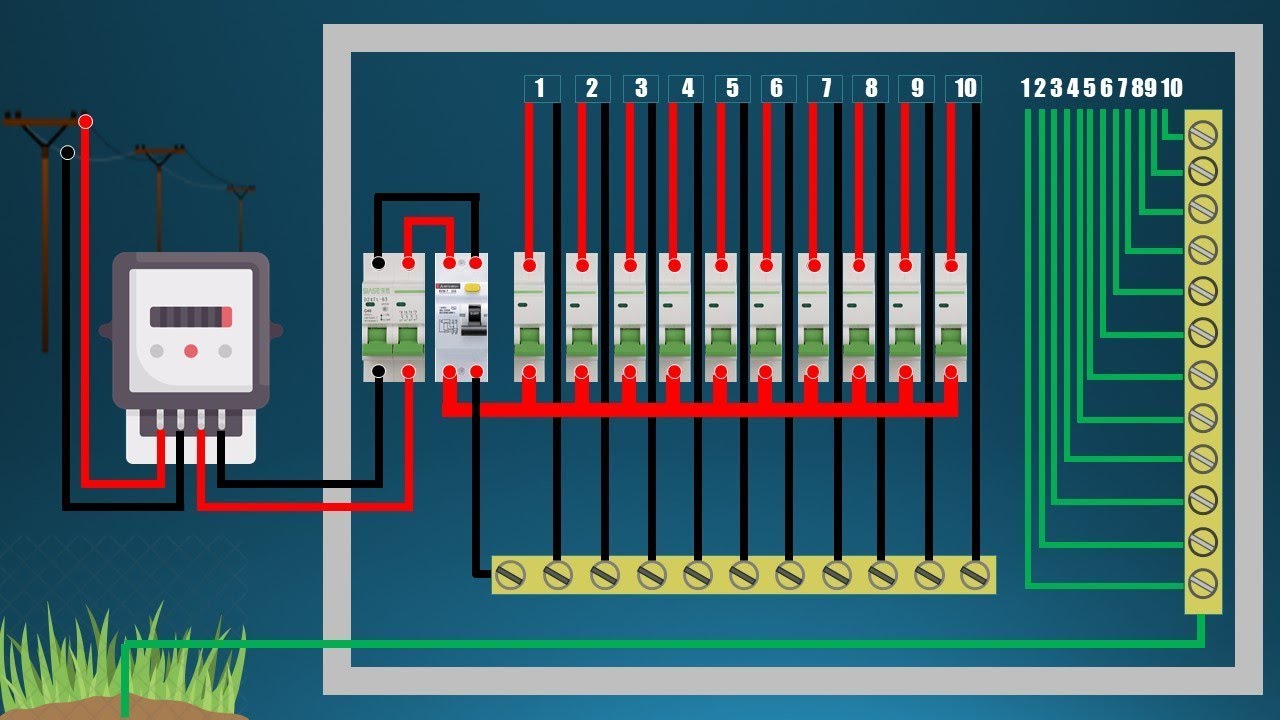
Also be careful, if the neutral wire was looped then even if you turn off the breaker, the active load from another breaker can shock you
*
QUOTE(Zot @ Oct 27 2022, 08:26 AM)
» Click to show Spoiler - click again to hide... «

*
QUOTE(shykull @ Oct 27 2022, 12:50 PM)
» Click to show Spoiler - click again to hide... «

*
QUOTE(epicure @ Oct 27 2022, 01:52 PM)
» Click to show Spoiler - click again to hide... «

*
QUOTE(lucaswjk @ Nov 20 2022, 04:31 AM)
agreed 433MHz remote is heaven sent, no need hp at all.

this is how I program on my sonoff switch
1. long press one of your desired button on your wall switch until u hear a beep... some device will blink led
2. then on ur remote, press the button u want for the trigger. thats it.
ps: not recommended but can trigger multiple button using the same key at remote. eg all lights or fan+light
*
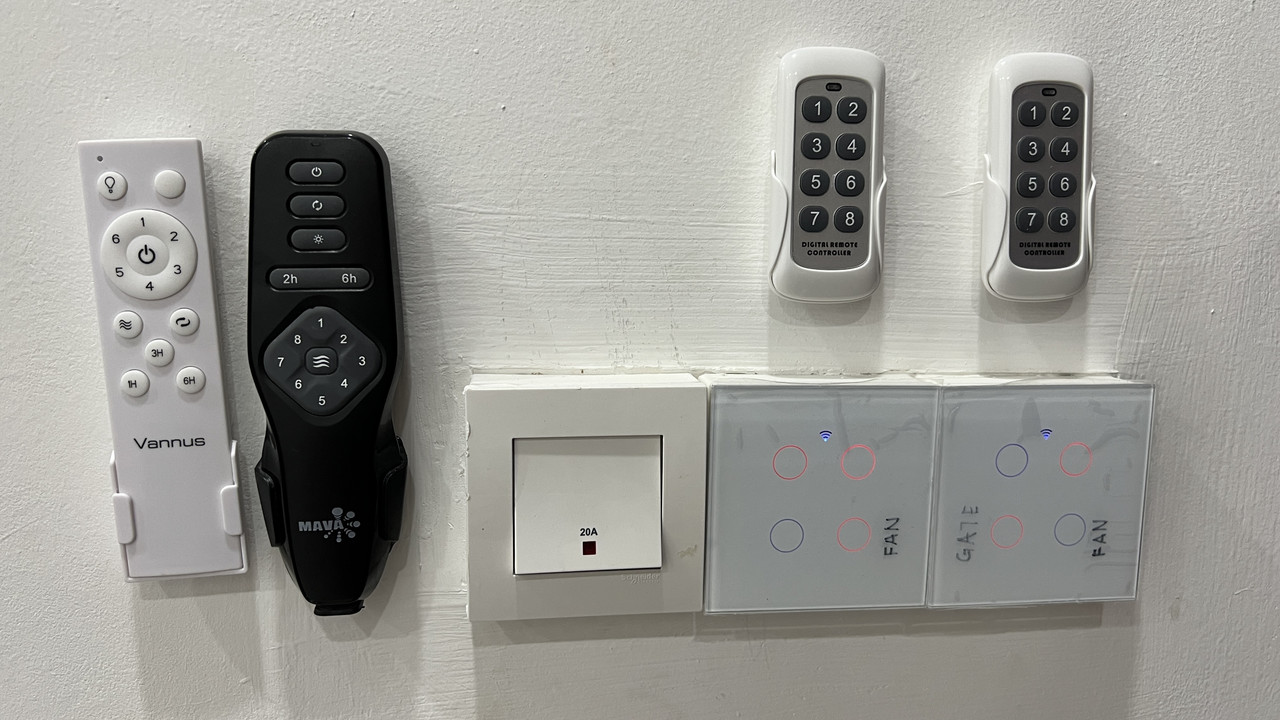
I ended up using Smartrul on Wifi. Since I am using a "dedicated" wifi network just for home automation purposes (rather than throwing away the 3-mesh LG8245X6-10 gifted by Maxis Fibre). Laptops and smart-whatever are using separate wifi on 3-mesh M9 Plus for quality-assurance reason.

Smartrul because most almost everyone else are selling switches with decorated pattern on the buttons while I want empty one - just a halo ring so that I can have custom stickers to label right on top of the buttons.

I connected N to the 20A next to them. I shall not use transistors.
The 433MHz is wonderful!!!

Tomorrow's gonna continue with the rest. Some switches I might need to call electrician to pull N as they don't have 20A or 3-pin or pathway to either that I can pull myself.

(I use separate remote to either control the porch or to control living room.)
user posted image
Oltromen Ripot
post Nov 26 2022, 09:41 PM

πŸ‘ 999999 person Likes this member
*******
Senior Member
4,034 posts

Joined: Dec 2019
QUOTE(alucard89 @ Nov 26 2022, 09:08 PM)
How did you get the 3 mesh? Subscribed to 800mbps maxis?
The smartrul touch pad are quite responsive, got some other brands there need to press extra hard like resistive touch lol.
Planning to buy their push button switch soon
*
3-mesh LG8245X6-10? included as part of 500 Mbps subscription.

3-mesh M9 Plus? add-on purchase via Unifi Fibre of another home.

if buttons not responsive, it could be due to screwing the rear plate to tight until bent and thus got gap with the front plate. learnt it as i installed the first 2 - pictured before.

This post has been edited by Oltromen Ripot: Nov 26 2022, 09:44 PM
Oltromen Ripot
post Nov 26 2022, 11:51 PM

πŸ‘ 999999 person Likes this member
*******
Senior Member
4,034 posts

Joined: Dec 2019
QUOTE(alucard89 @ Nov 26 2022, 10:25 PM)
I see, i only get 2 pack from some brand for 500mbps maxis.
Is that from a newer promo?
*
i signed up 100Mbps circa april/may and received 1 unit.

upgraded to 500Mbps circa june and received 2 more.
Oltromen Ripot
post Nov 27 2022, 08:33 AM

πŸ‘ 999999 person Likes this member
*******
Senior Member
4,034 posts

Joined: Dec 2019
QUOTE(lucaswjk @ Nov 27 2022, 02:11 AM)
i read mesh not suitable for the switch.
since u r not using mesh. then it is ok.
*
i am using the LG8245X6-10 as mesh.

and yes, i did find it odd that the farthest switch i installed yet is complaining about bad wifi connection while a mesh node is literally 4 metres away from it.

i was thinking it might be issue with it connecting to the mesh root node instead. maybe, it can only recognise BSSID of wifi, not SSID.
Oltromen Ripot
post Nov 27 2022, 07:22 PM

πŸ‘ 999999 person Likes this member
*******
Senior Member
4,034 posts

Joined: Dec 2019
i deleted wifi profile altogether from phone, went to the farthest reach (away from root node of the mesh) and then fresh re-connect to the 2.4GHz wifi.

then i deregister the "bad wifi connection" switch (press any button very long long time until the switch deregisters itself, surprisingly even from smarthome app). then re-register it again.

"bad wifi connection" resolved. so i guess it's really due to it using BSSID and not just SSID.

as for device profile of the switch, (the name assigned to the switch and to the individual buttons) all reappeared when the switch reregistered itself in smarthome app. but any automation that was previously referencing the old incarnation will need to be reviewed to set back to its new incarnation.

QUOTE(lucaswjk @ Nov 27 2022, 02:11 AM)
i read mesh not suitable for the switch.
since u r not using mesh. then it is ok.

i use multiple ap, and it doesnt work too...
note my ap didnt have channel collisions.
there r certain area the switch failed to connect to wifi.
i think the cheap esp chipset confused with multiple channel.

there are one problem i facing.
when i renovate my staircase light i disable the 2ways switch and i program the switch to sync on the power state. it works as long as the wifi working. and if it doesnt work, i have to switch off the main power supply to restart it. (restart the wifi sometime will knock the device out of wifi too) really suck.
*
QUOTE(Oltromen Ripot @ Nov 27 2022, 08:33 AM)
i am using the LG8245X6-10 as mesh.

and yes, i did find it odd that the farthest switch i installed yet is complaining about bad wifi connection while a mesh node is literally 4 metres away from it.

i was thinking it might be issue with it connecting to the mesh root node instead. maybe, it can only recognise BSSID of wifi, not SSID.
*
Oltromen Ripot
post Nov 27 2022, 08:45 PM

πŸ‘ 999999 person Likes this member
*******
Senior Member
4,034 posts

Joined: Dec 2019
continuance from installing 433MHz tuya wall switches.
my kids pointed out that 1 of the LED on button 1 (OFF) keeps blinking when button 2 is switched ON.

button
1 - ceiling LED x4
2 - ceiling LED x2
3 - empty
4 - ceiling fan

button
1 - ceiling LED x4
2 - pillar LED x2
3 - CFL gate x2
4 - ceiling fan
Oltromen Ripot
post Nov 28 2022, 08:53 AM

πŸ‘ 999999 person Likes this member
*******
Senior Member
4,034 posts

Joined: Dec 2019
UPDATE:

I reinstalled the switches exhibiting flickering.

For now, it appears that it was due to bent switches.

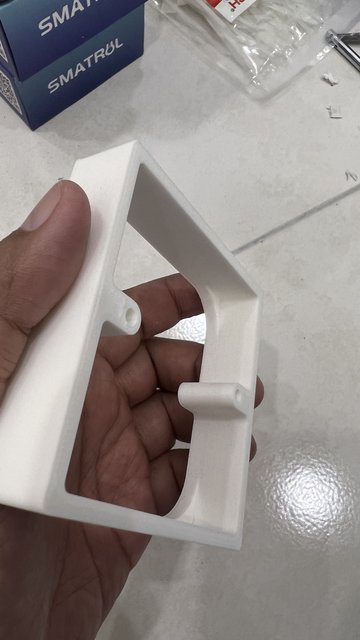
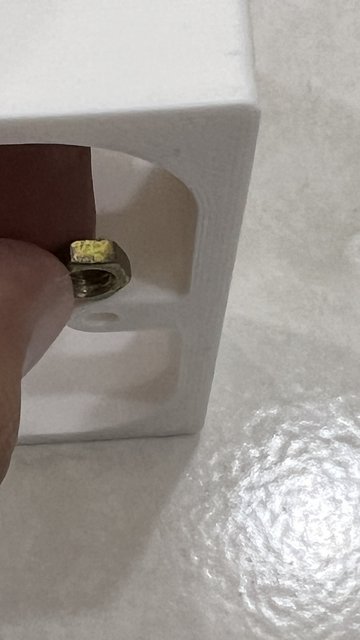
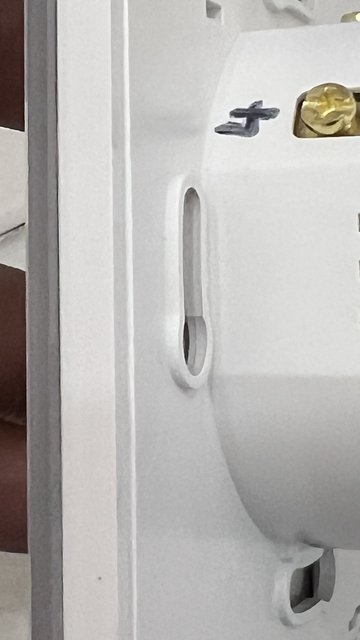
Why is it bent? Because each of seitches had protrusions on the screw holes, such that if I installed as-is with the spacer bracket, it will leave a gap between the wall/spacer and the switch's frame. So I had to saw off a bit of the spacer's screw holes, but I had sawed off too much of the spacer's screw hole in earlier installations. To re-fill back the space left vacant from sawing off too much of the spacer, I used nuts.

Now the switches are flush with the spacers without any gap between wall, spacer, and switch; and no more flickering since the switches are no longer bent from tightening too much over empty, sawed off screw holes.

user posted image

user posted image

user posted image

EARLIER:

Attached video.

Anyone knows why this flickering is happening?

4-gang switch.
I tried to switch LEDx4 and LEDx2 between L1 and L2, but whoever sits on L1 will flicker.

If LEDx2 sits on L1, both LEDx2 flickers when any on L2,L3,L4 is switched ON.

If LEDx4 sits on L1, only 1 of LEDx4 flickers when any on L2,L3,L4 is switched ON.

Attached File  trim.B1BC1CD0_3B23_4955_81BA_3FDA38284730.MOV ( 1.04mb ) Number of downloads: 2


This post has been edited by Oltromen Ripot: Nov 28 2022, 10:03 AM
Oltromen Ripot
post Dec 2 2022, 02:32 PM

πŸ‘ 999999 person Likes this member
*******
Senior Member
4,034 posts

Joined: Dec 2019
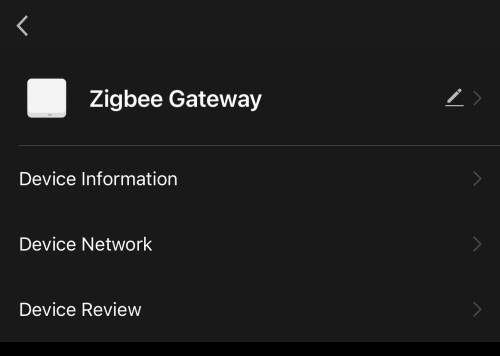
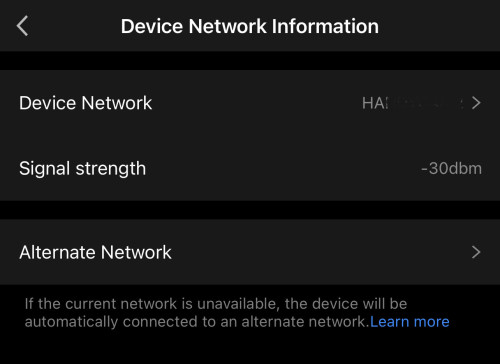
wifi version can failover to alternative network.
i use my B618 on UPS as failover to fibre.
super important as i have my home security built around zigbee longevity.

device' response have been stellar less than 1s.

QUOTE(SIEWBAO @ Dec 2 2022, 09:51 AM)
I saw some review saying Hub with network is more stable, izit true?
Since I already bought Near Hub, I dont have to install Near apps rite? Just Tuya app will do rite?
*
QUOTE(adamw @ Dec 2 2022, 11:05 AM)
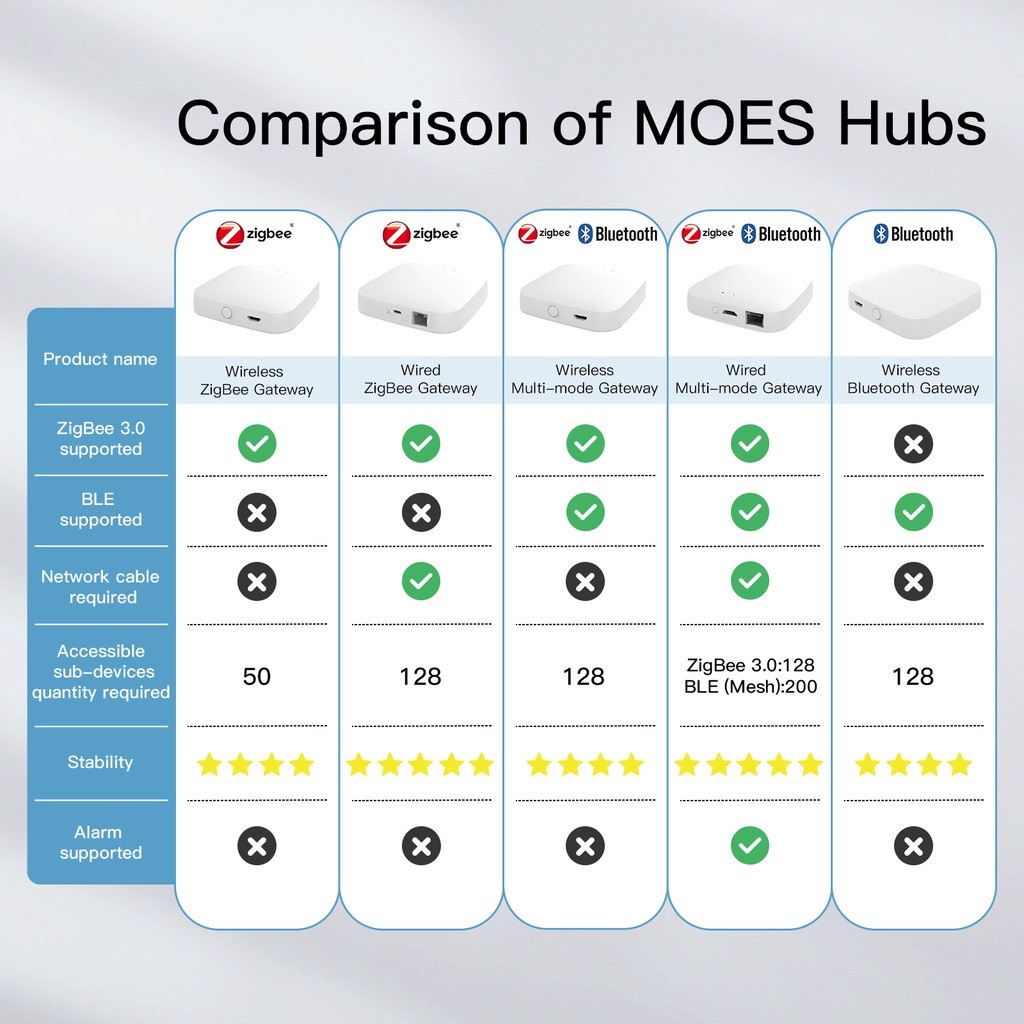
Yes, the RJ45 should be more stable & can also support more devices but the wireless hub also have it's advantage, placement is flexible. You can try installed Tuya/Smartlife app to link the Near ZigBee hub.
*
QUOTE(tomastan4134 @ Dec 2 2022, 12:09 PM)
confirm more stable using lan cable for the zigbee hub.  my house using lan cable zigbee tuya hub.  with more than 20 zigbee switches link to the hub including a zigbee signal repeater.  not ever once fail to trigger light through the zigbee .  unless no internet connection.

the main reason wifi version of the zigbee hub tend to be unstable is because it is using the old standard of wifi  2.4ghz wireless N (not wireless ac or even wifi 6).  this wifi standard is so old school.  when connect to more modern wifi router (wifi 6)  will face wifi drop out between the hub and router.  ( frequent offline) .   

i exterence this with my wifi version of smart plug .  one day can offline twice. 

if zigbee switch never offline even once.  (when connect through lan cable zigbee hub)
*
user posted image

user posted image

user posted image
Oltromen Ripot
post Dec 5 2022, 12:53 AM

πŸ‘ 999999 person Likes this member
*******
Senior Member
4,034 posts

Joined: Dec 2019
ignore branding. i believe they are practically just white label of same hardware.

user posted image

QUOTE(adamw @ Dec 2 2022, 11:05 AM)
Yes, the RJ45 should be more stable & can also support more devices but the wireless hub also have it's advantage, placement is flexible. You can try installed Tuya/Smartlife app to link the Near ZigBee hub.
*
QUOTE(tomastan4134 @ Dec 2 2022, 12:09 PM)
confirm more stable using lan cable for the zigbee hub.  my house using lan cable zigbee tuya hub.  with more than 20 zigbee switches link to the hub including a zigbee signal repeater.  not ever once fail to trigger light through the zigbee .  unless no internet connection.

the main reason wifi version of the zigbee hub tend to be unstable is because it is using the old standard of wifi  2.4ghz wireless N (not wireless ac or even wifi 6).  this wifi standard is so old school.  when connect to more modern wifi router (wifi 6)  will face wifi drop out between the hub and router.  ( frequent offline) .   
i exterence this with my wifi version of smart plug .  one day can offline twice. 

if zigbee switch never offline even once.  (when connect through lan cable zigbee hub)
*
QUOTE(SIEWBAO @ Dec 2 2022, 02:31 PM)
What if i go for 1 hub with network n other 1 without network? Can do?
*
Oltromen Ripot
post Dec 6 2022, 01:28 PM

πŸ‘ 999999 person Likes this member
*******
Senior Member
4,034 posts

Joined: Dec 2019
QUOTE(t3n @ Dec 6 2022, 01:23 PM)
Hi i need a smart switch to automate my water heater to be on twice a month for 15 mins. Which and what kind of smart switch you guys recommend?
*
Reminder: must be able to handle 20A
Oltromen Ripot
post Dec 7 2022, 02:08 PM

πŸ‘ 999999 person Likes this member
*******
Senior Member
4,034 posts

Joined: Dec 2019
Question:

Tuya environment.

I have gateway + a lot of zigbee sensors for home alarm purpose. NOTE: ZIGBEE.

All controlled from smartphone app.

Now I want to expand and create some sort of wall panel AND able to use remote hanging of keychain (like, i went off and return home, just need to press remote to arm/disarm).

1) any wall alarm panel recommendation? that can integrate/reuse existing ZIGBEE PIR and door contact sensor?

2) that also have keychain remote option? multiple units of the remote for different household members. THIS HAVE HIGHER PRIORITY THAN HAVING A BEAUTIFUL WALL PANEL.

3) possible to create smartscene rule that controls arming/disarming? (like, i can put wireless scene switch instead to control arming/disarming in lieu of a dedicated alarm wall panel.)

type of remote (zigbee/433) depends on whether wall panel can support. of if no wall panel, then need to be zigbee remote so that can communicate direct to zigbee gateway.
Oltromen Ripot
post Dec 7 2022, 08:59 PM

πŸ‘ 999999 person Likes this member
*******
Senior Member
4,034 posts

Joined: Dec 2019
QUOTE(mikeeeee @ Dec 7 2022, 03:53 PM)
Wireless scene switch should fit your requirements. I think they also have wireless scene remote where u can take along instead of fix on the wall
*
i tested my multi-mode zigbee gateway in past 3hrs.

i can get/set "triggered" variable whether it is "normal" or "alarmed" (i.e. sensor was triggered). the "alarmsound" variable will follow such state.

BUT, it does not provide a variable to get/set whether in armed or disarmed mode.

in other words: i don't know if the system is supposed to make noise (i'm away) or don't make noise (i'm at home).

imagine opening a car door and have it yell out regardless, simply because it cannot determine whether you have pressed armed/disarmed.
Oltromen Ripot
post Dec 8 2022, 03:33 AM

πŸ‘ 999999 person Likes this member
*******
Senior Member
4,034 posts

Joined: Dec 2019
QUOTE(mikeeeee @ Dec 8 2022, 12:06 AM)
How are your arming disarming it currently?
*
Direct through SmartLife only.
There is no condition where I can achieve arm/disarm through Automation rules.

user posted image

user posted image

user posted image
Oltromen Ripot
post Dec 8 2022, 11:35 AM

πŸ‘ 999999 person Likes this member
*******
Senior Member
4,034 posts

Joined: Dec 2019
QUOTE(Oltromen Ripot @ Nov 28 2022, 08:53 AM)
UPDATE:

I reinstalled the switches exhibiting flickering.

For now, it appears that it was due to bent switches.

» Click to show Spoiler - click again to hide... «

EARLIER:

Attached video.

Anyone knows why this flickering is happening?

4-gang switch.
I tried to switch LEDx4 and LEDx2 between L1 and L2, but whoever sits on L1 will flicker.

If LEDx2 sits on L1, both LEDx2 flickers when any on L2,L3,L4 is switched ON.

If LEDx4 sits on L1, only 1 of LEDx4 flickers when any on L2,L3,L4 is switched ON.

Attached File  trim.B1BC1CD0_3B23_4955_81BA_3FDA38284730.MOV ( 1.04mb ) Number of downloads: 2

*
QUOTE(epicure @ Nov 29 2022, 11:26 AM)
Good job bro. Glad it works. I’m still on the fence on the 4 gang, so im just leaving it as a dumb switch for now. upgrading my other switches to either Tuya MOES (first floor) or Aqara (ground floor). they all work great in homekit. now looking at buying an google home display, cos it can link to my Tuya video doorbell. smart home is a deep deep rabbit hole. haha
*
Apparently it wasn't due to bent wall switches.

Flickering is still happening. Just that it wasn't visible and bright enough to notice during daytime when I re-sit the switches.

Question:
(1) Vendor told me to install capacitor eventhough I am already using N. Valid instruction?

(2) By default, instruction is to install capacitor at at L before and N after L1 load. But since all N in my home appears to return to the same N anyway, can I just put capacitor right at L1 and then N of the unassociated 20A switch?

(3) are capacitors hot while they are absorbing L1 trickle in OFF operation? hot in switched ON operation? safe if input this enclosed inside wall recess?

(hey, come to think of it, i never tested whether my N hooked to an unassociated 20A switch is actually flowing properly...)

This post has been edited by Oltromen Ripot: Dec 8 2022, 01:04 PM
Oltromen Ripot
post Dec 13 2022, 12:24 PM

πŸ‘ 999999 person Likes this member
*******
Senior Member
4,034 posts

Joined: Dec 2019
QUOTE(Oltromen Ripot @ Nov 28 2022, 08:53 AM)
UPDATE:

I reinstalled the switches exhibiting flickering.

For now, it appears that it was due to bent switches.

--snip--

EARLIER:

Attached video.

Anyone knows why this flickering is happening?

4-gang switch.
I tried to switch LEDx4 and LEDx2 between L1 and L2, but whoever sits on L1 will flicker.

If LEDx2 sits on L1, both LEDx2 flickers when any on L2,L3,L4 is switched ON.

If LEDx4 sits on L1, only 1 of LEDx4 flickers when any on L2,L3,L4 is switched ON.

Attached File  trim.B1BC1CD0_3B23_4955_81BA_3FDA38284730.MOV ( 1.04mb ) Number of downloads: 2

*
QUOTE(epicure @ Nov 29 2022, 11:26 AM)
Good job bro. Glad it works. I’m still on the fence on the 4 gang, so im just leaving it as a dumb switch for now. upgrading my other switches to either Tuya MOES (first floor) or Aqara (ground floor). they all work great in homekit. now looking at buying an google home display, cos it can link to my Tuya video doorbell. smart home is a deep deep rabbit hole. haha
*
QUOTE(Oltromen Ripot @ Dec 8 2022, 11:35 AM)
Apparently it wasn't due to bent wall switches.

Flickering is still happening. Just that it wasn't visible and bright enough to notice during daytime when I re-sit the switches.

--snip--

(hey, come to think of it, i never tested whether my N hooked to an unassociated 20A switch is actually flowing properly...)

*
Final "solution".
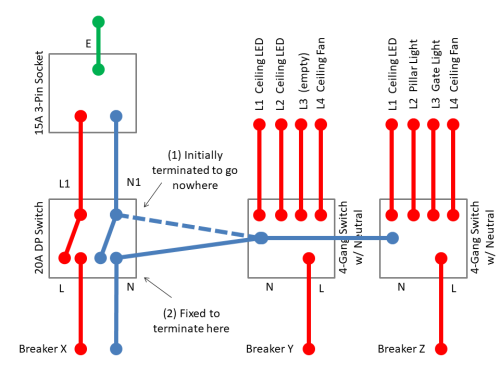
It was due to my mistake in tapping to the wrong side of 20A DP's N1. Now that the energy from smart switches' Neutral can flow correctly, all the flickering previously affecting 2 units of smart switches are resolved.

user posted image

9 Pages « < 2 3 4 5 6 > » Top
 

Change to:
| Lo-Fi Version
0.3551sec    0.46    7 queries    GZIP Disabled
Time is now: 16th December 2025 - 01:45 PM