

anyone tried using a powerline homeplug to extend the DECT phone?
Smart Home, Let's discuss
Smart Home, Let's discuss
|
|
 Sep 27 2018, 01:13 PM Sep 27 2018, 01:13 PM
Return to original view | Post
#41
|
 
Junior Member
103 posts Joined: Jun 2006 
|
anyone tried using a powerline homeplug to extend the DECT phone?
|
|
|
|
|
|
Sep 27 2018, 06:21 PM
Return to original view | Post
#42
|
|
Junior Member
103 posts Joined: Jun 2006
|
QUOTE(Zot @ Sep 27 2018, 02:07 PM) DECT phone do comes with either RJ11 (regular old phone) or RJ45 (Ethernet) plug. However, the phone and Internet are different signalling. It also has different voltage swing. Devices used for Ethernet signalling will not work for DECT phone that reason, I believe. I found this https://www.ligo.co.uk/rtx-wireless-phone-jack-twin But dont think its selling in Malaysia  |
|
|
Sep 28 2018, 09:48 AM
Return to original view | Post
#43
|
|
Junior Member
103 posts Joined: Jun 2006
|
QUOTE(Zot @ Sep 28 2018, 09:09 AM) aneip suggestion is very good idea. Normally for 2-story house, there are 2 separate phone wires. One to ground floor and one to upper floor. These wires go one point at the edge of the roof for external phone line connection. If you join these two wires, you have connection between ground and upper floor. You have parallel phone wire pairs. Well the main reason i was looking for this kind of solution is because i want to connect another point to the alarm panel which is under the stairs. I do not have a typical PSTN telekom telephone. I was thinking of using Unifi phone connections that comes out from the modem which is far away from the stairs. I need to find out the original where internal rj11 ends so maybe i can tap it from there In fact most phone wires has two pairs of wire, even though only one pair is used by phone. These two pairs can be used as Ethernet cable. I believe it is still good even for 100Mbps. Just need to replace with RJ45 connector to it. If you still want to utilize your house wireless LAN (well if wireless LAN can cover the whole house, there is no reason the DECT can't cover, I think  ), you can use this device, which I found the least expensive so far: ), you can use this device, which I found the least expensive so far:http://blog.thetelecomspot.com/how-to-exte...sipvoip-fxofxs/ I think you just need to plug the HT-503 to your wall phone socket and then plug the LAN cable to your wireless router. On the receiving end of the LAN, you need the HT-502 that will act as your FXS point. I hope I understood the device correctly   |
|
|
Jul 3 2019, 01:36 PM
Return to original view | Post
#44
|
|
Junior Member
103 posts Joined: Jun 2006
|
QUOTE(ycs @ Jul 2 2019, 03:27 PM) installed the sonoff switch, working nicely; put some foam tape behind pcb to prevent shorts; can you tell me yellow and black cable go to which port in autogate board?now, 3 ways to open gate  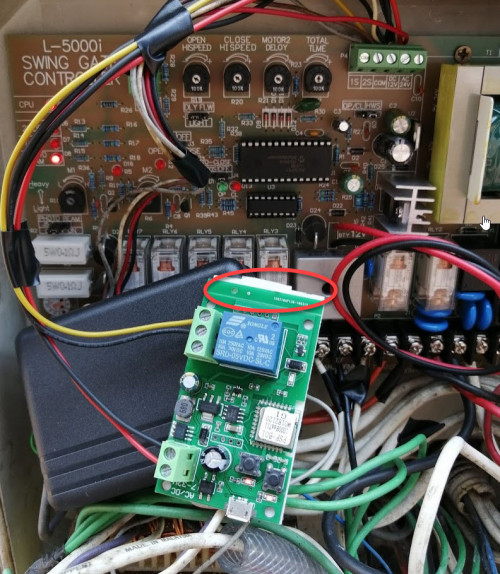 |
|
|
Jul 3 2019, 05:54 PM
Return to original view | Post
#45
|
|
Junior Member
103 posts Joined: Jun 2006
|
QUOTE(ular_king @ Jul 3 2019, 01:36 PM) can you tell me yellow and black cable go to which port in autogate board? So is COM and 2S for you? |
|
|
Jul 3 2019, 05:55 PM
Return to original view | Post
#46
|
|
Junior Member
103 posts Joined: Jun 2006
|
QUOTE(yfyap69 @ Jul 3 2019, 02:11 PM) The yellow and black cable go into your signal port to open and close the gate. So is that COM and 2S for you? |
|
|
Jul 3 2019, 07:47 PM
Return to original view | Post
#47
|
|
Junior Member
103 posts Joined: Jun 2006
|
QUOTE(ycs @ Jul 3 2019, 06:28 PM) from COM/NO to COM/2S Thanks  |
| Change to: |  0.3924sec 0.3924sec
 0.18 0.18
 7 queries 7 queries
 GZIP Disabled GZIP Disabled
Time is now: 7th December 2025 - 08:19 AM |
 Quote
Quote