
Welcome Guest ( Log In | Register )

46 Pages « < 18 19 20 21 22 > » Bottom

Outline · [ Standard ] · Linear+

 Smart Home, Let's discuss

views
     
Zot
post Oct 23 2018, 11:10 PM

Look at all my stars!!
*******
Senior Member
7,938 posts

Joined: Mar 2014
QUOTE(lencent @ Oct 23 2018, 10:17 PM)
Thanks for the response. I suspect my house is on 3 phase house wiring, is there anyway to confirm that? Phase 1 development does not mention about the wiring, but phase 2 development explicit mentioned 3 phase.
*
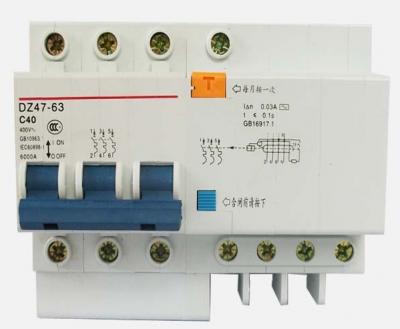
The 3 phase master circuit breaker is bigger with 3 ganged switch like this
Attached Image

New housing is using RCCB not ELCB. The RCCB concept is comparing current going out to load and current return from load. If equal, then OK. If not it will trip. Some house wiring separates the 3 phase N, thus if you mix the L from other phase then return the current through N in another phase, the RCCB will trip. However, they may use common N for all. The MCCB in picture has 3 L out and 1 N. This I believe will have no problem. Probably some use 3 single phase RCCB, thus tis will cause trip. That is my understanding.

The 3 phase wiring will have 3 different L wire color like Blue, Yellow and Red. You can try connect. The worse is the RCCB will trip. smile.gif
Zot
post Oct 24 2018, 08:49 AM

Look at all my stars!!
*******
Senior Member
7,938 posts

Joined: Mar 2014
QUOTE(kelembai @ Oct 24 2018, 08:12 AM)
What i know, pls look at your meter box, if you can see 3 big fuse box and have 3 big wire coming go thru it, it mean 3 phase. Sifu, is it right?
*
Yea... I was looking at inside the house. It is easier to look at the fuse. # fuses mean 3 phase supply nod.gif
Zot
post Oct 25 2018, 10:19 AM

Look at all my stars!!
*******
Senior Member
7,938 posts

Joined: Mar 2014
QUOTE(kelembai @ Oct 25 2018, 09:41 AM)
Not invidual i believe since 1 switch probably control 2-3 downlight, put before the junction.

But sometime, this sonoff basic become not stable mean it did not connect to internet, and need to reset
*
Is this often, need to reset? You probably have the unit on ceiling, then it is a nuisance.

Since I've never own any sonoff and was thinking of a project for it, this makes me think twice laugh.gif
Zot
post Oct 26 2018, 08:13 AM

Look at all my stars!!
*******
Senior Member
7,938 posts

Joined: Mar 2014
QUOTE(cursebreaker @ Oct 26 2018, 01:04 AM)
Yup, for lights. I set the power on state to 'ON'. So I can manually switch off, and when I switch on, the lights will come on.
*
Like what Fubar20 suggested, get the Sonoff RF. At current switch location, short the wire so that the power is always on. Replace the switch with RF switch which operated at 433MHz. This is just like remote control to toggle Sonoff RF unit at lamp location to ON and OFF like normal switch. The Sonoff RF unit also has WiFi control that can be controlled through apps.

Not sure where you put your Sonoff now. On top of plaster ceiling?
Zot
post Oct 26 2018, 01:57 PM

Look at all my stars!!
*******
Senior Member
7,938 posts

Joined: Mar 2014
QUOTE(kelembai @ Oct 26 2018, 01:02 PM)
For tv and speaker , connected to what device to make it smart or it can direct input to HA
*
https://support.google.com/googlehome/answer/7552173?hl=en
Zot
post Oct 29 2018, 01:00 PM

Look at all my stars!!
*******
Senior Member
7,938 posts

Joined: Mar 2014
QUOTE(ahton @ Oct 29 2018, 10:14 AM)
Dear all sifus,
I'm planning to make my house smart with Google Home.
Looking for smart blind which is Google Home supported.
So far only found Hunter Douglas, planning to go quote for a price.
Any other brand which is available in Malaysia?

Have done some research on cheaper solutions like Axis/Blunt but there are not available to purchase here. Please share your comment.
*
Before starting the project, consider how many time per day you would want to open and close the blind. Is it even 30m walk to your blind. Why would we want to spend so much just to avoid walking to blind several meters away to open or close probably twice a day, but every morning jogs around our taman just to keep fit.

Is this a smart move? laugh.gif

Anyway, I think I saw product sold here but how expensive is considered expensive? You go Taiwan or China side instead for sure cheap.
Zot
post Oct 29 2018, 01:27 PM

Look at all my stars!!
*******
Senior Member
7,938 posts

Joined: Mar 2014
QUOTE(ahton @ Oct 29 2018, 01:21 PM)
Well, you're right about the need of smart blind, but since i'm planning to get a Google Home, and looking for new blind for my new house, just exploring it is worth to get one, trying to make my home smarter.
*
Have you look into this offer?

https://www.mk.com.my/?gclid=EAIaIQobChMI2Z...AyAAEgIto_D_BwE

Can visit here too for idea:

http://elyza.com/showroom-2/

This post has been edited by Zot: Oct 29 2018, 01:29 PM
Zot
post Oct 29 2018, 02:37 PM

Look at all my stars!!
*******
Senior Member
7,938 posts

Joined: Mar 2014
QUOTE(ozak @ Oct 29 2018, 02:11 PM)
Not sure what it assign in the router.

But it confirm cannot run on 5g. I tried pair in 5g but it can't detect. Only fall back to 2.4g and it work.

This is what the sonoff behave I believe.

You can try experiment with it. Understand how it behave.
*
As you know Sonoff supports 802.11b/g/n which is 2.4GHz only. The client side (sonoff in this case) will follow the wireless AP mode setting. If fall back to 2.4g, it means that the AP is set to run 2.4g mode. If you use an AP that is set at 2.4b or 2.4n, then the sonoff will switch accordingly.
Zot
post Oct 29 2018, 07:53 PM

Look at all my stars!!
*******
Senior Member
7,938 posts

Joined: Mar 2014
QUOTE(ozak @ Oct 29 2018, 07:45 PM)
I stick the SSID and password on the fridge.

When the Maxis tech request, I take the paper from the fridge and show him. That's why it shouldn't be wrong.

Unless the guy input the wrong SSID.
*
Maxis do not allow you enter the router menu like TM? You can check yourself, right?
Zot
post Oct 30 2018, 09:07 AM

Look at all my stars!!
*******
Senior Member
7,938 posts

Joined: Mar 2014
QUOTE(ozak @ Oct 30 2018, 08:45 AM)
Not sure good or not. Free 1.

I change the Maxis fiber plan from 20mb to 100mb. Than make a complain for the router.

The tech guy said, old router cannot run on 100mb. So change lor since it free.

Speed wise, normal surf doesn't see any improve. Download much faster. Youtube can stream many device and able to watch at HD all the time on TV.

user posted image
*
shocking.gif What model is that? Can't recall any TP Link like that.
Zot
post Oct 31 2018, 08:36 AM

Look at all my stars!!
*******
Senior Member
7,938 posts

Joined: Mar 2014
QUOTE(idoblu @ Oct 30 2018, 05:05 PM)
sonoff acting up again - network not available. Going in and out of connection
got firmware 2.6.0 but can update till 90% then failed
same problem as before
*
Could be bad hardware. Intermittent failure is hard to troubleshoot.
Zot
post Oct 31 2018, 09:28 AM

Look at all my stars!!
*******
Senior Member
7,938 posts

Joined: Mar 2014
QUOTE(ozak @ Oct 31 2018, 08:46 AM)
This wan. AC1200 wireless.

The 5G pretty weak. An upstair with 2-3 concrete block will weaken the signal. Prefer use 2.4g.

user posted image
*
I see the TP Link AC1200 does not look like that Maxis version biggrin.gif biggrin.gif

There was one guy asking how to get to Advance menu to set Port Forwading. I don't know if Maxis hide the tab, but looks like your has no problem hmm.gif

I don't think there is significant signal drop with 5GHz. My phone is set to connect on 5GHz and leave the 2.4GHz for anything else. I check the signal lever is either very good or excellent at all extreme corners downstairs and upstairs of my house. My router is not far beside my TV downstairs in hall
Zot
post Oct 31 2018, 10:27 AM

Look at all my stars!!
*******
Senior Member
7,938 posts

Joined: Mar 2014
QUOTE(robert82 @ Oct 31 2018, 10:05 AM)
sorry if this is out of topic, noticed that since most of my devices connect to the same 2.4 channel, seems like some devices will lag when gaming.

Any potential solution? (other than replacing my router) as I still have bunch of devices to be connected to.
*
Online gaming? It takes a lot of bandwidth I believe. Some router can set priority on gaming packets.

The devices are on local LAN control. So, I think no other option than to have dual band router, that is if your PC support the 5 GHz. Then you will have separate band for gaming and your devices.

If you do not want to buy new router, then has to wire your PC through LAN. If you are thinking of powerline solution, you might as well buy new modem instead smile.gif
Zot
post Oct 31 2018, 11:18 AM

Look at all my stars!!
*******
Senior Member
7,938 posts

Joined: Mar 2014
QUOTE(ozak @ Oct 31 2018, 10:54 AM)
It is easy setup port forwarding. All the menu is at the left. But limited to 16 port fow.

I took my ipad top floor toilet shit and it get a weak signal till cannot stream. Toilet from the router is about 4-5m.

I put the router in the store.
*
I guess the store placing might have caused a destructive resonance effect to incident wave due to physical nature of your store space, I guess. The signal from my router in hall to bedroom upstairs separated by concrete floor is still excellent on 5GHz wink.gif
Zot
post Oct 31 2018, 11:20 AM

Look at all my stars!!
*******
Senior Member
7,938 posts

Joined: Mar 2014
QUOTE(ozak @ Oct 31 2018, 11:06 AM)
oh. mean place many device around the house to relay.

Don't want this system. Too many radiation cook my brain.
*
The 2.4GHz that cooks the brain. That is why 2.4GHz is used for microwave laugh.gif
Zot
post Nov 1 2018, 08:29 AM

Look at all my stars!!
*******
Senior Member
7,938 posts

Joined: Mar 2014
QUOTE(robert82 @ Oct 31 2018, 09:43 PM)
Is only ipad game, which is why i'm curious why such issue, wifi speed can go up to 300mbps though.
Powerline doesn't work for ipad.
*
I thought you are gaming on PC laugh.gif

That IPad support 5GHz? Maybe you need to separate the iPad WiFi to another band, but that would be another wireless AP hmm.gif

What mode is the AC1200 operating on? 802.11g? What is the channel?
Zot
post Nov 1 2018, 09:24 AM

Look at all my stars!!
*******
Senior Member
7,938 posts

Joined: Mar 2014
QUOTE(idoblu @ Nov 1 2018, 08:55 AM)
robert82

yes agree with Zot. Put your iPad on 5GHz since your smart devices are on 2.4GHz
but i doubt that is even the problem. Smart devices uses so little bandwidth and like Kiding said, latency is the main issue
*
Latency affects the game but perhaps I understood it wrongly. I thought the lagging was on the devices response not the iPad because the complain was about lagging when the iPad went gaming online.

Probably the gaming protocol is causing this or the router behave differently when got data streaming.
Zot
post Nov 1 2018, 01:15 PM

Look at all my stars!!
*******
Senior Member
7,938 posts

Joined: Mar 2014
QUOTE(idoblu @ Nov 1 2018, 12:53 PM)
ozak can tell me how many ohms are these resistors? thanks

[attachmentid=10093898]

here is a better picture
[attachmentid=10093900]
*
You can use this:

https://www.allaboutcircuits.com/tools/resi...ode-calculator/

Use the 5 color band and start reading from Orange

It's 33.2Ω 10% I believe.


This post has been edited by Zot: Nov 1 2018, 01:27 PM
Zot
post Nov 1 2018, 01:28 PM

Look at all my stars!!
*******
Senior Member
7,938 posts

Joined: Mar 2014
QUOTE(idoblu @ Nov 1 2018, 01:17 PM)
I’m color blind  blush.gif
*
I see.

It's 33.2Ω 10%
Zot
post Nov 1 2018, 03:45 PM

Look at all my stars!!
*******
Senior Member
7,938 posts

Joined: Mar 2014
QUOTE(ozak @ Nov 1 2018, 01:57 PM)
Don't forget the watt. 1/4w, 1/2w, 1w etc....
*
laugh.gif laugh.gif laugh.gif

Long time not handling leaded resistor.

The wattage of resistor hard to judge from the picture here. Depends on body size. It looks like a 1W resistor. In general

1 W
Body length 11mm ± 1
Body Diameter 5mm ± 0.5

1/2 W
Body length 8.5mm ± 0.5
Body Diameter 3.2mm ± 0.3

1/4 W
Body length 6.5mm ± 0.5
Body Diameter 2.5mm ± 0.3

1/8 W
Body length 3mm ± 0.3
Body Diameter 1.8mm ± 0.3

One more thing. In general the body color are nothing specific except normally light blue color (or dark brown, not beige one) body usually the resistor with 1 or 2% tolerance. This normally metal film type, not carbon film type.

Another one came across my mind:
Usually the light blue and light green resistors are flame-proof type. Can also be gray or pink

I think the tolerance I mentioned at 10% is not correct. The last band color looks like White not Silver, which confused me. I have no idea why it is white. Cannot find any info on this, but it is not 10%. The reason I said that is because the 5 or more band resistor is usually tight tolerance type like 1 or 2%.

So, my presumption is:
33.2Ω 1% 1W
Metal Film type non-flammable

However, like you said confirm with multimeter. laugh.gif


46 Pages « < 18 19 20 21 22 > » Top
 

Change to:
| Lo-Fi Version
0.4441sec    0.85    7 queries    GZIP Disabled
Time is now: 2nd December 2025 - 07:50 PM
