Welcome Guest ( Log In | Register )

Outline · [ Standard ] · Linear+

 Smart Home, Let's discuss

views
     
Oltromen Ripot
post Jul 26 2024, 12:54 PM

👍 999999 person Likes this member
*******
Senior Member
4,034 posts

Joined: Dec 2019
QUOTE(ZeneticX @ Jul 26 2024, 01:31 AM)

ii) The CCTV doesn't reconnect to wifi if its disconnected from it. Lets say your wifi have issues or you just restarted your router, even if its up later the CCTV will remain disconnected. Have to force reboot it only will reconnect, and there's no way to reboot from the app

*
i use what-is-otherwise no-longer-used B618 4G modem to create a separate Zigbee-based network of plug-sockets.
All my fibre networking and CCTV cameras are layered with these plug-sockets.
I can force switch off-on from remote. Also created automation to reboot the whole thing one-after-another with timer in-between.
Oltromen Ripot
post Sep 10 2024, 08:48 PM

👍 999999 person Likes this member
*******
Senior Member
4,034 posts

Joined: Dec 2019
QUOTE(azbro @ Sep 10 2024, 09:15 AM)
Hi, any WiFi 2.4Ghz router to recommend for smart home?

Extended range and at least 60 connections.

I try best to use ZigBee stuff instead of WiFi, but things just keep adding up.  All those CCTV also using 2.4Ghz. my current router I think gonna max out soon as stuff gets disconnected many times

My house currently using 300mbps Unifi DIR X3060Z.

Any router to recommend to bridge to to my current router?

Thank you
*
I have same problem like you. 70 odd permanent IoT devices tenggelam timbul at their own convenience, not at my convenience. Maxis' Huawei LG8245X-10 mesh.
Difficult to manage since we're not staying at the property every day.

I found that if i have only 1 SSID on the mesh, and all IoT connect to that, they will come and go. I find that about 20 devices per SSID seems to be working to make them stay online, thus I had 4 SSID on the same mesh.

--

I switched to TP-Link Omada.
I bought ER706W gateway and EAP613.
I was surprised that when I initially installed just 1 EAP613, it immediately took over 4 IoT-related SSID and 1 CCTV SSID without breaking a sweat. All devices connected and online, 24/7.
I have also moved all the IoT devices back to only 1 SSID.

It made the 4 previously-configured Maxis' a bad preschool joke!

I resolved to expand further on Omada. Replaced the root LG8245X-10 with ER706W. Bought a 24-port PoE managed switch and moved all my wired CCTV and devices to it as well. Now my network is split into VLANs for Security, Automation, and for interactive users. All managed from central and accesible from web and app.

The only beef is, it takes 5-10 minutes for network to be usable if reboot the Omada gateway. But other than that, no complain.

Caution:

Access Points of Omada are wired-only backbone.
But they are VLAN-capable.
Each AP have limit to the number of SSID they can deploy; and each SSID can have their own VLAN, thus separating traffic and priority right at the AP.
EAP613 can deploy maximum 8x SSID on 2.4GHz and another 8x SSID on 5GHz; that means you can have between 1 VLAN to 16 VLANs delivered on wireless.
Depending on model, they come with choice of PoE or power adapter; no difference to deploying wired CCTV.
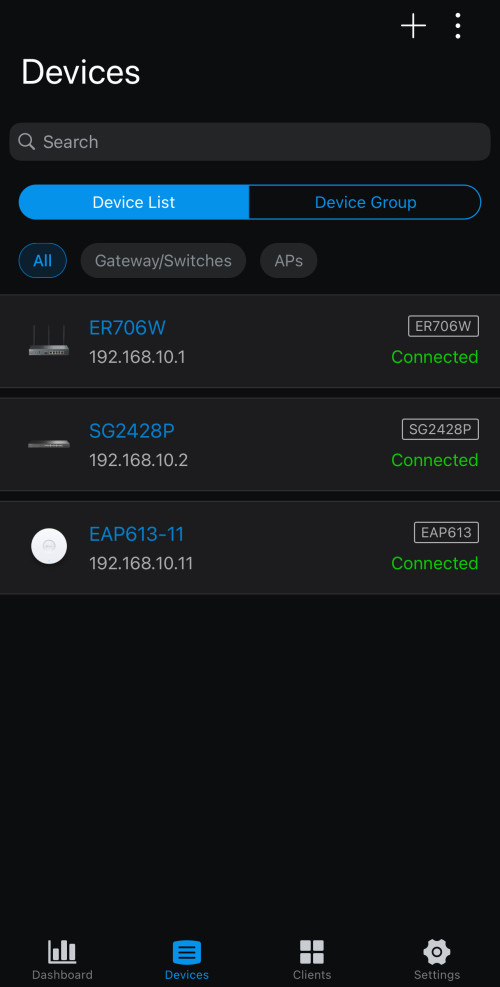
user posted image

This post has been edited by Oltromen Ripot: Sep 10 2024, 08:58 PM

Oltromen Ripot
post Sep 11 2024, 11:59 AM

👍 999999 person Likes this member
*******
Senior Member
4,034 posts

Joined: Dec 2019
QUOTE(azbro @ Sep 11 2024, 09:36 AM)
Firstly thank you for the feedback, I might to study more on this tplink omada. It's kind of interested of the capabilities.
*
QUOTE(razr_sped @ Sep 11 2024, 10:05 AM)
» Click to show Spoiler - click again to hide... «

just in time as mine today it broke 32 devices and i'm seeing unstable networrk issue
using zytel from digi, though it mention 128 simultaneous device on 2.4Ghz but the setup onli allow 32 max.
have tried to put guest network (which doesnt seems to have limit) as same SSID still having issue, need to consider more powerful unit that can handle more devices on the 2.4G single SSID
*
QUOTE(gerald7 @ Sep 11 2024, 10:46 AM)
wah, thats quite detailed, I was looking at omada stuff yesterday and wondering whats s 'sample' setup would look like, today saw your post. I think you have shown the path for many~  thumbup.gif

I was always wondering why my IoT devices online offline online offline. Some IP cam also, eventho its within same room of the router. Maybe is the SSID thing.
*
it's not so much about the 1 SSID vs many SSID.
it just so happened that when i was using Maxis' mesh LG8245X6-10, which is capable of creating multiple SSID, the issue almost disappeared - ALMOST - when i divide into 20-odd per SSID on same mesh network.

i would attribute the problem to these:-
- consumer wifi devices are only capable of handling limited number of concurrent clients. processors just fast enough to turn around a limited number of clients, not to mention having to fight for limited aurtime slot against other APs in hostile vicinity.

- IoT devices are still on the 802.11bg protocol, so they can't benefit from newer, efficient time-sharing protocol.

- IoT don't transmit huge packet, and most of the time idling and sleeping to conserve batteries and what not; probably can't wake up soon enough for their allted transmission slot.

- the flapping issue becomes prevalent if a network has been left running too long, that eventually even my static IP reserved for CCTVs and anything will become not responding. this is educated guess:- when IoT devices reconnect, they'll request new dhcp address, not reuse what was previously already assigned, and my dhcp server kindly and foolishly dish a new address. so to make sure there is always an address available, i shortened my dhcp lease time to 2hrs, which helped to further mitigate the issue.
Oltromen Ripot
post Sep 11 2024, 12:12 PM

👍 999999 person Likes this member
*******
Senior Member
4,034 posts

Joined: Dec 2019
QUOTE(azbro @ Sep 11 2024, 09:36 AM)
Firstly thank you for the feedback, I might to study more on this tplink omada. It's kind of interested of the capabilities.
*
add-on practice note:
- need to add local Omada controller if you need clients to roam seamlessly without drop between APs

- you can create wireless profile and create many SSID inside each profile,
THEN, assign the profile to 1 or more APs.
You can create multiple profiles, to assign to different devices.
using this, i create "LIVING ROOM" profile assigned to AP in front of house (containing SSID for front AutomationX IoT and for interactive devices) and "KITCHEN" profile assigned to AP in kitchen (SSID for rear AutomationY IoT and for interactive devices).
Thus interactive devices can roam anywhere, but front IoT devices sticky to front AP, and rear IoT device sticky to rear AP.
No more "this device signal is weak" in SmartLife.
Oltromen Ripot
post Sep 11 2024, 07:08 PM

👍 999999 person Likes this member
*******
Senior Member
4,034 posts

Joined: Dec 2019
QUOTE(lucaswjk @ Sep 11 2024, 03:12 PM)
2 options for u
1. use 2 AP or more.
2. buy second hand enterprise grade AP, no need new coz most IoT only support legacy wireless and wireless N sajer.
low end enterprise grade can support 256 devices.
i tried expensive tp link router rated i think 300 devices, but in real life only 100 sajer. so dont waste money.

disclaimer: i use 2 ap, 1 highend asus and second one enterprise grade.
*
TP-Link Deco: "we can handle 200+ devices"

reality: 4-members mesh cannot deal with 70-odd devices.

no more Deco for me.

9 Pages « < 7 8 9Top
 

Change to:
| Lo-Fi Version
0.5216sec    0.53    7 queries    GZIP Disabled
Time is now: 13th December 2025 - 03:33 AM