QUOTE(celciuz @ Nov 7 2023, 01:16 PM)
Maxis is unlike Unifi:- RJ11 VoIP is with their ISP router, and if you follow @Anime4000 thread, he tested that the VoIP device must identify with certain string before Maxis allow login.With Unifi
Smart Home, Let's discuss
|
|
Nov 7 2023, 01:20 PM
Return to original view | IPv6 | Post
#141
|
![]() ![]() ![]() ![]() ![]() ![]() ![]()
Senior Member
4,034 posts Joined: Dec 2019 |
QUOTE(celciuz @ Nov 7 2023, 01:16 PM) Maxis is unlike Unifi:- RJ11 VoIP is with their ISP router, and if you follow @Anime4000 thread, he tested that the VoIP device must identify with certain string before Maxis allow login.With Unifi |
|
|
|
|
|
Nov 7 2023, 02:00 PM
Return to original view | IPv6 | Post
#142
|
![]() ![]() ![]() ![]() ![]() ![]() ![]()
Senior Member
4,034 posts Joined: Dec 2019 |
QUOTE(celciuz @ Nov 7 2023, 01:31 PM) I was thinking to switch to Maxis once my Digi contract over for the public IP. If like me want to retain usage of VoIp, then have to continue using the ISP router or find ATA that can spoof model identification string. This post has been edited by Oltromen Ripot: Nov 7 2023, 02:00 PM |
|
|
Nov 8 2023, 06:01 PM
Return to original view | IPv6 | Post
#143
|
![]() ![]() ![]() ![]() ![]() ![]() ![]()
Senior Member
4,034 posts Joined: Dec 2019 |
|
|
|
Nov 8 2023, 06:18 PM
Return to original view | IPv6 | Post
#144
|
![]() ![]() ![]() ![]() ![]() ![]() ![]()
Senior Member
4,034 posts Joined: Dec 2019 |
QUOTE(celciuz @ Nov 7 2023, 01:16 PM) QUOTE(simmarjit @ Nov 8 2023, 05:41 PM) Why not set fixed IP? I have been doing house keeping and organizing everything including grouping all IPs nicely. - i need VoIP to for home phone, and that also left me with having to retain ISP router- 3 nodes of m9 plus mesh cannot sustain continuous connection of too many HAS devices, and does not support multi-SSID - thus i had expand 4 nodes mesh using Maxis LG8245X10-6 to carve multi-SSID only on 2.4GHz - LG8245X10-6 have limited entries for mac-based dhcp assignment (thus i can only assign to important devices), - LG8245X10-6 only allow /24 LAN subnet size (254 possible IPs). i cannot resize to /23 (510 possible IPs). - since the suspected behaviour of tuya wifi devices seems to be fetch new IP and not reuse what was previously assigned (trust me, a list of dhcp assignment for same mac), the only solution left under the constraint of all is to shortened the dhcp lease lifetime, so that those IP which was previously assigned and no longer used can be recycled as soon as practical. -- can smartlife set fixed IP? i don't accept "set up this server in order to do that" kind of solution. not because i not techie, but i don't have time to continously maintain such set up, and if i die, nobody will be able to pick up. it must be a ready solution for non-techie to understand. |
|
|
Nov 8 2023, 07:34 PM
Return to original view | IPv6 | Post
#145
|
![]() ![]() ![]() ![]() ![]() ![]() ![]()
Senior Member
4,034 posts Joined: Dec 2019 |
QUOTE(lucaswjk @ Nov 8 2023, 06:37 PM) correct.consumer routers do support this. but there is limit to the number of entries. anyway, i was initially relating how i eventually solved the problem of my wifi-based HA devices keep falling offline. partitioning by loads of SSIDs AND shortening the dhcp lease. loads of SSIDs alone does not solve it. for small number of wifi HA devices, maybe it's not apparent enough as you get to recycle IP even on long lease. This post has been edited by Oltromen Ripot: Nov 8 2023, 07:38 PM |
|
|
Nov 8 2023, 08:36 PM
Return to original view | IPv6 | Post
#146
|
![]() ![]() ![]() ![]() ![]() ![]() ![]()
Senior Member
4,034 posts Joined: Dec 2019 |
|
|
|
|
|
|
Nov 9 2023, 09:42 AM
Return to original view | IPv6 | Post
#147
|
![]() ![]() ![]() ![]() ![]() ![]() ![]()
Senior Member
4,034 posts Joined: Dec 2019 |
QUOTE(alucard89 @ Nov 9 2023, 09:36 AM) Grab any 4 gang zigbee with neutral and use this hack NO 4-gang w/ neutral.Works for me, and it still acts as repeater It's like installing those capacitor on L1 but you diy the component not even 4-gang. anyway, already water under bridge. all wall switches and wall sockets on wifi. 50-odd of them. zigbee sockets with no tolerance above 250V, i put after AVR and UPS. the zigbee gateway can failover to standby 4G wifi if no fibre internet, so it's great to control restart of fibre internet and mesh and cctv from remote. |
|
|
Nov 9 2023, 02:44 PM
Return to original view | IPv6 | Post
#148
|
![]() ![]() ![]() ![]() ![]() ![]() ![]()
Senior Member
4,034 posts Joined: Dec 2019 |
QUOTE(simmarjit @ Nov 9 2023, 02:25 PM) I see you mention multiple times the 250V thing, you live near a station? I also do have that "issue". Has any of your electrical stuff ever spoil? I think i did have a receiver that did spoil and then contacted TNB and they changed some stuff but still slightly higher voltage. there's only 1 brand that provide zigbee UK wall socket in Shopee a year ago.the model cannot pakai one. i bought 9 of them, all 9 will auto off immediately once voltage >= 250V. i complaint, but end result vendor only want to reimburse iinm cost of 1 unit. i put those zigbee sockets AFTER cyberpower voltage regulator (this brand reduced voltage to 220V). certain 2000VA UPS (multi-brand) i found them also able to reduce voltage below 220V if not in passthru mode. so i serial both AVR and UPS together to make sure always around 220V. those zigbee sockets i use them to restart fibre, cctv etc from remote; the zigbee gateway can failover to standby wifi network, which is great as even if it lose fibre internet when i restart fibre, it will switch to 4G internet, vice-versa. always connected. their wifi version also with same usage metering is otherwise not having same issue. i continue using the wifi version, about 30+ of them. |
|
|
Nov 29 2023, 07:36 PM
Return to original view | IPv6 | Post
#149
|
![]() ![]() ![]() ![]() ![]() ![]() ![]()
Senior Member
4,034 posts Joined: Dec 2019 |
QUOTE(loonsave @ Nov 29 2023, 05:53 PM) I have a very weird situation. I owned an ASUS TUF AX5400 router, and LG Puricare water purifier + LG TV in my previous house. They are connected in ThinQ app, and always online. i had similar weird connect/disconnect when WPA2+WPA3 is enabled.But when I moved to new house with the same router, with more smart devices, eg: Aqara E1 hub, S1E panel, LG washer and dryer, Samsung Bespoke fridge. LG and Samsung devices started act weird and offline in ThinQ and Smarthing App until I reboot the router. After reboot, all LG appliances show online, but after some random period, from 15-30mins, maybe more, they started go offline. Same goes to Samsung fridge. The router have the same setting like my previous house. I tried to remove the Smart Connect, to separate 2.4Ghz and 5Ghz, disable 802.11ax mode, set static IP, none of them help. I even remove all appliances from ThinQ and Smarthings App, and leave the Puricare in the ThinQ app, it still show offline where it work flawlessly in my previous house. Aqara E1 hub and S1E always online though. I wonder what is missing in my troubleshooting. olay after back to WPA2. |
|
|
Jan 21 2024, 09:52 PM
Return to original view | IPv6 | Post
#150
|
![]() ![]() ![]() ![]() ![]() ![]() ![]()
Senior Member
4,034 posts Joined: Dec 2019 |
QUOTE(lucaswjk @ Jan 20 2024, 12:42 AM) i use both; UPS for internet uptime for eveything that is essential even during outage, and CCTV.a batch of those round Zigbee sockets with power monitor that i bought will turn off when V>=250V. had to put them after CyberPower AVR (only this brand really bring down from 250V to β220V, or after those bulky 2000VA UPS (only ones which output to β220V). |
|
|
Jan 22 2024, 01:02 AM
Return to original view | IPv6 | Post
#151
|
![]() ![]() ![]() ![]() ![]() ![]() ![]()
Senior Member
4,034 posts Joined: Dec 2019 |
QUOTE(lucaswjk @ Jan 21 2024, 10:18 PM) earlier i said it's Zigbee round socket. i am mistaken. it's MOES Zigbee 3-pin wall socket.i already ask TNB; you are slightly wrong. the range is 230V +10% upper tolerance, not +10V tolerance. so up to 253V is still within allowable range - but the Zigbee wall sockets w/ power monitor will turn off when it hits 250V. this causes problem if connected directly to wall, so as a workaround, i put AVR or UPS that can reduce to 220V. it wasn't intended to use AVR or UPS like that. it's just that the dealer refused/unable to offer firmware/solution to the turn-off, and instead offer to reimburse only the amount of 10% or 1 socket of the whole purchase. each of this cost around ~RM70, so you can imagine my disappointment for buying bulk for home upgrade. end up only usable as trailing gang after AVR or UPS instead of on the wall itself. This post has been edited by Oltromen Ripot: Jan 22 2024, 01:05 AM |
|
|
Jan 22 2024, 10:27 AM
Return to original view | IPv6 | Post
#152
|
![]() ![]() ![]() ![]() ![]() ![]() ![]()
Senior Member
4,034 posts Joined: Dec 2019 |
QUOTE(lucaswjk @ Jan 22 2024, 09:43 AM) really thought +10v π
the wifi version w/ power monitor of the MOES 3-pin UK wall sockets didn't have this issue, so i thought to buy the Zigbee variant as well and have it installed at random dispersed throughout house because it can act as Zigbee repeater; mana tahu the Zigbee one have this limitation instead. the round versions didn't exhibit this 250V limit.jfyi, the product is perfect for china but not us. again our standard is 230v, but in china their standard is 220v https://en.m.wikipedia.org/wiki/Mains_electricity_by_country |
|
|
Feb 3 2024, 12:38 PM
Return to original view | IPv6 | Post
#153
|
![]() ![]() ![]() ![]() ![]() ![]() ![]()
Senior Member
4,034 posts Joined: Dec 2019 |
QUOTE(eagle7 @ Jan 24 2024, 03:26 PM) I wonder how you guys have fully made use of your smart home system. - home alarm. with keychain remote and also mobile app.Do you program your smart home to do all the automation for you? Can you share your most satisfying upgrade, and what is your next project or wish list? - fertigation system that fires on time, 5-minutes, thrice every daylight. - timer for border lighting. - flood sensor (because it happened in the kitchen). - i'm also thinking of gas sensor. - light sensor, to make sure i don't unnecessarily turn on light where i put body heat sensor inside house and at front lawn. i want the light to be available not only when it's naturally dark at night but also whenever sky is dark, e.g. storm during daytime. - i have 2 home automation network. one is fibre-internet based network for the usual wall sockets and home alarm and presence detection. another network is 4G-internet based just to control the Zigbee sockets of the fibre internet and cctv. if i want to reset fibre internet or cctv, i don't have to worry about losing control of their restart because it's done through 4G. and if i need to reset the 4G modem, its socket is on the fibre internet. basically i repurposed the 4G router that is otherwise retired when fibre came in. cawan liked this post
|
|
|
|
|
|
Mar 14 2024, 05:42 PM
Return to original view | IPv6 | Post
#154
|
![]() ![]() ![]() ![]() ![]() ![]() ![]()
Senior Member
4,034 posts Joined: Dec 2019 |
i think house sudah kena lightning.
1 Wifi wall switch no longer working. gonna switch the switch to Zigbee version as trial. hopefully no need neutral. |
|
|
Mar 14 2024, 06:16 PM
Return to original view | IPv6 | Post
#155
|
![]() ![]() ![]() ![]() ![]() ![]() ![]()
Senior Member
4,034 posts Joined: Dec 2019 |
QUOTE(lucaswjk @ Mar 14 2024, 06:10 PM) if lightning managed to burn one of ur wall switch, non of your house electric devices are safe. 1 breaker did trip. i remember you can change ur rccb to more sensitive rating to protect from surge and lightning. it will trip more easily... 1 wall switch not functioning. 10 random LED downlights all over the rear part of the house out for good. all under same breaker. |
|
|
Apr 7 2024, 11:27 AM
Return to original view | IPv6 | Post
#156
|
![]() ![]() ![]() ![]() ![]() ![]() ![]()
Senior Member
4,034 posts Joined: Dec 2019 |
avoid MOES UK Zigbee Wall socket.
i bitched before; bought 9 through China's official in Shopee and all of them auto switched off on their own whenever voltage >250V. Seller won't do anything except offer to reimburse cost of 1 socket. my house is around 250V. for Malaysia, 253V is still within spec. QUOTE(celciuz @ Apr 4 2024, 10:03 AM) Which are the more reliable Tuya products? I mean which brand to go for... my brother asked me, he's looking for those smart switch Wi-Fi type. Me personally using Aqara so looking for recommendations. QUOTE(simmarjit @ Apr 4 2024, 11:28 AM) QUOTE(ZeneticX @ Apr 4 2024, 12:22 PM) i'm using moes for my whole house 8 months in so far ok just one of the switch decided to die few days before I moved in. reported to moes and they sent me a replacement, also 8 months in and still working QUOTE(alucard89 @ Apr 4 2024, 05:07 PM) QUOTE(simmarjit @ Apr 4 2024, 11:58 PM) |
|
|
May 29 2024, 10:43 AM
Return to original view | IPv6 | Post
#157
|
![]() ![]() ![]() ![]() ![]() ![]() ![]()
Senior Member
4,034 posts Joined: Dec 2019 |
anyone knownof reliable tuya zigbee padlock?
"medium"-sized for gate and grill. with respectable battery mileage before beeding recharge. interested to have one; i can then install to receive direct-to-weekend-home bulk delivery in the middle of week. |
|
|
Jul 3 2024, 07:40 AM
Return to original view | Post
#158
|
![]() ![]() ![]() ![]() ![]() ![]() ![]()
Senior Member
4,034 posts Joined: Dec 2019 |
QUOTE(azbro @ Jul 2 2024, 05:05 PM) I wonder has anyone tried adding 2 PIR sensors to 1 WiFi light? Based off Smart Life app.If PIR sensor detect movement it will ON, if no detect it will OFF So if 1 PIR is ON, the other remains off is easy. But if 1 both sensors is ON,Β 1 is still detecting movement and remains ON, but the other sensor after 1 minute is OFF, will the light remain ON or OFF? I want it to remain ON. Or is it need to do some conditioning. Example if sensor is still detecting movement, sensor 2 will not off the light. Wow..this is getting complicated for me. I'm just using the simple ewelink app, I don't think can do that. involving my - PIR1 (door), - PIR2 (window) - Laundry Lights switch. AUTOMATION 1 CODE 1. Create Automation named "Laundry Lights Auto OFF". 2. If ALL conditions are met (a) PIR1 detects no one, AND (b) PIR2 detects no one, AND (c) PIR3 detects no one, AND (d) PIR4 detects no one, AND (e) Laundry Lights *is* switched ON. (this is here because of Then (a). You don't want Then (a) to switch ON what is otherwise already OFF.) 3. Then (a) Laundry Lights switches ON. (This to make sure the countdown in (c) will swap into "OFF". (b) Delay action by 3 seconds. (To make sure the switch's state is properly registered before next processing.) (c) Laundry Lights countdown 300seconds (supposedly will swap the current "ON" into "OFF". (d) Disable Automation "Laundry Lights Auto OFF". (Yes, disable its own self.) 4. After saving this Automation, disable it. AUTOMATION 2 CODE 1. Create Automation named "Laundry Lights Auto ON". 2. If ANY condition is met (a) PIR1 detects motion, OR (b) PIR2 detects motion, OR (c) PIR3 detects motion, OR (d) PIR4 detects motion. 3. Then (a) Enable Automation "Laundry Lights Auto OFF". (b) Laundry Lights countdown 0s. (disables any countdown that maybe is already in progress). (c) Laundry Lights switches ON. 4. After saving this Automation, enable it. AUTOMATION 3 CODE 1. Create Automation named "Laundry Lights Manual OFF". 2. If ALL conditions are met (a) Laundry Lights *is* switched OFF. 3. Then (a) Disable Automation "Laundry Lights Auto OFF". (b) Enable Automation "Laundry Lights Auto ON". 4. After saving this Automation, enable it. AUTOMATION 4 CODE 1. Create Automation named "Laundry Lights Manual ON". 2. If ALL conditions are met (a) Laundry Lights *is* switched ON. 3. Then (a) Disable Automation "Laundry Lights Auto OFF". (b) Disable Automation "Laundry Lights Auto ON". 4. After saving this Automation, enable it. Algorithm. 1. Always remember, PIR remembers its own "motion detected" for about 2 minutes before it resets and be useful for next "motion detected". 2. The Automation Manual OFF/ON will control whether you allow Automation Auto ON to take effect. You don't want Automation Auto OFF/ON to wreak havoc if you intentionally and manually switched ON, right? 3. The Automation Auto ON is only enabled by and after Automation Manual OFF. 4. The Automation Auto OFF is only enabled by and after Automation Auto ON. 5. If anyone manually switches OFF before Countdown expires, the switch will forget about the Countdown. This is intentional. 6. DO NOT USE DELAY+EXPLICIT OFF in the Automation Auto OFF; you do not want (i) the Automation was triggered some time ago, and (ii) someone actually manually switched ON while the DELAY is still not expiring, and (iii) ended up in dark after DELAY eventually expires and EXPLICIT OFF is finally processed. 7. If done right, your AUTO ON/OFF will not interfere with manually operating the switch OFF/ON. ![]() edit: 1. swapped order of creating Automation 1 and Automation 2 2. updated image to remove wrong arrow flow. 3. add step for Automation Auto ON to remove countdown possibly already set in-progress by prior Auto OFF invocation. 4. add more PIR3, PIR4 as example if more PIRs or sensors are involved. mmwave? -- DELAY is pausing processing of the automation ON THE SERVER. It does not take into account if the state of involved devices had changed while it is pausing. you will run unto awkward unintended outcome when processing is resumed. COUNTDOWN is processed by the device itself, thus allowing it to abort the countdown when its own state changes. This post has been edited by Oltromen Ripot: Jul 3 2024, 08:27 AM |
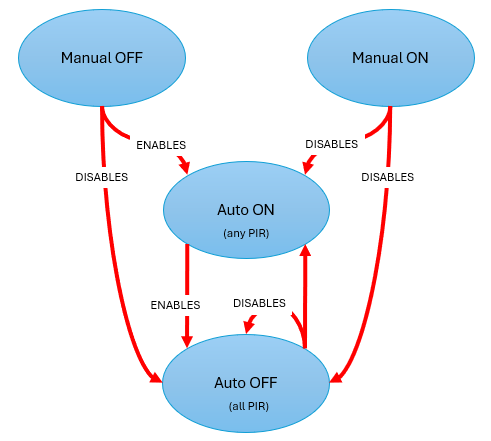

|
|
Jul 3 2024, 09:15 AM
Return to original view | IPv6 | Post
#159
|
![]() ![]() ![]() ![]() ![]() ![]() ![]()
Senior Member
4,034 posts Joined: Dec 2019 |
QUOTE(azbro @ Jul 3 2024, 08:39 AM) Thanks, that is some heavy reading in this morning to understand 1. "Then I disable myself" should be put last in the list of Thens.Good information. Will take me some time to digest it. Anyway, I do agree delay function is mostly makes the scene doesn't work due to some factor. Shall try the countdown function instead. Thank you again We cannot predict how the server will treat such instruction, now and in future. What if put it at NOT at last in the list and it causes even the current invocation to be aborted right there and then, leaving the rest in the list of Then unexecuted. So don't take risk of premature abort. -- Actually aaaa, if based on the conditions of Automation Auto OFF, in which it does not execute if Lights is not ON, to make it simpler, can remove and modify the following Thens. (2) Automation Auto OFF does not need to disable itself. (3) Automation Auto ON does not need to enable Auto OFF. (4) Automation Manual ON need to disable both Auto OFF and Auto ON. (5) Automation Manual OFF need to enable both Auto OFF and Auto ON. -- |
|
|
Jul 6 2024, 10:00 PM
Return to original view | IPv6 | Post
#160
|
![]() ![]() ![]() ![]() ![]() ![]() ![]()
Senior Member
4,034 posts Joined: Dec 2019 |
QUOTE(azbro @ Jul 6 2024, 08:39 PM) I tested my Sonoff door sensor I put at autogate, that thing detects even when there is no magnet. When door swing open it starts to detect midway even when there is nagnet. can i suggest:So when it is suppose to be close Open Close It is Close Open Close Open Close. Happen since new I will probably change the sensor And the PIR sensor is crazy one, seems like detecting ghost The bulbs keep disconnecting. Once disconnects need to reboot again Crazylah, no wonder you guys insist on Aqara even though it's cost double or triple Sonoff. - get magnet from Daiso. those small but powerful ones. - if your gate is sliding type to close, then paste the magnet farther from edge of the closing pole/pillar. just far enough that it triggers the sensor on pole/pillar.. - if your gate is swing-to-close or foldable, try to see if you can paste the magnet in-between the two sides of the swing gate. adjust the distance of sensor on the opposing side, just enough to respond to the magnet. This post has been edited by Oltromen Ripot: Jul 6 2024, 10:01 PM |
| Change to: | 0.0412sec
1.10
7 queries
GZIP Disabled
Time is now: 13th December 2025 - 08:01 PM |