Welcome Guest ( Log In | Register )

9 Pages « < 5 6 7 8 9 >Bottom

Outline · [ Standard ] · Linear+

 Smart Home, Let's discuss

views
     
Oltromen Ripot
post Apr 30 2023, 10:19 AM

👍 999999 person Likes this member
*******
Senior Member
4,034 posts

Joined: Dec 2019
QUOTE(melvinchng @ Apr 30 2023, 10:13 AM)
3. all with neutral switches? (Can I borrow the neutral from the AC switch next to it?)
*
I did this with whatever is next to switch (be it A/C or 3-pin sockets), under assumption all N goes direct to same connection point at the db mains.
Oltromen Ripot
post Sep 9 2023, 07:50 PM

👍 999999 person Likes this member
*******
Senior Member
4,034 posts

Joined: Dec 2019
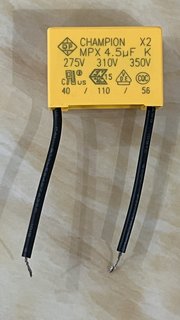
user posted image

(1) Is this a consumable?

(2) Possible for me to install 2 or more in parallel configuration? To extend lifespan and longer wear-and-tear.

Background:
I found the LED lighting that I had this installed to flickering. And the smart wall switch that controls it is dead in water, not lighted up, not responding. Off-On MCB only returned switch's functionality for an undetermined short length of time.
The switch returned to normal function and flickering stops after I replaced the capacitor.
Oltromen Ripot
post Sep 13 2023, 11:16 AM

👍 999999 person Likes this member
*******
Senior Member
4,034 posts

Joined: Dec 2019
QUOTE(ZeneticX @ Sep 9 2023, 02:19 PM)
Anyone using those handle style Tuya smart lock? I'm currently using Eva M5. Want to check is it normal that any unlock activity from inside house (exiting from house) is not logged?

A bit dissapointed with this because due to this now, I'm having a hard time figuring out how to do my automation (eg: exit house switch off all lights etc)
*
QUOTE(ZeneticX @ Sep 12 2023, 03:56 PM)
So I checked with the lock supplier. Turns out there is really no way to create any exit automation using the lock alone. Usually exit automation will be done via a scene switch + tap to run or using sensors / tags. I checked with my friend who is using Xiaomi lock, there is a button on the inside panel where you press to indicate you are leaving the house, then it will do the automation. Maybe there's a way to replicate this with the Tuya lock

For entry automation, there's actually a straightforward way without relying on location, which is using the "Device status change" trigger, then selecting your door lock > fingerprint unlock

The drawback I can see with this is what if you are just going out for a moment eg: throwing rubbish. Haven't played with the triggers yet
*
while i don't use smart door knob or variant.

i use home alarm panel + remote keychains. when you leave far far, you will carry keychains anyway, right?
it's like (dis)arming vehicle alarm everytime i leave and return.
all doors and windows have contact sensor.
just have event-driven scene automation.

modes
• arm away (like, really leaving home, all sensors inside out expected to be shut)
• arm home (maybe you just want to go shop next door, just exterior sensors expected to shut)

Oltromen Ripot
post Sep 21 2023, 09:01 AM

👍 999999 person Likes this member
*******
Senior Member
4,034 posts

Joined: Dec 2019
QUOTE(simmarjit @ Sep 21 2023, 04:25 AM)
BTW those that use z2m, how do you guys rename like individual switches on a multi gang switch?
*
not using z2m, but for the make and model i use, long-press on the individual switch's button that i want to (re)name.
my bad. answered based on SmartLife.

This post has been edited by Oltromen Ripot: Sep 21 2023, 08:41 PM
Oltromen Ripot
post Sep 21 2023, 08:42 PM

👍 999999 person Likes this member
*******
Senior Member
4,034 posts

Joined: Dec 2019
QUOTE(simmarjit @ Sep 21 2023, 08:28 PM)
i dont quite get what you mean lol
*
my bad. answered based on SmartLife.
Oltromen Ripot
post Oct 2 2023, 09:17 PM

👍 999999 person Likes this member
*******
Senior Member
4,034 posts

Joined: Dec 2019
QUOTE(ZeneticX @ Oct 2 2023, 08:40 PM)
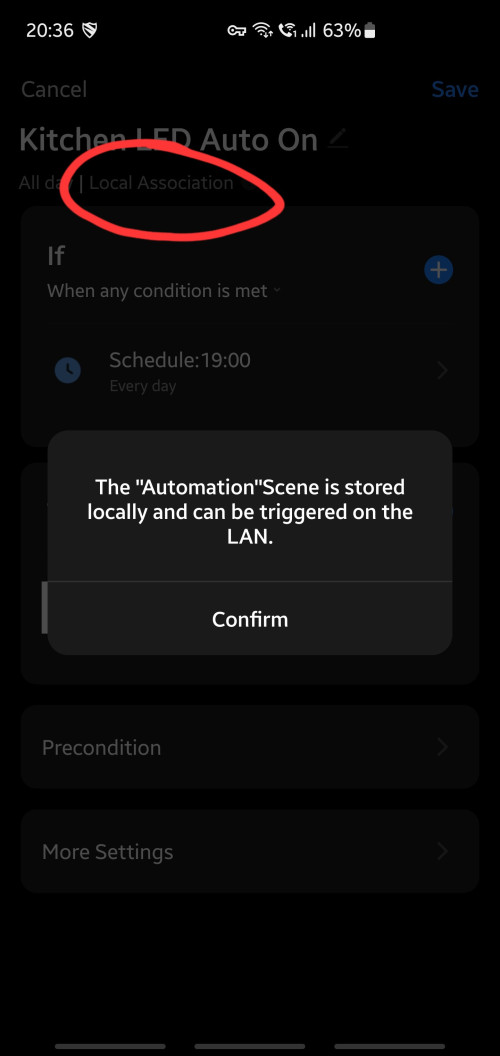
What does this mean? On smart life app

user posted image
*
This using Zigbee Gateway, right?
I sometimes meet this.
I assume if the trigger condition is simple, the zigbee gateway can perform it without instructed from Internet. If you add another condition making it "a AND b" or "a OR b", then it becomes complex and zigbee gateway unable to perform on its own.
Oltromen Ripot
post Oct 2 2023, 10:50 PM

👍 999999 person Likes this member
*******
Senior Member
4,034 posts

Joined: Dec 2019
QUOTE(ZeneticX @ Oct 2 2023, 10:10 PM)
Yes using zigbee

I noticed as long you dont use Pre Condition then this will show

Hopefully they able to improve on this further so we dont need rely on cloud in the future. But I know its unlikely
*
I toyed around just now with just time condition, like yours. But I cannot get the local association to appear. (shrug)
Oltromen Ripot
post Oct 5 2023, 03:40 PM

👍 999999 person Likes this member
*******
Senior Member
4,034 posts

Joined: Dec 2019
QUOTE(epicure @ Oct 5 2023, 03:02 PM)
By the way off topic,

I just bought a new usb zigbee repeater to extend the mesh on the ground floor. Plugged it in, and then realized that it didnt extend the mesh. Its working of course, but nothing seems to be using it to extend. And coincidentally, the one that i had plugged in up stairs also wasnt extending anything anymore, even though it used to.

So, i rebooted the hub, and both repeaters, but still nothing. Whats happening? Does it need time to figure it out on its own and then route traffic accordingly? Its been a few days, but the network doesnt seem to be using the repeaters, but the child devices all connect to the hub, and some of them say bad network/reception.

Really funny i cant figure it out
*
did you add the repeater to the hub it is supposed to extend for?

Repeater is hib-specific.
Eventhough I have 3 zigbee hubs in the same home, my repeater only repeat signal of the hub i paired it with.
Oltromen Ripot
post Oct 10 2023, 01:44 PM

👍 999999 person Likes this member
*******
Senior Member
4,034 posts

Joined: Dec 2019
QUOTE(epicure @ Oct 10 2023, 09:10 AM)
I'm using tuya hub, and both ZigBee Repeaters paired to it. Not using ZigBee mqtt

The first repeater used to extend network but not doesn't. The new one doesn't too. Just is online.

I've rebooted the hub before but still doesn't extend the mesh.

No updates for the hub nor the repeaters. Not sure what's going on
*
I just recalled why did I bought zigbee repeaters.

the zigbee door sensor, and zigbee presence sensor at the far end of house keep getting notification as being too far and weak inside smartlife app.

after adding the repeater "halfway" in-between, such notification stopped.

if you want to test out your repeater, maybe, i suggest to temporarily switch repeater off, then put a spare zigbee device so far away until you get error about its signal being weak, for few days just to establish a pattern. then switch the repeater back online, see if that makes a difference. now you will know whether your repeater is actually doing anything.

This post has been edited by Oltromen Ripot: Oct 10 2023, 01:46 PM
Oltromen Ripot
post Oct 10 2023, 02:08 PM

👍 999999 person Likes this member
*******
Senior Member
4,034 posts

Joined: Dec 2019
QUOTE(epicure @ Oct 10 2023, 01:57 PM)
I dont have any dropoffs.. just bad signals. They never ever drop off / go offline.. so i wanted to give them better signal.

Last time, the first repeater that i got, halfway i put it, and then it managed to reroute the traffic, extended the mesh. Now nothing happening for both. Haha. Funny these things
*
yes, my furthest zigbee also never went offline. just the smartlife app keep complaining bad signal or something like that. the repeater eliminated that message for good.
Oltromen Ripot
post Oct 13 2023, 09:36 PM

👍 999999 person Likes this member
*******
Senior Member
4,034 posts

Joined: Dec 2019
QUOTE(Dweller @ Oct 13 2023, 09:27 PM)
Forgot to add. It was a zigbee MOES smart switch with no neutral required. In the ad also said no cap needed. I try connect neutral and remove also same result.
*
if not mistaken, without neutral, you should install LED (not CFL) light on 1st switch, with capacitor bypass. Fan cannot be first.

and make sure your capacitor connect to Live before in enters device, and connect to Neutral after device. The Neutral is expected to be alive yaaa, not disconnected.
Oltromen Ripot
post Oct 14 2023, 02:04 AM

👍 999999 person Likes this member
*******
Senior Member
4,034 posts

Joined: Dec 2019
QUOTE(lucaswjk @ Oct 14 2023, 12:21 AM)
speaking on flickering...
I hv 2 switches in my room, and the second switch second button connected to my balcony t10 fluorescent light.
whenever i switch it on, the lights on first switch will flicker.
not sure how the electrician tap the power n causing it 😅
*
i had the same issue with LED on 1st flickers regardless 2nd is ON or OFF.

• 1st instance, smart switch connected to a Neutral that is going nowhere. I tapped Neutral from a neighbouring aircond switch, BUT, due to confusion, I had tapped the one that is ingress toward switch (and thus is disconnected state when aircond switch is OFF) and not egress from the switch. I only realised the mistake after eventually noticed it never flickered when aircond switch is ON.

• 2nd instance, smart switch without Neutral, and the capacitor I installed at LED tube on 1st had "burnt". It stopped flickering after I replaced capacitor.
Oltromen Ripot
post Oct 14 2023, 10:04 AM

👍 999999 person Likes this member
*******
Senior Member
4,034 posts

Joined: Dec 2019
QUOTE(Dweller @ Oct 14 2023, 09:26 AM)
I have swapped the 1st switch to be led and 2nd to be fan. Still encountered the same issue. One thing to note, when I turn on both fan and light, no flickering observed when changing fan speed. I also observed the same issue at my different house.

https://youtu.be/P5ofx-dRTbM?si=fnToaUuMrjceLTUp
*
if flickers, that means there is residual energy (from the smart switch operating itself) still reaching your 1st device. no other reason and you have to t/shoot around this. the flickering is because that energy need to be expended by the device itself as it have no way to dissipate it otherwise.

that's why you either
• have the switch direct into Neutral, or
• have a capacitor collect before it reaches device, and then release it off by skipping the device.

you use capacitor, right? replace your capacitor on 1st' path. it might be a dud or already faulty.

if you have Neutral connected direct to the switch, check back that Neutral's path really connected all the way back to MCB.

edit:
looking at the vid, maybe it has something to do with you having a fan with that type of speed control. as the energy on 2nd is "disturbed" "slower"/"faster" as you change speed, un..controlled excess goes out via 1st, and more than what capacitor can absorb in short time, so most of the excess reaches your 1st device.

This post has been edited by Oltromen Ripot: Oct 14 2023, 10:09 AM
Oltromen Ripot
post Oct 14 2023, 12:31 PM

👍 999999 person Likes this member
*******
Senior Member
4,034 posts

Joined: Dec 2019
QUOTE(Dweller @ Oct 14 2023, 10:56 AM)
I'll probably will try to add capacitor on the incoming live so that it'll even out the fluctuation. Weird since the switch didn't specify any capacitor requirement. Anyone have the same config as mine?

Switch: Moes 2 gang zigbee switch
Fan : mistral/kdk 5 speed fan with rotary regulator (connected at L2)
Led: ledvance 12W 3000K (connected at L1)
*
all switch, regardless number of gangs, have a "hidden" user.

A switch with it's own N connector behind
CODE

L --> "smart's logic board" --> N
  --> sw1 --> L1 --> device --> N
  --> sw2 --> L2 --> device --> N


A switch that does not have dedicated N connector behind, will share L1 with sw1's. In this case you need to have capacitor for L1 to bypass device straight to N.
CODE

L --> "smart's logic board" --> L1
              L1 --> capacitor --> N
  --> sw1 --> L1 --> device -----> N
  --> sw2 --> L2 --> device -----> N


i suspect the fan changing speed affected the logic board, thus excess leak to the shared L1

This post has been edited by Oltromen Ripot: Oct 14 2023, 12:33 PM
Oltromen Ripot
post Oct 14 2023, 05:01 PM

👍 999999 person Likes this member
*******
Senior Member
4,034 posts

Joined: Dec 2019
QUOTE(WildChai @ Oct 14 2023, 03:24 PM)
Hey peeps,

Anyone here using smart home speakers? Multi rooms for music and possible PA style also? Want to double up to yell at my kids remotely.

Any ideas or anyone using multi room speakers?
*
I just use TP-Link Tapo C2xx camera for yelling purposes
Oltromen Ripot
post Oct 20 2023, 10:29 AM

👍 999999 person Likes this member
*******
Senior Member
4,034 posts

Joined: Dec 2019
QUOTE(loonsave @ Oct 20 2023, 09:23 AM)
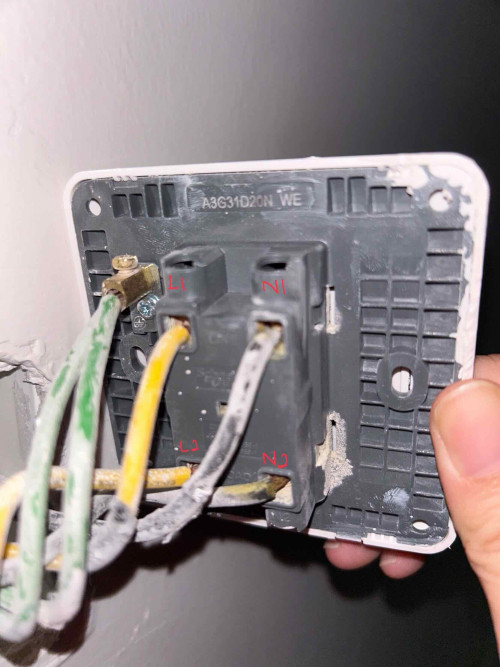
This is my aircond 20A switch. In order to use Aqara switch with neutral, where should I connect the neutral cable to the Aqara switch?

N1 or N2?

user posted image
*
no correct answer.
you have to test which cable comes from DB and which goes back to DB.
that will be the L and N expected by the switch for its logic board to operate.

if you instead connect L that is supposed to go out to your device, then the switch won't be powered.

if you instead connect N that is supposed to come back from device, then the switch won't be powered.
Oltromen Ripot
post Oct 20 2023, 03:11 PM

👍 999999 person Likes this member
*******
Senior Member
4,034 posts

Joined: Dec 2019
QUOTE(loonsave @ Oct 20 2023, 12:06 PM)
So I have to find out N1 or N2 come from DB, and connect my Aqara switch to there to achieve neutral loop?
*
correct.
connect the N that goes to DB. L masuk bawa arus dari DB, N pulangkan arus ke DB.

else how is your logic board gonna function? L masuk bawa arus, N keluar going nowhere....
Oltromen Ripot
post Oct 26 2023, 08:39 PM

👍 999999 person Likes this member
*******
Senior Member
4,034 posts

Joined: Dec 2019
QUOTE(simmarjit @ Oct 26 2023, 08:36 PM)
Anyone using presence sensors?
*
PIR? or the actual presence sensor?
Oltromen Ripot
post Nov 7 2023, 11:52 AM

👍 999999 person Likes this member
*******
Senior Member
4,034 posts

Joined: Dec 2019
QUOTE(celciuz @ Nov 7 2023, 11:36 AM)
I'm using Broadlink via homebridge, so far rock solid. No disconnecting issue. maybe check your wi-fi reception perhaps?
*
in my case, infound that 3 nodes of M9 Plus mesh cannot sustain continuous connection.
some switches will eventually fall offline never to return.

eventually had to make use of Maxis mesh nodes to carry the wall switches, spread over multi-SSID, and set DHCP lease max 4hrs.

something about a hunch that previously when they go offline, they reconnect to wifi then asked for a totally new IP, eventually exhausting the DHCP /24 pool. So i shortened the lease time so that used IP can be reused as soon as practical.

This post has been edited by Oltromen Ripot: Nov 7 2023, 11:53 AM
Oltromen Ripot
post Nov 7 2023, 01:02 PM

👍 999999 person Likes this member
*******
Senior Member
4,034 posts

Joined: Dec 2019
QUOTE(celciuz @ Nov 7 2023, 12:20 PM)
I fix my Wi-Fi devices IP so they are static, perhaps that can help the situation.
*
consumer routers have limited entries for mac-based assignment.
and those tuya devices can't set static IP inside.
i don't have fancy HA server. just smartlife.
always think about what-if-i-die-and-no-one-can-continue.

9 Pages « < 5 6 7 8 9 >Top
 

Change to:
| Lo-Fi Version
0.3418sec    0.55    7 queries    GZIP Disabled
Time is now: 14th December 2025 - 01:19 AM