Welcome Guest ( Log In | Register )

656 Pages « < 568 569 570 571 572 > » Bottom

Outline · [ Standard ] · Linear+

 Smart Home, Let's discuss

views
     
PowerGadget
post Apr 21 2023, 10:04 PM

Enthusiast
*****
Junior Member
821 posts

Joined: Apr 2012
QUOTE(dest9116 @ Apr 21 2023, 04:22 PM)
Nope, I got mine from my aunt gate installer, but it's the same thing, not sure if that is the cheapest, maybe you can try search if there's any cheaper
*
Thanks once again for your help dest! Will try to source for it on Shopee or Lazada 👍

Anything don’t know install maybe can look for you for advise again 😂

Any other smart item that you bought and feel it’s well worth the price?

QUOTE(celciuz @ Apr 21 2023, 09:18 PM)
In this case this product will be suitable for you 👍🏻

MYR 52.94  30% Off | ATHOM Homekit And MQTT WiFi Relay Module Inching Switch Self-locking Interlock  Entry Access Gate Control DC 5V 12V 8V-80V
https://a.aliexpress.com/_m0Wd11q
*
Thanks Nate! Really appreciate it.

You bought 1 channel one as well? What’s the difference between 1ch or 2ch? Is it that if 1ch we can’t control the gate open one leaf or both leaf?

James Teo
post Apr 22 2023, 04:33 AM

Getting Started
**
Junior Member
55 posts

Joined: May 2012


Hi, I am renovating my new house and I figured to have at least 1 smart switch installed in each room. Anyone could suggest me a worthy and reliable brand? Thanks a lot.

Ps: I have neutral.

This post has been edited by James Teo: Apr 22 2023, 04:48 AM
celciuz
post Apr 22 2023, 11:23 AM

10k Club
********
All Stars
14,034 posts

Joined: Nov 2004
QUOTE(PowerGadget @ Apr 21 2023, 10:04 PM)
Thanks once again for your help dest! Will try to source for it on Shopee or Lazada 👍

Anything don’t know install maybe can look for you for advise again 😂

Any other smart item that you bought and feel it’s well worth the price?
Thanks Nate! Really appreciate it.

You bought 1 channel one as well? What’s the difference between 1ch or 2ch? Is it that if 1ch we can’t control the gate open one leaf or both leaf?
*
Depends on your requirement, my gate is Dcmoto. It only has single input.. open both gates 😅 a bit stupid this thing.

One thing I plan to do in future is just connect a 4 channel to the remote. Then trigger remote so I can do left or right side or both.
PowerGadget
post Apr 22 2023, 12:12 PM

Enthusiast
*****
Junior Member
821 posts

Joined: Apr 2012
QUOTE(celciuz @ Apr 22 2023, 11:23 AM)
Depends on your requirement, my gate is Dcmoto. It only has single input.. open both gates 😅 a bit stupid this thing.

One thing I plan to do in future is just connect a 4 channel to the remote. Then trigger remote so I can do left or right side or both.
*
Ouch I just placed my order for dcmoto as well since seemed like quite a lot of peoples recommend this model.

Do you mean we going to buy the same Athom board but with 4 channel? Then connect it to dcmoto remote? Sorry as I’m quite new with this thing and learning from you all
alucard89
post Apr 22 2023, 12:46 PM

Look at all my stars!!
*******
Senior Member
4,454 posts

Joined: Apr 2006
QUOTE(James Teo @ Apr 22 2023, 04:33 AM)
Hi, I am renovating my new house and I figured to have at least 1 smart switch installed in each room. Anyone could suggest me a worthy and reliable brand? Thanks a lot.

Ps: I have neutral.
*
What’s your preference?
Touch, push button type or stick to the current switches at home?
tomastan4134
post Apr 22 2023, 02:08 PM

Enthusiast
*****
Senior Member
830 posts

Joined: Mar 2014
QUOTE(alucard89 @ Apr 22 2023, 12:46 PM)
What’s your preference?
Touch, push button type or stick to the current switches at home?
*
I'm currently using moes zigbee switch for my entire house switches. Been really reliable using the zigbee version.


James Teo
post Apr 23 2023, 12:19 AM

Getting Started
**
Junior Member
55 posts

Joined: May 2012


QUOTE(alucard89 @ Apr 22 2023, 12:46 PM)
What’s your preference?
Touch, push button type or stick to the current switches at home?
*
Either touch or button is fine, not sticking into current switch since I am replacing them.
dest9116
post Apr 23 2023, 07:59 AM

Casual
***
Junior Member
495 posts

Joined: Apr 2019
I suggest zigbee la, too many wifi switches end up you need to buy a very good router that dan support so many devices

No difference from getting a zigbee hub
Oltromen Ripot
post Apr 23 2023, 08:42 AM

👍 999999 person Likes this member
*******
Senior Member
4,034 posts

Joined: Dec 2019
QUOTE(dest9116 @ Apr 23 2023, 07:59 AM)
I suggest zigbee la, too many wifi switches end up you need to buy a very good router that dan support so many devices

No difference from getting a zigbee hub
*
I have 20-odd wifi wall switches, 40-odd wifi wall sockets, 20-odd misc wifi devices (sensors, bulbs, hubs); and yes, maintaining uptime using mesh is not fun. already add to become 4-nodes, split into 3 SSID, and shortened wifi lease to 4hrs, and after 2 weeks of stability after whole house power reset, yesterday i start finding sockets going offline. aarrrghhhh...........

i'm starting to believe short bursts of 20-odd is the max that an SSID is actually able to deal with in reality....
dest9116
post Apr 23 2023, 09:42 AM

Casual
***
Junior Member
495 posts

Joined: Apr 2019
QUOTE(Oltromen Ripot @ Apr 23 2023, 08:42 AM)
I have 20-odd wifi wall switches, 40-odd wifi wall sockets, 20-odd misc wifi devices (sensors, bulbs, hubs); and yes, maintaining uptime using mesh is not fun. already add to become 4-nodes, split into 3 SSID, and shortened wifi lease to 4hrs, and after 2 weeks of stability after whole house power reset, yesterday i start finding sockets going offline. aarrrghhhh...........

i'm starting to believe short bursts of 20-odd is the max that an SSID is actually able to deal with in reality....
*
What router you using btw? I'm using the unifi AZ technology router and wirh 12 devices connected, some start to go offline lol

Luckily i have another tenda router and I connect the cctv and zigbee hub to it to ensure proper uptime
Oltromen Ripot
post Apr 23 2023, 11:27 AM

👍 999999 person Likes this member
*******
Senior Member
4,034 posts

Joined: Dec 2019
QUOTE(dest9116 @ Apr 23 2023, 09:42 AM)
What router you using btw? I'm using the unifi AZ technology router and wirh 12 devices connected, some start to go offline lol

Luckily i have another tenda router and I connect the cctv and zigbee hub to it to ensure proper uptime
*
For HA and CCTV, I put them on 4-node Maxis LG8245X6-10 fibre router+mesh.
SSID1 (2.4GHz-only) specific for 20-odd wall switches, for reliability purposes. This one I cannot take chance being offline. So far no issue.
SSID2 (2.4GHz-only) specific for 40-odd wall sockets, again for reliability, but doesn't seem to be holding up after 2 weeks.
SSID3 (2.4GHz-only) for 20-odd miscellaneous, for reliability purposes. So far no issue.
SSID4 (5GHz-only) dummy no purpose except I because I am not sure if it is necessary for 5GHz backhaul to be available at all.

For laptop, mobile devices, etc, i still rely on venerable Deco M9 Plus (2.4GHz+5GHz) on AP-only mode.

I found that the Tuya devices can renew a different DHCP IP altogether. Huawei LG8245X6-10 unfortunately only allow /24 subnet size, it didn't allow me to increase pool to /23. So workaround to make sure there is always sufficient IP to dish out is reduce DHCP lease to 4hrs.

Also, connect them to 2.4GHz-only SSID. I read and was impressed on, that if transmitter uses same SSID on both 2.4GHz and 5GHz, the Tuya devices will hit issue when transmitter keeps tells it to move to 5GHz. Or something like that.

The Zigbee hubs can have alternate wifi network and it will switch when the current one is not working. I have Huawei B618 4G router as failover for those Zigbee hubs; separate zigbee-based sockets for CCTV, fibre modem, alarm will remain controllable, pending failover, in the event my fibre network is interrupted.
epicure
post Apr 26 2023, 09:23 PM

Getting Started
**
Junior Member
229 posts

Joined: Sep 2009
Just wanted to update, it works !

ZigBee smart switch arms/disarms the vivos (works in homekit and tuya).

When armed, vivos alarm sends 12V to the DV relay which closes the loop of a ZigBee contact sensor, giving me a status in homekit/tuya. Once contact sensor is open or closed, stateful dummy switch turns on or off accordingly, allowing me to use that in Google home to announce that the vivos alarm is armed.

Works all ways. Keypad engages the relay. Vivos app engages the relay. Homekit/ tuya engages the relay.

Couldn't be happier.


QUOTE(epicure @ Apr 12 2023, 01:27 PM)
I think i pretty much got my solution, after a lengthy discussion with my friend

The 12V + and 12V - outputs from the alarm panel, will feed into a 12VDC relay, which then i will output to a Normally open and COM pair of cables. Then i will solder these to a reed sensor on a zigbee door sensor, which will then give me a closed door for when the alarm is armed, and open door when alarm is open. Then all i need to do is create an automation in homekit, which says that when that certain door is closed, then arm the aqara security , which will then show me a symbol of alarm being armed. In essence, when the main wired alarm is armed, then the aqara alarm is also armed (pretty convenient).

Now i just gotta buy the items to get this into motion.

Also, the alarm panel has a remote in.. which means that you can actually wire up a traditional RF receiver from autogate to the alarm panel. However, since i’m goin the smart route, i will be getting a zigbee module with RF built in. That way, i can arm and disarm using Tuya/Homekit/Google Home/Alexa and also use RF remote 433Mhz to arm the alarm.

In a nutshell,
1. Tuya/Homekit/Google Home/Alexa and also use RF remote 433Mhz to arm the alarm.
2. Alarm Panel will output 12V DC+ to relay, which will activate door reed sensor, and arm aqara alarm - to show dumb alarm is armed.

All will be present in Homekit, in theory. now just gotta get these items and try it out.
Thanks!
*
celciuz
post Apr 26 2023, 11:27 PM

10k Club
********
All Stars
14,034 posts

Joined: Nov 2004
QUOTE(epicure @ Apr 26 2023, 09:23 PM)
Just wanted to update, it works !

ZigBee smart switch arms/disarms the vivos (works in homekit and tuya).

When armed, vivos alarm sends 12V to the DV relay which closes the loop of a ZigBee contact sensor, giving me a status in homekit/tuya. Once contact sensor is open or closed, stateful dummy switch turns on or off accordingly, allowing me to use that in Google home to announce that the vivos alarm is armed.

Works all ways. Keypad engages the relay. Vivos app engages the relay. Homekit/ tuya engages the relay.

Couldn't be happier.
*
So your alarm system can be armed by that 12V relay? Neat... mine need to type in keypad number before it arm or disarm... I can't use this concept I guess?
epicure
post Apr 27 2023, 07:39 AM

Getting Started
**
Junior Member
229 posts

Joined: Sep 2009
umm not really, if you go back to my post, i can arm with a Normally Open and COM input

the 12V relay is status of the alarm output to the 12V relay + contact sensor combo

I think you probably can look for your wiring diagram to see if you can use or not. My one also uses keypad or app.

QUOTE(celciuz @ Apr 26 2023, 11:27 PM)
So your alarm system can be armed by that 12V relay? Neat... mine need to type in keypad number before it arm or disarm... I can't use this concept I guess?
*
epicure
post Apr 27 2023, 07:48 AM

Getting Started
**
Junior Member
229 posts

Joined: Sep 2009
If you use homekit, you can integrate your tuya zigbee devices into homekit using the zemismart homekit zigbee hub

QUOTE(dest9116 @ Apr 19 2023, 08:10 AM)
I use both aqara and tuya, aqara is good quality but problem is it can't integrate with tuya and others unless you use IFTTT or some third party service and ifttt needs to pay once exceed 2 automations

Also zigbee is nice, my unifi router once connect to more than 7 tuya wifi devices, it starts to go crazy and disconnects some, need to buy new router that can handle so many devices.

Also aqara automations run offline locally, meaning if internet down disconnected, the automations will still run and because it is run locally the response time is blazing fast, soemtimes I even thought I forgot off the lights when I enter my bedroom
*
epicure
post Apr 27 2023, 07:49 AM

Getting Started
**
Junior Member
229 posts

Joined: Sep 2009
Aqara zigbee devices are local when they are controlled using homekit. but when used in Aqara/Mi Home app, they run on the cloud

QUOTE(celciuz @ Apr 20 2023, 11:49 AM)
Wait... Aqara is running local?

I have both the Aqara app and HomeKit... I usually control via HomeKit, but when I control via Aqara app... it lags (seems like via cloud).
*
celciuz
post Apr 27 2023, 08:27 AM

10k Club
********
All Stars
14,034 posts

Joined: Nov 2004
QUOTE(epicure @ Apr 27 2023, 07:39 AM)
umm not really, if you go back to my post, i can arm with a Normally Open and COM input

the 12V relay is status of the alarm output to the 12V relay + contact sensor combo

I think you probably can look for your wiring diagram to see if you can use or not. My one also uses keypad or app.
*
Got it, need to check my board if it supports such arm/disarm. Would be nice to have this function.

QUOTE(epicure @ Apr 27 2023, 07:49 AM)
Aqara zigbee devices are local when they are controlled using homekit. but when used in Aqara/Mi Home app, they run on the cloud
*
Ah ok, so its the same as what I'm experiencing. Thanks.
Oltromen Ripot
post Apr 29 2023, 01:19 PM

👍 999999 person Likes this member
*******
Senior Member
4,034 posts

Joined: Dec 2019
QUOTE(Oltromen Ripot @ Feb 21 2023, 11:05 AM)
user posted image
*
Guys, what is the odd that my smart switches were actually fried by lightning?

Lightning strikes somewhere near, the jolt travels via water piping.
Since my sprinkler tank is somewhat connected to water mains, the inlet valve is always submerged right under water surface, and my pump is inside the water, the jolt travels back towards the smart socket and *poof*.

Is that probably even if imaginative? Since I cannot think of WHY(!!!!??????) digital timer, analogue timer, smart switches all *poof*. Will adding a surge suppressor (belkin in mind) between pump and (smart) switch helps?
dest9116
post Apr 29 2023, 02:39 PM

Casual
***
Junior Member
495 posts

Joined: Apr 2019
QUOTE(Oltromen Ripot @ Apr 29 2023, 01:19 PM)
Guys, what is the odd that my smart switches were actually fried by lightning?

Lightning strikes somewhere near, the jolt travels via water piping.
Since my sprinkler tank is somewhat connected to water mains, the inlet valve is always submerged right under water surface, and my pump is inside the water, the jolt travels back towards the smart socket and *poof*.

Is that probably even if imaginative? Since I cannot think of WHY(!!!!??????) digital timer, analogue timer, smart switches all *poof*. Will adding a surge suppressor (belkin in mind) between pump and (smart) switch helps?
*
Possible from lightning, but there's no way to suppress lightning regardless what u do, u need to make sure it's the path of least resistance only
melvinchng
post Apr 30 2023, 10:13 AM

New Member
*
Junior Member
24 posts

Joined: Jun 2011
I am looking to DIY and replace my current home switch to smart switch and would need help on some questions.

3 switches need to replaced in total
- 2x two gang (1x light and 1x fan)
- 1x three gang (2x light and 1x fan)

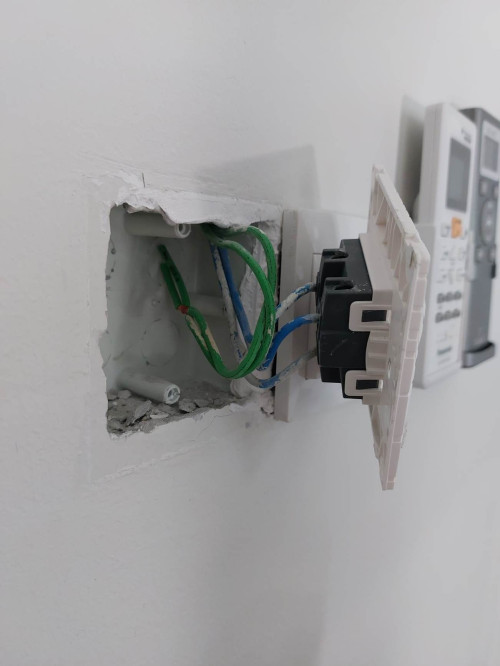
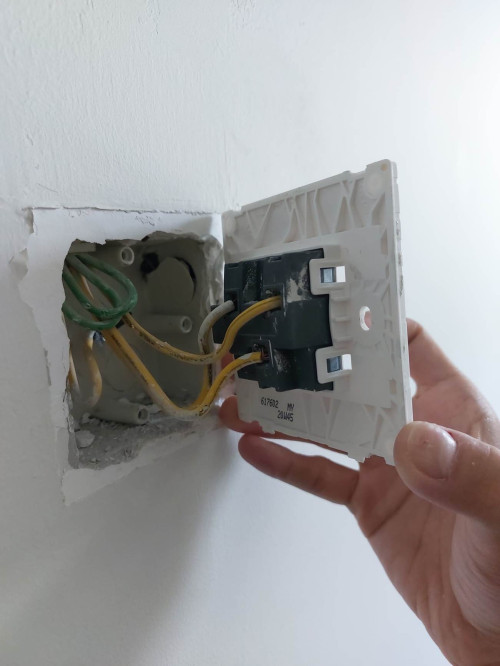
This is how the 2x two gang is wired. I do have neutral hidden and unused. (EDIT: green might be earth as pointed out by member)

user posted image
user posted image

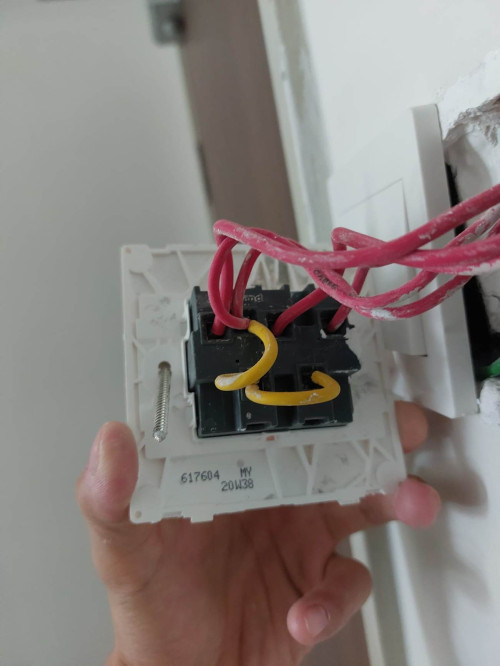
For the three gang switch. There is no neutral.

user posted image

In my case, what is the best setup that can work with my Alexa? Shall I go with
1. all no neutral switches
2. two with neutral and one without neutral switches
3. all with neutral switches? (Can I borrow the neutral from the AC switch next to it?)

This post has been edited by melvinchng: Apr 30 2023, 10:27 AM

656 Pages « < 568 569 570 571 572 > » Top
 

Change to:
| Lo-Fi Version
0.0243sec    0.35    6 queries    GZIP Disabled
Time is now: 9th December 2025 - 08:24 AM