Welcome Guest ( Log In | Register )

9 Pages « < 4 5 6 7 8 > » Bottom

Outline · [ Standard ] · Linear+

 Smart Home, Let's discuss

views
     
Oltromen Ripot
post Feb 21 2023, 11:35 PM

👍 999999 person Likes this member
*******
Senior Member
4,034 posts

Joined: Dec 2019
QUOTE(alucard89 @ Feb 21 2023, 10:58 PM)
Welp, looks like the same hardware, just different zigbee & wifi chip. Could be zigbee chip issue?
What's the progress with the seller? Refund/return/replacement?
I think I could help with swapping the zigbee chip with a an esp chip to test it out or you could do it yourself.
I do have a few extra esp-02s chip that's pin compatible with cb2s/zt2s

https://templates.blakadder.com/ESP-02S.html
*
I agree, definitely an issue with the tolerance setting of the Zigbee-based.

If I understand the materials I've been reading online, there are several issue, but it always involve (i) Zigbee and (ii) power monitoring.
power monitor supplies monitored values at interval.
Unfortunately, the problem is either power monitor supplied 0V (Zero Volt) at switching ON, causing the socket to switch OFF, OR, in my case, it supplies values correctly BUT over the configured limit.
So over there, vendor either disabled capability of power monitor to push value and instead external system have to poll for it manually, OR, raise the configured limit.
If Zigbee socket cannot determine values, it won't switch OFF on its own laugh.gif

Initially the seller tried to coax me with partial refund.
But he came back in the evening pointing out to the "95V - 245V" spec in the description.
The seller if pinning the blame on me for having TNB supplying me Voltage over what the socket can support. So he will only talk to his boss to refund for 1 socket (I bought 9!). I'm insulted that he blamed me for the (over)voltage supply - which is not even under my control - and the token refund amount, so I declined his refund offer altogether.

Thank you for the offer to swap on my behalf.
Let me give a thought over the new finding of blown capacitor and resistor first. Probably a re-strategise.
As I am now concerned that this whole thing about replacing sockets with smart sockets could be an expensive misadventure on my part, considering the mains voltage itself is always above 250V and I could have a repeat of that blown capacitor in near future. I still have 24 wifi sockets not yet installed..........

what a joke that the socket itself die in the first 2 weeks while the equipment it was meant to control had survived all the while and longer.
Oltromen Ripot
post Feb 22 2023, 04:28 PM

👍 999999 person Likes this member
*******
Senior Member
4,034 posts

Joined: Dec 2019
QUOTE(dest9116 @ Feb 22 2023, 08:18 AM)
HI did you complain to tnb?

I use a few smart socket with energy monitor and it shows that my voltage is 228V to 233V
*
I didn't.
Voltage in excess of 250V is still within spec of Energy Commission.
And, I used socket testers at 3 geographically different premises and also in office; all above 250V. So this seems to be normal as far my haunts are concerned.
Oltromen Ripot
post Feb 24 2023, 11:31 AM

👍 999999 person Likes this member
*******
Senior Member
4,034 posts

Joined: Dec 2019
QUOTE(epicure @ Feb 24 2023, 11:11 AM)
Wow, very unlucky indeed. I am actually considering to purchase some of these zigbee wall sockets to increase my zigbee mesh. BUt not looking at MOES products at the moment. Eyeing the Smatrul universal zigbee wall outlet at the moment, quite cheap at RM5X.XX. Once i do buy it, hope it doesnt fry like yours. Fingers crossed.
*
QUOTE(alucard89 @ Feb 24 2023, 11:23 AM)
This one?

https://s.lazada.com.my/s.U5EQG

Find any wifi/zigbee wall sockets with type c ports?
*
Those other non-MOES sockets; check their amperage rating.

The one @alucard89 referred to, I think only maxed at 10A.
So it can be unpredictable since our 3-pin plugs are 13A; you might mindlessly insert 13A device into such 10A socket.

16A amperage is one of the reason I went with MOES socket, apart from (now shattered) trust in the brand name.

This post has been edited by Oltromen Ripot: Feb 24 2023, 11:32 AM
Oltromen Ripot
post Feb 27 2023, 10:58 AM

👍 999999 person Likes this member
*******
Senior Member
4,034 posts

Joined: Dec 2019
QUOTE(alucard89 @ Feb 26 2023, 02:29 PM)
Probably just stick with power monitoring plugs now just to be safe.
Any updates with the seller? refund for the damaged ones?
*
Hi, yeah.

I refused to continue with refund altogether.
He wanted to refund a single 1 unit out of 9, but at the same time he blamed me for not checking that my residence voltage fall between 95V-245V. He wants to nitpick that he already have the range in his description, so I also nitpick that his description had me fooled into believing the zigbee wall sockets is rated 16A but actually it printed only 13A.

Yes, my fault for only paying attention to amperage; but hey, which of us actually surveyed the (range of) voltage before buying appliances? Who would have thought the wall socket is so sensitive that itself turned off for good, while the zigbee round plugs otherwise worked happily. I have a dozen 20A zigbee round plugs that I use to force-reset key networking devices from afar and they worked over 250V without complaint.
Oltromen Ripot
post Feb 27 2023, 11:07 AM

👍 999999 person Likes this member
*******
Senior Member
4,034 posts

Joined: Dec 2019
QUOTE(alucard89 @ Feb 26 2023, 02:29 PM)
Probably just stick with power monitoring plugs now just to be safe.
Any updates with the seller? refund for the damaged ones?
*
Not buying the zigbee wall socket after this.
I will buy more of the zigbee round plugs instead.

As for the 9, I made a batch of 2-gang sockets, and have them take over where my 20A round plugs used to sit after AVR+UPS.

The AVR+UPS combination is good at keeping voltage to around 220V, so now these zigbee sockets can work their wonder.

And to my surprise, after attaching the zigbee wall sockets to 2000VA UPS, which I had calculated to only be able to last less than 2hrs (based on the spec of adapters consuming it), actually lasted 4hrs and still have 50% juice. More than happy with the outcome.
Oltromen Ripot
post Mar 4 2023, 09:49 PM

👍 999999 person Likes this member
*******
Senior Member
4,034 posts

Joined: Dec 2019
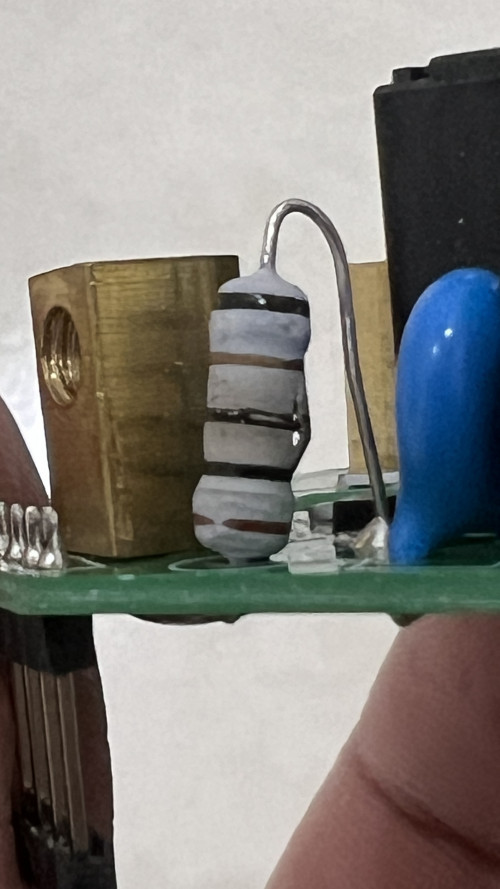
Aiseh... #4 of wifi socket to be "blown". Again, it's the one connected to water pump for watering plants.

I was about to take picture and ask if there is anything wrong with the supposedly good-looking resistor when I saw what exactly is wrong with it.

Always the resistor and the blue thing next to it (but this time the blue thing appears okay). Bad batch quality? Don't know.

user posted image

This post has been edited by Oltromen Ripot: Mar 4 2023, 09:50 PM
Oltromen Ripot
post Mar 4 2023, 11:25 PM

👍 999999 person Likes this member
*******
Senior Member
4,034 posts

Joined: Dec 2019
QUOTE(Max @ Mar 4 2023, 11:05 PM)
Both ur smart socket blown by powering the water plant pump?
*
I honestly don't know why it is always this particular socket connected to pump that will malfunction.
The pump is just odd 65W.
Weekend home. I have it on smart wall plug so that I can have it activated both time-based and manually as necessary.

This post has been edited by Oltromen Ripot: Mar 4 2023, 11:26 PM
Oltromen Ripot
post Mar 6 2023, 01:23 AM

👍 999999 person Likes this member
*******
Senior Member
4,034 posts

Joined: Dec 2019
QUOTE(Max @ Mar 5 2023, 04:20 PM)
Might be ur pump pulling more current, or using with pump/motor/inductive devices, mess up the power supply module on the smart plugs.

As i know, motor/inductive is not suitable for some smart switch or plug.
*
I used hammer drill and vacuum cleaner on same-model wifi UK wall sockets I installed all over the residence... touch wood, so far no other wall in the house experienced 100% "blown".

that's 4 units of ~RM64/ea 😭

fed up. I put not-smart 13A socket and a digital timer device instead just for this.
Oltromen Ripot
post Mar 7 2023, 12:03 PM

👍 999999 person Likes this member
*******
Senior Member
4,034 posts

Joined: Dec 2019
Venting out my frustration on stability of "offline" Tuya sockets and switches. For purpose of venting, I will just collectively call all the Wifi Tuya sockets, switches, sensors ... as devices.

If any of us have any advice on achieving stable and continuous availability, I all ears to consider.

Sporadically through the week, random devices will become unavailable regardless for manual flip or for automation; either visibly offline in Smart Life app, or in the case with Deco phone app they'll appear to be not connected to the mesh.

Once offline, it will stay as such until an intervention is applied e.g. toggle the main MCB. This..is..frustrating, when the purpose of it having the devices in the first place is to manage the home when we're not there.

With the on-going issue of UK wall sockets "blowing" up, it causes anxiety when seeing "offline" as soon as each Monday, to wait for following Saturday to check what's going on.

I have experimented setting up mesh exclusively only for the devices.
(1) 2 nodes, 1 SSID set up of Maxis' Huawei LG8245X6-10.
(2) 2 nodes, 1 SSID set up of TP-Link' Deco E4R.
(3) 3 nodes, 3 SSIDs set up of Maxis' Huawei LG8245X6-10.

If anyone do a scan of my site, they'll be horrified with the amount of radiation from 8-odd access point nodes (including for mobile, laptop, CCTV, non-home automation purpose).

So far, only the 2nd set up achieve the lowest number of offline devices.

I have restricted to only using 2.4GHz.
I have disabled fast roaming.
I have increased number of nodes, to "distribute the client load", thinking maybe there is max clients per node.
I have increased SSIDs to "distribute the client load" as well.
The devices does not seem to be able to jump to another mesh' node when the one it used to be connected to becomes unavailable i.e. i reboot specific node.


This post has been edited by Oltromen Ripot: Mar 7 2023, 12:12 PM
Oltromen Ripot
post Mar 7 2023, 03:26 PM

👍 999999 person Likes this member
*******
Senior Member
4,034 posts

Joined: Dec 2019
QUOTE(ozak @ Mar 7 2023, 02:40 PM)
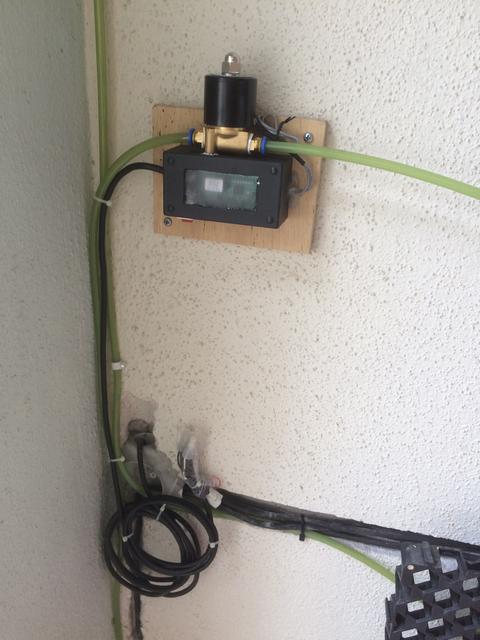
Why not direct connect without the tank?
user posted image
*
-ekhem- "Home Ministry" requirement. 😮‍💨

I'm only "contractor". 😅
Oltromen Ripot
post Mar 20 2023, 11:51 PM

👍 999999 person Likes this member
*******
Senior Member
4,034 posts

Joined: Dec 2019
QUOTE(Skylinestar @ Mar 20 2023, 10:58 PM)
what happen to tuya smart life? it's now tuya smart and smart life?

tuya smart by tuya inc
https://play.google.com/store/apps/details?id=com.tuya.smart

smart life by volcano technology (i swear this was tuya last time)
https://play.google.com/store/apps/details?...ife&hl=en&gl=US
*
when i started last year, there were already 2 separate apps "Tuya" and "Smart Life".
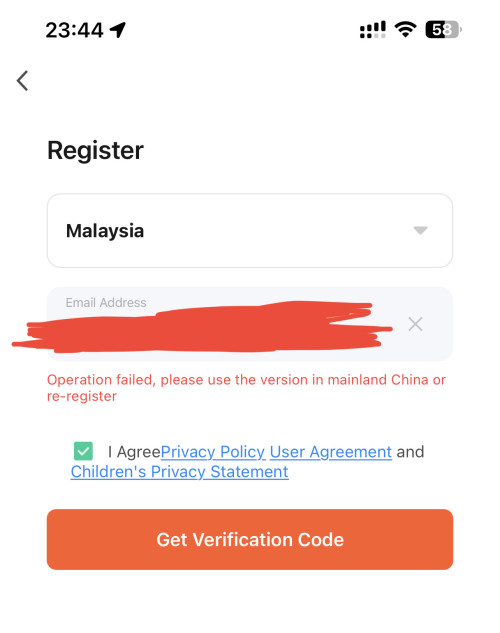
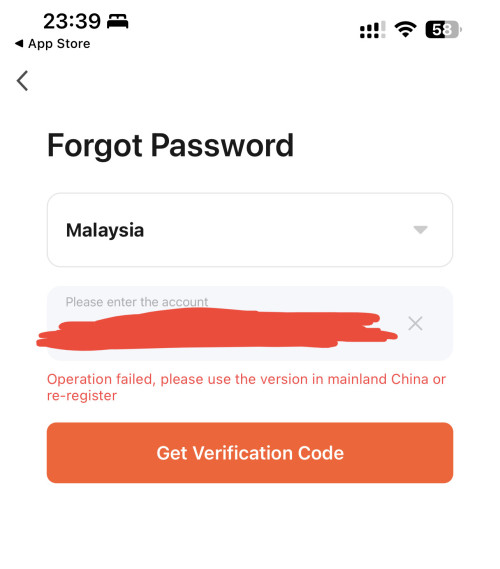
reading further, "Tuya" is meant for users in Mainland China, "Smart Life" is meant for outside Mainland China. This was told by the support personnel him/herself when I lodge complaint of not being able to log in to "Tuya".
the backend servers for each of the apps are separate.

when i wrote of the difference and mentioned that I was not allowed to login to "Tuya" because it's meant for Mainland China, some of you guys said I was confused and in the wrong.

user posted image

user posted image

https://robotpoweredhome.com/tuya-vs-smart-life/

Oltromen Ripot
post Mar 21 2023, 07:57 AM

👍 999999 person Likes this member
*******
Senior Member
4,034 posts

Joined: Dec 2019
QUOTE(Skylinestar @ Mar 21 2023, 07:54 AM)
it's nonsense from tuya.
i can login to the volcano app, but cannot login to the tuya app.
*
2 separate backend. Have to create new account.
My bad luck; after account first on Tuya app, it then refused to allow login because Tuya app is for Mainland China. Support personnel him/herself told me.
Had to switch to Smart Life - and register anew.
Oltromen Ripot
post Apr 3 2023, 06:07 PM

👍 999999 person Likes this member
*******
Senior Member
4,034 posts

Joined: Dec 2019
QUOTE(epicure @ Apr 1 2023, 01:43 PM)
Quick question.. I’m planning to not buy the Zigbee smart wall embedded sockets for fear that my box may be too congested or any fitment issues. Therefore looking at getting those zigbee smart wall plugs instead.
*
All my wall-embedded sockets and switches use this spacer to overcome depth issue. I use 20mm thickness.
Check out Smart Switch Wall Spacer Reinforced Version Sonoff Ewelink Tuya Smart Life. Get it on Shopee now! https://shp.ee/z6f6yby.
Oltromen Ripot
post Apr 5 2023, 09:30 AM

👍 999999 person Likes this member
*******
Senior Member
4,034 posts

Joined: Dec 2019
QUOTE(epicure @ Apr 5 2023, 08:39 AM)
Hey bro, just want to ask u, before your sockets fried, did they function as ZigBee extenders/repeaters?
*
Sorry. The fried ones are WiFi version.

Anyway, the Zigbee version, I put them behind AVR and UPS that can step down to lower end of 200V-250V range as workaround. But I wouldn't be buying more of them anymore.
As for their usage as extender, I cannot verify the feature. But their connection have been very, very stable.

Home 1. Separate network powered by Huawei B618 as backbone, specifically to control switches behind the other Homes and itself.
Hub, no usb extender. All the 9 * wall sockets and 12 * plug socket. Very stable, not reliable (as in, less than 5 of them can turn off on their own for no reason and never came back if no manual intervention. So I set schedule to turn ALL of them on every 30mins.)

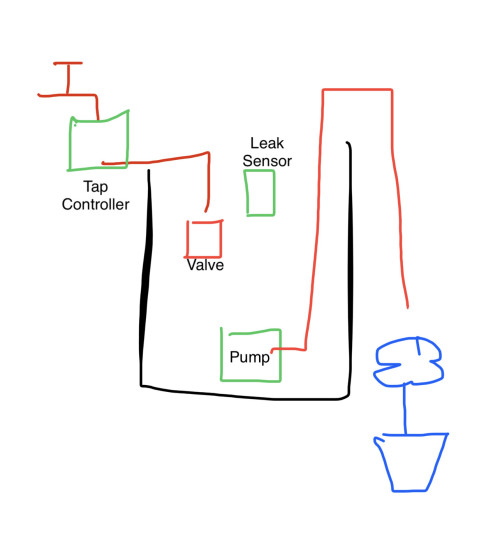
Home 2. Sprinkler. Rides on Home 1 network as well.
Hub, no usb extender. Zigbee tap controller to avoid overfill if water-leak sensor inside tank is triggered. 1 wall socket to control water-pump timer. Very reliable, very stable. Why not straight spray from tap instead of using tank? Because we want to make sure there is stored water for at least 1 cycle if pump is ON during mains interruption. And, we can put fertilizer inside tank.

Home 3. General home and Fibre services.
Hub, 1 USB extender to reach far rear. Home alarm (i use one of those tuya "tablet"-like from Shopee, like it because it have remote control to hang with keychain), wall switches, wall sockets, (sun)light sensor (to limit auto lights ON/OFF at porch and in hallway only when it's dark outdoor), aircond, heater, water leak sensor (because the tap inside wall that controls water supply to sink itself can silently leak if i opened it too much, had that twice and it ruined the cabinet door being soaked for whole week, not to mention excessive moisture in home from mini flood). Also the heat-based motion sensor (previously used for alarm, now to switch lights on only when there is humans present). I think it performed unreliably at the far rear, but improved after I put USB repeater in the middle to Hub. my Wifi-based devices at far rear will have notice inside SmartLife app about signal degradation, so I assumed the Zigbee ones also have issue, thus the USB repeater.

Oh, the Wifi degradation, I attempt to solve with 4-node mesh scattered around WITH dhcp lifetime of 4hrs only (apparently the devices somehow gets new IP at random time, so if set for too long, the pool will run out and I will have lots of offline Wifi devices that never recovered until power reset at mains.

I use Zigbee USB extender. Why? I can plug in behind any of mesh nodes, which I have 8 altogether scattered around (4 for home automation, 4 for laptops, mobiles, etc.) Since, again, I cannot verify wall zigbees usage as extenders. And. USB repeater is free to switch Hub to repeat, but Zigbee wall swiches supposedly repeats only the Hub it is registered to; wall sucks if I need it to repeat for Home A when it is registered to Home C. Imagine "missing" your kitchen socket in Home A because you had to have it repeat Home C. Nobody woild miss a missing USB extender if you move it to another Home.

This post has been edited by Oltromen Ripot: Apr 5 2023, 09:40 AM
Oltromen Ripot
post Apr 10 2023, 04:35 PM

👍 999999 person Likes this member
*******
Senior Member
4,034 posts

Joined: Dec 2019
QUOTE(Created On 21/1/2021 @ Apr 10 2023, 04:13 PM)
Hi, is there a smart light bulb with timer function?

I want the light bulb to be on from 7pm to 5am, is such function available on Wiz or Yeelight?
*
That's all?

(i) I use dual-sensor bulbs. This one no need special setup as it will auto detect insufficient SUNlight to switch on. I'm not promoting this specific brand, just link the one i bought for gate usage.
Check out SINCELIGHT Dusk to Dawn LED Bulb with Dual Daylight Sensors· ON/Off Automatic Depends On Daylight Level · Night Light from Dusk Till Dawn.
Get it on Shopee now! https://shp.ee/unrn8f4.

(ii) Tuya/SmartLife
but you don't want timer function.
"Timer" will flip the state as opposed to state at the time a timer started i.e. ON becomes OFF, or OFF becomes ON.

You can set auto Scenes.
Then choose to have your bulb switched ON/OFF based on either
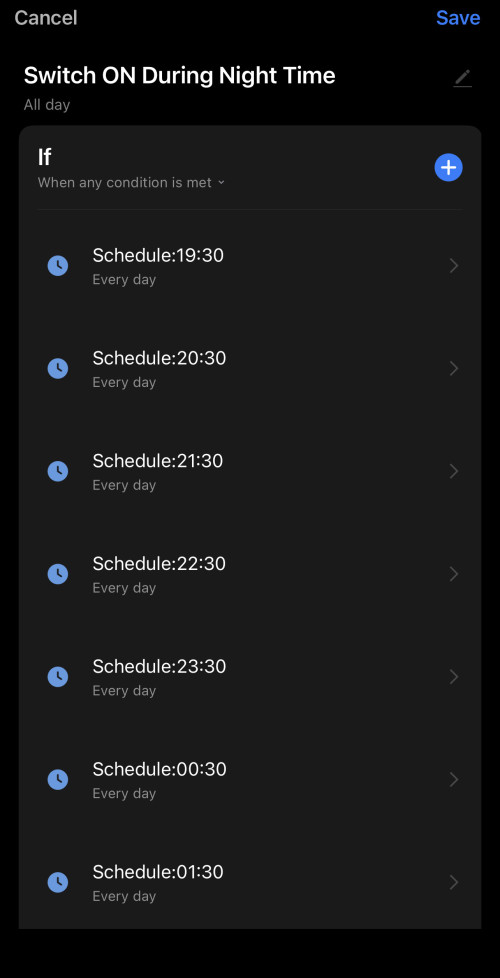
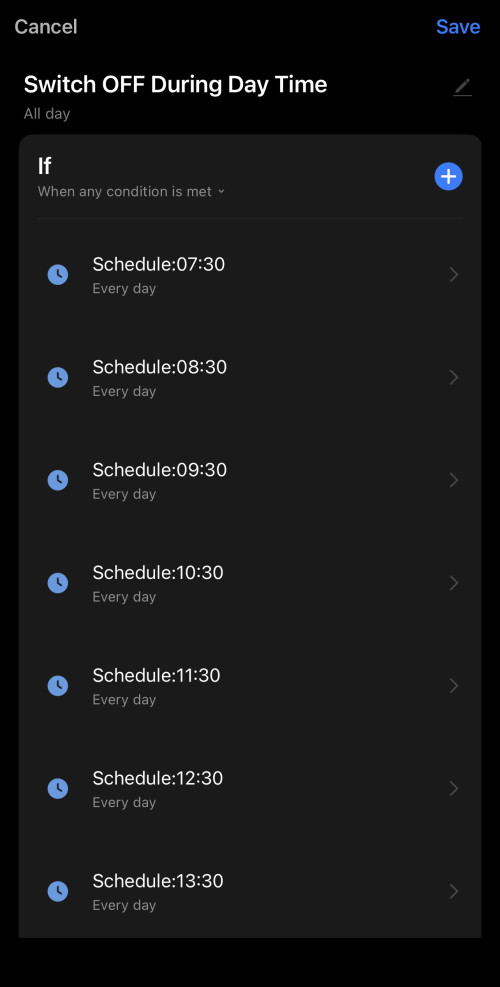
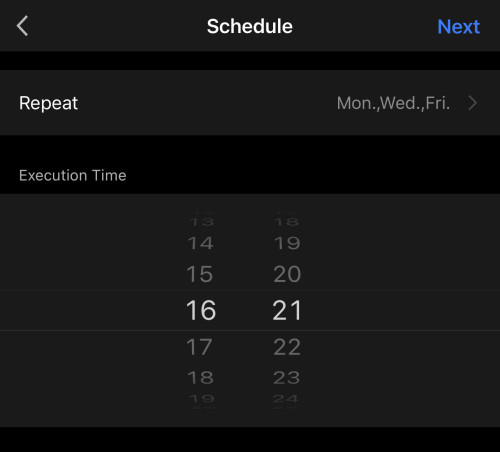
- fixed time (once, or select which day),
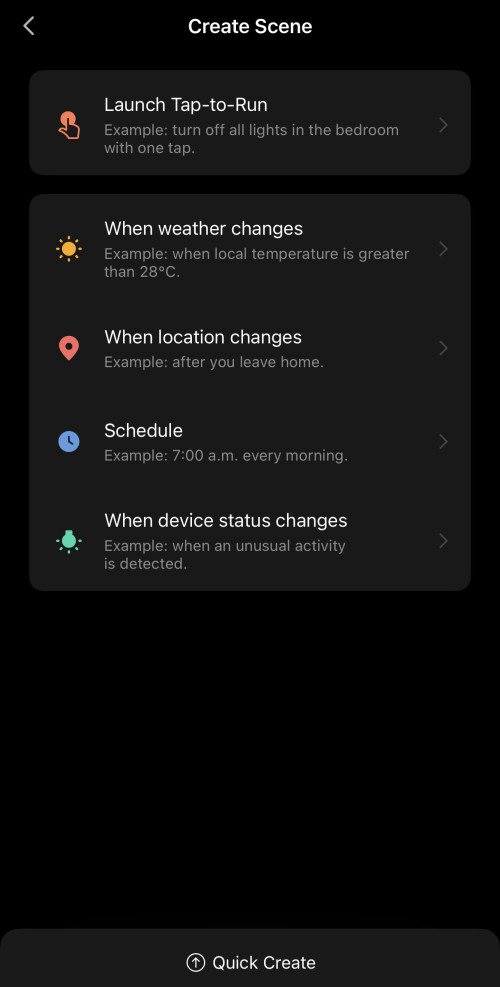
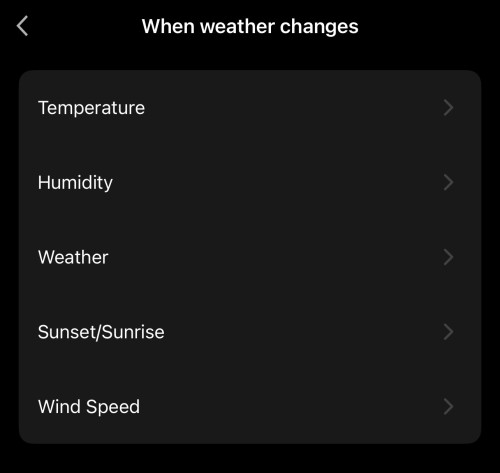
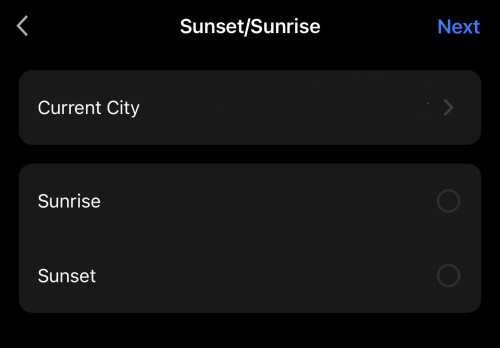
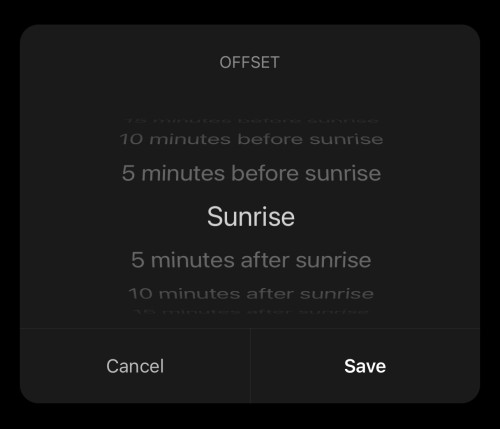
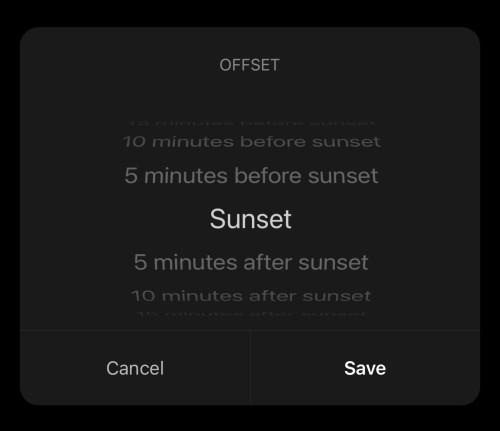
- dynamic based on sunset/sunrise for your geographical location, or,
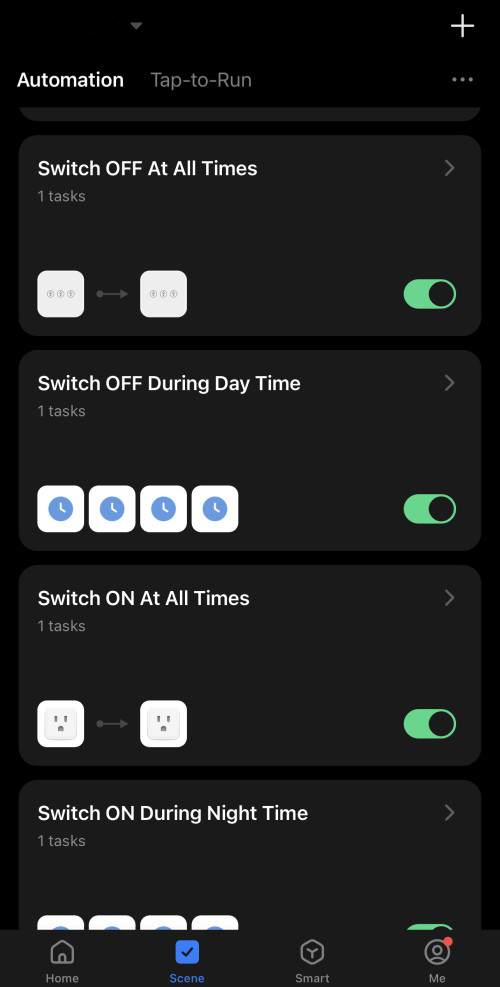
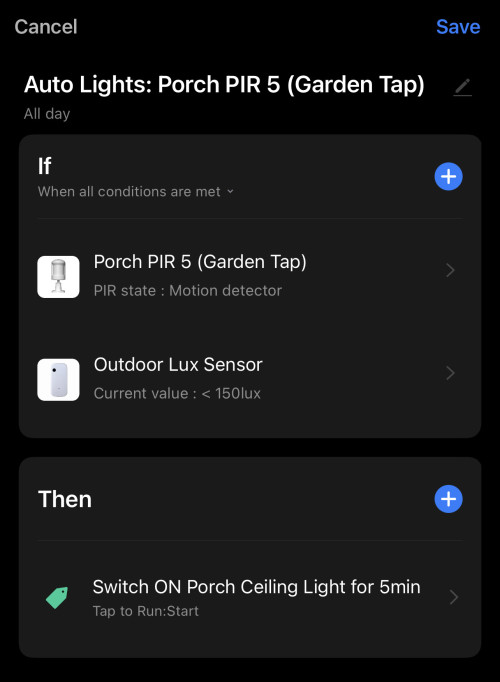
- like mine, I (i) add a light sensor to measure intensity of outdoor lux value, and (ii) motion sensor; to autoswitch porch and rear flood lights only when it is motion-triggered and dim.

» Click to show Spoiler - click again to hide... «


» Click to show Spoiler - click again to hide... «


Oltromen Ripot
post Apr 11 2023, 06:01 PM

👍 999999 person Likes this member
*******
Senior Member
4,034 posts

Joined: Dec 2019
QUOTE(epicure @ Apr 11 2023, 05:26 PM)

First and foremost pardon the noob question that I have here. I have an alarm panel, that has 2 output terminals, 12V DC each, to indicate arm and disarm status. Means when armed, it has 12V DC voltage. When disarmed then no voltage. I'm trying to figure out, how to use this output into my smart home app ( could be anything, apple home, tuya, Ewelink etc etc)

Any ideas sifus??
*
2 separate output terminals? Means if armed then 1 terminal have constant power? Brief power?
And when disarmed, another 1 terminal have constant power? Brief power?

Sort of like, you can put green bulb, red bulb as status indicator?

I don't know if there is any tuya device that can outright rake in 12V as input signal.

But i can think of using bulb for each of the 2 output terminal, then use 2 separate tuya light sensors to capture LUX value of the bulb.
I assume the output terminals are mutually exclusive. such that if light sensor A read a sudden brightness, then can assume output terminal A has light up. The same goes for light sensor B reading a sudden brightness coming from output terminal B.
Oltromen Ripot
post Apr 11 2023, 11:42 PM

👍 999999 person Likes this member
*******
Senior Member
4,034 posts

Joined: Dec 2019
QUOTE(epicure @ Apr 11 2023, 06:31 PM)
Hey there,

No only one terminal has voltage. The other one is ground. I did think of lux through a light..but if the environment is bright then it kinda is not going to be very reliable.

Still thinking of how to get over this..
*
well, you can always fashion 2 darkened containers just to hold 12V LED and light sensor....
but beware of trapped heat if the 12V supply is continuously lighting up the LED.

example of 12V LED.

user posted image

Oltromen Ripot
post Apr 23 2023, 08:42 AM

👍 999999 person Likes this member
*******
Senior Member
4,034 posts

Joined: Dec 2019
QUOTE(dest9116 @ Apr 23 2023, 07:59 AM)
I suggest zigbee la, too many wifi switches end up you need to buy a very good router that dan support so many devices

No difference from getting a zigbee hub
*
I have 20-odd wifi wall switches, 40-odd wifi wall sockets, 20-odd misc wifi devices (sensors, bulbs, hubs); and yes, maintaining uptime using mesh is not fun. already add to become 4-nodes, split into 3 SSID, and shortened wifi lease to 4hrs, and after 2 weeks of stability after whole house power reset, yesterday i start finding sockets going offline. aarrrghhhh...........

i'm starting to believe short bursts of 20-odd is the max that an SSID is actually able to deal with in reality....
Oltromen Ripot
post Apr 23 2023, 11:27 AM

👍 999999 person Likes this member
*******
Senior Member
4,034 posts

Joined: Dec 2019
QUOTE(dest9116 @ Apr 23 2023, 09:42 AM)
What router you using btw? I'm using the unifi AZ technology router and wirh 12 devices connected, some start to go offline lol

Luckily i have another tenda router and I connect the cctv and zigbee hub to it to ensure proper uptime
*
For HA and CCTV, I put them on 4-node Maxis LG8245X6-10 fibre router+mesh.
SSID1 (2.4GHz-only) specific for 20-odd wall switches, for reliability purposes. This one I cannot take chance being offline. So far no issue.
SSID2 (2.4GHz-only) specific for 40-odd wall sockets, again for reliability, but doesn't seem to be holding up after 2 weeks.
SSID3 (2.4GHz-only) for 20-odd miscellaneous, for reliability purposes. So far no issue.
SSID4 (5GHz-only) dummy no purpose except I because I am not sure if it is necessary for 5GHz backhaul to be available at all.

For laptop, mobile devices, etc, i still rely on venerable Deco M9 Plus (2.4GHz+5GHz) on AP-only mode.

I found that the Tuya devices can renew a different DHCP IP altogether. Huawei LG8245X6-10 unfortunately only allow /24 subnet size, it didn't allow me to increase pool to /23. So workaround to make sure there is always sufficient IP to dish out is reduce DHCP lease to 4hrs.

Also, connect them to 2.4GHz-only SSID. I read and was impressed on, that if transmitter uses same SSID on both 2.4GHz and 5GHz, the Tuya devices will hit issue when transmitter keeps tells it to move to 5GHz. Or something like that.

The Zigbee hubs can have alternate wifi network and it will switch when the current one is not working. I have Huawei B618 4G router as failover for those Zigbee hubs; separate zigbee-based sockets for CCTV, fibre modem, alarm will remain controllable, pending failover, in the event my fibre network is interrupted.
Oltromen Ripot
post Apr 29 2023, 01:19 PM

👍 999999 person Likes this member
*******
Senior Member
4,034 posts

Joined: Dec 2019
QUOTE(Oltromen Ripot @ Feb 21 2023, 11:05 AM)
user posted image
*
Guys, what is the odd that my smart switches were actually fried by lightning?

Lightning strikes somewhere near, the jolt travels via water piping.
Since my sprinkler tank is somewhat connected to water mains, the inlet valve is always submerged right under water surface, and my pump is inside the water, the jolt travels back towards the smart socket and *poof*.

Is that probably even if imaginative? Since I cannot think of WHY(!!!!??????) digital timer, analogue timer, smart switches all *poof*. Will adding a surge suppressor (belkin in mind) between pump and (smart) switch helps?

9 Pages « < 4 5 6 7 8 > » Top
 

Change to:
| Lo-Fi Version
0.2899sec    0.35    7 queries    GZIP Disabled
Time is now: 16th December 2025 - 05:00 AM