Welcome Guest ( Log In | Register )

Outline · [ Standard ] · Linear+

Review [Review] MSI GS70 Stealth Pro Gaming Notebook

views
     
TSlucidlts
post Mar 25 2015, 09:23 PM, updated 11y ago

brain powder
*******
Senior Member
2,906 posts

Joined: Oct 2010
From: hurrr durrrrr?


Author's Note: The Original Review may be found in www.tech-critter.com, please head to the site to show us your support as well.

Gaming notebooks can be a great companion for on the go gamers and higher end gaming notebooks like the MSI Gaming GT72 is able to deliver outstanding performance and guaranteed satisfaction for these on the go gamers - the bulkiness of these high end gaming notebooks is the only real issue here - not everyone likes to carry a heavy gaming notebooks around, especially for those who travels a lot.

Today we'll be examining a gaming notebook from MSI, special thanks to MSI Malaysia in provision of their GS70 2QE Stealth Pro Gaming Notebook. A slimmer and stylish one it is, let's find out what kind of performance can it deliver to satisfy our needs for gaming?

(SRP for the MSI Gaming GS70 2QE Stealth Pro is around RM7,299)

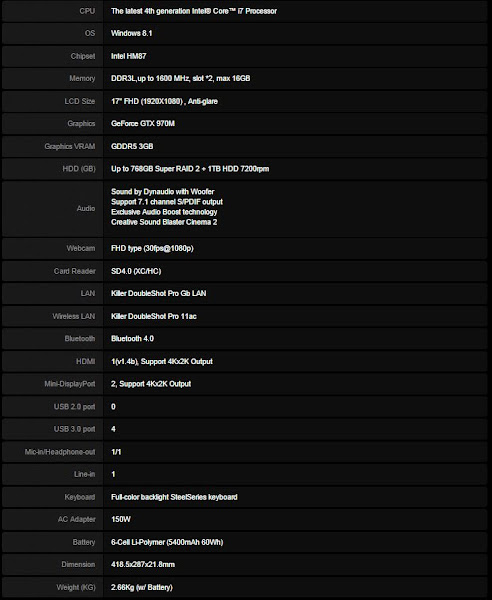
Specifications
user posted image

Packaging
user posted image

We can see that MSI has put on a lot of effort on their packaging, a luxurious one we must say - this is not the kind of packaging you'll normally get from most brand's gaming notebooks out there.

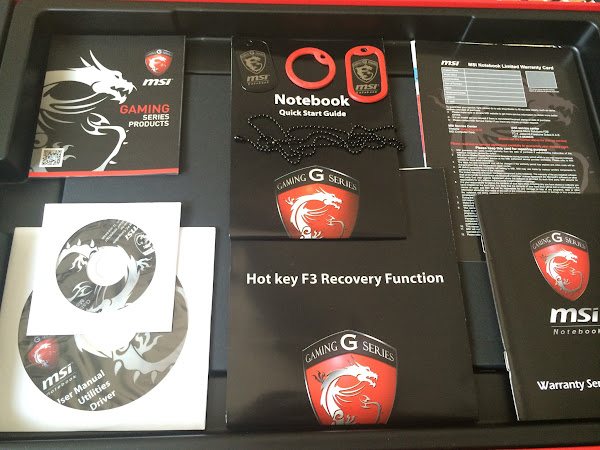
Accessories
user posted image

Closer Look
user posted image

The GS70 2QE Stealth Pro Red Edition - it comes in black, silver and red variants.

user posted image

The lid comes with brushed aluminum finish as usual, looks stylish and with an added touch of premium.

user posted image

ottom view of the GS70 2QE, there's 6 large rubber feet and 3 smaller feet to raise the notebook in order to have sufficient space in between the bottom of the notebook and the surface it is placed on.
TSlucidlts
post Mar 25 2015, 09:24 PM

brain powder
*******
Senior Member
2,906 posts

Joined: Oct 2010
From: hurrr durrrrr?


user posted image

The main grill for air intake directly to the cooling fans looks rather small and might reduce the overall cooling performance, but we'll find that out in cooling performance test later.

user posted image

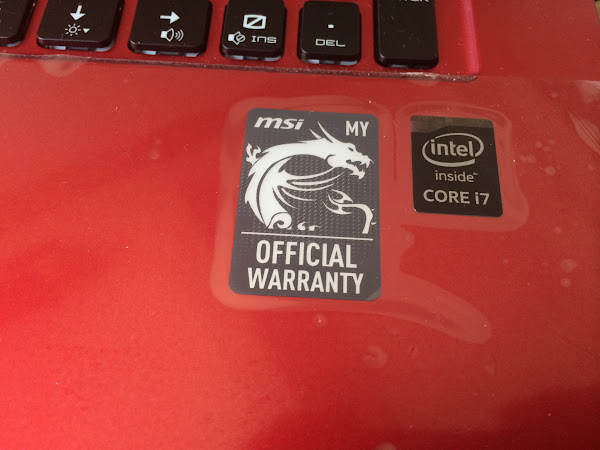
Self upgrade seems to be impossible as a screw happens to be right under the warranty sticker, any tamper to the sticker will void the warranty immediately.

user posted image

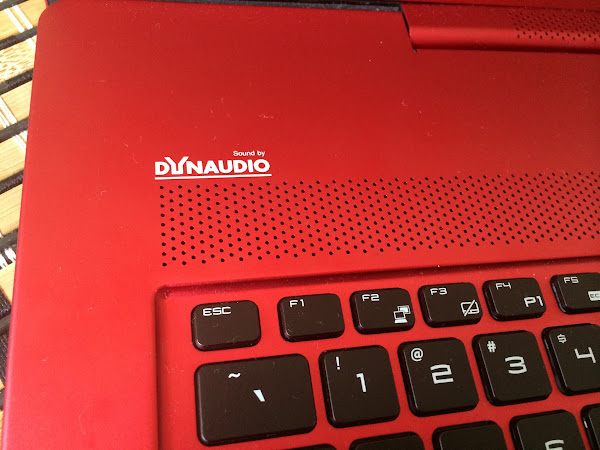
The Dynaudio subwoofer got you covered with extra bass while you're gaming, watching movies or listening to music.

user posted image

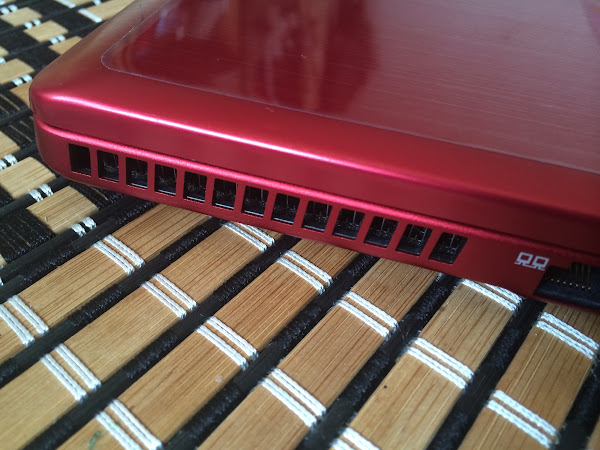
At the rear end of both sides of the GS70 2QE is the main heat exhaust.

user posted image

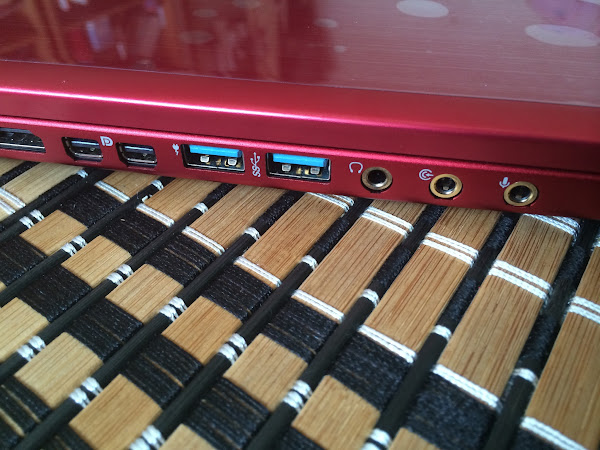
At the left side of the GS70 2QE you'll find a HDMI port, 2 x mini display port, 2 x USB 3.0 port and 3 x audio jacks.

user posted image

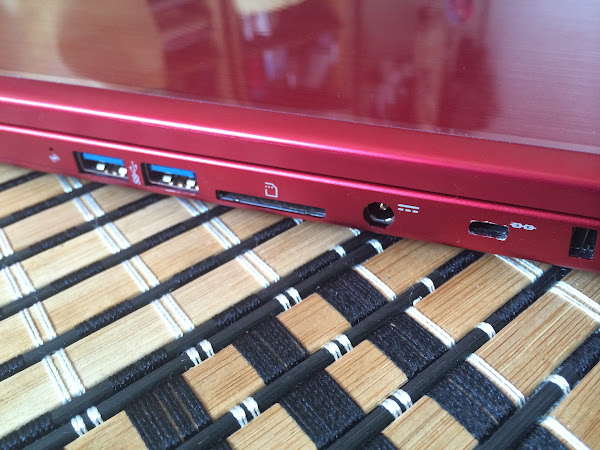
At the right side you'll find 2 x USB 3.0 port, a card reader, charging port and a Kensington security slot.


TSlucidlts
post Mar 25 2015, 09:27 PM

brain powder
*******
Senior Member
2,906 posts

Joined: Oct 2010
From: hurrr durrrrr?


user posted image

From this angle the GS70 2QE doesn't looks like any gaming notebooks which we initially expected, as it looks more like a stylish notebook for work.

user posted image

Opening the lid to 180° is pretty much impossible due to hinge design.

user posted image

The main body of the GS70 2QE Stealth Pro, we see a full featured keyboard designed by SteelSeries, large area of palm rest

user posted image

The system audio is powered by Dynaudio, the Danish sound experts that are dedicated to the goal of authentic sound reproduction since they where founded 1977 in Danish Skanderborg.

user posted image

It might vary by region, this is the label to prove that your MSI gaming notebook is fully covered within the limited warranty period by MSI Malaysia.

user posted image

Target selection and execution is made easier as the touchpad (or better known as clickpad) comes with integrated mouse button under the touch-sensitive area.
TSlucidlts
post Mar 25 2015, 09:29 PM

brain powder
*******
Senior Member
2,906 posts

Joined: Oct 2010
From: hurrr durrrrr?


user posted image

Function keys with different function is labelled with relevant icons as following:
- Up & down arrow keys fror screen brightness adjustment
- left & right arrow keys for volume adjustment
- numpad 0 for enabling / disabling the system sound

user posted image


- F4: P1 shortcut key for Instant Play feature that launch a designated application when pressed
- F5: Eco mode (power saving mode) for lower power consumption
- F6: Enable / Disable the webcam.
- F7: The SHIFT function to toggle system performance according to your needs

user posted image

The type of key switches used on the keyboard is the scissor switch which is commonly used on low profile keyboards.

user posted image

The customizable RGB backlit keyboard which can be toggled between 4 layers (FN + 1/2/3/4) to suit your mood for gaming, entertainment, etc.


TSlucidlts
post Mar 25 2015, 09:32 PM

brain powder
*******
Senior Member
2,906 posts

Joined: Oct 2010
From: hurrr durrrrr?


Testing Methodology

Software: MSI Dragoon Gaming Center

user posted image

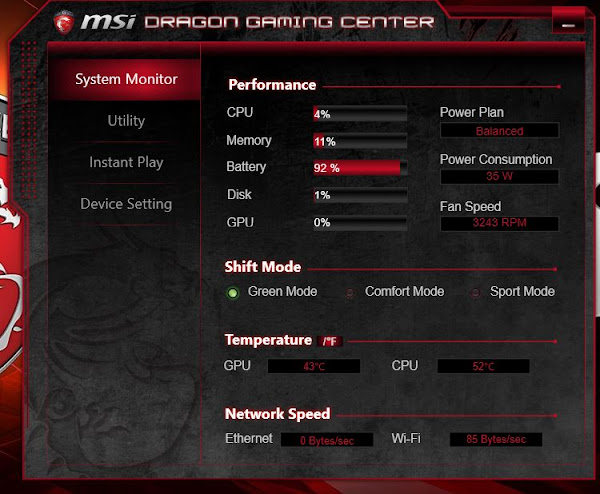
System Monitor is a pretty useful tool for one to monitor the system performance, shift mode, temperature and network speed. All the details is presented in the simplest form which can be easily understandable.

user posted image

The Utility allows you to compile all frequent used applications into the list for the ease of access.

user posted image

The instant play tab allows you to add your most frequent played games to the list and launch it via the P1 function key located at the F4 key.

user posted image

Display & audio tab allows you to adjust the volume for speakers/microphone and display brightness/gamma.

user posted image

The mouse tab, allows you to control the mouse pointer speed, double click speed and scrolling line number easily without having to access the mouse properties in Control Panel.

user posted image

The resource release tab lists out all the active programs and you can select the programs to be killed to release resources for the designated games when instant play is activated.

user posted image

Device Setting allows you to toggle for enable/disable of Windows key on the keyboard, enabling/disabling the high performance profile and toggle the system performance with the shift mode's green (low power consumption), comfort (balanced) and sport mode (high performance mode).


TSlucidlts
post Mar 25 2015, 09:43 PM

brain powder
*******
Senior Member
2,906 posts

Joined: Oct 2010
From: hurrr durrrrr?


Temperature

user posted image

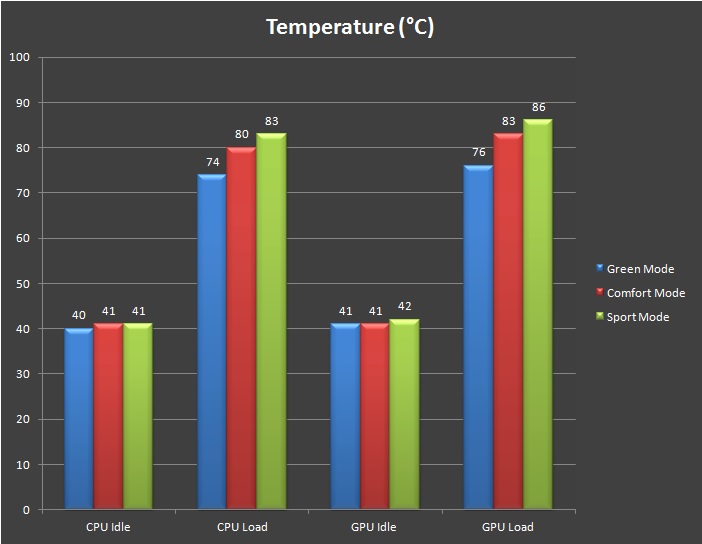
We've ran a series of system stress test with Prime95, Intel Extreme Tuning Utility, FurMark that has been widely used by enthusiasts around the globe for system stability test. While the stress test generates heat, we've recorded the temperature reading for both situation where the cooling fans operate normally and with Cooler Boost enabled.
  • Under green mode, the CPU and GPU temperature peaked at 74°C and 76°C respectively - a little hot but still within the bearable range.
  • When we shifted to comfort mode, the system performance is changed to balanced mode and the temperature of both CPU and GPU now peaked at 80°C and 83°C respectively.
  • Shifting to sport mode makes the system performs at its best, the temperature of both CPU and GPU now peaked at 83°C and 86°C respectively

Battery Life
The battery life isn't looking very good when it comes to heavy use - it lasted only for about 1 hour 21 minutes under heavy gaming session on high performance mode, around 3 hour 14 minutes on movie session and 4 hour 23 minutes on web surfing.

MSI included adjustable system performance feature is a great feature to have on a gaming notebook as it greatly improve battery life by reducing the system performance so it is less taxing on the battery.

Gaming
user posted image

In order to test the capability of the GS70 2QE, we have opted for ultra settings on all the games and synthetic benchmark which will be tested in this review. We take 30 FPS as the bottom line for our test because it's a playable frame rate that is commonly seen on game consoles.

Most games are playable when we're on Green mode and Comfort mode, except for Crysis 3. Shifting to Sports mode sacrifices the temperature for greater good - it unleashes the maximum potential of the GS 2QE and most games tested runs at decent FPS with no significant stuttering, but you will need a decent cooling pad for this.

user posted image

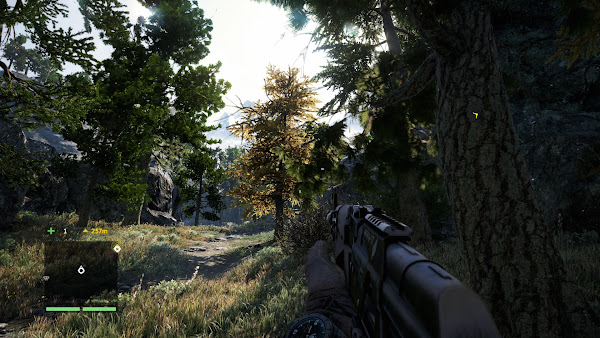
We used the Far Cry 4, an open-world survival shooter video game from Ubisoft Montreal to check on some of the new feature we can expect from the GTX 970M:

user posted image

Without enhancement from NVIDIA Hairworks, the fur of this goat that we've hunted down with a flat texture look - dry and stiff.

user posted image

With enhancement from NVIDIA Hairworks, the fur of this goat looks much fluffier and lively.

user posted image

Low lighting quality: The graphics looks great but what's the big deal about this lighting quality anyway? Let's see what NVIDIA's Godrays can do.

user posted image

High lighting quality (Godrays): And this is the lighting quality set to high. Indeed, it looks way much better and realistic.


Audio
The Dynaudio speakers delivers clear and powerful sound stage during gaming and movie session that is pretty satisfying but maxing out the volume somewhat creates a crackling sound - seems that this applies only for movies we've watched on the GS70 2QE, as everything sounds just fine during gaming session. Music wise, classical / ochestral music sounds the best among various genre of musics tested.
TSlucidlts
post Mar 25 2015, 09:45 PM

brain powder
*******
Senior Member
2,906 posts

Joined: Oct 2010
From: hurrr durrrrr?


Keyboard
When it comes to gaming keyboard, we're expecting for design and feature that is beneficial to gamers. Designed by the renown gaming peripherals manufacturer SteelSeries, the keyboard on the GS70 2QE Stealth Pro comes with fancy lighting and key mapping that appears to be helpful for the gamers, but we find that the keyboard itself is lacking of the N-key rollover feature that has been widely used on most expensive gaming keyboards on the market.

user posted image

We've tried the commonly used key combination for FPS games and everything seems well for now.

user posted image

The commonly used key combination for racing games seems okay as well.

user posted image

When we tried playing rhythm games that requires simultaneous keys to be pressed at the same time, the signal blocking issue arises and the maximum amount of keys that can be registered simultaneously is limited to 6 keys (not including modifier keys). We've tried configuring the key configuration on other area of the keyboard and there's not way for us to resolve the issue.


Verdict
In terms of graphics performance, we find the benchmark result with FPS that circles around the value of 30 is still a comfortable FPS count to game on. Do note that the FPS we're getting is the result of having the graphics settings set to ultra, if you feel uncomfortable with FPS lower than 60, turning down the graphics to high / medium will yield higher FPS count.

Battery life and temperature has always been a concern when it comes to slim design notebooks, the performance shifting feature might not be a total solution to overcome the shortcoming, but it's a pretty sweet feature to have on the GS70 2QE.

Green mode sacrifices performance for lower temperature and lower power consumption
Comfort mode is the balance point in between Green mode and Sport mode
Sport mode sacrifices temperature and battery life for greater performance

Still, if you still wanted to enjoy a longer gaming session on battery, shifting to Green mode and lowering the graphics quality of the game is recommended.

Another subjective issue that we would like to highlight is the keyboard roll-over feature. While not everyone is going to press all of the keys on the keyboard at the same time, the N-key rollover is still an important feature that should be cater of if its targeted audience is to be gamers from all kinds of game genres.


Pros
- Slim, stylish and portable
- Instead of being just plain black, it comes with 3 color variant
- Decent audio performance
- Good graphics performance
- Customizable keyboard macros, LED colors and effect
- Adjustable system performance helps to extend battery life and lower temperature

Cons
- Expensive
- Gets very hot under long hours of gaming

Subjective
- Keyboard doesn't comes with N-key rollover feature

Left4Dead2
post Mar 25 2015, 10:17 PM

Regular
******
Senior Member
1,103 posts

Joined: Nov 2009
Finally GTX970M laptop and good review as usual Bro icon_rolleyes.gif

But much expensive than my i7, GTX970, 1440p monitor, 200w speaker PC rig.... Mobility ? sweat.gif
TSlucidlts
post Mar 27 2015, 12:55 AM

brain powder
*******
Senior Member
2,906 posts

Joined: Oct 2010
From: hurrr durrrrr?


QUOTE(Left4Dead2 @ Mar 25 2015, 10:17 PM)
Finally GTX970M laptop and good review as usual Bro  icon_rolleyes.gif

But much expensive than my i7, GTX970, 1440p monitor, 200w speaker PC rig.... Mobility ?  sweat.gif
*
Definitely better in terms of mobility if were to compare to the GT72 laugh.gif


Change to:
| Lo-Fi Version
0.0170sec    0.40    5 queries    GZIP Disabled
Time is now: 17th December 2025 - 04:57 AM