Welcome Guest ( Log In | Register )

Bump Topic Topic Closed RSS Feed
37 Pages « < 3 4 5 6 7 > » Bottom

Outline · [ Standard ] · Linear+

 The SSD Thread V5, Solid State Drive

views
     
horns
post Apr 24 2015, 11:17 PM

\m/
*******
Senior Member
3,038 posts

Joined: Nov 2009
QUOTE(air_pull91 @ Apr 24 2015, 10:56 PM)
do let me know if you want..
LOL
*
haha thanks

i normally use tools like crystal diskinfo or hdd guardian for reference. it's easier to find comparable results online.

to me i just use the ssd as usual, with some system optimizations. at the rate based on these smart information, it will outlast my system easily.

edit: ho ho ho 128gb (8x 16gb) quad channel ddr4 was announced by g.skill!

This post has been edited by horns: Apr 24 2015, 11:30 PM
horns
post Apr 25 2015, 03:03 PM

\m/
*******
Senior Member
3,038 posts

Joined: Nov 2009
QUOTE(alfiejr @ Apr 25 2015, 02:28 PM)
Is there any different between the Liteon L9S and the S900 model? I kinda confuse between the two.
*
they are different imo but still under the family of L9S. i suspect the L9S as advertised at liteonit.com is for oem (model number: LCS-256L9S), while S900 is for retail (model number: SCS-256L9S)

S900 is slightly faster. (comparisons: L9S vs. S900)
horns
post Apr 25 2015, 08:49 PM

\m/
*******
Senior Member
3,038 posts

Joined: Nov 2009
QUOTE(alfiejr @ Apr 25 2015, 03:19 PM)
Thnx for the reply ☺ , i was searching the s900 model in the garage sales but couldn't find any , there are a few sellers selling the L9S . Guess i will go L9S model 😌
*
you need to dig deeper. as NightFelix pointed out, normally the sellers in garage sales do have it smile.gif

QUOTE(pakji @ Apr 25 2015, 04:59 PM)
who still need 1TB SSD I SELLING https://forum.lowyat.net/index.php?showtopic=3522845&hl=

i looking sell fast urgent need money
*
why do you wanna sell them? like many ssds that have bad incidents, although imperfect, they are still good drives.
horns
post Apr 25 2015, 11:15 PM

\m/
*******
Senior Member
3,038 posts

Joined: Nov 2009
QUOTE(pakji @ Apr 25 2015, 10:12 PM)
why i want sell because i wanted get M.2 SSD hehe
*
oh. ok then smile.gif


horns
post Apr 25 2015, 11:40 PM

\m/
*******
Senior Member
3,038 posts

Joined: Nov 2009
QUOTE(pakji @ Apr 25 2015, 11:17 PM)
u want buy SSD 1TB ???
*
no sir thanks for asking smile.gif i am aiming for m.2 ssd also. for sata ssds, i still have some spares hehe


horns
post Apr 26 2015, 12:31 AM

\m/
*******
Senior Member
3,038 posts

Joined: Nov 2009
QUOTE(pakji @ Apr 26 2015, 12:12 AM)
ohh its ok i waiting someone buy ssd

i need money
*
good luck on your sale. if i were you i just keep them for own use. the new firmware updade and advanced performance mode in magician 4.6 is most likely the right remedy for the short comings of 840 evo.
horns
post Apr 27 2015, 11:49 PM

\m/
*******
Senior Member
3,038 posts

Joined: Nov 2009
i wonder when we can have this kind of warranty support?

http://ocz.com/shieldplus

i forgot ocz vertex 4 has a 5-year warranty.
horns
post Apr 28 2015, 12:22 AM

\m/
*******
Senior Member
3,038 posts

Joined: Nov 2009
QUOTE(Harold2009 @ Apr 28 2015, 12:04 AM)
thumbup.gif  thumbup.gif Yeah, I agree with you, mine SSD near 3 years old, just format once because migrate from win 7 lanun to ori win 8.1 pro use till today smooth like butter.  biggrin.gif

[attachmentid=4428891]
*
that corsair force 3 is a 60gb version? as boot drive it will last for some time even if it's small hehe


horns
post Apr 28 2015, 11:56 AM

\m/
*******
Senior Member
3,038 posts

Joined: Nov 2009
QUOTE(Harold2009 @ Apr 28 2015, 12:37 AM)
» Click to show Spoiler - click again to hide... «


Rest research by your self.  wink.gif
*
nice smile.gif

in general there is no need to do 4k alignment like that. (perhaps w7 needs it, but i never do that on w8.x) usually i just do diskpart > clean > proceed with installation (w8.x; gpt disk; uefi mode). i haven't encountered any 4k alignment issues.

QUOTE(1024kbps @ Apr 28 2015, 10:16 AM)
Grab a cheap SSD and put it into a 2.5inch hdd enclosure? or SATA to USB 3 adapter, im using one with USAP support, but with 320GB hdd only  sweat.gif
*
bro do you mind to share the information about your hdd enclosure? i wanna get some noctua fans at lyp, so if possible i just grab some hdd enclosures too.
horns
post Apr 28 2015, 03:55 PM

\m/
*******
Senior Member
3,038 posts

Joined: Nov 2009
QUOTE(1024kbps @ Apr 28 2015, 03:43 PM)
Eh, im using my HDD naked  sweat.gif
the SATA to USB3 adapter is made by Asus. if you want to grab you, better find the enclosure that support UASP mode.
*
oh lol! i am using normal hdd enclosure. the max it can go is 190MB/s

yeah the problem is that enclosures with uasp are rare here :/
horns
post Apr 29 2015, 01:45 AM

\m/
*******
Senior Member
3,038 posts

Joined: Nov 2009
QUOTE(1024kbps @ Apr 28 2015, 06:53 PM)
190MB/s is damn fast already, i'm not sure if UASP going to increase the performance further. sweat.gif
Too bad i dont have spare SSD to test the UASP mode vs the normal mode.

Or just get it from amazon http://www.amazon.com/gp/product/B00E1JAB3...d=ATVPDKIKX0DER
*
hm.. after reading through the right way to get that good speed, i think i will just sit this one out, and wait for usb 3.1.

i just remembered that some one in this forum have told me about the complete compatibility of usb 3.0 enclosures with uasp support. actually you need a compatible host also. uasp was implemented in older mobo's before (z77, z87 mobos. need to check out the actual implementations), but i guess for cost reasons and the limited availability of uasp-capable enclosures, that part was absent in new mobos (most z97 in the market, except for some that are from asus).

without the whole set, you will never get close to full speed, which is pointless imo.

QUOTE(supersound @ Apr 29 2015, 12:15 AM)
Need some advise, I accidentally damage the power supply connector of my when installing a new HDD. The plastic on top of the pin damaged.
Now I still able to use it(have to use tape to secure it), should I send it for repair?
*
first, back your data up while you can.

i am not sure if there is any place to fix the damaged part. maybe someone else have something to share.
horns
post Apr 29 2015, 09:16 AM

\m/
*******
Senior Member
3,038 posts

Joined: Nov 2009
QUOTE(1024kbps @ Apr 29 2015, 02:25 AM)
i rarely change mobo and CPU so i wouldn't know much sweat.gif
i'm using Asus M5A99X for years, here are the fast inaccurate benchmark with UASP mode on and off:
» Click to show Spoiler - click again to hide... «


USB3 Thumbdrives are supported, tested with verbatim OTG and Sandisk extreme, both aren't even mention any "UASP" mode or boost feature on their package, i guess all of them work out of box.
i have yet to try the 1TB WD passport.

So far most of the ASUS board support this feature, i checked gigabyte mobo, some models does not seems to mention any of the USB3 boost related function sweat.gif
*
haha a lot of us don't do that either.

for uasp compatibility, it's kind of like a buzz thing at that point of time. moving forward, i guess usb3.1 is one of the good choices in near future.

right, only asus is persistent in having this on their mobos.
horns
post Apr 29 2015, 10:27 AM

\m/
*******
Senior Member
3,038 posts

Joined: Nov 2009
QUOTE(supersound @ Apr 29 2015, 09:23 AM)
Already talk to the Kingston tech support and they requested a photo for it and see what they can do.
*
that's nice to hear man smile.gif it's good to know that someone official still care about us consumers.

off topic:after reading through threads about bad rma things, like this pinned topic, https://forum.lowyat.net/topic/861703 (looking at how sellers responded to it), and asus complaint topics, i am really not happy to let local shops and distributors to earn my money.

i especially feel annoyed about local distributors that handle rma process for their own goods. (money they take, service they don't deliver properly. wtf?) the rma processes are so bad that at some point of time i thought that it was pointless to get stuff locally (lengthy, takes months for them to get their asses up to fulfill; no guarantee that the replaced unit will work; on top of that we need to pay to get things moving. another wtf?). there is no difference between being eligible for rma but getting abused by them, and getting stuff elsewhere and get disqualified for warranty. (for the latter you don't feel anything bad because it's one of the calculated risks)

sorry for whining about something unrelated. it's in my head for some years, and i never complained about local sellers here about being slow, late, unresponsive, sometimes kind of arrogant, with missing parts in goods they sent, etc. yeah for the livelihood of local markets, i still choose to spend here. i believe i have done my part. all i ask is just deliver what you have promised.
horns
post Apr 29 2015, 01:04 PM

\m/
*******
Senior Member
3,038 posts

Joined: Nov 2009
QUOTE(supersound @ Apr 29 2015, 12:13 PM)
Worst case will be, I strip out my old SATA HDD's connection and put to this SSD. I just need an electronic repairman to do the soldering works.
*
if it's worth to try why not? good luck.

all in all, just maintain regular multiple system and data backups at all times. multiple backups are critical for important data. if you have at least 2 copies of them, you should be safe from almost any failure. (just don't put them in the same machine) i had several cases of hardware failure due to improper handling. that simple backup plan saved me a lot of time and efforts.

if possible, encrypt the drives. if the storage is faulty, you don't need to worry about its contents and you can do rma straightaway. (ok if you had the chance, wipe it clean before rma. but if you don't get that chance, it can help prevent certain levels of malicious data rediscovery by someone else) there are always pro's and con's in encrypted drives, but again multiple backup copies will save you from terrible experience, i.e. unable to recover data properly because of encryption.


horns
post Apr 29 2015, 03:53 PM

\m/
*******
Senior Member
3,038 posts

Joined: Nov 2009
QUOTE(supersound @ Apr 29 2015, 01:24 PM)
As read on Kingston's tech support, they will on the spot clear all the data before starting the repair works, so no issues on this.

Remember, SSD will last longer compare to conventional HDD, so as long as the repair cost does not > 50% of buying price, I think still worth a try icon_rolleyes.gif
*
ok smile.gif yeah it's up to you to trust a third party or not regarding data handling. i just do my part to make myself feel better lol!

as for repair costs, if it's fair, i guess it's good to go. after all, all we need is a functional unit.

updates: for those who are affected, you might wanna keep an iso version of samsung 840 evo that is compatible with samsung magician 4.6 new advanced performance feature. http://www.samsung.com/global/business/sem.../downloads.html

horns
post Apr 29 2015, 06:56 PM

\m/
*******
Senior Member
3,038 posts

Joined: Nov 2009
QUOTE(supersound @ Apr 29 2015, 04:01 PM)
Well, he does not deal with PC, more on TV, amp repairs.
*
Ok then haha

QUOTE(1024kbps @ Apr 29 2015, 05:47 PM)
The UASP is kinda gimmicky sweat.gif i've tried both my external HDD, no transfer rate improvement except lower CPU utilization(like 3%)...
Now you know why most mobo maker didnt even bothered to add the functions tongue.gif

Turbo mode(different from UASP) does help a lot with flash storage though, free performance upgrade for old thumbdrive lol
*
Thanks for this helpful insights about usb storage.

For now i can live with the current speed. Just hope usb 3.1 will populate at better rate so that we can use ssd as storage with that 2x usb 3.0 speed. It's really cheaper to get a small ssd instead of multiple usb sticks for quick backups.

horns
post May 10 2015, 10:10 PM

\m/
*******
Senior Member
3,038 posts

Joined: Nov 2009
QUOTE(lulz @ May 10 2015, 10:01 PM)
Are there any pci-e ssd with sata 3 speed limitation or other feature cuts for it to be sold cheap?
*
no i don't think so. pcie ssd is supposed to overcome sata6 speed limit.
horns
post May 11 2015, 12:03 AM

\m/
*******
Senior Member
3,038 posts

Joined: Nov 2009
QUOTE(lulz @ May 10 2015, 10:13 PM)
Dang, I dont like putting more cables inside my already full small case. Bad cable management some more  tongue.gif  . Can only hope for the bigger and cheaper ssd to come out fast then maybe the pcie ssd will come down too then.
*
it will take a while for the price of pcie ssd to go down. you should just go for larger sata ssds.


horns
post May 12 2015, 11:09 AM

\m/
*******
Senior Member
3,038 posts

Joined: Nov 2009
- a heads-up, ssd might not be good enough for storage purposes in unpowered state and in unfavorable environments: http://www.extremetech.com/computing/20538...s-without-power

- 6tb sata ssd is coming in July 2015: http://www.extremetech.com/extreme/205362-...arket-this-july


horns
post May 13 2015, 02:24 PM

\m/
*******
Senior Member
3,038 posts

Joined: Nov 2009
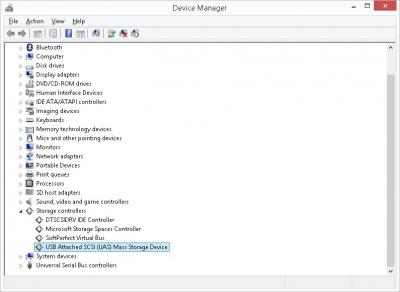
found the uasp compliant usb3 hdd enclosure @viewnet. damn all this while it's there but i never visited that part of the store hehe

Attached Image

now the transfer speed is slightly bumped to 200MB/s with ssd.


37 Pages « < 3 4 5 6 7 > » Top
Topic ClosedOptions
 

Change to:
| Lo-Fi Version
0.0810sec    0.45    7 queries    GZIP Disabled
Time is now: 2nd December 2025 - 07:44 PM