Welcome Guest ( Log In | Register )

Bump Topic Topic Closed RSS Feed
37 Pages < 1 2 3 4 > » Bottom

Outline · [ Standard ] · Linear+

 The SSD Thread V5, Solid State Drive

views
     
horns
post Mar 12 2015, 11:35 PM

\m/
*******
Senior Member
3,038 posts

Joined: Nov 2009
QUOTE(Momo2014 @ Mar 12 2015, 09:03 PM)
Hi,need to ask how to install windows again on a new ssd.I want to do a clean install.I'm on a laptop that came with windows 8.Will I just need to replace my hdd and then put ssd and install windows?What I'm confused is if I can still reinstall the oem w8 that came with my laptop into my new ssd.I heard it is tied to the motherboard.
*
QUOTE(Momo2014 @ Mar 12 2015, 09:40 PM)
How do I find my w8 cd key?
*
the better way to install os is to use usb drive. it's much faster, and is usually error-free.

first of all, run slmgr /dlv in admin command prompt, it will tell you which version of w8 the laptop is running on. the common ones are windows core, or single language. the laptop should run in uefi mode (gpt disk type). for new ssd, you just let the windows install media to do the job for you (make the ssd a gpt disk, and populate the appropriate partitions for uefi install). the key step to install windows in uefi mode is to use fat32-formatted usb drive, and extract the contents of downloaded w8 iso (the correct version based on the results of slmgr), and use the usb drive to install the os. (alternatively you can use marfccy's way to do it too) when you boot, select uefi type of your usb drive. (it will be labelled as something like 'uefi: <usb.drive.name>' in the boot media selection menu) by default, as long as you are using the right windows version, the key in bios will be used automatically during the installation.

as for cd key, machines that come with w8 or above don't have stickers under the laptop or inside the battery compartment anymore. it's embedded in the bios. you can use belarc advisor or rweverything to view it. (for backup purposes) if somehow you cannot activate the windows with this key, you can call microsoft for help. (did this before)

QUOTE(marfccy @ Mar 12 2015, 09:24 PM)
yes you need to if youre opting for fresh installation. and not just copy and paste into the pendrive, youll need to 'prep' the pendrive first. use the Windows 7 USB Tool (works with W8)

CD key wise, no. youll need your own set to input before installing
*
no, there is no need to prep imo. you can actually format the usb drive with fat32 (for uefi mode installation; or ntfs for bios mode installation), then extract the contents of w8 iso into the drive. the structure since w8 can boot in uefi or bios mode depending on the type of filesystem format. for w7, you can do the same but an additional firmware file must be put in the right directory structure to make it work.

horns
post Mar 13 2015, 09:30 AM

\m/
*******
Senior Member
3,038 posts

Joined: Nov 2009
QUOTE(Momo2014 @ Mar 13 2015, 07:11 AM)
Ok tthank you very much
*
no problem. once you have completed all the driver install and windows updates, have windows activated, and have essential applications installed and updated, and confirmed everything is working fine, you can create a system image using the built-in tool. the apparent advantage of this method is to create a working snapshot of the os in its up-to-date form. this way, you do not need to go through all software installs, updates and patches again and again. (it's gigabytes these days, so it's a rather painful and time-consuming process) note that the windows activation tokens are also preserved in this process, so you don't need to call up Microsoft every time you do the system restore. all things that you need can be restored with less time, if something bad happens.

all you need is an external storage for system images, and a bootable and compatible windows install media.

QUOTE(NightFelix @ Mar 13 2015, 08:19 AM)
Great advice, I thought we were not able to retrieve the embedded win8 key.
*
haha yeah i thought the same initially, until i searched the web out of curiosity lol
horns
post Mar 13 2015, 11:58 AM

\m/
*******
Senior Member
3,038 posts

Joined: Nov 2009
QUOTE(NightFelix @ Mar 13 2015, 11:15 AM)
Talking about we use create system image on previous HDD/SSD using Windows built-in-tool, what was the software name? hmm.gif

And also, why not we use 3rd Party Software like Clonezilla? hmm.gif
*
i use administrative powershell command, wbAdmin. the actual command is 'wbAdmin start backup -backupTarget:<target.backup.drive.letter>: -include:C: -allCritical -quiet' (without quotes)

change <target.backup.drive.letter> to the location where you wanna store your system image (e.g. external hdd). it's better to store at the top level, i.e. x:\, assuming your external drive has a drive letter of x) what it does is to back up the os, and related system partitions only, without anything else (i.e. the minimum to restore a working system)

actually i don't use the gui version. it's in the control panel (for w8.1, it's under file history, click on system image backup to proceed)

yes you can use other software for the same purpose. to me the tool is built-in and it preserves everything i need, including system tweaks, ram cache and ram disk. so i just use it all the times biggrin.gif
horns
post Mar 13 2015, 12:38 PM

\m/
*******
Senior Member
3,038 posts

Joined: Nov 2009
QUOTE(ngkhanmein @ Mar 13 2015, 12:18 PM)
guys, should i enable or disable? Optimize Start Menu Cache Files

can cause any harm to ssd?

did u guys disable superfetch & prefetch on win8.1?
*
tbh there is no serious harm done without disabling this. without it the system still runs fine and as speedy as what i want. to me it's better to disable them. (save some writes)

yes i have disabled those too. apart from that, i move user temporary folder to ram disk. there are a lot of background writes that make use of temp folders that we are not aware of in daily use. these temp files are usually can be discarded safely upon reboot.

horns
post Mar 13 2015, 04:31 PM

\m/
*******
Senior Member
3,038 posts

Joined: Nov 2009
QUOTE(ngkhanmein @ Mar 13 2015, 02:06 PM)
but i thought it auto disable for ssd on win8.1 whereas we still got hdd that need superfetch & prefetch rite? i know no improvement for ssd but hdd got different.
*
I am not sure because it's my routine to disable them first after fresh install, along with system restore.

QUOTE(NightFelix @ Mar 13 2015, 02:35 PM)
Maybe I should move my temporary file to ram too. I got 16GB RAM while with 128GB SSD as my primary SSD partition.

*
I think you should. You can start with 1 or 2gb ram disk. You should also move web browser cache locations to it.

I suggest softperfect ramdisk, free, very easy to set it up, one of the fastest.
horns
post Mar 14 2015, 09:15 AM

\m/
*******
Senior Member
3,038 posts

Joined: Nov 2009
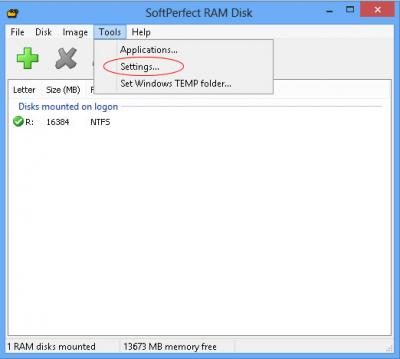
off-topic notes: how to set up a ram disk with softperfect ram disk. this is for those who are interested in doing so.

what you need and do is very simple:

1. install the software and create a ramdisk, and set it up accordingly; the size is up to you. you can start with a small one, then adjust it when it's insufficient for your usage.

Attached Image
Attached Image
Attached Image
Attached Image
Attached Image
Attached Image

2. map user temporary folder, and web broswer cache folders to ram disk.

note that i use the option that creates the ramdisk and directory structures on-the-fly; i do not create a ramdisk image that can be reused (i.e. preserve the state of ram disk contents and reloaded upon next boot). to me, this is good enough. please consult the user manual for more complex setups.
horns
post Mar 14 2015, 10:12 AM

\m/
*******
Senior Member
3,038 posts

Joined: Nov 2009
QUOTE(slimfox @ Mar 14 2015, 10:00 AM)
Thanks. So your pagefile is still in c:?
*
my pagefile is 0. i haven't faced any issues for some years now without pagefile. i have 32gb of ram. i do adjustments according to my ram usage, i.e. i turn my ram disk, ram cache off if i need to. so far so good.

edit: to be safer, you can adjust the pagefile size accordingly until the level that you don't have problems running anything (in this case, the pagefile is in ssd). you can start with a minimal 1gb. or, you can also move it to hdd. (less optimal but you can put it as large as you want biggrin.gif)

This post has been edited by horns: Mar 14 2015, 10:25 AM
horns
post Mar 14 2015, 10:34 AM

\m/
*******
Senior Member
3,038 posts

Joined: Nov 2009
QUOTE(skylinelover @ Mar 14 2015, 10:24 AM)
Lolz. Looks like i need 2 add more ram 4 trying out this ram disk thing. The more the merrier. laugh.gif rclxms.gif
*
yeah the idea is to make full use of excess resources in the system to make it run smoother, but please don't do this for the sake of using ram disk only. to me ram disk is a bonus when i don't use a lot of ram for my work. my common usage only requires 8gb, so i have plenty to play with hehe

edit: finally, they are all dead now, http://techreport.com/review/27909/the-ssd...theyre-all-dead


This post has been edited by horns: Mar 14 2015, 10:40 AM
horns
post Mar 14 2015, 03:38 PM

\m/
*******
Senior Member
3,038 posts

Joined: Nov 2009
QUOTE(icecreamcake @ Mar 14 2015, 12:58 PM)
I plan to get a liteon s900 256gb next week, and put inisde my laptop.

The question is since my laptop is dos version, after i replace my hdd to ssd and insert a win7 dvd to fresh install, do i need to optimize any things to fully utilize the ssd??
*
yes you do. check out the first post for more information. actually, the first few posts have all the basic but good information that you can learn about ssd.
horns
post Mar 14 2015, 09:37 PM

\m/
*******
Senior Member
3,038 posts

Joined: Nov 2009
QUOTE(air_pull91 @ Mar 14 2015, 09:30 PM)
is it ok if i use 2GB from 4GB ram available?
i use old laptop with sata2 port only..
*
no it's better don't :/ you must have more than enough system ram first, then you can consider using ram disk.
horns
post Mar 15 2015, 11:37 PM

\m/
*******
Senior Member
3,038 posts

Joined: Nov 2009
QUOTE(makky @ Mar 15 2015, 10:04 PM)
Rm199 for liteon 128gb ok or not? My pc setup almost finish without harddrive or ssd only...if i using pc only 3 hour a day for web surfing and some game, how long the ssd would last?
*
don't worry about the lifespan. with that usage, plus proper ssd optimizations, it will last for quite some times. it's better to go for 256gb. it has more space for you.
horns
post Mar 16 2015, 08:40 AM

\m/
*******
Senior Member
3,038 posts

Joined: Nov 2009
QUOTE(SSJBen @ Mar 15 2015, 11:47 PM)
Oh God, people need to stop being so paranoid about SSD life... like seriously, stop.

http://techreport.com/review/27909/the-ssd...eyre-all-dead/4
*
right biggrin.gif imo the abuse of "limited lifespan" without giving a meaningful context of how long it is kind of the main reason of why people keep asking about this.

There are many such persons. I just hope they can one day get the facts right lol!

QUOTE(Human10 @ Mar 16 2015, 02:02 AM)
Haha, lastly the experiment came to an end... sweat.gif

But it do sounds some warning, particularly for Samsung's drive. Both their drives (TLC and MLC) suffered from spontaneous failure without pre-warning, that is something to take note bout though.
*
I think they will be retired long before that point of time is reached.

horns
post Mar 16 2015, 10:13 AM

\m/
*******
Senior Member
3,038 posts

Joined: Nov 2009
what SSJBen said. yes a signal to warn drive failure is good, but imo a more practical way is to do backups. you don't write a lot in backup drives/storage, except for backing up stuff. for now, backups in hdd still makes sense.
horns
post Mar 17 2015, 04:52 PM

\m/
*******
Senior Member
3,038 posts

Joined: Nov 2009
QUOTE(streetfighter2020 @ Mar 17 2015, 04:18 PM)
hey guys, is there any significant difference between the samsung 850 pro and 840 pro besides the price?

saw this article: http://www.lowyat.net/2015/03/ssds-in-benc...nyone-expected/

and wanna replace my laptop's hdd with ssd.
*
in general the differences are slight bumps of performance, warranty period, controller, and nand flash. additionally 840 pro is proven to survive for quite some times.
horns
post Mar 17 2015, 09:51 PM

\m/
*******
Senior Member
3,038 posts

Joined: Nov 2009
QUOTE(limadekad @ Mar 17 2015, 07:27 PM)
which one? suggestion?
*
in general. it's better to use the ssd management software from the manufacturers. the thing is that there is no standardization in smart information for ssd yet. manufacturers define and use their smart attributes for their ssd (especially for special features in their ssds). also, not all manufacturers release their list of smart attributes to public. (many do but not all. you might need to dig deeper on the internet for more information) the closest that i can refer to is the smartctl database. (tbh their ssd database is not really complete)

i never used this hd tune pro, so i'm not sure if they provided updated vendor-specific smart information regularly. you can try hdd guardian and see how it goes, https://hddguardian.codeplex.com/ (run it as administrator, and remember to update the smartctl database)


horns
post Mar 18 2015, 12:15 AM

\m/
*******
Senior Member
3,038 posts

Joined: Nov 2009
QUOTE(wahdiao @ Mar 17 2015, 11:36 PM)
any recommendation for ssd about 250gb? samsung 850 evo ok? I saw some ppl buy liteon s900 seems cheaper but performance dont know how is it.
*
liteon s900 is one of the best buy currently. performance wise, it's good enough for general use.

for the similar price, i will always go for mlc nand flash instead of tlc. (unless that mlc is a vanilla asynchronous nand hehe)
horns
post Mar 18 2015, 07:56 PM

\m/
*******
Senior Member
3,038 posts

Joined: Nov 2009
QUOTE(Neomax3 @ Mar 18 2015, 06:27 PM)
Hi guys!

Need some advice here.. Will 120GB SSD storage for C suffice? Will install OS, programs and some FPS games here..
Read that SSD will not be so efficient if its 3/4 full.. Is it true?
Please help..
*
er you should know the answer better. only you know the total size of your 'programs' and 'fps games' (especially games. bf4 alone is about 56+ gb?). if it's solely for os and some productivity suites, yes it should be fine.

normally yes but it depends on the type of activities (reads or writes. usually availability of free space affects writes more). when the ssd space is getting filled up, there will be a point that the ssd controller needs to do extra work in order to sustain writes performance (e.g. moving data around to free up space for further writes. the time needed to complete the same task become longer, hence you feel the slowdown of performance). this is why as a practice we purposely set over provisioning up in a ssd so that there will be some reserved space for the controller to work with. note that some drives already have additional OP done so you don't need to do that.

if the activities involves more reads than writes (os booting, app loading, etc.), it should be no problem even if the drive is 90% full.
again, for general use, you might not experience that.
horns
post Mar 20 2015, 11:04 AM

\m/
*******
Senior Member
3,038 posts

Joined: Nov 2009
QUOTE(Sentinel92 @ Mar 20 2015, 02:20 AM)
My Samsung 840 Evo Read and Random Read speeds are above what was advertised but my Write and Random Write speeds have dropped almost 30%. I have already run the Performance restoration download to counter the old files bug but I really don't know what's going on. This happened after I moved from Windows Defender to Kaspersky as well as updated my AMD drivers. I think the fact I fixed BF4 5-6 times due to DirectX errors have something to do with it.
*
the drive is a victim of the second wave bug i think.

i have plenty of dx errors in bf4 also :/ and the recent bugs are really depressing. go in, then killcam bug. great.
horns
post Mar 20 2015, 02:42 PM

\m/
*******
Senior Member
3,038 posts

Joined: Nov 2009
QUOTE(Sentinel92 @ Mar 20 2015, 12:01 PM)
So do I redo the Performance restoration again? The read speeds are all fantastically above what samsung advertised but write is not. Sigh. But otherwise there is no fully noticeable hit on overall performance though. I do notice my browsers taking a tiny slight longer time to open.

And yeah, the constant crashing happens after the recent patch. I gave up fixing the game so I deleted the whole bloody file and just reinstalled. My regret was upgrading to newer Omega drivers in the process. Now BF4 stutters like mad.

The killcam bug pisses me off the most. I'll be having a fantastic game on a epic kill spree and this thing on schedule Will hit me. Like WTF.
*
i think you better wait for the second fix since it doesn't have terrible impacts to your usage yet. i thought the current fix can only run once. i'm not sure.

ah that's bad. i will not play bf4 with stuttering going on. it's depressing :/ maybe you should clean the gpu driver first and revert to the older drivers (using ddu, http://www.wagnardmobile.com/DDU/ or other better ones sorry i am not familiar with amd gpu)

haha same here when i got better scores usually it will happen biggrin.gif this is by far the worst patch we have. netcode bugs are also very common these days.

edit: a new tool, ssd-z, http://aezay.dk/aezay/ssdz/


This post has been edited by horns: Mar 20 2015, 03:01 PM
horns
post Mar 21 2015, 11:49 AM

\m/
*******
Senior Member
3,038 posts

Joined: Nov 2009
QUOTE(Sentinel92 @ Mar 21 2015, 02:50 AM)
I found the issue to all my problems. It's my damned TP Link Wifi dongle and it's drivers. It keeps causing random internet connection or speed drops, leading to GPU driver crashes as it can't keep up, and also BSOD my PC 3-4 times already.

My SSD is pretty much back to normal now except random write which is still 40% lower than stated but everything else is faster than advertised.

BF4 doesn't stutter much now. 2-3KD per round easy.
*
oh haha

well i guess samsung is very careful this time. (it's been a while since the report about the second wave of report) it's really bad for them to unable to provide proper fix during the first time.

QUOTE(air_pull91 @ Mar 21 2015, 10:53 AM)
hi guys..
if i use raid 0 on my SSD..
should i care about over provision too?
*
yes, over provisioning is to provide unused space for trim and garbage collection operations by the controllers. you can do it 2 ways, but normally the first one is easier to manage:

1. creating the raid array with all the space available. after windows install, use disk management to shrink the partition so that there are unallocated space for op;
2. creating the smaller raid array with some space unused.

37 Pages < 1 2 3 4 > » Top
Topic ClosedOptions
 

Change to:
| Lo-Fi Version
0.0682sec    0.44    7 queries    GZIP Disabled
Time is now: 3rd December 2025 - 06:20 AM