

QUOTE(Superman7 @ Dec 31 2016, 12:15 PM)
Another data plan? Better just bluetooth imo.. but if u wana have the watch alone then you need thatAndroid Smartwatch V2, Discuss Any Smartwatch Here
Android Smartwatch V2, Discuss Any Smartwatch Here
|
|
 Dec 31 2016, 01:44 PM Dec 31 2016, 01:44 PM
Return to original view | Post
#21
|
 
Senior Member
1,711 posts Joined: Sep 2009  
|
QUOTE(Superman7 @ Dec 31 2016, 12:15 PM) Another data plan? Better just bluetooth imo.. but if u wana have the watch alone then you need that |
|
|
|
|
|
Dec 31 2016, 05:56 PM
Return to original view | Post
#22
|
|
Senior Member
1,711 posts Joined: Sep 2009
|
QUOTE(singgung @ Dec 31 2016, 01:59 PM) For Gear S3 users, if you are disconnected because you are out of Bluetooth range, once you're back in the range, does the watch automatically connect to the phone or you need to manually connect it? Yes it auto connects, just like any other bluetooth device.. |
|
|
Dec 31 2016, 11:52 PM
Return to original view | Post
#23
|
|
Senior Member
1,711 posts Joined: Sep 2009
|
QUOTE(singgung @ Dec 31 2016, 06:44 PM) That's what i thought too. I'm not sure but if I'm not mistaken it originally auto connects but after I meddle with some settings it no longer does. Now i dont know how to get it to work again. Lol. Is it possible that its your phone settings? Btw the battery is quite impressive. Been more than 41 hours and still hv 40%. That's with me wearing it for 2 nights to test the sleep tracker. Battery life is good. 2 days easily but if you play alot with bluetooth etc, then its less than 2 days. |
|
|
Jan 1 2017, 01:14 AM
Return to original view | Post
#24
|
|
Senior Member
1,711 posts Joined: Sep 2009
|
QUOTE(singgung @ Jan 1 2017, 12:42 AM) Yup. I'm pretty sure it was my phone's settings. Cause I played with the phone's setting. I'm just not sure which setting or how to get there. Something about optimisation if I'm not mistaken. Maybe you need to put the watch as registered device or always connect? |
|
|
Jan 5 2017, 06:55 PM
Return to original view | Post
#25
|
|
Senior Member
1,711 posts Joined: Sep 2009
|
Just notice an update for my Gear. I think its related to the music player since I saw in the Galaxy Apps but I can't update it unless I update my Gear.
|
|
|
Jan 6 2017, 01:15 AM
Return to original view | Post
#26
|
|
Senior Member
1,711 posts Joined: Sep 2009
|
QUOTE(singgung @ Jan 5 2017, 10:27 PM) So samsung pay is not available for our GS3 yet? nope.. not yet. But good news if you're a samsung phone user. They intend to apply it for other banks as well (CIMB, Standard Chartered) |
|
|
|
|
|
Jan 6 2017, 07:40 PM
Return to original view | Post
#27
|
|
Senior Member
1,711 posts Joined: Sep 2009
|
QUOTE(d33pbluez @ Jan 6 2017, 04:45 PM) Samsung Shop at prangin mall Where you get the band?After consideration and having look i plan to get the velcro band ...they look sick  *Credit image goes to CUKIO34 at XDA* |
|
|
Jan 9 2017, 10:12 AM
Return to original view | Post
#28
|
|
Senior Member
1,711 posts Joined: Sep 2009
|
QUOTE(audiocool @ Jan 9 2017, 09:47 AM) Any different on 1st batch or 2nd batch ? 1st batch get free gifts from samsung. |
|
|
Jan 9 2017, 10:45 AM
Return to original view | Post
#29
|
|
Senior Member
1,711 posts Joined: Sep 2009
|
QUOTE(audiocool @ Jan 9 2017, 10:35 AM) I bought yesterday from mall and there is no free gift option. I dont think there is anymore.. |
|
|
Jan 11 2017, 01:15 AM
Return to original view | Post
#30
|
|
Senior Member
1,711 posts Joined: Sep 2009
|
QUOTE(Pok Leh @ Jan 11 2017, 12:56 AM) Guys, where to get best price for Moko Silicone strap for Gear S3.. i'm also looking for that.. only can find online..Thanks.. |
|
|
Jan 11 2017, 12:26 PM
Return to original view | Post
#31
|
|
Senior Member
1,711 posts Joined: Sep 2009
|
QUOTE(jacksonywl @ Jan 11 2017, 10:43 AM) I am buying from Lazada That is Moko band? Should be arriving in the next couple of days, will report in on the quality... For peeps looking for "branded" and high quality watchface (via Samsung's Gear Watch Designer), check out this "face maker" https://plus.google.com/u/1/104704492398430829346 The face maker, is it an app? |
|
|
Jan 11 2017, 07:11 PM
Return to original view | Post
#32
|
|
Senior Member
1,711 posts Joined: Sep 2009
|
QUOTE(johnsontys @ Jan 11 2017, 05:45 PM) Can some sifu share some step-by-step guidance on how to load the .gwd files into the Gear S3? Have tried watchland but it does not allow me to install. Try samsung gear watch designer. Can sync over wifi from PC. But i have yet to succeedThanks in advance |
|
|
Jan 12 2017, 12:09 AM
Return to original view | Post
#33
|
|
Senior Member
1,711 posts Joined: Sep 2009
|
QUOTE(huislaw @ Jan 11 2017, 10:26 PM) I follow the steps here : http://developer.samsung.com/gear/design/w...r-watch-getting how do you connect to your Gear? My Gear is on the same wifi network as my PC, but it doesn't seem to be able to find it..But this page miss out one important step which is mentioned by someone in the Gear S3 Facebook Group. In order to run on your Gear, you need to click Build first then only click Run, every single time. By the way.. http://www.samsung.com/my/news/global/sams...r-fitness-apps/ This post has been edited by sonotme: Jan 12 2017, 12:29 AM |
|
|
|
|
|
Jan 12 2017, 11:18 AM
Return to original view | Post
#34
|
|
Senior Member
1,711 posts Joined: Sep 2009
|
QUOTE(huislaw @ Jan 12 2017, 12:33 AM) In gear wifi u can see the IP address. Then in gwd run on device, key in the ip. Make sure debug mode is on. Thanks! I didnt turn the debug mode on..QUOTE(d33pbluez @ Jan 12 2017, 10:36 AM) Here is the breakdown instruction on how to do it. Hope it will help others in the process... Rather then some ppl just ask to search google. Thank you! Will try it later.. lots of watch faces to try hehe..1. Make sure you computer / laptop are connected to router via cable (Not Wifi, A common misunderstanding mistake for those who use laptop or dongle) 2. Make sure you have Author Cert (With samsung Account) register. Before do anything. 3. Make sure you have Distributor Cert (With Samsung Account) register. This would require your watch to connected with the Gear watch design before you can register them.. P/S: it can be done after step 6 3. Load the the watch face. 4. Press F10 or go to project > Build to build your face watch .GWD to .TPK 5. Press F9 or go to project > Run on devices 6. Then there is a menu "Connect to gear" pop up. Click on the plus sign. Key in the IP address you get from your watch. (Setting > Connection > WIFI > WIFI Network > Click on the wifi your on > Scroll down > IP) 7. Make sure you watch is in debugging mode (Settings > Gear info > Scroll down > Debugging mode) 8. You watch will show up on the "Connect to gear" menu. Click on it. Note 1: If you don't have Distributor Cert registered. The transfer will stop at 61% an error will pop up. Note 2: Author & Distributor Cert and Registered can be found at Gear Watch design app under Project |
|
|
Jan 14 2017, 04:10 PM
Return to original view | Post
#35
|
|
Senior Member
1,711 posts Joined: Sep 2009
|
QUOTE(d33pbluez @ Jan 12 2017, 10:36 AM) Here is the breakdown instruction on how to do it. Hope it will help others in the process... Rather then some ppl just ask to search google. i can't build because it says i'm not connected to my device. but when I click connect to device, i insert my Gear ip, but nothing happened. How?1. Make sure you computer / laptop are connected to router via cable (Not Wifi, A common misunderstanding mistake for those who use laptop or dongle) 2. Make sure you have Author Cert (With samsung Account) register. Before do anything. 3. Make sure you have Distributor Cert (With Samsung Account) register. This would require your watch to connected with the Gear watch design before you can register them.. P/S: it can be done after step 6 3. Load the the watch face. 4. Press F10 or go to project > Build to build your face watch .GWD to .TPK 5. Press F9 or go to project > Run on devices 6. Then there is a menu "Connect to gear" pop up. Click on the plus sign. Key in the IP address you get from your watch. (Setting > Connection > WIFI > WIFI Network > Click on the wifi your on > Scroll down > IP) 7. Make sure you watch is in debugging mode (Settings > Gear info > Scroll down > Debugging mode) 8. You watch will show up on the "Connect to gear" menu. Click on it. Note 1: If you don't have Distributor Cert registered. The transfer will stop at 61% an error will pop up. Note 2: Author & Distributor Cert and Registered can be found at Gear Watch design app under Project |
|
|
Jan 15 2017, 12:41 PM
Return to original view | Post
#36
|
|
Senior Member
1,711 posts Joined: Sep 2009
|
QUOTE(Superman7 @ Jan 15 2017, 12:03 PM) yeah.. can't read multiple messages it's a bummer. I think you could read the multiple Whatsapp message. Just click the number below?Also, no sticker and pictures  Wonder if Samsung actually works on improvements of the Tizen watchOS |
|
|
Jan 15 2017, 01:30 PM
Return to original view | Post
#37
|
|
Senior Member
1,711 posts Joined: Sep 2009
|
QUOTE(Superman7 @ Jan 15 2017, 01:17 PM) Don't remember there are numbers below that you could read individually. well, for me if the person whatsapp me twice, I see (2) below the name and the most recent message below it. Either I reply the most recent, or click the number to see the two new messages. Try it next time and see. But it gets overwhelming if its like too long lolPebbleOS was even better in terms of notifications |
|
|
Apr 7 2017, 04:46 PM
Return to original view | Post
#38
|
|
Senior Member
1,711 posts Joined: Sep 2009
|
QUOTE(dlsl @ Apr 7 2017, 02:07 PM) I received new update firmware on gear s3 today What update? |
|
|
Jul 13 2017, 01:00 PM
Return to original view | Post
#39
|
|
Senior Member
1,711 posts Joined: Sep 2009
|
QUOTE(Someonesim @ Jul 13 2017, 11:03 AM) Good alternative AW2.0 watches ! I really dig that white simple design for Ticwatch E, so I pledged already Just becareful of kickstarters.. i didnt get my product in two of my pledges.. PS: Act fast, I'm seeing 100 slot gone in last one hour, for each early bird deal 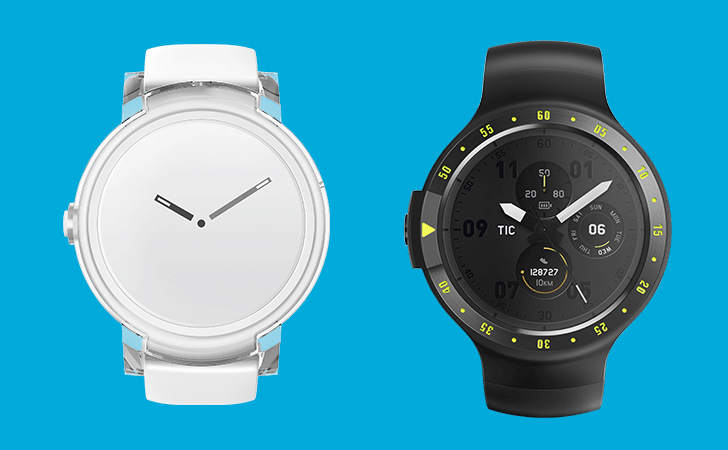 TicWatch E » Click to show Spoiler - click again to hide... « TicWatch S » Click to show Spoiler - click again to hide... « https://www.kickstarter.com/projects/mobvoi...ized-smartwatch |
|
|
Jul 13 2017, 01:27 PM
Return to original view | Post
#40
|
|
Senior Member
1,711 posts Joined: Sep 2009
|
QUOTE(Someonesim @ Jul 13 2017, 01:05 PM) Hahaha, I had bad experience with KS also cough*Kreyos*cough Okay but in KS, if they dont deliver, there is nothing you can do.. i learnt to not get electronics from KS (either they cant deliver or its just to sell it which you probably can get it if you wait). I didnt support TicWatch during their earlier project, skeptical that time  Now seeing they're quite success with previous product, I gained confidences. Also, the project planned for shipping out in Oct, means they've already developed the product, just using KS as selling platform. Just to share my bad experience for 3 products (wireless earbuds, small mini camera with sticky pad, and tea brewer).. |
| Change to: |  0.0251sec 0.0251sec
 0.69 0.69
 7 queries 7 queries
 GZIP Disabled GZIP Disabled
Time is now: 2nd December 2025 - 01:22 PM |
 Quote
Quote

