Welcome Guest ( Log In | Register )

5 Pages  1 2 3 > » Bottom

Outline · [ Standard ] · Linear+

Review [REVIEW] TP-LINK Archer C7 Wireless Router, WiFi AC1750

views
     
TSblacktubi
post Feb 19 2015, 12:39 AM, updated 11y ago

-
Group Icon
Elite
8,409 posts

Joined: Jul 2008

user posted image

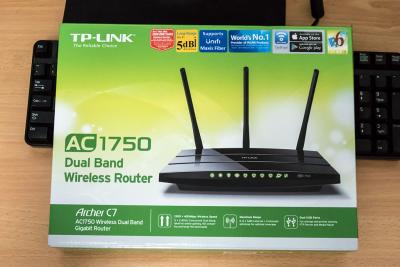
The TP-LINK Archer C7 is a really affordable AC1750 router priced below RM400. This easily make it the most affordable AC1750 router yet. It is fully compatible with TM Unifi.

Introduction

Quick Specs:
  • Wireless AC1750
  • 4 Gigabit LAN port + 1 Gigabit WAN port
  • Dual USB 2.0 ports
  • 3 detachable 5dBi wireless antenna
  • 12V 2.5A power brick
The Archer C7 based on the Qualcomm QCA9558 CPU with integrated 2.4Ghz radio and Qualcomm QCA9880 for the 5Ghz radio. The unit I receive is the V2 version with 16MB flash and 128MB RAM. It come with 2 USB 3.0 ports. There are 6 antennas (3 external and 3 internal). Click here for specs detail

It come with a power adapter, a LAN cable, some literature, a quick start CD and 3 5dBi wireless antenna.

The device come with 2 years warranty.
Attached Image Attached Image


Device Overview
Attached Image

The build quality is alright with glossy plastic on top with hidden air vents. It did warm up like other router but nothing serious. You are able to hang the router on the wall if you want to.
Attached Image
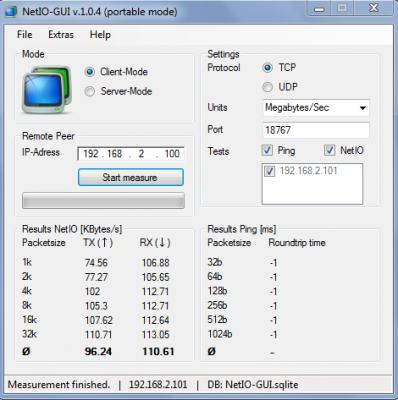
Ethernet LAN speedtest


The Archer C7 is stable, never face any issue with it. No congestion is observed when I am testing it with my NAS and other devices continuously streaming over the network.

Wireless is stable as well, I never face any drop after running the router continuously for a week. Performance is consistent, no issue with the wireless coverage. The coverage is relatively good, shouldn’t have any issue in a standard terrace house.

Wireless speed benchmark
Attached Image

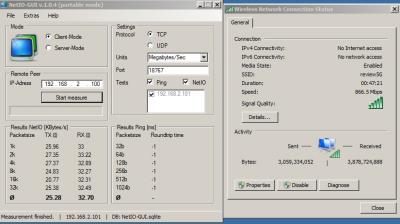
My test device is around 5m in front of the router. The test device I am using is the Macbook Air 2013 running Windows 7 which is capable of WiFi AC and speeds up to 867Mbps.

By using the NetIO tool, I am able to reach 261.6Mb/s (32.70MB/S) download speed and 202.24Mb/s (25.28MB/S) for the upload speed which is really impressive. I should be able to reach even higher speed with a better wireless adapter specifically a wireless adapter capable of WiFi AC1750. I will perform another test once I am able to get a better wireless adapter.

User Interface
It is the usual TP-LINK style on the Archer C7, simple and it works well. Everything is where it should be, clearly labeled with detail explanation on the right panel. The interface is smooth with no lags.

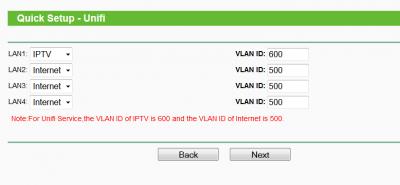
However, the QoS settings is quite confusing. But, for this kind of price, I won’t complaint. Unifi is fully supported on this router with manual VLAN tagging available as well.

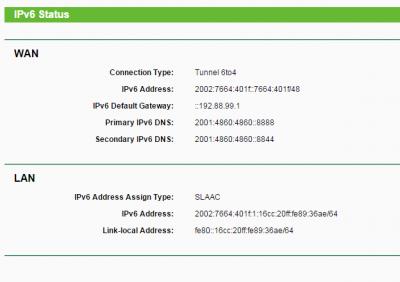
IPV6 is working by using 6to4. I can't test Native IPV6 due to some issue with the ISP.

You can try the user interface with the emulator here.
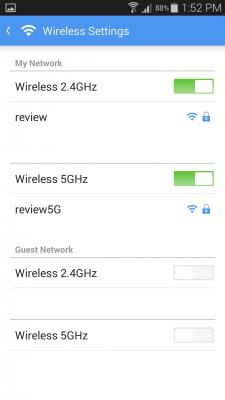
Attached Image Attached Image Attached Image


TP-LINK Tether app
Attached Image
TP-LINK Tether app

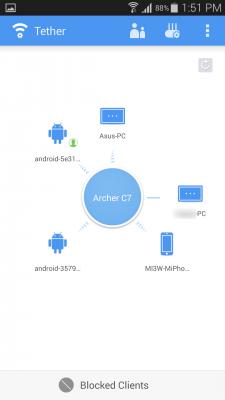
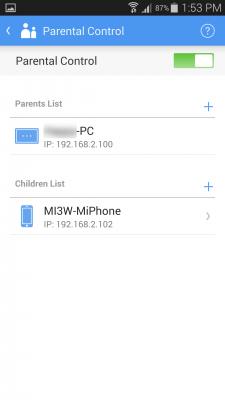
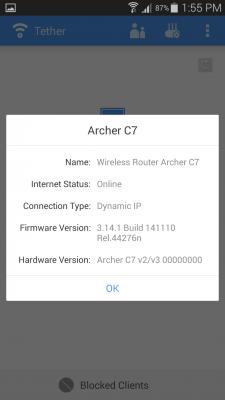
The new TP-LINK tether mobile app is really intuitive and simple to use. You are able to block a client from the router or configure parental control. The interface is simple and you get stuff done quickly. I particularly like the screen where it show all connected device visually.

The app is actually really well made, everything works well. I really like the app, I wish I am able to setup QoS on the app as well.

Sidenote: The Unifi firmware is not compatible with TP-LINK Tether yet.
Attached Image Attached Image Attached Image Attached Image Attached Image


Conclusion
The TP-LINK Archer C7 is one of the best devices you can get with the price you pay. It performs well and never face any issue when I am testing it. It is a very good replacement router for the stock Unifi router and you will definitely get a big performance and stability boost. The wireless performance is the main point of this device, get this if you need good wireless speed.

The Good
  • Really affordable yet perform well
  • Wireless performance is really good
  • No frills interface
  • TP-LINK tether app is really useful
Place to improve
  • The QoS setting interface can be further improved


This post has been edited by blacktubi: Mar 4 2015, 08:42 PM
TSblacktubi
post Feb 19 2015, 12:49 AM

-
Group Icon
Elite
8,409 posts

Joined: Jul 2008

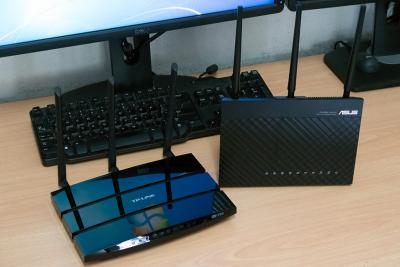
Comparison with Asus AC68U
Attached Image


Since I also have the Asus AC68U with me so I decided to make some quick wifi speed comparison. Be sure to remember that the AC68U is a Wireless AC1900 capable device compare to the Archer C7 which is Wireless AC1750 and the price is 2 times of the Archer C7.

Attached Image

As you can see the wireless download speed is quite close between both router but there’s an almost 8MB/s different on the wireless upload speed. The test device and the environment is exactly the same. 5m distance to the router on a Wireless AC 867Mbps capable laptop.

This post has been edited by blacktubi: Feb 19 2015, 01:00 AM
Moogle Stiltzkin
post Feb 19 2015, 10:42 AM

Look at all my stars!!
*******
Senior Member
4,463 posts

Joined: Jan 2003
bruce.gif

This post has been edited by Moogle Stiltzkin: Jul 16 2017, 01:52 PM
daric1991
post Feb 22 2015, 10:47 PM

Getting Started
**
Junior Member
161 posts

Joined: Nov 2012
QUOTE(Moogle Stiltzkin @ Feb 19 2015, 10:42 AM)
here is a review of the AC68U
http://www.smallnetbuilder.com/wireless/wi...a-asus-rt-ac68u
this model is supported by shibby's tomato firmware

http://tomato.groov.pl/?page_id=69
that said...
you would still be better of getting a AC1750 for bang for buck. And i'd recommend getting a router that supported shibby tomato because of lots of features and fixes added frequently. smallnetbuilder router ranker is a good source to read the router performance review before purchasing.

unless you opt for a DIY router to use PFSENSE which is even better :}
*
hmm..no offense, not worth to getting a "double-up priced" router which can only use for less than 3 years (common to all brand)..when talking about life-span instead of features.,money come first..especially for the majority of customer..too complicated..much of features will always get thing spoil easily and problems raise..atleast to you. biggrin.gif

This post has been edited by daric1991: Feb 22 2015, 10:50 PM
Moogle Stiltzkin
post Feb 23 2015, 03:55 AM

Look at all my stars!!
*******
Senior Member
4,463 posts

Joined: Jan 2003
bruce.gif

This post has been edited by Moogle Stiltzkin: Jul 16 2017, 01:54 PM
hjzhawii
post Mar 4 2015, 11:40 AM

New Member
*
Junior Member
43 posts

Joined: Jan 2007
How is the wifi range on this? Typical or above average?

It uses 3 5dBi external antennas and 3 internal antennas. Are the external antennas replaceable?
TSblacktubi
post Mar 4 2015, 12:01 PM

-
Group Icon
Elite
8,409 posts

Joined: Jul 2008

QUOTE(hjzhawii @ Mar 4 2015, 11:40 AM)
How is the wifi range on this? Typical or above average?

It uses 3 5dBi external antennas and 3 internal antennas. Are the external antennas replaceable?
*
The signal is what you should expect from a router this range. Better than my old 1043ND V1.

The external one are removable and replaceable.
djhenry91
post Mar 4 2015, 03:16 PM

Slow and Steady
*******
Senior Member
6,779 posts

Joined: Jan 2009
From: SEGI Heaven


how much u bought?
spayre
post Mar 4 2015, 04:48 PM

hush puppy
******
Senior Member
1,251 posts

Joined: Jan 2003
Hi,

Does it support Guest AP? I was reading somewhere that typically TPlink International Firmware would have this feature but not the Malaysia Firmware...

Also, what firmware was this review based on? According to the website, there is "Archer C7_V2_V3_141110" as the latest build
TSblacktubi
post Mar 4 2015, 08:37 PM

-
Group Icon
Elite
8,409 posts

Joined: Jul 2008

QUOTE(spayre @ Mar 4 2015, 04:48 PM)
Hi,

Does it support Guest AP? I was reading somewhere that typically TPlink International Firmware would have this feature but not the Malaysia Firmware...

Also, what firmware was this review based on? According to the website, there is "Archer C7_V2_V3_141110" as the latest build
*
The latest Malaysia firmware (Build 140704) for Archer C7 does support WiFi Guest AP.

You can always flash to the international firmware if you don't use Unifi.

Most part of the review is on Malaysia firmware except for the part where I am testing the TP-LINK Tether app.
High-Speed
post Mar 10 2015, 11:58 AM

Getting Started
**
Junior Member
54 posts

Joined: Feb 2015


QUOTE(djhenry91 @ Mar 4 2015, 03:16 PM)
how much u bought?
*
SRP 399 spotted at lowyat, maybe u can get cheaper at Lazada or somewhere else in online nod.gif
alucard89
post Mar 10 2015, 11:22 PM

Look at all my stars!!
*******
Senior Member
4,454 posts

Joined: Apr 2006
Hi, nicely detailed review
Have you tested the wireless transfer speed when your pc/laptop beyond 5meter from the router? Say around 10m?

Diademz
post Mar 12 2015, 08:12 AM

Folding@Malaysia needs you!
Group Icon
VIP
1,246 posts

Joined: Jan 2003

Not to mention the C7 also supports OpenWRT for Tomato like features.

Months ago, was shopping for a replacement for my Victek'ed 10yo WRT54G which was showing its age especially on Unifi with multiple concurrent requirements (downloads, streaming, etc). Was trying to decide between C7 and an equivalent Tomato compatible router (i.e. Broadcom based CPUs). Needed a "future proof" router (fast CPU, reasonable RAM, gig ports, wireless not so important) but price point was not attractive (read ASUS).

Then ASUS came out with the RT-N18U (replacement for the "legendary" RT-N16) which met all the criteria and also had initial Tomato support for a similar price to the C7.

So got the RT-N18U instead - so far so good except it's now been RMA'ed. So back to my trusty WRT54G until I get a replacement.

The C7 is a good router - if you need AC speeds then by all means go for it.

This post has been edited by Diademz: Mar 12 2015, 10:10 AM
zhihao4456
post Mar 29 2015, 01:37 PM

On my way
****
Senior Member
559 posts

Joined: Apr 2008
I would like how is the wireless range for a double storey house with an average partitions in the house~ And would like to see a comment of the speedtest for 10m and above
TSblacktubi
post Mar 29 2015, 02:06 PM

-
Group Icon
Elite
8,409 posts

Joined: Jul 2008

QUOTE(zhihao4456 @ Mar 29 2015, 01:37 PM)
I would like how is the wireless range for a double storey house with an average partitions in the house~ And would like to see a comment of the speedtest for 10m and above
*
QUOTE(alucard89 @ Mar 10 2015, 11:22 PM)
Hi, nicely detailed review
Have you tested the wireless transfer speed when your pc/laptop beyond 5meter from the router? Say around 10m?
*
Shouldn't have any issue in a standard double storey house.

I don't have space to conduct a 10m test but shouldn't have much degradation issue if it is line of sight.

This post has been edited by blacktubi: Mar 31 2015, 04:55 PM
ameri
post Mar 31 2015, 07:57 PM

Casual
***
Junior Member
484 posts

Joined: Jan 2013
may i know is this the same thing?
from lazada
edit:
nvm, found out that it's adsl+ router.

This post has been edited by ameri: Mar 31 2015, 08:06 PM
TSblacktubi
post Mar 31 2015, 08:06 PM

-
Group Icon
Elite
8,409 posts

Joined: Jul 2008

QUOTE(ameri @ Mar 31 2015, 07:57 PM)
may i know is this the same thing?
from lazada
*
Hmm, I suggest you double check with the seller.

Although it is listed as Archer C7 on the title, the actual product in the image is Archer D7.
ameri
post Mar 31 2015, 09:26 PM

Casual
***
Junior Member
484 posts

Joined: Jan 2013
QUOTE(blacktubi @ Mar 31 2015, 08:06 PM)
Hmm, I suggest you double check with the seller.

Although it is listed as Archer C7 on the title, the actual product in the image is Archer D7.
*
now that you mentioned it, i realized that it stated d7 on the box.
so d7 supports adsl2+ and unifi while c7 supports only unifi, right?
Chromei5
post Mar 31 2015, 09:29 PM

Getting Started
**
Junior Member
92 posts

Joined: Feb 2015
From: Katakland


i use n600 (wdr 3600) only...
daric1991
post Apr 13 2015, 09:34 AM

Getting Started
**
Junior Member
161 posts

Joined: Nov 2012
QUOTE(ameri @ Mar 31 2015, 09:26 PM)
now that you mentioned it, i realized that it stated d7 on the box.
so d7 supports adsl2+ and unifi while c7 supports only unifi, right?
*
I think you better enquiry from lelong OOKAS a reliable reseller, pick up purchase option will do..

5 Pages  1 2 3 > » Top
 

Change to:
| Lo-Fi Version
0.0277sec    0.50    6 queries    GZIP Disabled
Time is now: 6th December 2025 - 07:15 PM