

 Feb 9 2015, 02:01 PM, updated 9y ago


The great thing to be my first sharing is TP-LINK Archer C2 an AC750 Wireless Dual Band Gigabit router.
For more information can visit: http://www.tp-link.com.my/common/Spotlight/Archer-C2.html

Recently I just upgrade my TM Unifi from VIP 5Mbps to VIP 10Mbps, as we all know if we are still using the wifi router provided in the package you will never get to enjoy the truly speed of the transmission, yes, very slow. Therefore, I plan to buy a wifi router and among the brands in the market, I pick TP-LINK as its reasonable price and 2 years warranty (1 to 1 Swap
 ). Due to I am a heavy user with gaming, Full-HD movie download (illegally)
  and I have a number of sibling who doing almost the same thing to me so my friend suggested me to pick a mid-end spec router ARCHER C2 that just launched online last week Lazada, iPmart and Lelong. SRP RM299, and I think it is reasonable and affordable, don't you think so?
Here a highlight from official website:
- Support UNIFI & Maxis Fiber.
- Support 2nd Generation WiFi technology IEEE 802.11AC (although i am not expert on this but I found that it is a pretty cool new tech from Google).
- 2.4GHz 300Mb + 5GHz 433Mb = 733Mb total wireless transmission speed.

- Dual detachale external antenna.
- USB sharing, easy to built up a small size file sharing point, sharing printer.
After all, lets start on setup!
It is very simple:
1. Connect the router to your computer/laptop by LAN cable then open any Internet browser to access 192.168.0.1 or tplink.net. When "Authentication Required" appear key in " admin" in both User Name and Password.

2. After enter the router interface, select Quick Setup → Next → choose Unifi Mode → Next. After all, fill in your TM UNIFI ID and Password → Next to proceed. If you do not have/forget the ID and Password, the only way is call TM Unifi lo 1300 88 1222.


3. Due to Archer C2 provide dual band wireless 5GHz & 2.4GHz, therefore it need to be done with twice setting on Wireless name (to be appearing on device search) and WiFi Password.

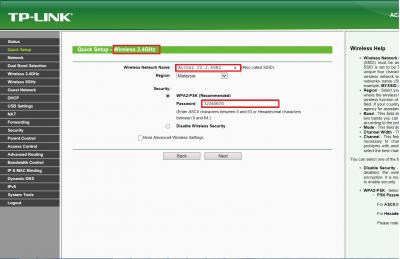

4.Yes, it is a final step!
 After setting up the dual band wireless Name and Passwords, the final step is to Reboot!
Woola! You can now enjoy the truly speed of the rate that you paid!
Who said so? If you don't believe me can you test it out with any app available in the app store: Ookla speedtest, Wifi speed test, Wifi analyzer and many more.The testing location was in my 2nd floor bedroom and the both router was connected from Ground floor living room. Lets watch over the result!
TM WiFi Router vs TP-LINK Archer C2

The result tested by WiFi Network Analyzer:

As you can see, the signal strength of Archer C2 is 6dBm [COLOR=red]higher than the TM Unifi routher and 2times[COLOR=red] higher on Link Speed!
Conclusion:
After a week, there is no disconnect issue on wireless connection and feels real good of saving my time from slow
loading on Internet browsing, gaming dc or video slow loading.

Here's an unboxing video for Archer C2 found on Youtube:
https://www.youtube.com/watch?v=anNX8yZPu58
This post has been edited by High-Speed: Aug 20 2015, 12:20 PM
 Quote
Quote


 What is the chipset using for C2?


 thanks for the recommendation TS



 0.0318sec
 0.54
0.54
 6 queries
 GZIP Disabled