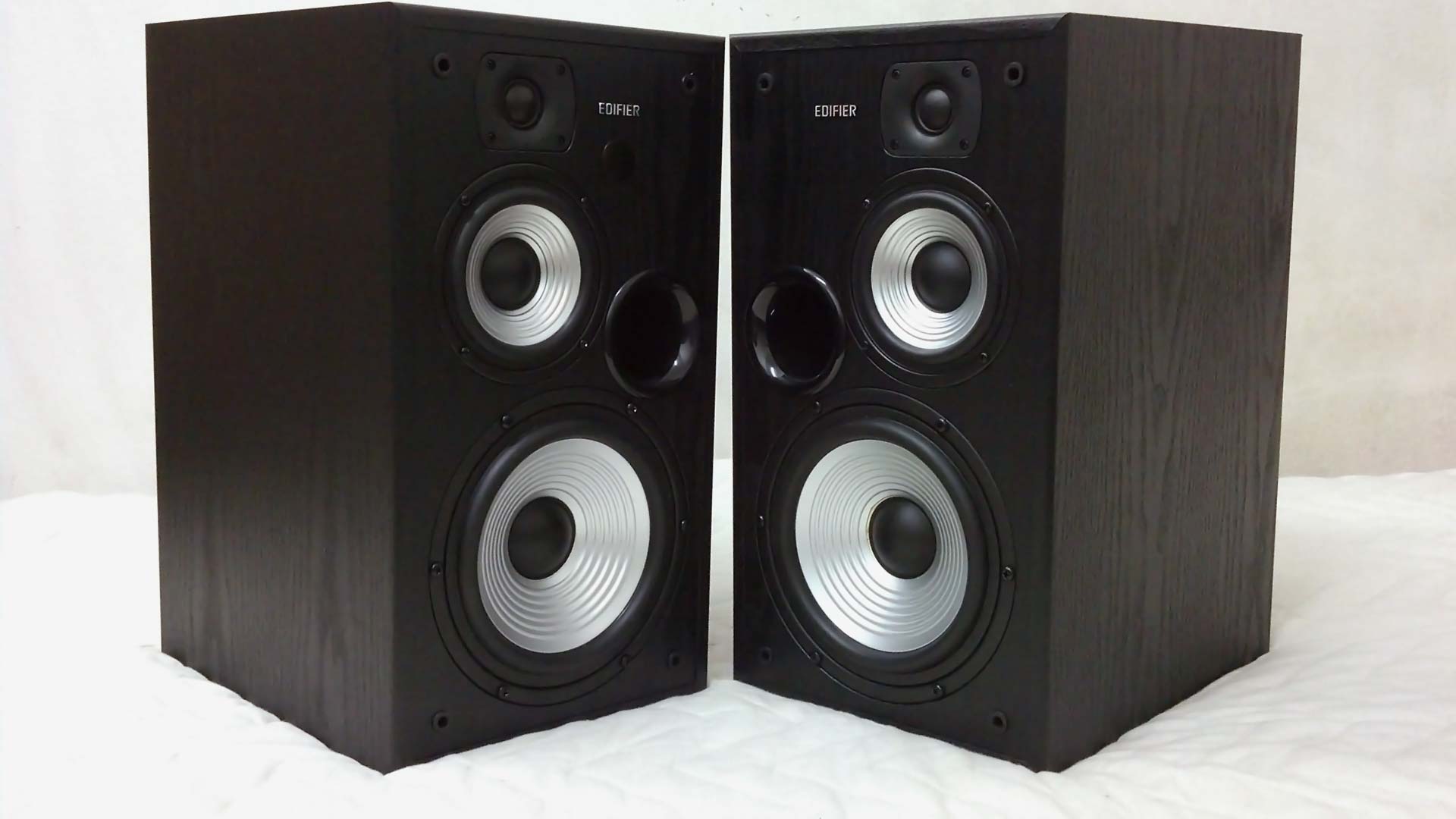
First ImpressionAt first glance, it physically looks the same as the older model R2700. Black theme and rectangular design. But wait! A closer inspection reveals the subtle changes in its remote control and the interface behind the active speaker. The remote control is now replaced with a smaller version similar to the R2000DB (without the classic/dynamic preset) and the rear of the active speaker now has a subwoofer output!
DiscoveriesSub out aka Subwoofer OutputI performed a quick test by connecting it to a 2.0 stereo speaker to the sub out. The result? No sound emitted at all. Moving on to the next equipment is the headphone. Plugging into it also produces the same result as the first. No sound too. Finally, I connected a wireless 2.1 Hi-Fi active speaker to it and bass started to play out of its subwoofer but the satellite speaker is silent as a mouse. When I adjust the bass, the subwoofer plugged to the R2730DB will be synchronize to the changes that I made. Very convenient.
New Test on Subwoofer Output (February 26, 2015):I noticed that pairing an active subwoofer speaker to the R2730DB via the Sub output produces very low volume bass (approximately 1/5 the bass volume). If it's done the other way around which is the active dedicated subwoofer is the one that gets the audio source and passes the Left+Right audio channel to the R2730DB speaker and the subwoofer plays the bass is much more louder (louder than R2730DB Sub out by 500%). This makes the Edifier R2730DB sub out not that ideal though. Probably should go with R2700 in the first place to save the extra cash unless users wants the Bluetooth capabilities.
 Temperature
Running the speakers for few hours with random music genre (techno, trance, K-pop, J-pop, instrumental, rock, etc) generated some heat behind the active speaker. The warmth is similar to a 2TB Western Black Caviar on load at 40 degree Celsius, less warmer than the R2000DB speaker. So have no worries about heat as it will much be cooler compared to a loaded gaming laptop.
No hissing noise on Idle or Mute + No pop on power up/downAs expected from a high-end speaker, there isn't any hissing/electrostatic noise emitted when the speaker is on idle, mute and standby. When the speaker is power up or power down from the power plug, it does not emit any annoying popping noise like most lower-end speakers.
Speakers Magnetically ShieldedThe one thing that annoys me about speaker is that they emit weird blip-blip noise when a SMS/call is received if the phone is placed close to the speaker. This common speaker issue doesn't occur to the R2730DB as all the drivers are magnetically shielded. Thumbs up! No issues when placing side by side to the monitor with the strong magnets as its not faced directly.
Bluetooth Coverage + VolumeI played a FLAC music via my smartphone using Bluetooth connection to the R2730DB and measured the distance the speaker can receive the signal. The speaker is capable of receiving the audio signal up to 4 meters with direct line-of-sight. I found out that the R2730DB volume cannot be adjusted through the Bluetooth Volume of my smartphone. Other Bluetooth speaker that I used previously such as Logitech, AudioBox and Ellysium is capable of this Bluetooth volume control feature. The strange thing is, when using RCA to 3.5mm (speaker to smartphone), I am able to control the volume using my smartphone instead of the speaker remote control.
New Bluetooth Volume Test (March 7, 2015): Tested Edifier R2730DB Bluetooth volume again using Android KitKat 4.4.4 MiUI OS (previous test was with Android JellyBean) and found out the Bluetooth volume is not able to control the speaker volume. However, it must be done via the Media volume (the volume that controls music, video games, etc). Pretty strange.
New Bluetooth Volume Test (May 23, 2015): Tested Edifier R2730DB Bluetooth volume again using a high-end smartphone OnePlus One Cyanogen 11S Android KitKat 4.4.4 and discovered the Bluetooth volume is able to control the speaker volume. Perhaps this issue varies independently on the smartphone OS.
Speaker VolumeIf the volume is set below 10 (example: 5), turning off and on via the remote control or behind the active speaker will reset it to volume 10. However, if its set above 10 (example: 35), turning it off and on will not reset it to volume 10. It will memorize that volume setting. This should apply for all input (tested with Line 1 and Bluetooth).
Remote Control CoverageThe remote control is capable of controlling the speaker functionality up to 4 meters too, similar to the Bluetooth signal. The buttons is large and are well-spaced from each other, making it easy to press with large fingers. Many other speaker remote controls that I used tend to make the buttons tightly-knit with one another and makes it too easy to press the incorrect button.
Power ConsumptionI used a digital power energy meter to calculate the power consumption of the speakers. My findings revealed the R2730DB consumes 0W on standby (power off) and 9.3~9.5W on idle and mute. The following tests below are done with the speaker volume set at 60% which is sufficiently loud for near-field speaker usage (By default, the speaker is set at 80% volume which is too loud when listening to rock+bass music) The music used for testing is rock bass music (lots of drums, kicks, vocals).
Test-1: With the treble and bass set at -6dB, the power usage hovers approximately 11.2~11.8W. Increasing the treble from -6dB to +6dB does not increase the power usage at all based from my observation on the digital meter.
Test-2: With the treble and bass set at maximum +6dB, 23.6~31.8W and occasionally spikes up to 50W when the low deep bass kicks in. You can feel the some tight pressure in the lungs and the desk is vibrating a lot. The vibration can be avoided if the speaker are placed on a speaker stand separated from the table!
Sound Default FormatWhat sound default format can these speakers play? I have tested 2 connections using my PC and they are Optical cable (Digital) and RCA-to-3.5mm (Analog). The result "PASS" means there is sound coming out from speaker and "FAIL" means there is no sound emitted. The analog is able to play sound on all format whereas digital can play all except 192KHz (Studio Quality).
Optical (Digital Input)2 channel, 16 bit, 44100 Hz (CD Quality) = PASS
2 channel, 16 bit, 48000 Hz (DVD Quality) = PASS
2 channel, 16 bit, 96000 Hz (Studio Quality) = PASS
2 channel, 16 bit, 192000 Hz (Studio Quality) = FAIL
2 channel, 24 bit, 44100 Hz (CD Quality) = PASS
2 channel, 24 bit, 48000 Hz (DVD Quality) = PASS
2 channel, 24 bit, 96000 Hz (Studio Quality) = PASS
2 channel, 24 bit, 192000 Hz (Studio Quality) = FAIL
RCA-to-3.5mm (Analog Input)2 channel, 16 bit, 44100 Hz (CD Quality) = PASS
2 channel, 16 bit, 48000 Hz (DVD Quality) = PASS
2 channel, 16 bit, 96000 Hz (Studio Quality) = PASS
2 channel, 16 bit, 192000 Hz (Studio Quality) = PASS
2 channel, 24 bit, 44100 Hz (CD Quality) = PASS
2 channel, 24 bit, 48000 Hz (DVD Quality) = PASS
2 channel, 24 bit, 96000 Hz (Studio Quality) = PASS
2 channel, 24 bit, 192000 Hz (Studio Quality) = PASS
Sound QualityWhen comparing this studio speaker with non-studio speakers that I have auditioned (R2000DB, C2X, Spinnaker E30 and Eclipse E25), I find it very neutral cool sounding. It does not have the sparkly warmth feeling to it. It takes sometime to get used to it. You might be wondering, would it sound better with the treble and bass turned up to the max? In my experience, it does not. This same applies with the R2700 Studio Speaker. However, increasing the volume does overall boost the treble and bass, but the overall sound gets a little loud to bear. At 50% volume is just nice if you are sitting approximately 30 inches away. The R2800 speaker does sound somewhat different when its bass and treble is set above 0dB, feels a little warm to the sound.
Playing music at a high volume (50% to 80% volume) with treble and bass maxed out at 6dB does not distort at all! It's pretty amazing as cheaper speaker tends to emit pop/crackling noise or doesn't sound pleasant with ear piercing noise, but the R2730DB treble is very clear and smooth to the ears whereas the bass gets stronger without sounding harsh.
Regarding the treble and bass boost, increasing the treble to +6dB doesn't sound much different (perhaps 5% change). I wished that the treble can increase a tiny bit more so it feels much clearer for entertainment listening when not in use for audio engineering. The treble sounded confined in the R2730DB. The solution I used to solve that is to install a DFX Audio Enhancer (Free version) to increase the Fidelity, Ambience, Dynamic Boost and Hyperbass. With this enhancement, now it sounds like your regular treble sharp but smooth speakers! The bass is a different story. It gets much stronger at +6dB, vibrates the desk while pushing lots of air. The bass from is solid and punchy but does not provide the deep wide bass from the 2.1 speaker subwoofer. It does react quite quickly to fast beat music, so that is an added advantage of having a smaller woofer. No muddiness detected in the bass, its filled with energetic beats. Regarding the mids, the mids sound thick and rich.
VerdictFor those who are looking to buy this speaker R2730DB or the older model R2700 for music listening and movies/shows, I would recommend other Edifier Speaker series (e.g. Edifier Signature, Edifier Component, Edifier Multimedia with 2.1 speaker setup) unless you are a audio engineer creating music for a living/hobby (e.g. soundtrack for games, opening/ending music for shows, AMV, etc). This speaker is much more suitable purely for listening to music than watching movies/shows or playing games.
I would stress again that is flat neutral sounding with tested with optical cable (treble sounded more recessed) but has a tinge of sharper treble with RCA-to-3.5mm cable (treble sounded a little more airy/openness) Treble lovers or bass lovers may not find it enjoyable as it lacks the sparkly warmth and deep wide bass. However, do take note that the R2730DB has an option for a subwoofer out, so you can connect it to an active subwoofer (powered independently from the R2730DB speaker) to a achieve a deeper wider bass.
Another thing I would like to emphasize is, this speaker will easily allow you to pinpoint whether that song is mixed badly or nice. When testing several songs, it easily helps me determine the music created is lacking bass or it has too much bass, same applies with the treble in the areas it need to shine or it sounded too dull even in neutral balance mode. Finally, if you are listening on this speaker, you can easily tell a good/bad music source (128kbps below or higher) which might tempt you to upgrade your entire music collection to a higher bitrate 192~320kbps MP3/OGG (lossy compression), or FLAC (lossless compression).
ExpectationsIf there is a 3rd revision to the Studio Speaker lineup (perhaps in 3-5 years time), I wished that the LED is place in the front instead of the side as its easier to see whether the speaker is turned on from the front if you are sitting far away from the speaker. Secondly, is the ability to turn the studio speaker to an entertainment version with higher adjustment to the treble. Currently turning the treble down/up, the changes aren't significant at all compared to the bass that vibrates much stronger when turned up. Also, would like to see a longer cable for the optical, so I could place the active speaker on the left side where I can see the knobs/potentiometer with LED light as its troublesome to have to stand up and move to the right side to view the controls. Another good feature that I can think of for future enhancement would be going on auto-standby (0 Watt) when no song is played for a period of time.
Disclosure: This review was made using my own Edifier R2730DB, duly purchased at the retail price.
This post has been edited by asunakirito: May 23 2015, 08:43 PM 


 Feb 8 2015, 11:33 AM, updated 7y ago


 Quote
Quote






 ) and;
 0.0181sec
 0.61
0.61
 6 queries
 GZIP Disabled