Outline ·
[ Standard ] ·
Linear+
Acer Aspire V Nitro Thread, Designed to rev up your life
|
zuhaili87
|
 Mar 25 2015, 11:04 AM Mar 25 2015, 11:04 AM
|

|
QUOTE(Stardust2197 @ Mar 25 2015, 04:16 AM) Guys , any bright ideas on this one ? I googled it and they said it was normal .. is it ? Let me know if you're having that as well ... [attachmentid=4385562] its normal, it will charge back when its below 90% if im not mistaken.  |
|
|
|
|
|
Stardust2197
|
Mar 25 2015, 12:50 PM
|
New Member

|
QUOTE(austinjklim @ Mar 25 2015, 09:17 AM) True after switching my lenovo z500 tn panel to a ips display, all i can say is its like night and day. Putting on lowest brightness and still better than my lenovo z500. Didn't have games to test out on the nitro yet but when i spectate d2 omg i never thought it had such beautiful graphics. (dat river tho) You're lucky that you don't have wifi issues but for those who have please install the acer patchfix available on their website. Im using a NFA344 wifi adapter and this resets your power plan. It's kinda annoying but hell i rather have better wifi than close lid to not sleep. Or maybe I applied the patches already ? haha cz when i purchased this laptop , acer care centre has pushed several updates , i just updated all of them so i guess one of them is the wifi patch haha .. FYI , my wifi card is Atheros QCA61x4 |
|
|
|
|
|
Stardust2197
|
Mar 25 2015, 12:51 PM
|
New Member
|
QUOTE(zuhaili87 @ Mar 25 2015, 11:04 AM) its normal, it will charge back when its below 90% if im not mistaken. Okay ~ thanks mate ~ will try it out .. |
|
|
|
|
|
austinjklim
|
Mar 26 2015, 09:03 AM
|
Getting Started
|
QUOTE(Stardust2197 @ Mar 25 2015, 12:50 PM) Or maybe I applied the patches already ? haha cz when i purchased this laptop , acer care centre has pushed several updates , i just updated all of them so i guess one of them is the wifi patch haha .. FYI , my wifi card is Atheros QCA61x4 Same bro. Hopefully Acer faster push the the updates for fixing the wifi patch without always setting default power plan |
|
|
|
|
|
lopiop
|
Mar 26 2015, 06:47 PM
|
|
|
anybody did a thermal repaste? will it void warranty? i think im going to do it soon
|
|
|
|
|
|
JerseyBest
|
Mar 27 2015, 03:04 AM
|
Getting Started
|
Today tested the CPU, usage 100% Clocked over 3300mhz. Temperature around 85degree
Amazingly, the right side is not hot to touch when Cpu is on heavy load, because the fan will run.
Normally idle, Cpu temp is at 50degree and you can feel the heat on the right.
After the heavy load is finish it immediately went back 50
|
|
|
|
|
|
miong93
|
Mar 27 2015, 11:13 AM
|
|
|
QUOTE(JerseyBest @ Mar 27 2015, 03:04 AM) Today tested the CPU, usage 100% Clocked over 3300mhz. Temperature around 85degree Amazingly, the right side is not hot to touch when Cpu is on heavy load, because the fan will run. Normally idle, Cpu temp is at 50degree and you can feel the heat on the right. After the heavy load is finish it immediately went back 50 I believe the hot area mainly is caused by the GPU ? cause mostly people feel the hot area is when under playing game. |
|
|
|
|
|
JerseyBest
|
Mar 27 2015, 03:59 PM
|
Getting Started
|
QUOTE(miong93 @ Mar 27 2015, 11:13 AM) I believe the hot area mainly is caused by the GPU ? cause mostly people feel the hot area is when under playing game. Nope, not playing games only some programs running. It's at the right side. Not really"hot", but warm, or above human temperature. Nvidia not used. 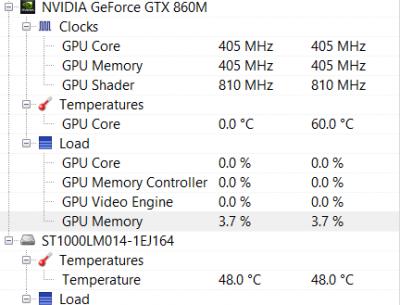 This post has been edited by JerseyBest: Mar 27 2015, 03:59 PM
 |
|
|
|
|
|
zuhaili87
|
Mar 27 2015, 06:13 PM
|
|
|
QUOTE(JerseyBest @ Mar 27 2015, 03:59 PM) Nope, not playing games only some programs running. It's at the right side. Not really"hot", but warm, or above human temperature. Nvidia not used.
What program did u run to achieve such temperature? is it benchmarking program? btw one thing i notice when i used the nitro before is the hard disk temperature tends to get really hot. always above 40C especially if ure in non air-conditioned room, it tends to go around 45C to 49C.  |
|
|
|
|
|
miong93
|
Mar 27 2015, 06:49 PM
|
|
|
QUOTE(JerseyBest @ Mar 27 2015, 03:59 PM) Nope, not playing games only some programs running. It's at the right side. Not really"hot", but warm, or above human temperature. Nvidia not used.
You get me wrong. What I meant is, you get that temperature and feel warm on the particular area is because the GPU is not running. Hence the area is not hot. If the GPU is using, the area may be a bit hotter. |
|
|
|
|
|
JerseyBest
|
Mar 27 2015, 10:14 PM
|
Getting Started
|
QUOTE(miong93 @ Mar 27 2015, 06:49 PM) You get me wrong. What I meant is, you get that temperature and feel warm on the particular area is because the GPU is not running. Hence the area is not hot. If the GPU is using, the area may be a bit hotter. Oh ok, but I dont think the right side is gpu cause when stressing the cpu from idle to max to idle, the right side gets cooler when cpu started running some heavy loads and warmer when somewhat idle (around 50degree). The GPU stayed at 0degree constantly. I stressed the cpu but not gpu |
|
|
|
|
|
iArvage
|
Mar 29 2015, 09:36 PM
|
Getting Started
|
Got mine today!
|
|
|
|
|
|
TSshadowlck
|
Mar 29 2015, 10:08 PM
|
Getting Started
|
QUOTE(iArvage @ Mar 29 2015, 09:36 PM) Welcome to the AAV Nitro family!  |
|
|
|
|
|
iArvage
|
Mar 29 2015, 10:32 PM
|
Getting Started
|
Quick question. My Skype doesn't detect my webcam. Have you guys used your webcams?
|
|
|
|
|
|
ylums
|
Mar 29 2015, 11:14 PM
|
New Member
|
QUOTE(iArvage @ Mar 29 2015, 10:32 PM) Quick question. My Skype doesn't detect my webcam. Have you guys used your webcams? No problem. But once I launch skype for the first time, it asks me for the permission to access webcam and microphone. Did you allow it? |
|
|
|
|
|
iArvage
|
Mar 29 2015, 11:29 PM
|
Getting Started
|
QUOTE(ylums @ Mar 29 2015, 11:14 PM) No problem. But once I launch skype for the first time, it asks me for the permission to access webcam and microphone. Did you allow it? It doesn't detect my webcam at all. |
|
|
|
|
|
nubfight4
|
Mar 30 2015, 02:28 AM
|
Getting Started
|
Quick question. If i were to manually change the fan speed manually to the fastest EVERY time I play video games (maybe indie games is an exception since they don't require much energy), will it kill the fan or is it fine to make it on full speed all the time I game.
|
|
|
|
|
|
hctang
|
Mar 30 2015, 09:17 AM
|
Getting Started
|
how to u set ur fan speed? the link was down... mind to share the software? =)
|
|
|
|
|
|
iArvage
|
Mar 30 2015, 12:55 PM
|
Getting Started
|
QUOTE(hctang @ Mar 30 2015, 09:17 AM) how to u set ur fan speed? the link was down... mind to share the software? =) I thought the software was different from the other links. But then I just downloaded it and it works just the same. It's some pretty advanced stuff though so do change it carefully. |
|
|
|
|



 Quote
Quote







 0.0244sec
 0.84
0.84
 6 queries
 GZIP Disabled