

So is everyone getting speed upgrade from 30Mbps to 100Mbps on 13 Sep 2018? For those whom upgraded to RM129 package.
The Official Maxis FTTH Thread | v5, Maxis Home Fibre Internet, from RM89
The Official Maxis FTTH Thread | v5, Maxis Home Fibre Internet, from RM89
|
|
 Sep 7 2018, 03:58 PM Sep 7 2018, 03:58 PM
Return to original view | Post
#1
|
 
Senior Member
1,310 posts Joined: Feb 2005  
|
So is everyone getting speed upgrade from 30Mbps to 100Mbps on 13 Sep 2018? For those whom upgraded to RM129 package.
|
|
|
|
|
|
Sep 8 2018, 06:19 PM
Return to original view | Post
#2
|
|
Senior Member
1,310 posts Joined: Feb 2005
|
QUOTE(syk @ Sep 8 2018, 01:08 PM) Just got my new router (TP-Link Archer C5v) from Maxis. Far better in terms of WIFI speed or WIFI coverage or overall performance?It is far better than Thompson & Amina.  Think I can sell off my D-Link DSL-G2452DG.  |
|
|
Sep 8 2018, 07:32 PM
Return to original view | IPv6 | Post
#3
|
|
Senior Member
1,310 posts Joined: Feb 2005
|
QUOTE(syk @ Sep 8 2018, 06:28 PM) Yes for both. And no internet down / hang issue so far. If compared to Dlink one better also? |
|
|
Sep 12 2018, 09:39 AM
Return to original view | Post
#4
|
|
Senior Member
1,310 posts Joined: Feb 2005
|
Last Saturday Maxis technician finally came & changed my router to latest TP-Link Archer C5v. Surprisingly the new router is way better than my newly bought D-Link D-Link DSL-G2452DG in terms of WIFI coverage & stability. I just bought 2 weeks ago & now it's wasted.
Also, Maxis CS did say I'll get a new router & DECT phone but in the end just router. Kind of unfair to existing customer where we also need to bind for 24 months but different treatment compared to new user. Anyway, waiting for 100Mbps upgrade tomorrow. |
|
|
Feb 1 2019, 08:07 PM
Return to original view | Post
#5
|
|
Senior Member
1,310 posts Joined: Feb 2005
|
QUOTE(danieltay @ Feb 1 2019, 07:59 PM) Anyone facing issue with maxis ftth? No issue here. Klang area.Not able to connect, authentification fail Call cs, mentioned nationwide issue Using my mobile phone 4g now |
|
|
Apr 14 2019, 10:15 PM
Return to original view | Post
#6
|
|
Senior Member
1,310 posts Joined: Feb 2005
|
Klang area. Maxis Fibre no issue.
LOL. It's down now at 10.50PM. Ok. Back online at 11PM. This post has been edited by mhhee: Apr 14 2019, 11:03 PM |
|
|
|
|
|
Apr 24 2019, 12:45 PM
Return to original view | Post
#7
|
|
Senior Member
1,310 posts Joined: Feb 2005
|
Reboot ur router?
|
|
|
Apr 28 2019, 11:03 AM
Return to original view | Post
#8
|
|
Senior Member
1,310 posts Joined: Feb 2005
|
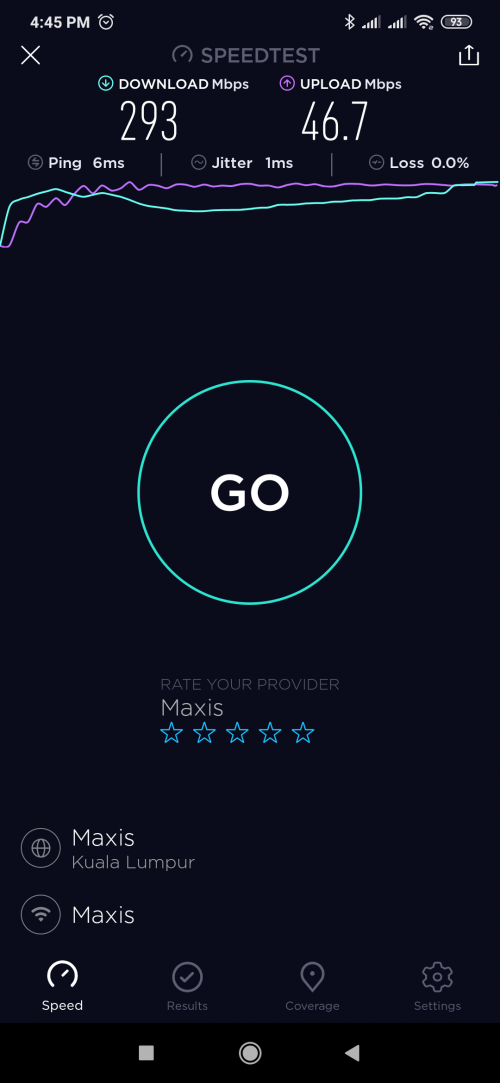 Upgraded to 300Mbps, tested using 5g WIFI. Maxis CS called at morning & upgraded afternoon. Need to reboot router to reflect the speed upgrade. Satisfied. |
|
|
May 1 2019, 10:03 PM
Return to original view | Post
#9
|
|
Senior Member
1,310 posts Joined: Feb 2005
|
[DELETED]
This post has been edited by mhhee: May 1 2019, 10:33 PM |
|
|
Jun 10 2019, 10:53 AM
Return to original view | Post
#10
|
|
Senior Member
1,310 posts Joined: Feb 2005
|
Whoever using MiHome apps for their devices. Just switch the region to China then everything should be OK. Their overseas server abnormal liao.
|
|
|
Jun 10 2019, 03:46 PM
Return to original view | Post
#11
|
|
Senior Member
1,310 posts Joined: Feb 2005
|
QUOTE(netken @ Jun 10 2019, 12:36 PM) aiya - i switch to china also cant .. aihs ... i hv both types - china and non china devices ... If you go MiHome Google Play Store & see the comments then you'll find out many complaints made.It happened to me also few weeks ago which I can connect to my Air Purifier 2 but cannot get the info. Tried many ways also cannot even tried UNIFI or data plan. Finally solved it after switched the region to China & add all devices included Mi Camera. However, China server is slower in initializing but connection is more stable. At least no disconnection issue to me anymore. |
|
|
Jun 19 2019, 09:11 PM
Return to original view | Post
#12
|
|
Senior Member
1,310 posts Joined: Feb 2005
|
Anyone having issue on connection to China app like coolapk & ecovacs home?
App won't loading at all but no issue if using VPN & data plan. |
|
|
Sep 7 2019, 11:07 AM
Return to original view | IPv6 | Post
#13
|
|
Senior Member
1,310 posts Joined: Feb 2005
|
QUOTE(delaciox @ Sep 6 2019, 08:29 PM) i comfirm is admin page, because the admin password i also change ready. U only can update the firmware manually with file on hand or contact Maxis CS to do it for u. Normally I'll contact them to do so, 2 working days job.but still dun have firmware upgrade  |
|
|
|
|
|
Mar 8 2020, 10:04 PM
Return to original view | Post
#14
|
|
Senior Member
1,310 posts Joined: Feb 2005
|
Finally Maxis added auto reboot features in firmware 191212
|
|
|
Mar 9 2020, 08:08 AM
Return to original view | Post
#15
|
|
Senior Member
1,310 posts Joined: Feb 2005
|
QUOTE(yongtjunkit @ Mar 8 2020, 10:21 PM) What model is the router? Archer c5vQUOTE(sitescope @ Mar 8 2020, 10:22 PM) Meaning u can schedule reboot ? Ya. The setting at the reboot section. |
|
|
Mar 15 2020, 02:39 PM
Return to original view | Post
#16
|
|
Senior Member
1,310 posts Joined: Feb 2005
|
QUOTE(keropla88 @ Mar 15 2020, 01:33 AM) anyone know why i cant change the max idle time for the c5v model ? it will keep on disconnect after 15min for every online games By default it's ALWAYS ON. See properly. [attachmentid=10448816] |
|
|
Mar 22 2020, 02:25 PM
Return to original view | Post
#17
|
|
Senior Member
1,310 posts Joined: Feb 2005
|
QUOTE(plsharevme @ Mar 22 2020, 11:24 AM) after the router upgrade to It's not firmware issue, tt's just happened few days ago. Before this all is OK & I can confirmed it.Firmware Version:v1.0_191212 seem like setting dns to bypass blocked website is no longger to working, any other solution? thanks. That's timeout for the blocked websites that you wanted to visit if you using tracert to trace. Not related to DNS. |
|
|
Dec 8 2020, 09:40 AM
Return to original view | Post
#18
|
|
Senior Member
1,310 posts Joined: Feb 2005
|
QUOTE(fadzly @ Dec 8 2020, 09:30 AM) im not sure if this question asked before. the rm1 65 inch tv, how long we should pay? and will we get the tv after contract terminated? Yes. TV ownership will be yours after 24 months contract. |
|
|
Dec 8 2020, 09:56 AM
Return to original view | Post
#19
|
|
Senior Member
1,310 posts Joined: Feb 2005
|
QUOTE(fadzly @ Dec 8 2020, 09:47 AM) wow.. pay rm24 will get u a 65 inch tv... veli nice Provided you need to have Maxis postpaid (RM128) + 500Mbps broadband (RM219) + RM1 (65'in TV) for 24 months . |
|
|
Nov 30 2021, 01:53 PM
Return to original view | Post
#20
|
|
Senior Member
1,310 posts Joined: Feb 2005
|
QUOTE(Xanxeviera. @ Nov 29 2021, 08:41 PM) Tried it for an hour today, and still got the same IP. SMH Same here. I remember last time IP will be changed to other but now cannot anymore, now like fixed IP. I'm still prefer ip start with 121, seems better connectivity to China website & app. |
| Change to: |  0.0302sec 0.0302sec
 0.56 0.56
 7 queries 7 queries
 GZIP Disabled GZIP Disabled
Time is now: 2nd December 2025 - 09:22 PM |
 Quote
Quote