

QUOTE(blibala @ Sep 26 2024, 09:25 PM)
Port out to get 6 months free counter offer if ur contract already expired

How to get this? Walkin to competitor to register? Or call maxis say wanna port out?The Official Maxis FTTH Thread | v5, Maxis Home Fibre Internet, from RM89
|
|
 Oct 3 2024, 10:19 PM Oct 3 2024, 10:19 PM
|
 
Junior Member
183 posts Joined: Nov 2011 From: belakang lu bro 
|
QUOTE(blibala @ Sep 26 2024, 09:25 PM) Port out to get 6 months free counter offer if ur contract already expired How to get this? Walkin to competitor to register? Or call maxis say wanna port out? |
|
|
|
|
|
Oct 4 2024, 10:04 AM
Show posts by this member only | IPv6 | Post
#9242
|

Senior Member
6,805 posts Joined: Oct 2008 From: Kuala Lumpur  
|
QUOTE(hakim1994 @ Oct 3 2024, 10:19 PM) How to get this? Walkin to competitor to register? Or call maxis say wanna port out? Yes walk in to competitor to register. After that you can call Maxis with the transfer ID. Then wait for Maxis retention team to call you for offer. |
|
|
Oct 4 2024, 12:38 PM
|
|
Junior Member
183 posts Joined: Nov 2011 From: belakang lu bro
|
QUOTE(YoungMan @ Oct 4 2024, 10:04 AM) Yes walk in to competitor to register. After that you can call Maxis with the transfer ID. Then wait for Maxis retention team to call you for offer. What are the chance maxis didn’t counter back? Gg then. I don’t want to go unipi shitty routing |
|
|
Oct 4 2024, 07:39 PM
|
|
Senior Member
6,805 posts Joined: Oct 2008 From: Kuala Lumpur
|
QUOTE(hakim1994 @ Oct 4 2024, 12:38 PM) What are the chance maxis didn’t counter back? Gg then. Then you have to call from time to time check on the port out status, can even tell Maxis to cancel port out as long not approve.I don’t want to go unipi shitty routing |
|
|
Oct 4 2024, 09:01 PM
|
|
Senior Member
5,292 posts Joined: Nov 2006
|
QUOTE(hakim1994 @ Oct 4 2024, 12:38 PM) What are the chance maxis didn’t counter back? Gg then. Those with latest processor don't know how fast their computer if they stick with unfi. PERIOD.I don’t want to go unipi shitty routing |
|
|
Oct 7 2024, 01:38 PM
Show posts by this member only | IPv6 | Post
#9246
|

Senior Member
1,597 posts Joined: Jan 2016
|
Found something interesting, someone posted KAON AR2140's proposal online
https://www.scribd.com/document/661239708/T...v-2-261120-pptx According to the document, spec are as following: Main Chipsets BCM6750+BCM43684 NAND 256MB RAM 512MB Wifi 2.4Ghz 2*2, 5Ghz 4*4 OS based on OpenWRT Turns out this thing uses the same tri core processor as Asus AX82u, Tplink AX6000 While using the same 5Ghz chipsets as Asus AX86u, AX88u Anyone actually using this router 24/7? |
|
|
|
|
|
Oct 7 2024, 06:49 PM
|

Junior Member
691 posts Joined: Nov 2021
|
QUOTE(QuantumEdge @ Oct 7 2024, 01:38 PM) Found something interesting, someone posted KAON AR2140's proposal online Must confess I didn’t really explore the Kaon for very long. May have been able to perform better if I played with the channels and other settings, but “out-of-the-box” it was pretty bad and the far lower spec Asus AX59u I replaced it with managed better performance/coverage with the 5Ghz band. Alas, I kind of semi-bricked the Kaon by playing with some of the DHCP toggles and promptly lost interest, did a factory reset, and put it in the box it came with. https://www.scribd.com/document/661239708/T...v-2-261120-pptx According to the document, spec are as following: Main Chipsets BCM6750+BCM43684 NAND 256MB RAM 512MB Wifi 2.4Ghz 2*2, 5Ghz 4*4 OS based on OpenWRT Turns out this thing uses the same tri core processor as Asus AX82u, Tplink AX6000 While using the same 5Ghz chipsets as Asus AX86u, AX88u Anyone actually using this router 24/7?   Might be a case of decent hardware (although RAM is low for that level of chipset) being hamstrung by whatever dodgy software overlay Maxis/Kaon put on top of OpenWRT, typical of many ISP issued routers.  This post has been edited by dev/numb: Oct 7 2024, 06:51 PM |
|
|
Oct 7 2024, 08:03 PM
|
 
Elite
8,413 posts Joined: Jul 2008 
|
Deleted
This post has been edited by blacktubi: Oct 8 2024, 03:07 PM |
|
|
Oct 8 2024, 12:55 PM
Show posts by this member only | IPv6 | Post
#9249
|
|
Senior Member
1,597 posts Joined: Jan 2016
|
QUOTE(dev/numb @ Oct 7 2024, 06:49 PM) Must confess I didn’t really explore the Kaon for very long. May have been able to perform better if I played with the channels and other settings, but “out-of-the-box” it was pretty bad and the far lower spec Asus AX59u I replaced it with managed better performance/coverage with the 5Ghz band. Alas, I kind of semi-bricked the Kaon by playing with some of the DHCP toggles and promptly lost interest, did a factory reset, and put it in the box it came with. Might be a case of decent hardware (although RAM is low for that level of chipset) being hamstrung by whatever dodgy software overlay Maxis/Kaon put on top of OpenWRT, typical of many ISP issued routers. QUOTE(blacktubi @ Oct 7 2024, 08:03 PM) The 5GHz is definitely not 4*4 so I think the document is either an earlier revision or it's = not the Maxis customized model 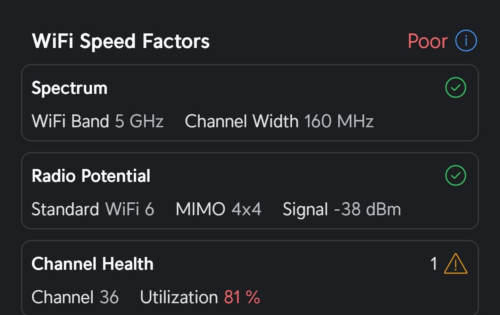 Interesting, according to wifiman it is 4*4 160mhz And it worked with TIME |
|
|
Oct 8 2024, 02:33 PM
Show posts by this member only | IPv6 | Post
#9250
|

Senior Member
2,856 posts Joined: Mar 2012
|
QUOTE(hakim1994 @ Oct 4 2024, 12:38 PM) What are the chance maxis didn’t counter back? Gg then. Definitely they will call you like hell.I don’t want to go unipi shitty routing 🤣🤣🤣 They call me 1 time, I pickup and they keep persuading me not to move to CelcomDigi with asking what Digi gives me and keep pushing multiple promos yada yada. I ask them just approve je la, and they give the steps what to do to port out smoothly. 2nd time they call three times, I don't want to pickup, I dunno what to discuss anymore. 😑😑😑 This post has been edited by khainiz94: Oct 8 2024, 02:34 PM |
|
|
Oct 8 2024, 03:02 PM
Show posts by this member only | IPv6 | Post
#9251
|
|
Senior Member
2,856 posts Joined: Mar 2012
|
QUOTE(QuantumEdge @ Oct 8 2024, 12:55 PM) Interesting, according to wifiman it is 4*4 160mhz And it worked with TIME But reliability is so so. Both of mine kaput within 18 months. 😆😆😆 |
|
|
Oct 8 2024, 03:26 PM
Show posts by this member only | IPv6 | Post
#9252
|
|
Senior Member
1,597 posts Joined: Jan 2016
|
QUOTE(khainiz94 @ Oct 8 2024, 03:02 PM) I use the router for almost 18 months, and I can tell you the router is good vs all the other shit quality router that the telco gives. I couldnt test the peformance over walls, how was your experience ping and coverage wise?But reliability is so so. Both of mine kaput within 18 months. 😆😆😆 Dont worry, moving out from this unit in 6 months  |
|
|
Oct 9 2024, 12:14 PM
Show posts by this member only | IPv6 | Post
#9253
|
|
Senior Member
2,856 posts Joined: Mar 2012
|
QUOTE(QuantumEdge @ Oct 8 2024, 03:26 PM) I couldnt test the peformance over walls, how was your experience ping and coverage wise? This is the last speedtest I done in my room before changing to Asus TUF AX6000.Dont worry, moving out from this unit in 6 months Mode: Dual Band Smart Connect 1 wall between the router with some cupboard all around it, but coverage overall, Asus TUF have a bit better signal coverage. Honestly, I am satisfied with the speed given, eventhough the software inside is trash. 🤣🤣🤣 P.S. Just wanted to inform that the Kaon have a backdoor for the telco to snoop around our Maxis Fibre network (TR-069). I am surprised that they managed to detect any issue on my network by just checking from their system, including speedtest done from their part by using this Kaon router. 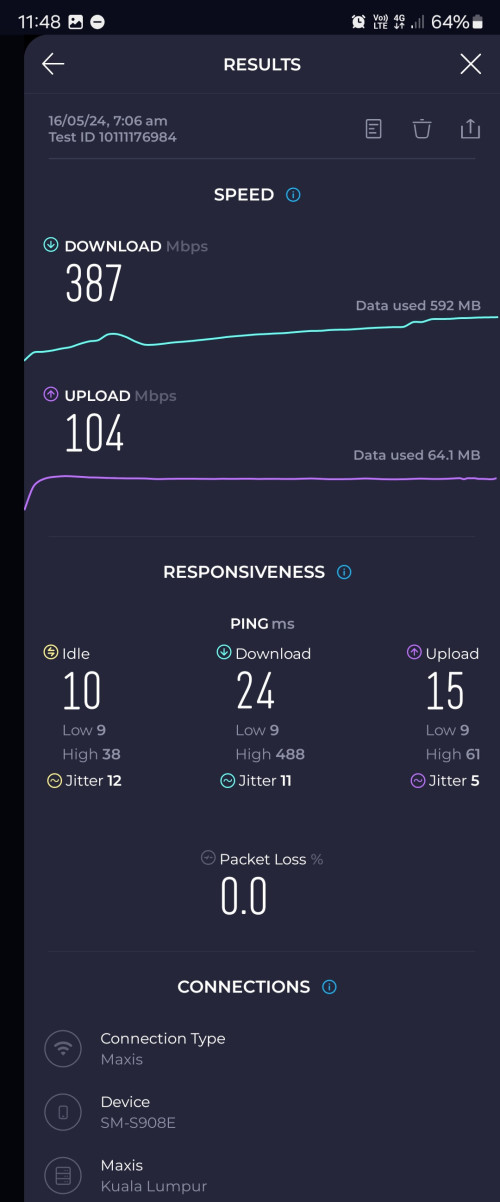 This post has been edited by khainiz94: Oct 9 2024, 12:19 PM |
|
|
|
|
|
Oct 9 2024, 12:22 PM
Show posts by this member only | IPv6 | Post
#9254
|
|
Senior Member
2,856 posts Joined: Mar 2012
|
And this result is after I change my router to ASUS TUF AX6000.
Signal is a bit better, but Asus Dual Band Smart Connect failed me since day one, I dunno what happen. They keep stuck on 2.4 GHz, so I have to split the band to make sure the device connected not stuck at 2.4 GHz. AND the speed sucks a bit in my room vs my old Kaon. I am just lazy to tinker around, so I just let it be and use as normal. 😆😆😆 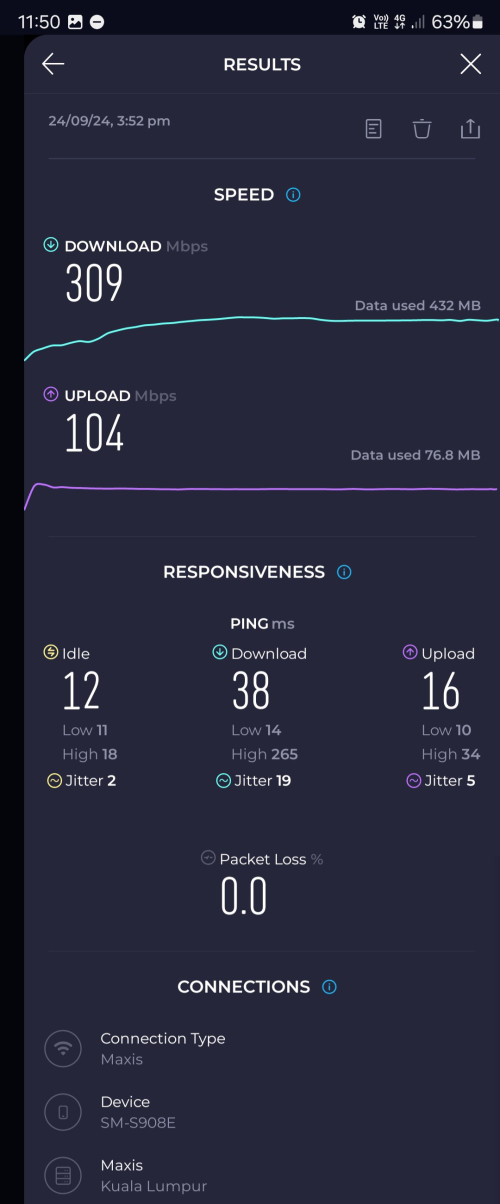 This post has been edited by khainiz94: Oct 9 2024, 12:24 PM |
|
|
Oct 9 2024, 12:45 PM
|
|
Junior Member
183 posts Joined: Nov 2011 From: belakang lu bro
|
QUOTE(khainiz94 @ Oct 8 2024, 02:33 PM) Definitely they will call you like hell. With all the counters, what makes you still wanna leave maxis bro?🤣🤣🤣 They call me 1 time, I pickup and they keep persuading me not to move to CelcomDigi with asking what Digi gives me and keep pushing multiple promos yada yada. I ask them just approve je la, and they give the steps what to do to port out smoothly. 2nd time they call three times, I don't want to pickup, I dunno what to discuss anymore. 😑😑😑 |
|
|
Oct 9 2024, 01:02 PM
Show posts by this member only | IPv6 | Post
#9256
|
|
Senior Member
2,856 posts Joined: Mar 2012
|
QUOTE(hakim1994 @ Oct 9 2024, 12:45 PM) With all the counters, what makes you still wanna leave maxis bro? Better promo overall.Plus, my dad's account have been a loyal customer of 15 years to Digi, so they include a lot of freebies. RM129 for 500 Mbps with 300 Mbps price. 6 months FREE fibre. AND free conversion to CelcomDigi ONE Ultra at a price of RM260 with no contract renewal on fibre once my FREE 6 months fibre is done! Plus, I think convergence plan offered by CelcomDigi is much better than Maxis. And for these 2 weeks, Digi routing is not bad. I am satisfied with it. But will keep monitoring and update you guys. xjoshualaw29 liked this post
|
|
|
Oct 9 2024, 03:09 PM
Show posts by this member only | IPv6 | Post
#9257
|
|
Senior Member
1,597 posts Joined: Jan 2016
|
QUOTE(khainiz94 @ Oct 9 2024, 12:22 PM) And this result is after I change my router to ASUS TUF AX6000. I tried the router a bit yesterday, the speed is actually really goodSignal is a bit better, but Asus Dual Band Smart Connect failed me since day one, I dunno what happen. They keep stuck on 2.4 GHz, so I have to split the band to make sure the device connected not stuck at 2.4 GHz. AND the speed sucks a bit in my room vs my old Kaon. I am just lazy to tinker around, so I just let it be and use as normal. 😆😆😆 Not sure about signal strength as I cant simply enter other people's room Previously I was using Asus AX68u, using smart connect as well For my newer devices (Tab S9, S23U, AX200) they will switch to 5Ghz once they are avaliable However, Apple devices will stick to 2.4 despite I enabled band steering Even after changing to AX86U, same issue persisted |
|
|
Oct 9 2024, 07:01 PM
Show posts by this member only | IPv6 | Post
#9258
|
|
Senior Member
2,856 posts Joined: Mar 2012
|
QUOTE(QuantumEdge @ Oct 9 2024, 03:09 PM) I tried the router a bit yesterday, the speed is actually really good That is why I felt funny because all people keep bashing the Kaon router but it is good overall for an ISP router based on my experience for 18 months.Not sure about signal strength as I cant simply enter other people's room Previously I was using Asus AX68u, using smart connect as well For my newer devices (Tab S9, S23U, AX200) they will switch to 5Ghz once they are avaliable However, Apple devices will stick to 2.4 despite I enabled band steering Even after changing to AX86U, same issue persisted In my house, no Apple devices. It affects all of my devices that support 5 GHz. It seems like band steering issue. Dunno why. But recently, after my switch to CelcomDigi, I factory reset my TUF AX6000, setup back everything with Digi Fibre credential, band steering problem all gone. And my slow speed issue in my room also gone. I dunno what happen. 😆😆😆 Maybe firmware fault when I first bought the router? Speed in the same room as usual. This time from my Tab S9+ 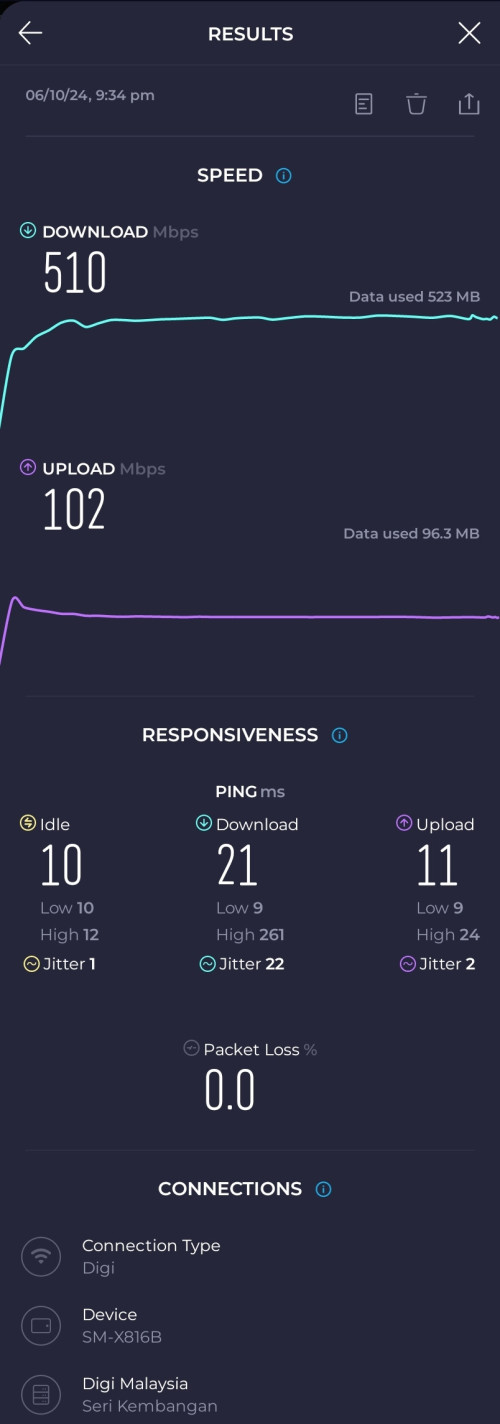 This post has been edited by khainiz94: Oct 9 2024, 07:02 PM |
|
|
Oct 9 2024, 07:09 PM
|
 
Staff
72,820 posts Joined: Sep 2005 From: KUL 
|
I have no issue with Asus router, it always prioritizes 5GHz even for my Apple devices.
|
|
|
Oct 9 2024, 08:53 PM
|
|
Senior Member
1,597 posts Joined: Jan 2016
|
QUOTE(khainiz94 @ Oct 9 2024, 07:01 PM) That is why I felt funny because all people keep bashing the Kaon router but it is good overall for an ISP router based on my experience for 18 months. I always install the newest merlin wrt, still...so far only iPhone 14,15,16 are having weird tendency to use 2.4 instead of 5In my house, no Apple devices. It affects all of my devices that support 5 GHz. It seems like band steering issue. Dunno why. But recently, after my switch to CelcomDigi, I factory reset my TUF AX6000, setup back everything with Digi Fibre credential, band steering problem all gone. And my slow speed issue in my room also gone. I dunno what happen. 😆😆😆 Maybe firmware fault when I first bought the router? Speed in the same room as usual. This time from my Tab S9+ QUOTE(fruitie @ Oct 9 2024, 07:09 PM) I have no issue with Asus router, it always prioritizes 5GHz even for my Apple devices. It's really odd, no such issue in my landed house but in my condo...it happens a lot |
| Change to: |  0.0210sec 0.0210sec
 0.67 0.67
 6 queries 6 queries
 GZIP Disabled GZIP Disabled
Time is now: 10th December 2025 - 04:52 AM |
 Quote
Quote