Welcome Guest ( Log In | Register )

488 Pages « < 30 31 32 33 34 > » Bottom

Outline · [ Standard ] · Linear+

 The Official Maxis FTTH Thread | v5, Maxis Home Fibre Internet, from RM89

views
     
Js23
post Jan 31 2016, 11:42 PM

Getting Started
**
Junior Member
115 posts

Joined: Feb 2010
Hello Guys ,

I have a problem need your guys help...
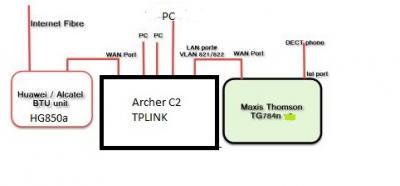
I had connected my new buy router archer c2 as shown on the attached but i having a problem the VOIP ?
On the maxis configuration checked telephone status OK but register shown a cross...
Anyone have any idea to solve the problem and i called to maxis but until now haven't get any reply from them.


Attached thumbnail(s)
Attached Image
jusbella
post Jan 31 2016, 11:43 PM

Look at all my stars!!
*******
Senior Member
3,033 posts

Joined: Dec 2011


Check for Unifi coverage. If got den maxis surely got, that because maxis using Unifi backbone, aka tm infra..

QUOTE(stevenng97 @ Jan 31 2016, 11:40 PM)
Hi is it Taman wawasan 3/7 puchong got maxis fibre already ?
*
blacktubi
post Feb 1 2016, 09:52 AM

-
Group Icon
Elite
8,409 posts

Joined: Jul 2008

QUOTE(Js23 @ Jan 31 2016, 11:42 PM)
Hello Guys ,

I have a problem need your guys help...
I had connected my new buy router archer c2 as shown on the attached but i having a problem the VOIP ?
On the maxis configuration checked telephone status OK but register shown a cross...
Anyone have any idea to solve the problem and i called to maxis but until now haven't get any reply from them.
*
Will VOIP work if you use the Maxis router without Archer C2?
jolmy
post Feb 1 2016, 11:10 PM

Meow
******
Senior Member
1,182 posts

Joined: Jan 2003


Not necessary. Some parts of Puchong, Maxis owns the infrastructure. In these areas, none of the TM services are available.

if that's the case, you are lucky if Maxis Fibre is available. But you don't have a choice between TM UniFi & Maxis Fibre (and in future Celcom) unlike most people who stay in areas where TM owns the infrastructure.

QUOTE(stevenng97 @ Jan 31 2016, 11:40 PM)
Hi is it Taman wawasan 3/7 puchong got maxis fibre already ?
*
QUOTE(jusbella @ Jan 31 2016, 11:43 PM)
Check for Unifi coverage. If got den maxis surely got, that because maxis using Unifi backbone, aka tm infra..
*
jchue73
post Feb 2 2016, 10:12 PM

Look at all my stars!!
*******
Senior Member
2,496 posts

Joined: Nov 2006
QUOTE(netken @ Jan 21 2016, 09:47 AM)
i too want to replace the thompson router as it is too weak in the wifi signal and frequent dropped connection.

would it be as easy as getting an Asus router, replaced it and use back the internet wifi with phone?

i would still need to maintain the TM Huawei switch right?

THanks.
*
If you want to use back the phone with custom router like Asus, I was successful by hacking the Huawei HG850a BTU to enable VOIP on it and connect the phone directly to the BTU. It worked for a few months but one day it refused to work out of the blue. I suspect something or some configuration changed on Maxis' side. No idea what it was. But Maxis came back saying that nothing's changed on their side. rolleyes.gif So I decided to get a Cisco SPA122 ATA to handle the VOIP connection.

QUOTE(async @ Jan 28 2016, 10:48 PM)
Sorry double post.
Cool! Always wondered if that was possible. How did you connect the ATA to the custom router? Is it inline between the router & ONT? What config did you need to dial the SIP server?
*
I just checked and the Cisco SPA122 ATA connects directly to my network switch.

Attached Image

Simple as that. It just needs internet connection. As for the config, I need to dig it out. One kind soul helped me out and I'm eternally grateful to him. If you happen to be facing the same problem, let me know, I'll guide you.

QUOTE(Js23 @ Jan 31 2016, 11:42 PM)
Hello Guys ,

I have a problem need your guys help...
I had connected my new buy router archer c2 as shown on the attached but i having a problem the VOIP ?
On the maxis configuration checked telephone status OK but register shown a cross...
Anyone have any idea to solve the problem and i called to maxis but until now haven't get any reply from them.
*
Have you checked the passwords and that it's all correct? Have you tried to verify the VOIP connection working ok on your old Thomson router?

Problem with Maxis support is that they will or can only support you when you're using their default hardware. If you're using a custom router, then I'm afraid you're pretty much on your own. Been there. sad.gif
netken
post Feb 5 2016, 01:08 PM

Regular
******
Senior Member
1,298 posts

Joined: May 2005
From: HamuHamu Chan DeKukuMalu
QUOTE(jchue73 @ Feb 2 2016, 10:12 PM)
If you want to use back the phone with custom router like Asus, I was successful by hacking the Huawei HG850a BTU to enable VOIP on it and connect the phone directly to the BTU. It worked for a few months but one day it refused to work out of the blue. I suspect something or some configuration changed on Maxis' side. No idea what it was. But Maxis came back saying that nothing's changed on their side.  rolleyes.gif So I decided to get a Cisco SPA122 ATA to handle the VOIP connection.
I just checked and the Cisco SPA122 ATA connects directly to my network switch.

Attached Image

Simple as that. It just needs internet connection. As for the config, I need to dig it out. One kind soul helped me out and I'm eternally grateful to him. If you happen to be facing the same problem, let me know, I'll guide you.
Have you checked the passwords and that it's all correct? Have you tried to verify the VOIP connection working ok on your old Thomson router?
do u know how much and where to get this Cisco SPA122 ATA? you can help with the configuration or just plug and play?

just found the price... RM300 plus ...

This post has been edited by netken: Feb 5 2016, 01:10 PM
viruse
post Feb 10 2016, 03:44 PM

New Member
*
Junior Member
7 posts

Joined: May 2005
Hi Sifu,

Need advice here. I'm using my PC for gaming, mostly playing CSGO via LAN cable. My problem, whenever my family member connect to the WiFi for YouTube streaming, it will cause high lag/ping. Is there any solution to this?

Thanks in advance for any feedback.

This post has been edited by viruse: Feb 10 2016, 03:49 PM
B u B u
post Feb 15 2016, 10:58 PM

chill
******
Senior Member
1,479 posts

Joined: Nov 2008


My line will always sudden stop (internet wont run) for few minutes, very annoying when I'm playing online games. Am thinking to change the default router, any good suggestion? I only use the internet, no need to use the phone. TQTQ
jusbella
post Feb 15 2016, 11:02 PM

Look at all my stars!!
*******
Senior Member
3,033 posts

Joined: Dec 2011


When internet down, what the status light on the modem? Most important is auth n link light, what the status on both light?

QUOTE(B u B u @ Feb 15 2016, 10:58 PM)
My line will always sudden stop (internet wont run) for few minutes, very annoying when I'm playing online games. Am thinking to change the default router, any good suggestion? I only use the internet, no need to use the phone. TQTQ
*
jusbella
post Feb 19 2016, 11:21 PM

Look at all my stars!!
*******
Senior Member
3,033 posts

Joined: Dec 2011


u need enter 603xxxxxx


QUOTE(MrHueHueHue @ Feb 19 2016, 11:18 PM)
Hi, i am new user and just installed Maxis Fibre 10 mbps today. The thing is i cant register myself to due to the error "Invalid Phone Number. Please re-enter" . I am not sure about this column  (Phone Number(Voip#) / Account Number*) .. so basically i entered 03XXXXXXXX with my IC no and tick the check box and submit.

please enlighten me with this problem . Thanks smile.gif
*
syk
post Feb 21 2016, 01:14 PM

Casual
***
Junior Member
315 posts

Joined: Jan 2003
From: KL


QUOTE(B u B u @ Feb 15 2016, 10:58 PM)
My line will always sudden stop (internet wont run) for few minutes, very annoying when I'm playing online games. Am thinking to change the default router, any good suggestion? I only use the internet, no need to use the phone. TQTQ
*
Most of the internet disconnect is caused by Maxis Router (Thompson/Technicolor).
I replaced it with TPLink never experiencef dsiconnect issue anymore, and performance is better.
If you no need VOIP, it is even more straight forward for you to replace it with 3rd party router.
B u B u
post Feb 21 2016, 06:01 PM

chill
******
Senior Member
1,479 posts

Joined: Nov 2008


QUOTE(syk @ Feb 21 2016, 01:14 PM)
Most of the internet disconnect is caused by Maxis Router (Thompson/Technicolor).
I replaced it with TPLink never experiencef dsiconnect issue anymore, and performance is better.
If you no need VOIP, it is even more straight forward for you to replace it with 3rd party router.
*
I bought an Asus RT-AC55UHP and it solved my problem, very happy now smile.gif
windson7618
post Feb 23 2016, 11:41 AM

New Member
*
Junior Member
5 posts

Joined: Feb 2010
Hi, i would like kindly ask to check for me maxis fiber availability in BK9, the zest. Thanks.
jusbella
post Feb 23 2016, 11:48 AM

Look at all my stars!!
*******
Senior Member
3,033 posts

Joined: Dec 2011


Its High rise building. Which Floor?


QUOTE(windson7618 @ Feb 23 2016, 11:41 AM)
Hi, i would like kindly ask to check for me maxis fiber availability in BK9, the zest. Thanks.
*
windson7618
post Feb 23 2016, 11:50 AM

New Member
*
Junior Member
5 posts

Joined: Feb 2010
Block A, 3rd floor. Thanks.
jusbella
post Feb 23 2016, 11:54 AM

Look at all my stars!!
*******
Senior Member
3,033 posts

Joined: Dec 2011


Checked Maxis no Coverage.

Checked Unifi, ONLY FIRST FLOOR got unifi, from 2nd floor till upper no coverage.

Since first floor got unifi, so I think they will expanding, so u can try go TM point and ask, or call TM centre to ask.

Anyway if ur place got Unifi coverage, u can try call Maxis to ask whether they got coverage or not since Maxis is using TM backbone, so maxis need to get approval from TM to install their service in ur apartment, once got approval maxis will contact u again happy.gif

QUOTE(windson7618 @ Feb 23 2016, 11:50 AM)
Block A, 3rd floor. Thanks.
*
windson7618
post Feb 23 2016, 01:44 PM

New Member
*
Junior Member
5 posts

Joined: Feb 2010
I went to TM center and they claim that my unit can install UNIFI, so means that i can try to subscribe for Maxis fibre ?
jusbella
post Feb 23 2016, 02:09 PM

Look at all my stars!!
*******
Senior Member
3,033 posts

Joined: Dec 2011


U need call Maxis to confirm first. As Maxis need to ask TM whether they can install in the residence or not first.

QUOTE(windson7618 @ Feb 23 2016, 01:44 PM)
I went to TM center and they claim that my unit can install UNIFI, so means that i can try to subscribe for Maxis fibre ?
*
weihuan
post Feb 23 2016, 03:27 PM

New Member
*
Junior Member
4 posts

Joined: Dec 2008


QUOTE(windson7618 @ Feb 23 2016, 01:44 PM)
I went to TM center and they claim that my unit can install UNIFI, so means that i can try to subscribe for Maxis fibre ?
*
Still thinking about Maxis Home Fibre? i think Unifi current have more faster download speed.
Just my cent. smile.gif
mlclmtan
post Feb 23 2016, 03:48 PM

New Member
*
Newbie
7 posts

Joined: Feb 2011


I have a question everyone,

Can TG784n V3 set schedule on wireless on/off? Wanted to make it turned off during the night which could reduce radiation level during sleeping time.

Thank you for your response smile.gif biggrin.gif


488 Pages « < 30 31 32 33 34 > » Top
 

Change to:
| Lo-Fi Version
0.0220sec    0.26    6 queries    GZIP Disabled
Time is now: 8th December 2025 - 02:28 AM