Outline ·
[ Standard ] ·
Linear+
The Official Maxis FTTH Thread | v5, Maxis Home Fibre Internet, from RM89
|
dev/numb
|
 Dec 16 2024, 12:08 PM Dec 16 2024, 12:08 PM
|

|
QUOTE(dante1989 @ Dec 15 2024, 11:56 PM) anyones internet shitting the bed tonight? Mine has been spazzy past few nights nights, but mostly it affects latency (eg: Maxis Cyberjaya speedtest server ping goes up to ~80ms, usually it’s <10ms) and actual speeds were still okay except for one instance I posted above. I never browse bareback and am mostly connected to a VPN though, so I can only speak for the connectivity to my particular SG server. Interestingly, I noticed last night that port 4500 wasn’t affected by this spike in latency I was experiencing (although jitter levels were still a bit worse than normal), and can only assume it’s because whatever traffic shaping Maxis are using is giving priority to IPsec connections. I’m guessing it’s for corporate sector staff who log into work networks from home. So I just set the WireGuard client (running on router) to use that port as well. Still need to do more investigating, so nothing definitive yet. This post has been edited by dev/numb: Dec 16 2024, 01:08 PM |
|
|
|
|
|
dev/numb
|
Dec 29 2024, 11:20 AM
|
|
|
QUOTE(sadlyfalways @ Dec 26 2024, 09:26 PM) Thank you! Is 14 hops normal? At work I only have 7, but I’m assuming enterprise connections have better routing Mine shows 14 hops as well. Maxis Fibre on TM infra. Possibility of your work connection being on Maxis own infra? If not, I can only assume that it’s more hops early on in the traceroute (before it reaches google owned IPs) results due to the switches and load balancing for residential connections. It’s normal for enterprise connections to have more optimized routing in many countries. |
|
|
|
|
|
dev/numb
|
Jan 31 2025, 12:47 PM
|
|
|
QUOTE(kart @ Jan 31 2025, 09:00 AM) Previously, I used TMnet Streamyx internet service (under copper wire infrastructure). In the event of heavy rain with thunder, I would detach the RJ-11 telephone cable between ADSL Router and the wall socket, to prevent the ADSL Router getting struck by lightning. At present, I am using my Maxis Home Fibre subscription (under TM fibre infrastructure). Do I need to detach the optical fibre from ZTE ONT during heavy rain with thunder, in order to prevent TP-Link router and ZTE ONT getting struck by lightning? Thank you for your information.  The only risk comes from electrical surges in case your house is directly struck by lightning. In most homes the breakers will trip first, but it’s always prudent to have those surge protection multi-socket strips (APC, Belkin, etc) for any sort of sensitive electrical equipment. Aside from that no need to worry about detaching/unplugging anything. This post has been edited by dev/numb: Jan 31 2025, 01:03 PM |
|
|
|
|
|
dev/numb
|
Aug 13 2025, 07:25 PM
|
|
|
QUOTE(QuantumEdge @ Aug 13 2025, 12:11 PM) Any Maxis user here using Controld DNS?
Are you able to be assigned to DNS hosted in Singapore?
How's the ping?
On Unifi I keeps getting routed to Japan, ping consistently 100ms+] Added one of ControlD's free server DoH address to browser. This is what I get. Singapore servers. Ignore the high ping at the bottom. That site is pinging from a different location. Cloudflare speedtest reports 17ms. 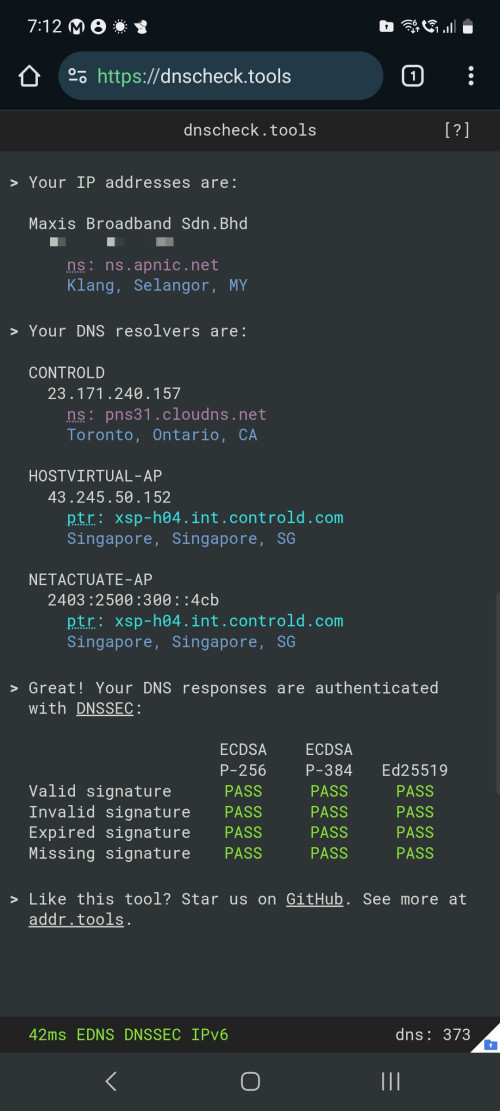 |
|
|
|
|
|
dev/numb
|
Aug 27 2025, 09:32 PM
|
|
|
QUOTE(QuantumEdge @ Aug 27 2025, 05:53 PM) Maxis users, have you encountered any slowdowns recently? Especially during the night? So far so good, but maybe I’m not the best person to ask since my main browsing devices are connected to a VPN server (server in KL, I’m in JB) via router full-time. Sometimes latency might go up a bit at night compared to day time, but still comfortably around 20ms. Occasionally might drop a few packets, but doesn’t affect anything I do. Not a gamer so cannot comment on gaming latency. Also disabled IPv6 (to prevent VPN leaks) so cannot comment on that either. This post has been edited by dev/numb: Aug 27 2025, 09:35 PM |
|
|
|
|
|
dev/numb
|
Aug 28 2025, 12:31 PM
|
|
|
QUOTE(QuantumEdge @ Aug 27 2025, 11:40 PM) So not Unifi level of bad then? Geez, U is not usable in the night recently For my needs, no contest. Maxis ain’t perfect but at the very least it seems like their network engineers went to school. My only regret was not switching sooner. All the blood I vomited from TM’s nightly international peering nonsense, I will never be able to claim back. |
|
|
|
|
|
dev/numb
|
Aug 30 2025, 09:19 PM
|
|
|
QUOTE(QuantumEdge @ Aug 30 2025, 05:54 PM) Because of the horrible routing, I considered taking Allo (either directly or Maxis under their infra) as my backup fibre plan while I serve Unifi's contract for another 18 months. My area is covered by both Allo and Unifi's infra, after checking with Allo's CS they told me it is impossible for customer to have both Unifi and Allo service in the same premise despite they are on different infra. Have you tried a VPN provider with MY servers? Based on my past experience with Unifi, a lot of the congestion happens at the SG internet exchanges. Maybe if you find a provider with a few different MY servers you can bypass that bottleneck. There’s still the matter of your online course provider blocking VPNs or not, but it’s still worth a shot. This post has been edited by dev/numb: Aug 30 2025, 09:19 PM |
|
|
|
|
|
dev/numb
|
Oct 11 2025, 05:33 PM
|
|
|
QUOTE(blacktubi @ Oct 6 2025, 08:42 PM) Maxis to Cloudflare routing is still broken, plenty of Cloudflare sites routed to US point of presence instead of MY or SG Even 1.1.1.1 is routed through NTT to SG POP instead of MYIX POP Any updates from Maxis on this? I didn’t even notice because I’m always on a VPN (peers via SG Equinix so I wasn’t affected), but today I switched one device to Warp Plus and noticed it was really bad. My traceroutes show the same results as yours. This post has been edited by dev/numb: Oct 11 2025, 05:56 PM |
|
|
|
|





 Quote
Quote
 0.0280sec
 0.26
0.26
 7 queries
 GZIP Disabled