Welcome Guest ( Log In | Register )

Outline · [ Standard ] · Linear+

 The Official Maxis FTTH Thread | v5, Maxis Home Fibre Internet, from RM89

views
     
Keatsan
post Jul 23 2025, 04:20 PM

If it ain't broke, don't 6ix it
******
Senior Member
1,218 posts

Joined: Jan 2010
From: Today 06.09 am
QUOTE(fruitie @ Jul 23 2025, 03:58 PM)
Ya, not interested in Maxis postpaid as my corporate plan is paid directly by company. My own number is on Digi Ambassador which is 0 cost.

Back to this discussion, even if I subscribe to another 5G plan it doesn't help with my situation though because my IoT stuff will only be connected to one connection.
Yes, I plan to do it. I'm suspecting it is the port issue to my unit because it seems other units in my condo are not having issues. But I don't have proof until I change back the router.

My Asus TUF Gaming AX3000 is still kinda new I don't think it is the router issue though. hmm.gif
*
Nevertheless, back to default Maxis router. Hopefully that isolates one lesser problem to troubleshoot.


Keatsan
post Aug 22 2025, 02:12 PM

If it ain't broke, don't 6ix it
******
Senior Member
1,218 posts

Joined: Jan 2010
From: Today 06.09 am
QUOTE(Raymond T. @ Aug 22 2025, 12:09 PM)
user posted image

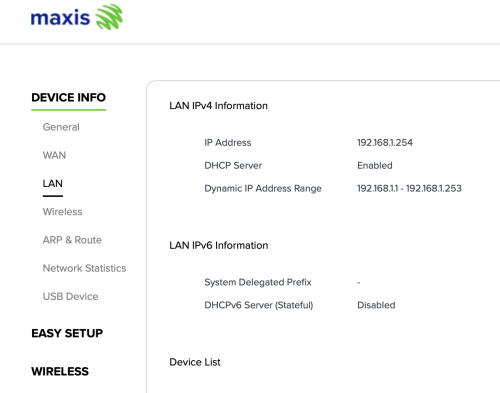
How to enable LAN IPv6
*
If I remember correctly, it's under WAN settings for ipv6 WAN.

Not sure if you can only enable ipv6 without WAN ipv6.

This post has been edited by Keatsan: Aug 22 2025, 02:13 PM
Keatsan
post Aug 25 2025, 01:26 PM

If it ain't broke, don't 6ix it
******
Senior Member
1,218 posts

Joined: Jan 2010
From: Today 06.09 am
QUOTE(Raymond T. @ Aug 22 2025, 04:05 PM)
WAN IPv6 seems enabled but unsure is it my login account got any configuration restrictions.

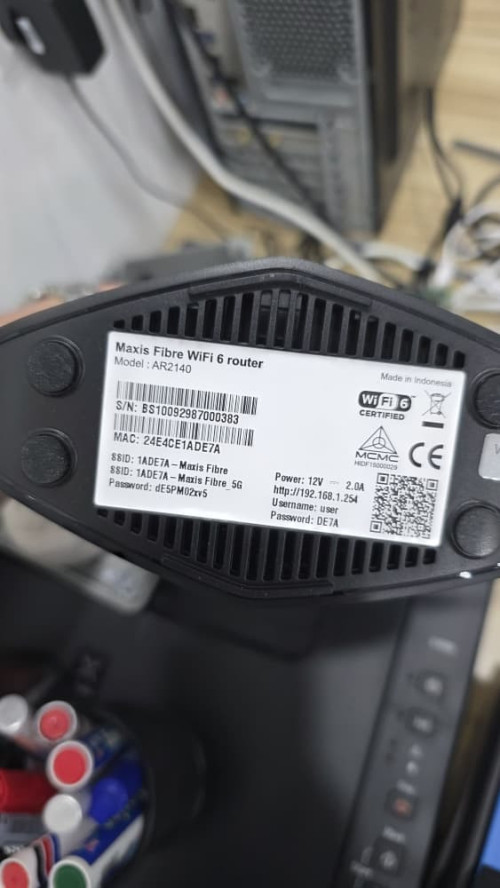
I'm using the user & password on the back of maxis router to access
*
If it's the KAON wifi 6 router, the admin login should be either below.

Option A
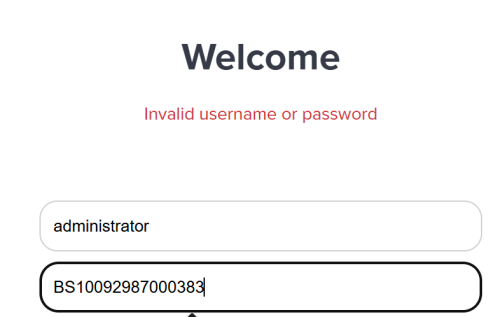
username: administrator
password: router serial number

Option B
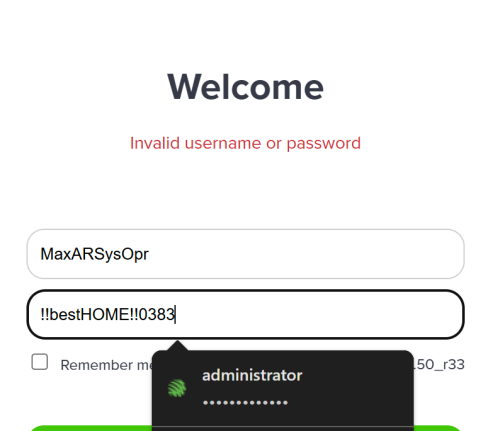
username: MaxARSysOpr
password: !!bestHOME!!XXXX (last 4 s/n)

Then try Enable the DHCP Server for both IPv4 & IPv6
Then use Stateless ipv6

This post has been edited by Keatsan: Aug 25 2025, 01:28 PM
Keatsan
post Sep 7 2025, 03:13 AM

If it ain't broke, don't 6ix it
******
Senior Member
1,218 posts

Joined: Jan 2010
From: Today 06.09 am
QUOTE(PRSXFENG @ Sep 4 2025, 07:57 AM)
I am considering jumping back to Maxis after being on TIME for a while

So, my area is under Maxis NGBB

Anyone here on that infra and is on the 300Mbps plan? What is the upload speed? Is it still 50Mbps?

Also, what's the real world speed test speed? Because from what I've seen NGBB is usually overprovisioned and you get more than written.
*
I'm on NGBB of 300mbps download and 50mbps upload.

QUOTE(jkfoong @ Sep 4 2025, 03:30 PM)
I couldn't login with these two credentials. What else could it be? Possible if the technician change the password?
Firmware version : 1.2.50_r33

user posted image

user posted image

user posted image
*
If I recall correctly the username administrator and password of S/N of 16 alphanumeric should work for KAON AR2140.
Alternative is to reset the router providing you have the PPPoE username and password.

PPPoE username - account number on your bill starts with A (A12345)
PPPoE password - A123451 (additional numbering 1)

This post has been edited by Keatsan: Sep 7 2025, 03:19 AM
Keatsan
post Sep 30 2025, 12:14 AM

If it ain't broke, don't 6ix it
******
Senior Member
1,218 posts

Joined: Jan 2010
From: Today 06.09 am
QUOTE(fruitie @ Sep 29 2025, 06:45 PM)
I wanted to use Maxis router to isolate problem but I just noticed Maxis router only accepts SSID without "space" and my existing SSID on Asus router has spaces... So, it means I need to reconfigure for all my devices again if I were to change to Maxis router... Yesterday and today problem came back again while I'm now back in the house.
*
Ah yes. The infamous Maxis Router that doesn't allow space. Not sure if you could try this as space for your SSID.

Alt-0173 for an invisible character

Alt-0160 for a visible space
Keatsan
post Oct 6 2025, 01:11 PM

If it ain't broke, don't 6ix it
******
Senior Member
1,218 posts

Joined: Jan 2010
From: Today 06.09 am
QUOTE(fruitie @ Oct 6 2025, 12:29 PM)
It turns out it is not my modem issue as well. laugh.gif
Solved it by unplugging and plugging in again the fiber optic cable though it is not loose. I just didn't want to give up. At that time, I had no other options besides waiting for Maxis Experts to come, since my connection was already down, so I tried out everything I could.

So, in short, no issue with my Asus router or Maxis modem. biggrin.gif
*
The classic plug-unplug resolution.

If it works, it ain't silly. Haha

This post has been edited by Keatsan: Oct 6 2025, 01:11 PM
Keatsan
post Oct 6 2025, 04:49 PM

If it ain't broke, don't 6ix it
******
Senior Member
1,218 posts

Joined: Jan 2010
From: Today 06.09 am
QUOTE(fruitie @ Oct 6 2025, 01:24 PM)
Yeah, didn’t expect it’s the culprit as it wasn’t loose or anything. laugh.gif

Even when I suggested to plug-unplug when I spoke to Maxis CS over the phone, he says it’s not required. Most likely my modem spoilt. sweat.gif I still went ahead and fixed it myself. sweat.gif Based on my experience using fiber broadband for more than a decade, none of my modems were spoilt. laugh.gif So, it’s not easy to spoil a modem.
*
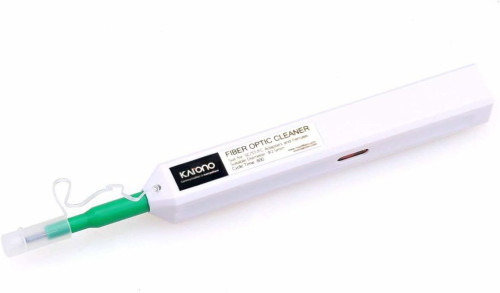
I went and bought a fibre cleaner and clean it whenever I feel like it.

» Click to show Spoiler - click again to hide... «


I like the Huawei Modem HG8240H GPON terminal. It's really solid stuff.
Keatsan
post Oct 6 2025, 05:15 PM

If it ain't broke, don't 6ix it
******
Senior Member
1,218 posts

Joined: Jan 2010
From: Today 06.09 am
QUOTE(fruitie @ Oct 6 2025, 04:51 PM)
I didn't know about this thing, is it useful? I live in a high rise prop, so the cable is from wall.
*
When the fibre team came to troubleshoot my network issue , I was curious on the tools they were using. Hence I just bought one and keep it for self cleaning only when I needed it.

It's to remove dust and keep the out the contaminants. But if you don't unplug it often, it shouldn't have any at the first place due to contact point of the fibre connectivity itself.

Best to just call the technical team and they'll come sort out anyways. (Part of the paid service)


Change to:
| Lo-Fi Version
0.2194sec    0.49    7 queries    GZIP Disabled
Time is now: 2nd December 2025 - 10:19 AM