Welcome Guest ( Log In | Register )

Outline · [ Standard ] · Linear+

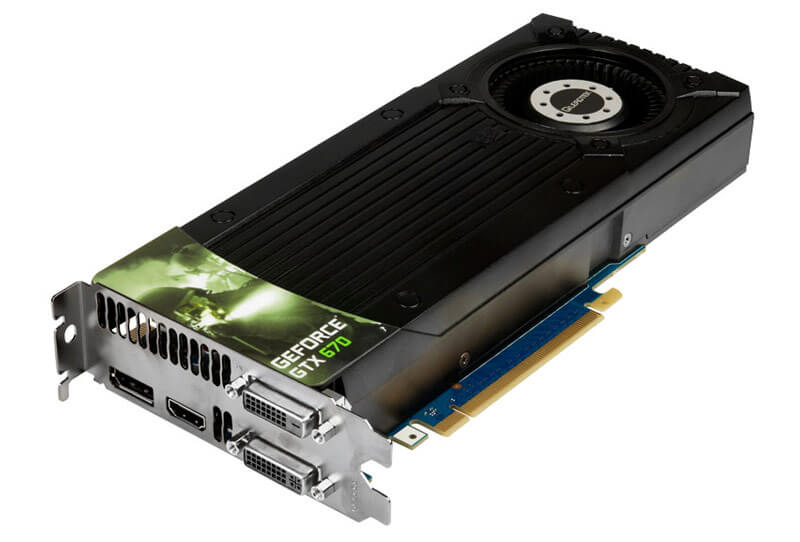
 Leadktek GTX 670 temp going high, load spike to 90-100c

views
     
TSTHE ZUL
post Jan 24 2015, 03:36 PM, updated 11y ago

The Mercurial Ben Arfa
*****
Senior Member
883 posts

Joined: May 2006
From: Osaka,Japan


hi,

my Leadktek GTX 670 shown some strange thing lately.
the temperature is spiking to 90-100c when in game (watchdogs,far cry 4,fifa 15 and dragon age)

i thought my normal load temp around 75-80c.

idle temp is 40-45c.

i already assemble it, clear dust and replace new thermal.
but still the same.

i dont't OC it.

does my GC went bad?
PSU faulty?

i bought it in 2012. cry.gif
TristanX
post Jan 24 2015, 04:31 PM

Where is my stars?
Group Icon
Elite
24,351 posts

Joined: Nov 2004
From: Setapak, Kuala Lumpur


QUOTE(THE ZUL @ Jan 24 2015, 03:36 PM)
hi,

my Leadktek GTX 670 shown some strange thing lately.
the temperature is spiking to 90-100c when in game (watchdogs,far cry 4,fifa 15 and dragon age)

i thought my normal load temp around 75-80c.

idle temp is 40-45c.

i already assemble it, clear dust and replace new thermal.
but still the same.

i dont't OC it.

does my GC went bad?
PSU faulty?

i bought it in 2012.  cry.gif
*
You need to replace the thermal compound once you disassemble it.
TSTHE ZUL
post Jan 24 2015, 04:49 PM

The Mercurial Ben Arfa
*****
Senior Member
883 posts

Joined: May 2006
From: Osaka,Japan


Already did it bro.
Searingmage
post Jan 24 2015, 05:36 PM

Regular
******
Senior Member
1,809 posts

Joined: Feb 2010


Turn the fan speed higher?
Check if your fan is malfunctioning as well.
TSTHE ZUL
post Jan 24 2015, 08:14 PM

The Mercurial Ben Arfa
*****
Senior Member
883 posts

Joined: May 2006
From: Osaka,Japan


QUOTE(Searingmage @ Jan 24 2015, 05:36 PM)
Turn the fan speed higher?
Check if your fan is malfunctioning as well.
*
yes i did.
and the fan is spinning.

maybe virus or defect card?
or install 3rd party fan? rclxub.gif
MrTrip
post Jan 24 2015, 08:26 PM

I am KEFKA!
****
Senior Member
522 posts

Joined: Dec 2014
Before this, what was the reading of your temperature?
Also, after you run the games that you mentioned, the GPU idles at 40-45C?
What was your idle temp before? Just roughly
TSTHE ZUL
post Jan 24 2015, 08:35 PM

The Mercurial Ben Arfa
*****
Senior Member
883 posts

Joined: May 2006
From: Osaka,Japan


QUOTE(MrTrip @ Jan 24 2015, 08:26 PM)
Before this, what was the reading of your temperature?
Also, after you run the games that you mentioned, the GPU idles at 40-45C?
What was your idle temp before? Just roughly
*
yes idle 40-45. right now im typing 44. i use speccy and msi afterburner for temp monitoring.
if i run heavy game it rocket to 80-90 very weird.
last time around 75.
MrTrip
post Jan 24 2015, 08:43 PM

I am KEFKA!
****
Senior Member
522 posts

Joined: Dec 2014
I would suggest you install 3rd party coolers
Other than that, I can't seem to find the problem of that happening

Maybe something changed with your GPU settings, accidentally
Either in game or desktop
Logically that is the only explanation I can think of
TristanX
post Jan 24 2015, 09:07 PM

Where is my stars?
Group Icon
Elite
24,351 posts

Joined: Nov 2004
From: Setapak, Kuala Lumpur


QUOTE(THE ZUL @ Jan 24 2015, 08:35 PM)
yes idle 40-45. right now im typing 44. i use speccy and msi afterburner for temp monitoring.
if i run heavy game it rocket to 80-90 very weird.
last time around 75.
*
Maybe the fan is weak. Try putting a bit of lubricating oil on the fan motor.
kevinyap100
post Jan 24 2015, 10:39 PM

Getting Started
**
Junior Member
221 posts

Joined: Aug 2013
QUOTE(THE ZUL @ Jan 24 2015, 03:36 PM)
hi,

my Leadktek GTX 670 shown some strange thing lately.
the temperature is spiking to 90-100c when in game (watchdogs,far cry 4,fifa 15 and dragon age)

i thought my normal load temp around 75-80c.

idle temp is 40-45c.

i already assemble it, clear dust and replace new thermal.
but still the same.

i dont't OC it.

does my GC went bad?
PSU faulty?

i bought it in 2012.  cry.gif
*
may i know whether your gtx 670 is reference design ? or non reference ?

what thermal paste u r using ?
Left4Dead2
post Jan 24 2015, 10:57 PM

Regular
******
Senior Member
1,103 posts

Joined: Nov 2009
Show us some pic of your Rig hmm.gif
Searingmage
post Jan 25 2015, 10:43 AM

Regular
******
Senior Member
1,809 posts

Joined: Feb 2010


QUOTE(THE ZUL @ Jan 24 2015, 08:14 PM)
yes i did.
and the fan is spinning.

maybe virus or defect card?
or install 3rd party fan?  rclxub.gif
*
Tried increasing your fan speed during load using MSI afterburner?
Set it to maximum when the temperature is around 70?
wongkoewei
post Jan 25 2015, 11:46 AM

New Member
*
Junior Member
35 posts

Joined: Nov 2014
QUOTE(THE ZUL @ Jan 24 2015, 03:36 PM)
hi,

my Leadktek GTX 670 shown some strange thing lately.
the temperature is spiking to 90-100c when in game (watchdogs,far cry 4,fifa 15 and dragon age)

i thought my normal load temp around 75-80c.

idle temp is 40-45c.

i already assemble it, clear dust and replace new thermal.
but still the same.

i dont't OC it.

does my GC went bad?
PSU faulty?

i bought it in 2012.  cry.gif
*
May I ask if your GTX 670 always reaching this temperature on load or it just happened recently. I got a friend who are using MSI GTX 670, he told me his card also reaching this temperature and he fixed it by downclocked it. May I ask if your card are overclocked? if so please try to down clock it to reference clock, It might help hmm.gif hmm.gif
imbibug
post Jan 25 2015, 12:18 PM

Regular
******
Senior Member
1,700 posts

Joined: Jan 2013


QUOTE(THE ZUL @ Jan 24 2015, 03:36 PM)
hi,

my Leadktek GTX 670 shown some strange thing lately.
the temperature is spiking to 90-100c when in game (watchdogs,far cry 4,fifa 15 and dragon age)

i thought my normal load temp around 75-80c.
idle temp is 40-45c.

i already assemble it, clear dust and replace new thermal.
but still the same.

i dont't OC it.
.......
What driver version are you running? Nvidia has screwed up driver updates before. One driver in 2010 (196.75) had a mistake in the fan control which caused temps to rise and possibly kill the card. And more recently the 320.18 also caused issues.
http://www.engadget.com/2010/03/05/nvidia-...g-graphics-car/

Try rolling back the Nvidia driver to the previous version if your problem occurred right around a driver update.

Monitor the fan speed under load to see if it is working correctly. Use your ears instead of relying on just the rpm as the driver might've messed it up which did happen in 196.75.
TSTHE ZUL
post Jan 27 2015, 10:39 PM

The Mercurial Ben Arfa
*****
Senior Member
883 posts

Joined: May 2006
From: Osaka,Japan


QUOTE(TristanX @ Jan 24 2015, 09:07 PM)
Maybe the fan is weak. Try putting a bit of lubricating oil on the fan motor.
*
already check and put some oil. still same

QUOTE(kevinyap100 @ Jan 24 2015, 10:39 PM)
may i know whether your gtx 670 is reference design ? or non reference ?

what thermal paste u r using ?
*
reference design by leadtek. coolermaster thermal.


QUOTE(Searingmage @ Jan 25 2015, 10:43 AM)
Tried increasing your fan speed during load using MSI afterburner?
Set it to maximum when the temperature is around 70?
*
idle 45. when game 80-90 with max rpm speed lol

QUOTE(wongkoewei @ Jan 25 2015, 11:46 AM)
May I ask if your GTX 670 always reaching this temperature on load or it just happened recently. I got a friend who are using MSI GTX 670, he told me his card also reaching this temperature and he fixed it by downclocked it. May I ask if your card are overclocked? if so please try to down clock it to reference clock, It might help  hmm.gif  hmm.gif
*
it happened recently. i think start this year. Leadtek gtx 670 is normal 1 no OC.


QUOTE(imbibug @ Jan 25 2015, 12:18 PM)
What driver version are you running? Nvidia has screwed up driver updates before. One driver in 2010 (196.75) had a mistake in the fan control which caused temps to rise and possibly kill the card. And more recently the 320.18 also caused issues.
http://www.engadget.com/2010/03/05/nvidia-...g-graphics-car/

Try rolling back the Nvidia driver to the previous version if your problem occurred right around a driver update.

Monitor the fan speed under load to see if it is working correctly. Use your ears instead of relying on just the rpm as the driver might've messed it up which did happen in 196.75.
*
i use the latest 1 and do clean install. even formating my windows.

UPDATE.

Format my windows, still same. replace thermal still same.
idk maybe something wrong with my headsink.

tmrw, i will test to my friend's PC, if same temp i will send to shop near my home.

any1 know who can check my GC in lowyat? probably install new headsink or fan?
i live in terengganu most pc shop is not good at it.

maybe time to upgrade? but this is very weird problem.!!

wongkoewei
post Jan 27 2015, 10:49 PM

New Member
*
Junior Member
35 posts

Joined: Nov 2014
QUOTE(THE ZUL @ Jan 27 2015, 10:39 PM)
already check and put some oil. still same
reference design by leadtek. coolermaster thermal.
idle 45. when game 80-90 with max rpm speed lol
it happened recently. i think start this year. Leadtek gtx 670 is normal 1 no OC.
i use the latest 1 and do clean install. even formating my windows.

UPDATE.

Format my windows, still same. replace thermal still same.
idk maybe something wrong with my headsink.

tmrw, i will test to my friend's PC, if same temp i will send to shop near my home.

any1 know who can check my GC in lowyat? probably install new headsink or fan?
i live in terengganu most pc shop is not good at it.

maybe time to upgrade? but this is very weird problem.!!
*
better check if ur card are 'cukup masa' or not...
SUSHuman10
post Jan 27 2015, 10:52 PM

Look at all my stars!!
*******
Senior Member
6,774 posts

Joined: Nov 2010
Temperature at idle is normal?
TSTHE ZUL
post Jan 27 2015, 10:55 PM

The Mercurial Ben Arfa
*****
Senior Member
883 posts

Joined: May 2006
From: Osaka,Japan


QUOTE(wongkoewei @ Jan 27 2015, 10:49 PM)
better check if ur card are 'cukup masa' or not...
*
how to check it bro? rclxub.gif

QUOTE(Human10 @ Jan 27 2015, 10:52 PM)
Temperature at idle is normal?
*
40-45. not really stable.

right now i max out my fan speed.

» Click to show Spoiler - click again to hide... «


maybe my GC defected? going to kubur?
SUSHuman10
post Jan 27 2015, 10:57 PM

Look at all my stars!!
*******
Senior Member
6,774 posts

Joined: Nov 2010
QUOTE(THE ZUL @ Jan 27 2015, 10:55 PM)
how to check it bro?  rclxub.gif
40-45. not really stable.

right now i max out my fan speed.

» Click to show Spoiler - click again to hide... «


maybe my GC defected? going to kubur?
*
I bet the contact between your heatsink and chip is not good.

Try repaste, this time using better paste, in lesser volume.
TSTHE ZUL
post Jan 27 2015, 10:58 PM

The Mercurial Ben Arfa
*****
Senior Member
883 posts

Joined: May 2006
From: Osaka,Japan


QUOTE(Human10 @ Jan 27 2015, 10:57 PM)
I bet the contact between your heatsink and chip is not good.

Try repaste, this time using better paste, in lesser volume.
*
ok bro, i will re-assemble it for the 3rd times.

i will put a minimal amount. maybe i put it too much.
TSTHE ZUL
post Jan 28 2015, 12:57 AM

The Mercurial Ben Arfa
*****
Senior Member
883 posts

Joined: May 2006
From: Osaka,Japan


tried and the result still same.
idle 40-45 and in game spike to 90-100c.


MrTrip
post Jan 28 2015, 01:03 AM

I am KEFKA!
****
Senior Member
522 posts

Joined: Dec 2014
QUOTE(THE ZUL @ Jan 28 2015, 12:57 AM)
tried and the result still same.
idle 40-45 and in game spike to 90-100c.
*
I think you need to change the cooling system overall
Try get a 3rd party cooler for the GPU or water cooling
The card is operating at a very dangerous temperature, which risk degrading the components inside the card
TSTHE ZUL
post Jan 28 2015, 01:04 AM

The Mercurial Ben Arfa
*****
Senior Member
883 posts

Joined: May 2006
From: Osaka,Japan


QUOTE(MrTrip @ Jan 28 2015, 01:03 AM)
I think you need to change the cooling system overall
Try get a 3rd party cooler for the GPU or water cooling
The card is operating at a very dangerous temperature, which risk degrading the components inside the card
*
right now i just browsing internet and watch movie. temp now 45c
when game the temp goes high.

i still try to find 3rd party cooling for 670 here.
MrTrip
post Jan 28 2015, 01:10 AM

I am KEFKA!
****
Senior Member
522 posts

Joined: Dec 2014
QUOTE(THE ZUL @ Jan 28 2015, 01:04 AM)
right now i just browsing internet and watch movie. temp now 45c
when game the temp goes high.

i still try to find 3rd party cooling for 670 here.
*
Before I go further, just wanna ask something
Your GPU design is the reference design? The blower one?
Or using 2/3 fans?
TSTHE ZUL
post Jan 28 2015, 01:20 AM

The Mercurial Ben Arfa
*****
Senior Member
883 posts

Joined: May 2006
From: Osaka,Japan


QUOTE(MrTrip @ Jan 28 2015, 01:10 AM)
Before I go further, just wanna ask something
Your GPU design is the reference design? The blower one?
Or using 2/3 fans?
*
i think this is ref design.

» Click to show Spoiler - click again to hide... «

MrTrip
post Jan 28 2015, 01:38 AM

I am KEFKA!
****
Senior Member
522 posts

Joined: Dec 2014
QUOTE(THE ZUL @ Jan 28 2015, 01:20 AM)
i think this is ref design.

» Click to show Spoiler - click again to hide... «

*
I see, reference design is known to have cooling issue, because of a single blower setup
The only way I can think of is to remove the cooler altogether, and replace it with a aftermarket 3 fans
Seems like a lot of hassle to do so sad.gif
I am not sure how to help with this
TSTHE ZUL
post Jan 28 2015, 01:53 AM

The Mercurial Ben Arfa
*****
Senior Member
883 posts

Joined: May 2006
From: Osaka,Japan


QUOTE(MrTrip @ Jan 28 2015, 01:38 AM)
I see, reference design is known to have cooling issue, because of a single blower setup
The only way I can think of is to remove the cooler altogether, and replace it with a aftermarket 3 fans
Seems like a lot of hassle to do so  sad.gif
I am not sure how to help with this
*
replace with new fan include headsink or just fan?
does it need some modification to fit with reference design?
SUSHuman10
post Jan 28 2015, 01:56 AM

Look at all my stars!!
*******
Senior Member
6,774 posts

Joined: Nov 2010
There's artic cooling which have quite an extensive line of 3rd party cooler (heatsink + fan) for GPU.

I saw them in Garage Sale before, but if you want it cheap(er), better source it from taobao.
http://detail.tmall.com/item.htm?spm=a230r...5761&abbucket=0

This post has been edited by Human10: Jan 28 2015, 02:00 AM
goldfries
post Jan 28 2015, 01:58 AM

40K Club
Group Icon
Forum Admin
44,415 posts

Joined: Jan 2003


aiyoyoyoyo until now 2 more important matters not addressed.

1. what is your casing and airflow configuration?
2. how warm is your room?

even if you remove the heatsink and did not re-apply new set of paste, it still shouldn't be reaching that temperature.

your idle temperature at 45c leads me to believe that your room isn't air conditioned and your casing might be small and have lousy airflow.
MrTrip
post Jan 28 2015, 02:11 AM

I am KEFKA!
****
Senior Member
522 posts

Joined: Dec 2014
QUOTE(Human10 @ Jan 28 2015, 01:56 AM)
There's artic cooling which have quite an extensive line of 3rd party cooler (heatsink + fan) for GPU.

I saw them in Garage Sale before, but if you want it cheap(er), better source it from taobao.
http://detail.tmall.com/item.htm?spm=a230r...5761&abbucket=0
*
Eureka! This was the cooler I saw. Definitely get this for better cooling THE ZUL
Also, need to take into considerations what goldfries have suggested
Might be contributing factors towards excessive heat icon_idea.gif
goldfries
post Jan 28 2015, 02:18 AM

40K Club
Group Icon
Forum Admin
44,415 posts

Joined: Jan 2003


I have tried this one http://www.goldfries.com/hardware-reviews/...-cooler-review/

user posted image

Less than RM 200.
TSTHE ZUL
post Jan 28 2015, 02:26 AM

The Mercurial Ben Arfa
*****
Senior Member
883 posts

Joined: May 2006
From: Osaka,Japan


QUOTE(Human10 @ Jan 28 2015, 01:56 AM)
There's artic cooling which have quite an extensive line of 3rd party cooler (heatsink + fan) for GPU.

I saw them in Garage Sale before, but if you want it cheap(er), better source it from taobao.
http://detail.tmall.com/item.htm?spm=a230r...5761&abbucket=0
*
looks good, wondering does it fit to GTX 670?

QUOTE(goldfries @ Jan 28 2015, 01:58 AM)
aiyoyoyoyo until now 2 more important matters not addressed.

1. what is your casing and airflow configuration?
2. how warm is your room?

even if you remove the heatsink and did not re-apply new set of paste, it still shouldn't be reaching that temperature.

your idle temperature at 45c leads me to believe that your room isn't air conditioned and your casing might be small and have lousy airflow.
*
my casing just cap ayam 1.
air flow quite ok, i open the side case.
been using this casing with GTX 670 since 2012.

start Jan 2015 start high temp. random black screen on heavy usage gaming. before dat works good.

i use same thermal paste with my cpu. or gpu need different thermal?
goldfries
post Jan 28 2015, 02:32 AM

40K Club
Group Icon
Forum Admin
44,415 posts

Joined: Jan 2003


the thermal paste works the same.

open side case isn't a good idea, in fact it could be why it's running hot too.

reference coolers wouldn't be running at that heat level on load.
marfccy
post Jan 28 2015, 03:03 AM

Le Ponyland!!!
*******
Senior Member
4,254 posts

Joined: Nov 2011


QUOTE(THE ZUL @ Jan 28 2015, 02:26 AM)
looks good, wondering does it fit to GTX 670?
my casing just cap ayam 1.
air flow quite ok, i open the side case.
been using this casing with GTX 670 since 2012.

start Jan 2015 start high temp. random black screen on heavy usage gaming. before dat works good.

i use same thermal paste with my cpu. or gpu need different thermal?
*
open side case for a reference cooler GPU isnt the ideal cooling idea sweat.gif
kraizer81
post Jan 28 2015, 12:53 PM

Getting Started
**
Junior Member
118 posts

Joined: Oct 2014
From: Kudat, Sabah


This reminds me of my infamous GTX 480 back in 2010. Temp while idle is 48*c and full load is 85-91*c. After cleaning the fans of dust and dirt, temps were a little okay 43*c in idle and 85*c at full load. But alas after 7 months of heat torture, it died peacefully in November 2010. Didn't have/know any thermal paste back then... I agree with Sir Goldfries, opening the side panel won't do much. Better change to aftermarket cooler or liquid cooling if budget permits.
TSTHE ZUL
post Jan 28 2015, 07:44 PM

The Mercurial Ben Arfa
*****
Senior Member
883 posts

Joined: May 2006
From: Osaka,Japan


thanks for your feedback.

i think i will go shop tomorrow or buy 3rd party cooling. probably artic cooling.
my pc auto restart while playing dota 2 due overheat. i think my cooler isn't good enough.

2nd hand GTX 670 RM500
3rd party cooling RM150-200
GTX 970 rm1300 ( JUST INCASE if i cant save that card, i will look for with good cooling like MSI,ASUS)
TSTHE ZUL
post Jan 29 2015, 02:49 AM

The Mercurial Ben Arfa
*****
Senior Member
883 posts

Joined: May 2006
From: Osaka,Japan


any chance if my GC over-volt?
MrTrip
post Jan 29 2015, 11:24 AM

I am KEFKA!
****
Senior Member
522 posts

Joined: Dec 2014
QUOTE(THE ZUL @ Jan 29 2015, 02:49 AM)
any chance if my GC over-volt?
*
Nah, unless you are overclocking, stressing the CPU to near full load, voltage should be lower than advertised
kraizer81
post Jan 29 2015, 11:59 AM

Getting Started
**
Junior Member
118 posts

Joined: Oct 2014
From: Kudat, Sabah


Could also be related to the bios? Maybe trying to update it? But chances are, your symptom is more towards problematic cooling. Better prepare for a new GC.
rav3n82
post Jan 29 2015, 12:34 PM

I find your lack of faith disturbing!
*******
Senior Member
7,084 posts

Joined: Feb 2011
From: Penang


I used to have Leadtek GTX 670 reference. The max load that I ever observed was up to 85C only. I personally feel something may be wrong with your card. GK104 chip does not usually run that hot at default settings.

Either your cooler baseplate does not have good and proper contact with your GPU, or maybe faulty temperature sensor giving you such temps. Either way, I believe you should try to send your card in for warranty claim (if still have). Have you tried using other monitoring software aside from the one you're using now?
TSTHE ZUL
post Jan 30 2015, 03:41 AM

The Mercurial Ben Arfa
*****
Senior Member
883 posts

Joined: May 2006
From: Osaka,Japan


guys, finally i SOLVED it.

after i clean my thermal i put the bracket at the back board 'terbalik'.
i notice that bracket longgar. then, i changed it back to actual position. shame on me.

fuh! now idle temp went down to 37 and gaming 70c.
ongweiping
post Jan 30 2015, 09:46 AM

Getting Started
**
Junior Member
151 posts

Joined: Feb 2009
From: Ipoh, Perak


QUOTE(THE ZUL @ Jan 30 2015, 03:41 AM)
guys, finally i SOLVED it.

after i clean my thermal i put the bracket at the back board 'terbalik'.
i notice that bracket longgar. then, i changed it back to actual position. shame on me.

fuh! now idle temp went down to 37 and gaming 70c.
*
That is great. Money saved, Congrats!

Havent try it myself on my GC. Must be quite a achievement for newbie to do that. thumbup.gif


Change to:
| Lo-Fi Version
0.0249sec    0.26    5 queries    GZIP Disabled
Time is now: 17th December 2025 - 07:24 AM