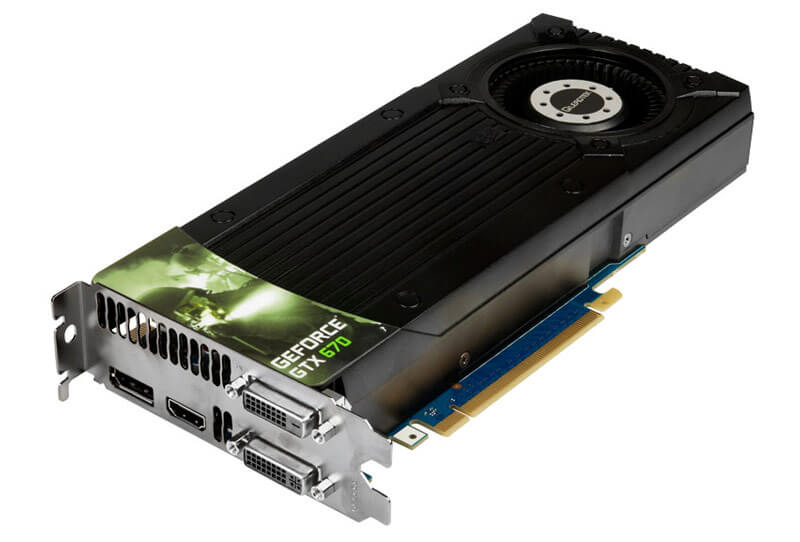
tried and the result still same.
idle 40-45 and in game spike to 90-100c.
Leadktek GTX 670 temp going high, load spike to 90-100c
Leadktek GTX 670 temp going high, load spike to 90-100c
|
|
 Jan 28 2015, 12:57 AM Jan 28 2015, 12:57 AM
|
 
Senior Member
883 posts Joined: May 2006 From: Osaka,Japan  
|
tried and the result still same.
idle 40-45 and in game spike to 90-100c. |
|
|
|
|
|
Jan 28 2015, 01:03 AM
|

Senior Member
522 posts Joined: Dec 2014
|
QUOTE(THE ZUL @ Jan 28 2015, 12:57 AM) tried and the result still same. I think you need to change the cooling system overallidle 40-45 and in game spike to 90-100c.  Try get a 3rd party cooler for the GPU or water cooling The card is operating at a very dangerous temperature, which risk degrading the components inside the card |
|
|
Jan 28 2015, 01:04 AM
|
|
Senior Member
883 posts Joined: May 2006 From: Osaka,Japan
|
QUOTE(MrTrip @ Jan 28 2015, 01:03 AM) I think you need to change the cooling system overall right now i just browsing internet and watch movie. temp now 45cTry get a 3rd party cooler for the GPU or water cooling The card is operating at a very dangerous temperature, which risk degrading the components inside the card when game the temp goes high. i still try to find 3rd party cooling for 670 here. |
|
|
Jan 28 2015, 01:10 AM
|
|
Senior Member
522 posts Joined: Dec 2014
|
QUOTE(THE ZUL @ Jan 28 2015, 01:04 AM) right now i just browsing internet and watch movie. temp now 45c Before I go further, just wanna ask somethingwhen game the temp goes high. i still try to find 3rd party cooling for 670 here. Your GPU design is the reference design? The blower one? Or using 2/3 fans? |
|
|
Jan 28 2015, 01:20 AM
|
|
Senior Member
883 posts Joined: May 2006 From: Osaka,Japan
|
QUOTE(MrTrip @ Jan 28 2015, 01:10 AM) Before I go further, just wanna ask something i think this is ref design.Your GPU design is the reference design? The blower one? Or using 2/3 fans? » Click to show Spoiler - click again to hide... « |
|
|
Jan 28 2015, 01:38 AM
|
|
Senior Member
522 posts Joined: Dec 2014
|
QUOTE(THE ZUL @ Jan 28 2015, 01:20 AM) i think this is ref design. I see, reference design is known to have cooling issue, because of a single blower setup» Click to show Spoiler - click again to hide... « The only way I can think of is to remove the cooler altogether, and replace it with a aftermarket 3 fans Seems like a lot of hassle to do so  I am not sure how to help with this |
|
|
|
|
|
Jan 28 2015, 01:53 AM
|
|
Senior Member
883 posts Joined: May 2006 From: Osaka,Japan
|
QUOTE(MrTrip @ Jan 28 2015, 01:38 AM) I see, reference design is known to have cooling issue, because of a single blower setup replace with new fan include headsink or just fan?The only way I can think of is to remove the cooler altogether, and replace it with a aftermarket 3 fans Seems like a lot of hassle to do so I am not sure how to help with this does it need some modification to fit with reference design? |
|
|
Jan 28 2015, 01:56 AM
|

Senior Member
6,774 posts Joined: Nov 2010
|
There's artic cooling which have quite an extensive line of 3rd party cooler (heatsink + fan) for GPU.
I saw them in Garage Sale before, but if you want it cheap(er), better source it from taobao. http://detail.tmall.com/item.htm?spm=a230r...5761&abbucket=0 This post has been edited by Human10: Jan 28 2015, 02:00 AM |
|
|
Jan 28 2015, 01:58 AM
|
 
Forum Admin
44,415 posts Joined: Jan 2003   
|
aiyoyoyoyo until now 2 more important matters not addressed.
1. what is your casing and airflow configuration? 2. how warm is your room? even if you remove the heatsink and did not re-apply new set of paste, it still shouldn't be reaching that temperature. your idle temperature at 45c leads me to believe that your room isn't air conditioned and your casing might be small and have lousy airflow. |
|
|
Jan 28 2015, 02:11 AM
|
|
Senior Member
522 posts Joined: Dec 2014
|
QUOTE(Human10 @ Jan 28 2015, 01:56 AM) There's artic cooling which have quite an extensive line of 3rd party cooler (heatsink + fan) for GPU. Eureka! This was the cooler I saw. Definitely get this for better cooling THE ZULI saw them in Garage Sale before, but if you want it cheap(er), better source it from taobao. http://detail.tmall.com/item.htm?spm=a230r...5761&abbucket=0 Also, need to take into considerations what goldfries have suggested Might be contributing factors towards excessive heat  |
|
|
Jan 28 2015, 02:18 AM
|
|
Forum Admin
44,415 posts Joined: Jan 2003
|
|
|
|
Jan 28 2015, 02:26 AM
|
|
Senior Member
883 posts Joined: May 2006 From: Osaka,Japan
|
QUOTE(Human10 @ Jan 28 2015, 01:56 AM) There's artic cooling which have quite an extensive line of 3rd party cooler (heatsink + fan) for GPU. looks good, wondering does it fit to GTX 670?I saw them in Garage Sale before, but if you want it cheap(er), better source it from taobao. http://detail.tmall.com/item.htm?spm=a230r...5761&abbucket=0 QUOTE(goldfries @ Jan 28 2015, 01:58 AM) aiyoyoyoyo until now 2 more important matters not addressed. my casing just cap ayam 1.1. what is your casing and airflow configuration? 2. how warm is your room? even if you remove the heatsink and did not re-apply new set of paste, it still shouldn't be reaching that temperature. your idle temperature at 45c leads me to believe that your room isn't air conditioned and your casing might be small and have lousy airflow. air flow quite ok, i open the side case. been using this casing with GTX 670 since 2012. start Jan 2015 start high temp. random black screen on heavy usage gaming. before dat works good. i use same thermal paste with my cpu. or gpu need different thermal? |
|
|
Jan 28 2015, 02:32 AM
|
|
Forum Admin
44,415 posts Joined: Jan 2003
|
the thermal paste works the same.
open side case isn't a good idea, in fact it could be why it's running hot too. reference coolers wouldn't be running at that heat level on load. |
|
|
|
|
|
Jan 28 2015, 03:03 AM
|

Senior Member
4,254 posts Joined: Nov 2011
|
QUOTE(THE ZUL @ Jan 28 2015, 02:26 AM) looks good, wondering does it fit to GTX 670? open side case for a reference cooler GPU isnt the ideal cooling idea my casing just cap ayam 1. air flow quite ok, i open the side case. been using this casing with GTX 670 since 2012. start Jan 2015 start high temp. random black screen on heavy usage gaming. before dat works good. i use same thermal paste with my cpu. or gpu need different thermal?  |
|
|
Jan 28 2015, 12:53 PM
|

Junior Member
118 posts Joined: Oct 2014 From: Kudat, Sabah
|
This reminds me of my infamous GTX 480 back in 2010. Temp while idle is 48*c and full load is 85-91*c. After cleaning the fans of dust and dirt, temps were a little okay 43*c in idle and 85*c at full load. But alas after 7 months of heat torture, it died peacefully in November 2010. Didn't have/know any thermal paste back then... I agree with Sir Goldfries, opening the side panel won't do much. Better change to aftermarket cooler or liquid cooling if budget permits.
|
|
|
Jan 28 2015, 07:44 PM
|
|
Senior Member
883 posts Joined: May 2006 From: Osaka,Japan
|
thanks for your feedback.
i think i will go shop tomorrow or buy 3rd party cooling. probably artic cooling. my pc auto restart while playing dota 2 due overheat. i think my cooler isn't good enough. 2nd hand GTX 670 RM500 3rd party cooling RM150-200 GTX 970 rm1300 ( JUST INCASE if i cant save that card, i will look for with good cooling like MSI,ASUS) |
|
|
Jan 29 2015, 02:49 AM
|
|
Senior Member
883 posts Joined: May 2006 From: Osaka,Japan
|
any chance if my GC over-volt?
|
|
|
Jan 29 2015, 11:24 AM
|
|
Senior Member
522 posts Joined: Dec 2014
|
QUOTE(THE ZUL @ Jan 29 2015, 02:49 AM) any chance if my GC over-volt? Nah, unless you are overclocking, stressing the CPU to near full load, voltage should be lower than advertised |
|
|
Jan 29 2015, 11:59 AM
|
|
Junior Member
118 posts Joined: Oct 2014 From: Kudat, Sabah
|
Could also be related to the bios? Maybe trying to update it? But chances are, your symptom is more towards problematic cooling. Better prepare for a new GC.
|
|
|
Jan 29 2015, 12:34 PM
|

Senior Member
7,084 posts Joined: Feb 2011 From: Penang
|
I used to have Leadtek GTX 670 reference. The max load that I ever observed was up to 85C only. I personally feel something may be wrong with your card. GK104 chip does not usually run that hot at default settings.
Either your cooler baseplate does not have good and proper contact with your GPU, or maybe faulty temperature sensor giving you such temps. Either way, I believe you should try to send your card in for warranty claim (if still have). Have you tried using other monitoring software aside from the one you're using now? |
| Change to: |  0.0165sec 0.0165sec
 0.54 0.54
 5 queries 5 queries
 GZIP Disabled GZIP Disabled
Time is now: 15th December 2025 - 12:08 PM |
 Quote
Quote