Welcome Guest ( Log In | Register )

Outline · [ Standard ] · Linear+

 [FAQ] PC auto restart/Blue Screen (BSOD), All questions go here please.

views
     
~~5ive~~
post Mar 31 2008, 02:27 AM

Im n0one
*******
Senior Member
2,750 posts

Joined: Dec 2004
From: Malaysia


Microsoft ® Windows Debugger Version 6.8.0004.0 X86
Copyright © Microsoft Corporation. All rights reserved.


Loading Dump File [C:\WINDOWS\Minidump\Mini033008-03.dmp]
Mini Kernel Dump File: Only registers and stack trace are available

Symbol search path is: SRV*c:\websymbols*http://msdl.microsoft.com/download/symbols
Executable search path is:
Windows XP Kernel Version 2600 (Service Pack 2) MP (2 procs) Free x86 compatible
Product: WinNt, suite: TerminalServer SingleUserTS
Built by: 2600.xpsp_sp2_gdr.070227-2254
Kernel base = 0x804d7000 PsLoadedModuleList = 0x8055c700
Debug session time: Sun Mar 30 20:00:40.046 2008 (GMT+8)
System Uptime: 0 days 0:06:36.741
Loading Kernel Symbols
...................................................................................................................................
Loading User Symbols
Loading unloaded module list
..............
*******************************************************************************
* *
* Bugcheck Analysis *
* *
*******************************************************************************

Use !analyze -v to get detailed debugging information.

BugCheck 9C, {0, 8054d5f0, b600c000, 135}


Probably caused by : Unknown_Image ( ANALYSIS_INCONCLUSIVE )

Followup: MachineOwner
---------

0: kd> !analyze -v
*******************************************************************************
* *
* Bugcheck Analysis *
* *
*******************************************************************************

MACHINE_CHECK_EXCEPTION (9c)
A fatal Machine Check Exception has occurred.
KeBugCheckEx parameters;
x86 Processors
If the processor has ONLY MCE feature available (For example Intel
Pentium), the parameters are:
1 - Low 32 bits of P5_MC_TYPE MSR
2 - Address of MCA_EXCEPTION structure
3 - High 32 bits of P5_MC_ADDR MSR
4 - Low 32 bits of P5_MC_ADDR MSR
If the processor also has MCA feature available (For example Intel
Pentium Pro), the parameters are:
1 - Bank number
2 - Address of MCA_EXCEPTION structure
3 - High 32 bits of MCi_STATUS MSR for the MCA bank that had the error
4 - Low 32 bits of MCi_STATUS MSR for the MCA bank that had the error
IA64 Processors
1 - Bugcheck Type
1 - MCA_ASSERT
2 - MCA_GET_STATEINFO
SAL returned an error for SAL_GET_STATEINFO while processing MCA.
3 - MCA_CLEAR_STATEINFO
SAL returned an error for SAL_CLEAR_STATEINFO while processing MCA.
4 - MCA_FATAL
FW reported a fatal MCA.
5 - MCA_NONFATAL
SAL reported a recoverable MCA and we don't support currently
support recovery or SAL generated an MCA and then couldn't
produce an error record.
0xB - INIT_ASSERT
0xC - INIT_GET_STATEINFO
SAL returned an error for SAL_GET_STATEINFO while processing INIT event.
0xD - INIT_CLEAR_STATEINFO
SAL returned an error for SAL_CLEAR_STATEINFO while processing INIT event.
0xE - INIT_FATAL
Not used.
2 - Address of log
3 - Size of log
4 - Error code in the case of x_GET_STATEINFO or x_CLEAR_STATEINFO
AMD64 Processors
1 - Bank number
2 - Address of MCA_EXCEPTION structure
3 - High 32 bits of MCi_STATUS MSR for the MCA bank that had the error
4 - Low 32 bits of MCi_STATUS MSR for the MCA bank that had the error
Arguments:
Arg1: 00000000
Arg2: 8054d5f0
Arg3: b600c000
Arg4: 00000135

Debugging Details:
------------------

NOTE: This is a hardware error. This error was reported by the CPU
via Interrupt 18. This analysis will provide more information about
the specific error. Please contact the manufacturer for additional
information about this error and troubleshooting assistance.


This error is documented in the following publication:

- Bios and Kernel Developers Guid for AMD Athlon® 64 and AMD Opteron® Processors
Bit Mask:

MA Model Specific MCA
O ID Other Information Error Code Error Code
VV SDP ___________|____________ _______|_______ _______|______
AEUECRC| | | |
LRCNVVC| | | |
^^^^^^^| | | |
6 5 4 3 2 1
3210987654321098765432109876543210987654321098765432109876543210
----------------------------------------------------------------
1011011000000000110000000000000000000000000000000000000100110101


VAL - MCi_STATUS register is valid
Indicates that the information contained within the IA32_MCi_STATUS
register is valid. When this flag is set, the processor follows the
rules given for the OVER flag in the IA32_MCi_STATUS register when
overwriting previously valid entries. The processor sets the VAL
flag and software is responsible for clearing it.

UC - Error Uncorrected
Indicates that the processor did not or was not able to correct the
error condition. When clear, this flag indicates that the processor
was able to correct the error condition.

EN - Error Enabled
Indicates that the error was enabled by the associated EEj bit of the
IA32_MCi_CTL register.

ADDRV - IA32_MCi_ADDR register valid
Indicates that the IA32_MCi_ADDR register contains the address where
the error occurred.

PCC - Processor Context Corrupt
Indicates that the state of the processor might have been corrupted
by the error condition detected and that reliable restarting of the
processor may not be possible.

MEMHIRERR - Memory Hierarchy Error {TT}CACHE{LL}_{RRRR}_ERR
These errors match the format 0000 0001 RRRR TTLL


Concatenated Error Code:
--------------------------
_VAL_UC_EN_ADDRV_PCC_MEMHIRERR_35

This error code can be reported back to the manufacturer.
They may be able to provide additional information based upon
this error. All questions regarding STOP 0x9C should be
directed to the hardware manufacturer.


BUGCHECK_STR: 0x9C_AuthenticAMD

CUSTOMER_CRASH_COUNT: 3

DEFAULT_BUCKET_ID: DRIVER_FAULT

PROCESS_NAME: wuauclt.exe

LAST_CONTROL_TRANSFER: from 806e7bff to 804f9deb

STACK_TEXT:
8054d5c8 806e7bff 0000009c 00000000 8054d5f0 nt!KeBugCheckEx+0x1b
8054d6f4 806e2c52 80042000 00000000 00000000 hal!HalpMcaExceptionHandler+0xdd
8054d6f4 00000000 80042000 00000000 00000000 hal!HalpMcaExceptionHandlerWrapper+0x4a


STACK_COMMAND: kb

SYMBOL_NAME: ANALYSIS_INCONCLUSIVE

FOLLOWUP_NAME: MachineOwner

MODULE_NAME: Unknown_Module

IMAGE_NAME: Unknown_Image

DEBUG_FLR_IMAGE_TIMESTAMP: 0

FAILURE_BUCKET_ID: 0x9C_AuthenticAMD_ANALYSIS_INCONCLUSIVE

BUCKET_ID: 0x9C_AuthenticAMD_ANALYSIS_INCONCLUSIVE

Followup: MachineOwner
---------


Hi there. Mean this is a hardware problem? ohmy.gif


Added on March 31, 2008, 11:38 pmPlease consult me. Thx. sad.gif

This post has been edited by ~~5ive~~: Mar 31 2008, 11:38 PM
~~5ive~~
post Apr 9 2008, 10:35 AM

Im n0one
*******
Senior Member
2,750 posts

Joined: Dec 2004
From: Malaysia


QUOTE(~~5ive~~ @ Mar 31 2008, 02:27 AM)
Microsoft (R) Windows Debugger Version 6.8.0004.0 X86
Copyright (C) Microsoft Corporation. All rights reserved.
Loading Dump File [C:\WINDOWS\Minidump\Mini033008-03.dmp]
Mini Kernel Dump File: Only registers and stack trace are available

Symbol search path is: SRV*c:\websymbols*http://msdl.microsoft.com/download/symbols
Executable search path is:
Windows XP Kernel Version 2600 (Service Pack 2) MP (2 procs) Free x86 compatible
Product: WinNt, suite: TerminalServer SingleUserTS
Built by: 2600.xpsp_sp2_gdr.070227-2254
Kernel base = 0x804d7000 PsLoadedModuleList = 0x8055c700
Debug session time: Sun Mar 30 20:00:40.046 2008 (GMT+8)
System Uptime: 0 days 0:06:36.741
Loading Kernel Symbols
...................................................................................................................................
Loading User Symbols
Loading unloaded module list
..............
*******************************************************************************
*                                                                            *
*                        Bugcheck Analysis                                    *
*                                                                            *
*******************************************************************************

Use !analyze -v to get detailed debugging information.

BugCheck 9C, {0, 8054d5f0, b600c000, 135}
Probably caused by : Unknown_Image ( ANALYSIS_INCONCLUSIVE )

Followup: MachineOwner
---------

0: kd> !analyze -v
*******************************************************************************
*                                                                            *
*                        Bugcheck Analysis                                    *
*                                                                            *
*******************************************************************************

MACHINE_CHECK_EXCEPTION (9c)
A fatal Machine Check Exception has occurred.
KeBugCheckEx parameters;
    x86 Processors
        If the processor has ONLY MCE feature available (For example Intel
        Pentium), the parameters are:
        1 - Low  32 bits of P5_MC_TYPE MSR
        2 - Address of MCA_EXCEPTION structure
        3 - High 32 bits of P5_MC_ADDR MSR
        4 - Low  32 bits of P5_MC_ADDR MSR
        If the processor also has MCA feature available (For example Intel
        Pentium Pro), the parameters are:
        1 - Bank number
        2 - Address of MCA_EXCEPTION structure
        3 - High 32 bits of MCi_STATUS MSR for the MCA bank that had the error
        4 - Low  32 bits of MCi_STATUS MSR for the MCA bank that had the error
    IA64 Processors
        1 - Bugcheck Type
            1 - MCA_ASSERT
            2 - MCA_GET_STATEINFO
                SAL returned an error for SAL_GET_STATEINFO while processing MCA.
            3 - MCA_CLEAR_STATEINFO
                SAL returned an error for SAL_CLEAR_STATEINFO while processing MCA.
            4 - MCA_FATAL
                FW reported a fatal MCA.
            5 - MCA_NONFATAL
                SAL reported a recoverable MCA and we don't support currently
                support recovery or SAL generated an MCA and then couldn't
                produce an error record.
            0xB - INIT_ASSERT
            0xC - INIT_GET_STATEINFO
                  SAL returned an error for SAL_GET_STATEINFO while processing INIT event.
            0xD - INIT_CLEAR_STATEINFO
                  SAL returned an error for SAL_CLEAR_STATEINFO while processing INIT event.
            0xE - INIT_FATAL
                  Not used.
        2 - Address of log
        3 - Size of log
        4 - Error code in the case of x_GET_STATEINFO or x_CLEAR_STATEINFO
    AMD64 Processors
        1 - Bank number
        2 - Address of MCA_EXCEPTION structure
        3 - High 32 bits of MCi_STATUS MSR for the MCA bank that had the error
        4 - Low  32 bits of MCi_STATUS MSR for the MCA bank that had the error
Arguments:
Arg1: 00000000
Arg2: 8054d5f0
Arg3: b600c000
Arg4: 00000135

Debugging Details:
------------------

  NOTE:  This is a hardware error.  This error was reported by the CPU
  via Interrupt 18.  This analysis will provide more information about
  the specific error.  Please contact the manufacturer for additional
  information about this error and troubleshooting assistance.


  This error is documented in the following publication:

      - Bios and Kernel Developers Guid for AMD Athlon(R) 64 and AMD Opteron(R) Processors
  Bit Mask:

      MA                          Model Specific      MCA
    O  ID      Other Information      Error Code    Error Code
  VV  SDP ___________|____________ _______|_______ _______|______
  AEUECRC|                        |              |              |
  LRCNVVC|                        |              |              |
  ^^^^^^^|                        |              |              |
      6        5        4        3        2        1
  3210987654321098765432109876543210987654321098765432109876543210
  ----------------------------------------------------------------
  1011011000000000110000000000000000000000000000000000000100110101
VAL  - MCi_STATUS register is valid
        Indicates that the information contained within the IA32_MCi_STATUS
        register is valid.  When this flag is set, the processor follows the
        rules given for the OVER flag in the IA32_MCi_STATUS register when
        overwriting previously valid entries.  The processor sets the VAL
        flag and software is responsible for clearing it.

UC    - Error Uncorrected
        Indicates that the processor did not or was not able to correct the
        error condition.  When clear, this flag indicates that the processor
        was able to correct the error condition.

EN    - Error Enabled
        Indicates that the error was enabled by the associated EEj bit of the
        IA32_MCi_CTL register.

ADDRV - IA32_MCi_ADDR register valid
        Indicates that the IA32_MCi_ADDR register contains the address where
        the error occurred.

PCC  - Processor Context Corrupt
        Indicates that the state of the processor might have been corrupted
        by the error condition detected and that reliable restarting of the
        processor may not be possible.

MEMHIRERR - Memory Hierarchy Error  {TT}CACHE{LL}_{RRRR}_ERR
        These errors match the format 0000 0001 RRRR TTLL
  Concatenated Error Code:
  --------------------------
  _VAL_UC_EN_ADDRV_PCC_MEMHIRERR_35

  This error code can be reported back to the manufacturer.
  They may be able to provide additional information based upon
  this error.  All questions regarding STOP 0x9C should be
  directed to the hardware manufacturer.
BUGCHECK_STR:  0x9C_AuthenticAMD

CUSTOMER_CRASH_COUNT:  3

DEFAULT_BUCKET_ID:  DRIVER_FAULT

PROCESS_NAME:  wuauclt.exe

LAST_CONTROL_TRANSFER:  from 806e7bff to 804f9deb

STACK_TEXT: 
8054d5c8 806e7bff 0000009c 00000000 8054d5f0 nt!KeBugCheckEx+0x1b
8054d6f4 806e2c52 80042000 00000000 00000000 hal!HalpMcaExceptionHandler+0xdd
8054d6f4 00000000 80042000 00000000 00000000 hal!HalpMcaExceptionHandlerWrapper+0x4a
STACK_COMMAND:  kb

SYMBOL_NAME:  ANALYSIS_INCONCLUSIVE

FOLLOWUP_NAME:  MachineOwner

MODULE_NAME: Unknown_Module

IMAGE_NAME:  Unknown_Image

DEBUG_FLR_IMAGE_TIMESTAMP:  0

FAILURE_BUCKET_ID:  0x9C_AuthenticAMD_ANALYSIS_INCONCLUSIVE

BUCKET_ID:  0x9C_AuthenticAMD_ANALYSIS_INCONCLUSIVE

Followup: MachineOwner

*
does this mean it is my hardware problem?
or maybe it could be software problem too?
plz consult cry.gif
~~5ive~~
post Nov 15 2008, 11:21 PM

Im n0one
*******
Senior Member
2,750 posts

Joined: Dec 2004
From: Malaysia


Hi there. My laptop has BSOD since a long time ago. I send to shop and technician said that no problem with hardware and they suspect software problem, and help me reformat, but that doesnt help much.

Im using COMPAQ laptop and Nvidia Geforce Go 6150 with a vista business x86.

I had BSOD during watching movies, playing games and even do nothing. Usually will have it within a few days.

Below is attachment for the recent BSOD, which happen during im playing dota.

Please advise what should i do. Thanks.


Attached File(s)
Attached File  Mini111508_02.zip ( 10.47k ) Number of downloads: 10
~~5ive~~
post Nov 16 2008, 10:27 PM

Im n0one
*******
Senior Member
2,750 posts

Joined: Dec 2004
From: Malaysia


QUOTE(francischuahcw @ Nov 15 2008, 11:28 PM)
Hi there,
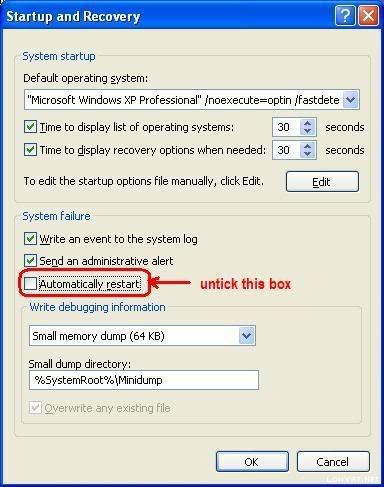
your minidump file could not be read. Can you please check your setting for me? Or at least upload another file for me.
Please check your setting accordingly to below.

user posted image

Make sure that write debugging information is Small Memory Dump (64kb) and not others.
Thanks

francis

P/S: the file you upload is corrupted. Can you upload another one?
*
Ok...this should be able to read.


Attached File(s)
Attached File  Mini111608_01.zip ( 28.42k ) Number of downloads: 10
~~5ive~~
post Nov 17 2008, 03:30 AM

Im n0one
*******
Senior Member
2,750 posts

Joined: Dec 2004
From: Malaysia


QUOTE(francischuahcw @ Nov 17 2008, 12:21 AM)
Yes it is. And it is your NVIDIA MCP Networking Function Driver. (NVIDIA Networking Driver - NVIDIA Corporation) that creates the problem.
You might need to have a look at your LAN driver or your chipset driver.
Bug Check 0xA: IRQL_NOT_LESS_OR_EQUAL
The IRQL_NOT_LESS_OR_EQUAL bug check has a value of 0x0000000A. This indicates that Microsoft Windows or a kernel-mode driver accessed paged memory at DISPATCH_LEVEL or above.
Check your driver. I don't think you are installing a Vista driver or it might not actually the exact driver that suits your laptop model. Please clarified that and update the driver or change the driver if possible.

Thanks
francis
*
Thanks for the superb fast reply.....
I try to find the drivers 1st....although not really know which one....
Thanks....
~~5ive~~
post Nov 17 2008, 01:05 PM

Im n0one
*******
Senior Member
2,750 posts

Joined: Dec 2004
From: Malaysia


QUOTE(~~5ive~~ @ Nov 17 2008, 03:30 AM)
Thanks for the superb fast reply.....
I try to find the drivers 1st....although not really know which one....
Thanks....
*
Still BSOD today....
yesterday i install

nVIDIA ForceWare X 176.68 for Windows Vista 32bit
Operating System: Windows Vista 32bit
Driver Version: 176.68
Driver Date: 2008-10-06 (YYYY-MM-DD)
Driver Size: 33.68 MB
Driver Released by: MS Catalogue
MS WHQL Certificate:
Setup Files Included:
International Files:

Original INF only supports:
[DEV_0244] NVIDIA GeForce Go 6150

Still the same problem?
May you guys tell me what should i looking for? Or which driver specifically?
Im totally noob with all this.....
Thanks....


Attached File(s)
Attached File  Mini111708_01.zip ( 41.89k ) Number of downloads: 7
~~5ive~~
post Nov 17 2008, 04:12 PM

Im n0one
*******
Senior Member
2,750 posts

Joined: Dec 2004
From: Malaysia


QUOTE(francischuahcw @ Nov 17 2008, 01:31 PM)
Hi there ~~5ive~~

BugCheck Code: Bug Check 0x124: WHEA_UNCORRECTABLE_ERROR
The WHEA_UNCORRECTABLE_ERROR bug check has a value of 0x00000124. This bug check indicates that a fatal hardware error has occurred. This bug check uses the error data that is provided by the Windows Hardware Error Architecture (WHEA).

You have a fatal hardware error that crash your whole system but i could not detect which hardware that fails you. It could be your processor. Is it AMD processor?
This is what i got from the debugger.
Does your laptop still under warranty? If possible, please send to service center for details checkup. Thanks.
Sorry to you that not much i can help here.

Regards.
francis
*
it is ok......now no more waranty....
when under waranty had sent to service center twice and they claims that no hardware problem and only help me reformat sweat.gif

Thanks anyway.............


Change to:
| Lo-Fi Version
0.0215sec    0.85    7 queries    GZIP Disabled
Time is now: 2nd December 2025 - 05:01 PM